
An earlier post described how to create a JavaScript module in Oracle Database 23c Free-Developer Release. Conceptually modules can be compared to PL/SQL packages, and just like packages they don’t typically come on their own. The power of modular development is available in JavaScript as well. This post covers how to create modules, and more importantly, how a given module can import functionality exported by another module.
Example Code
The demo is built around 2 MLE JavaScript modules:
HELPER_MODULEexports a function accepting a delimited string, transforming it to a JavaScript object.BUSINESS_LOGICimports this function to process an order.
The complete code is shown in the appendix, only those parts relevant to the discussion are repeated here. This post was created using …
- Oracle Database 23c Free-Developer Release
- Oracle Restful Data Services (ORDS) 23.2.0.
Understanding module dependencies
I started by logging into Database Actions. After successful authentication I entered the world of JavaScript by clicking on the MLEJS tile. Using the code in appendix I created both JavaScript modules. If you inspect the top part in BUSINESS_LOGIC closely you will find that it imports a function:
create mle module business_logic language javascript as

import { string2obj } from 'helpers';

export function processOrder(orderData) {

    // more code
Importing an (ECMAScript) module’s functionality works in the exact same way in Oracle Database 23c Free-Developer Release as it does in node or deno. Except that modules are stored in the database rather than the filesystem. Enter the MLE environment: using an environment you can tell the JavaScript engine about import names and which module they correspond to.
Creating MLE environments in Database Actions
Using the tree-view on the left hand side I switched from Modules to Environments. Next I clicked on the “…” button next to the search box, then on create object to create the environment. A dialogue appeared next allowing me to set the environment specifics. You can see the result here:
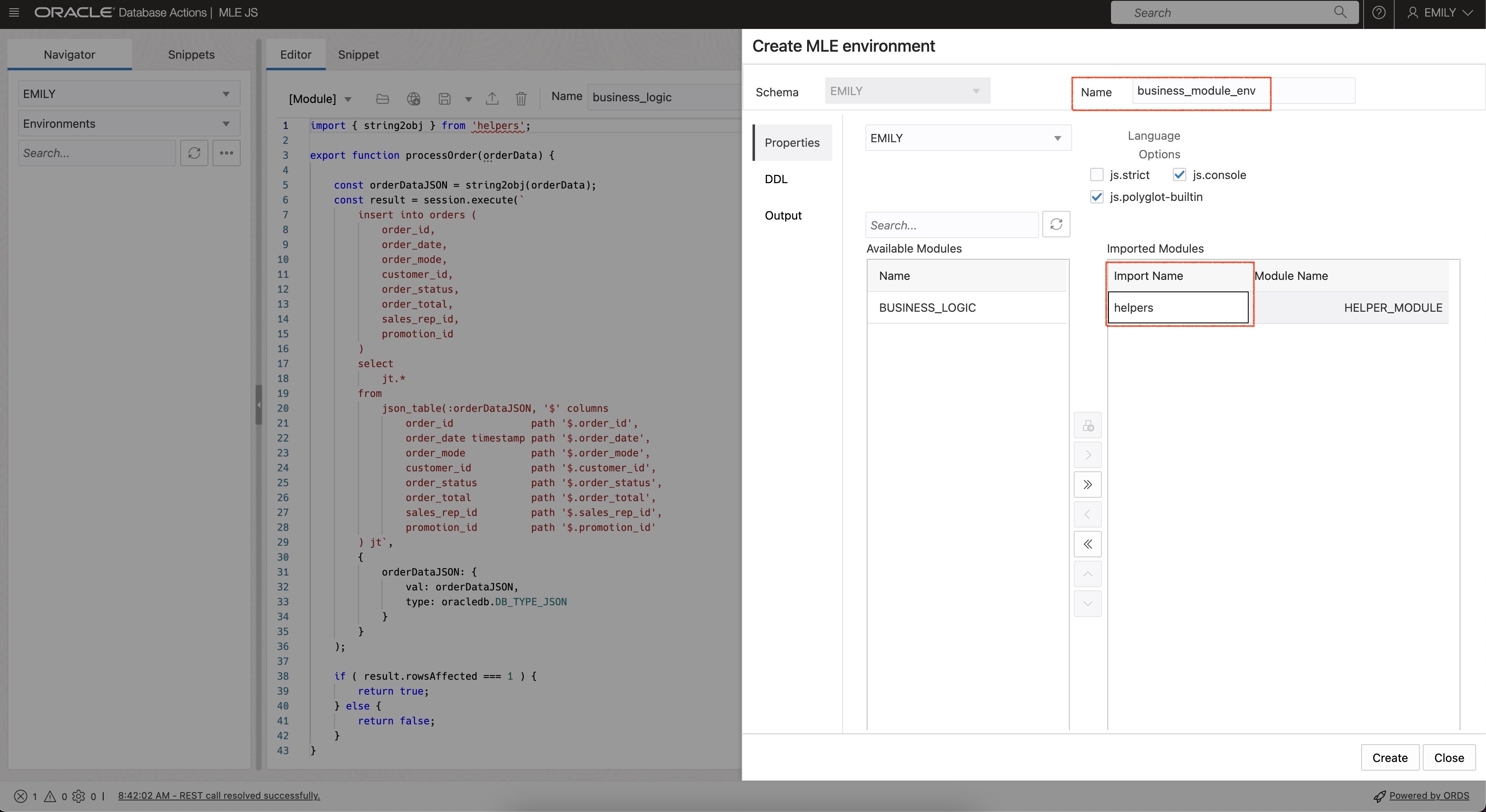
I clicked on the create button, acknowledged the DDL shown and voila! A new environment appears.
Generating call specifications
I wanted to expose processOrder() to PL/SQL using a call specification. Compared with the previous example from the earlier post an additional step is needed: I had to tie module, environment, and the JavaScript function’s signature to the call specification.
This can be done using Database Actions as well. I switched back to Modules, right-clicked BUSINESS_LOGIC and selected create -> call specification. I completed the wizard as per the screenshot:
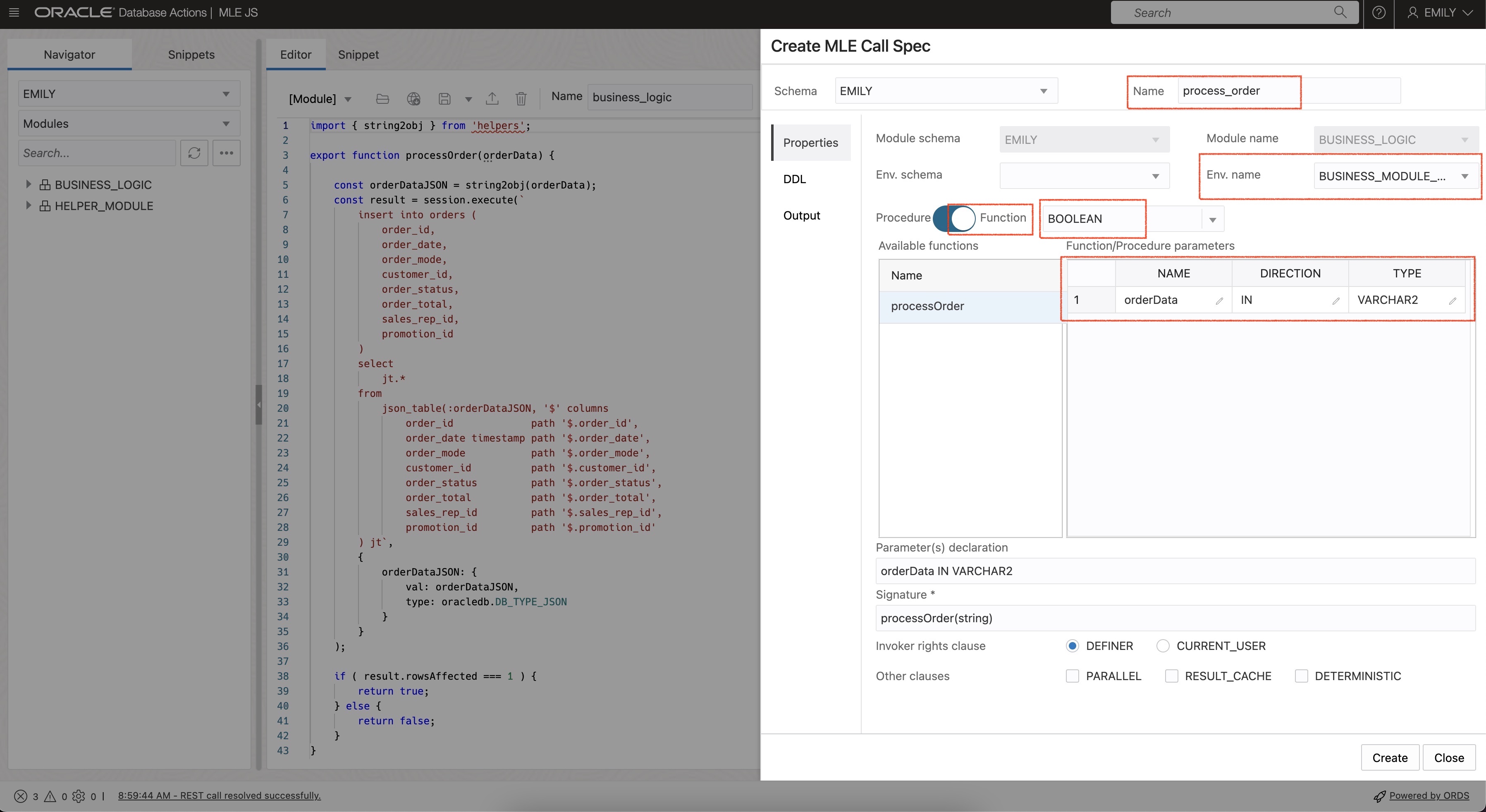
I quickly created the orders table (shown in the appendix) and ran a test using the following anonymous PL/SQL block:
set serveroutput on
declare
    l_success boolean := false;
    l_str     varchar2(256);
begin
    l_str := 'order_id=1;order_date=2023-08-01T10:27:52;order_mode=theMode;customer_id=1;order_status=2;order_total=42;sales_rep_id=1;promotion_id=1';
    l_success := process_order(l_str);

    -- you should probably think of a better success/failure evaluation
    if l_success then
        dbms_output.put_line('success');
    else
        dbms_output.put_line('false');
    end if;
end;
/
It worked!
SQL> declare
  2      l_success boolean := false;
  3      l_str     varchar2(256);
  4  begin
  5      l_str := 'order_id=1;order_date=2023-08-01T10:27:52;order_mode=theMode;customer_id=1;order_status=2;order_total=42;sales_rep_id=1;promotion_id=1';
  6      l_success := process_order(l_str);
  7
  8      -- you should probably think of a better success/failure evaluation
  9      if l_success then
 10          dbms_output.put_line('success');
 11      else
 12          dbms_output.put_line('false');
 13      end if;
 14  end;
 15* /
success


PL/SQL procedure successfully completed.

SQL> select * from orders;

   ORDER_ID ORDER_DATE    ORDER_MODE       CUSTOMER_ID    ORDER_STATUS    ORDER_TOTAL    SALES_REP_ID    PROMOTION_ID
___________ _____________ _____________ ______________ _______________ ______________ _______________ _______________
          1 01-AUG-23     theMode                    1               2             42               1               1
Generating a dependency diagram
Having an environment defined also allows me to show code dependencies. I loaded the BUSINESS_LOGIC module into the editor and associated business_module_env with it. Initially the environment didn’t appear in the drop-down list next to the module name. I fixed that by clicking the reload button. The code dependency diagram can be brought up by using the option in the drop-down menu:
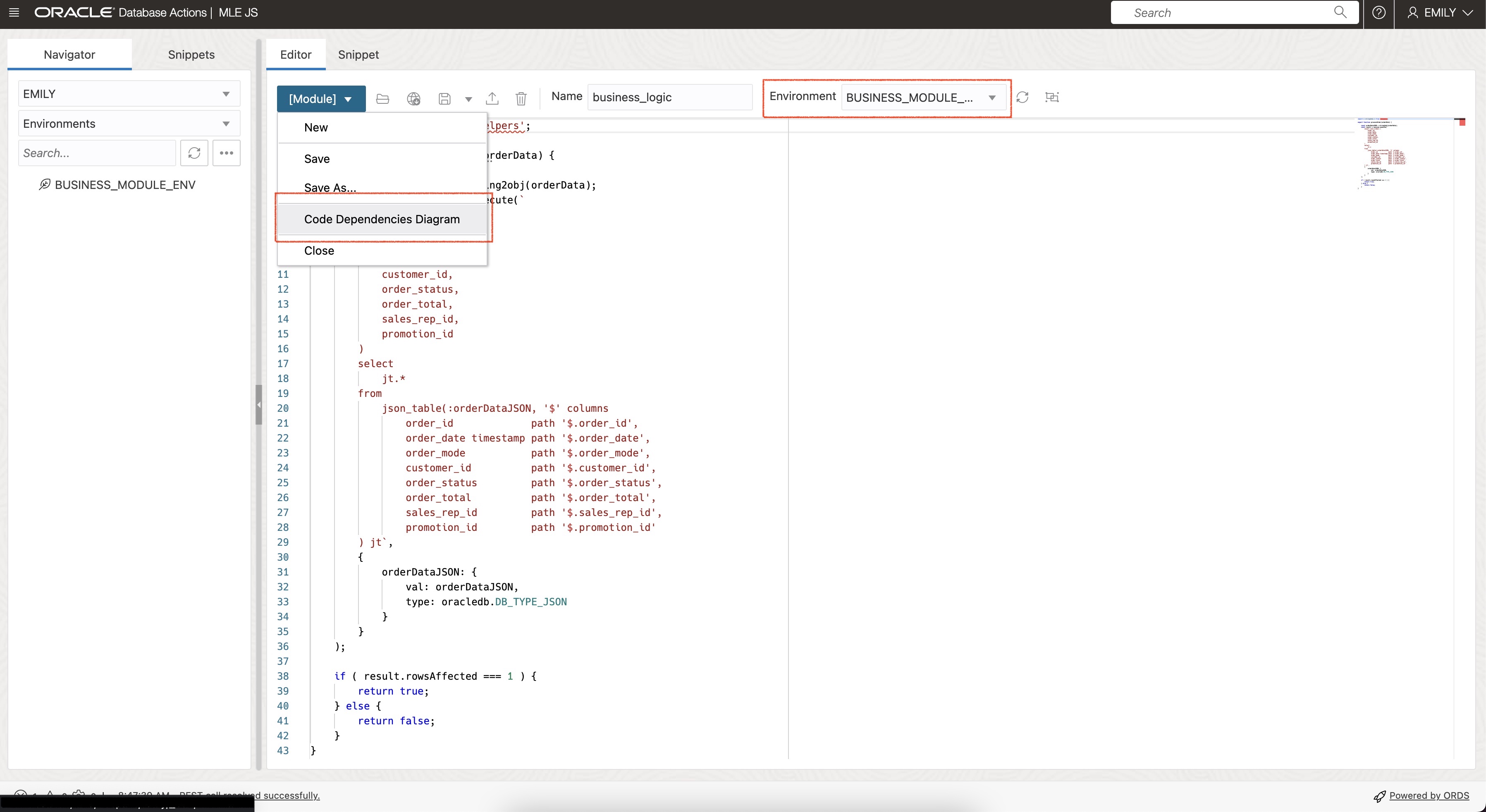
The resulting diagram provides a good overview of the modules’ exports and imports:
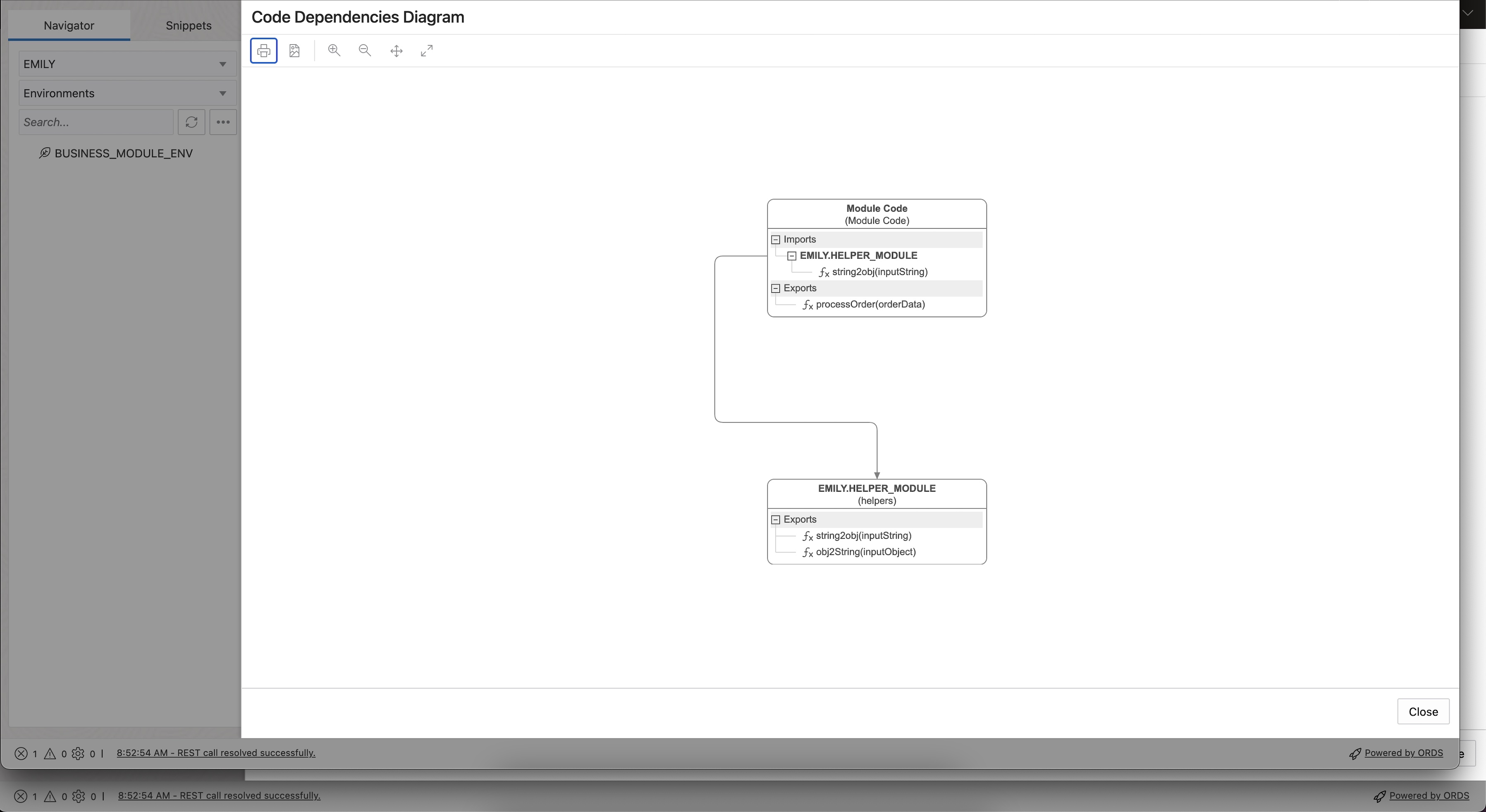
The more modules you work with, the greater the benefit of the dependency diagram.
Summary
Database Actions greatly enhance the developer experience working with MLE modules and environments. In addition to creating, editing, and visualising dependencies you can use the MLE JS IDE to debug modules as well. This will be shown in a future article.
Appendix
If you would like to execute the code, make sure to create a user with the necessary privileges to create and run JavaScript code. Connect to the database using this account, and deploy the code:
Auxiliary Objects
create table orders (
    order_id     number(12) not null,
    order_date   date not null,
    order_mode   varchar2(8),
    customer_id  number(6) not null,
    order_status number(2),
    order_total  number(8,2),
    sales_rep_id number(6),
    promotion_id number(6),
    constraint pk_orders primary key(order_id)
);
HELPER_MODULE
create or replace mle module helper_module
language javascript as

/**
 * convert a delimited string into key-value pairs and return JSON
 * @param {string} inputString - the input string to be converted
 * @returns {JSON}
 */
function string2obj(inputString) {
    if ( inputString === undefined ) {
        throw `must provide a string in the form of key1=value1;...;keyN=valueN`;
    }
    let myObject = {};
    if ( inputString.length === 0 ) {
        return myObject;
    }
    const kvPairs = inputString.split(";");
    kvPairs.forEach( pair => {
        const tuple = pair.split("=");
        if ( tuple.length === 1 ) {
            tuple[1] = false;
        } else if ( tuple.length != 2 ) {
            throw "parse error: you need to use exactly one '=' between " +
                    "key and value and not use '=' in either key or value";
        }
        myObject[tuple[0]] = tuple[1];
    });
    return myObject;
}

/**
 * convert a JavaScript object to a string
 * @param {object} inputObject - the object to transform to a string
 * @returns {string}
 */
function obj2String(inputObject) {
    if ( typeof inputObject != 'object' ) {
        throw "inputObject isn't an object";
    }
    return JSON.stringify(inputObject);
}

export { string2obj, obj2String }
/
BUSINESS_LOGIC
create mle module business_logic language javascript as

import { string2obj } from 'helpers';

export function processOrder(orderData) {

    const orderDataJSON = string2obj(orderData);
    const result = session.execute(`
        insert into orders (
            order_id,
            order_date,
            order_mode,
            customer_id,
            order_status,
            order_total,
            sales_rep_id,
            promotion_id
        )
        select
            jt.*
        from
            json_table(:orderDataJSON, '$' columns
                order_id             path '$.order_id',
                order_date timestamp path '$.order_date',
                order_mode           path '$.order_mode',
                customer_id          path '$.customer_id',
                order_status         path '$.order_status',
                order_total          path '$.order_total',
                sales_rep_id         path '$.sales_rep_id',
                promotion_id         path '$.promotion_id'
        ) jt`,
        {
            orderDataJSON: {
                val: orderDataJSON,
                type: oracledb.DB_TYPE_JSON
            }
        }
    );

    if ( result.rowsAffected === 1 ) {
        return true;
    } else {
        return false;
    }
}
/
BUSINESS_MODULE_ENV
create mle env business_module_env
imports (
    'helpers' module helper_module_inline
);