
This is article 4 of 8 in my Oracle AI Database Skills series.
Key Takeaways
- Managed MCP moves the action surface into the database itself. Tools run under real database identities with existing network controls, VPD policies, and audit trails already in force — no separate trust stack to build.
- Custom tools are database objects. You define the logic in PL/SQL and register it with
DBMS_CLOUD_AI_AGENT.CREATE_TOOL, so governance travels with the tool definition rather than depending on each caller to do the right thing. - The five questions security teams ask — who acted, under which identity, from what network path, against which tool, and where is the audit record — are answerable by design when the endpoint is managed by the database.
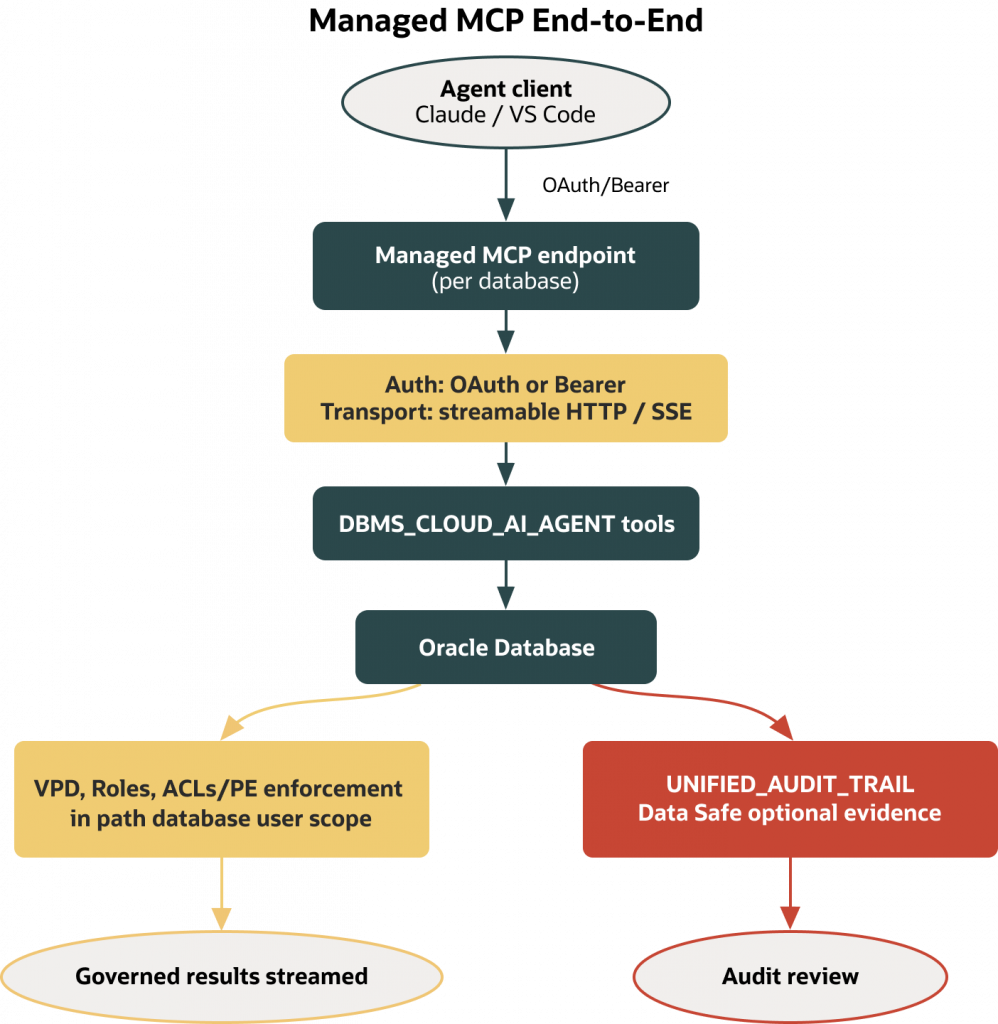
Most teams begin where Article 3 ended: a single developer running a local MCP (Model Context Protocol) server to prove out tools and workflows. That’s perfect for a solo experiment and brittle the moment work becomes shared. As soon as you put an IDE on a shared sandbox or add a second teammate, you need identity that isn’t “whoever is at the laptop,” network boundaries that aren’t home Wi‑Fi, and an audit trail your security team can actually review. Autonomous AI Database’s managed MCP server gives you those primitives without rebuilding your trust stack. Each database exposes its own HTTP MCP endpoint. Clients authenticate as a database user. Tools are defined and governed inside the database. Existing controls—roles, Access Control Lists (ACLs) or Private Endpoint reachability, Virtual Private Database (VPD)/redaction, and Unified Auditing—stay in the path for every tool call.
If you liked the local model—small, named tools; least‑privilege credentials; proof after the fact—you keep it. What changes is location and blast radius. The server runs with the database service. Calls execute with a database user’s roles. Network policy and auditing you already rely on continue to apply over streamable HTTP.
Sources: consult the Autonomous Database MCP documentation for concepts, enablement, security, and troubleshooting:
Version scope and assumptions
This article focuses on Autonomous Database Serverless (Autonomous AI Database) with its managed, per‑database HTTP MCP endpoint and on custom tool registration with DBMS_CLOUD_AI_AGENT. It does not cover on‑premises databases, self‑hosted proxies, or alternative deployment topologies. For authentication, follow the documented OAuth and short‑lived bearer token flows supported at publish time. The examples assume you can modify an Autonomous AI Database in Oracle Cloud Infrastructure (OCI) and create PL/SQL in your schema. Private Endpoint deployments require clients to run within, or be routed into, the VCN. Availability is documented as exclusive to Oracle Autonomous AI Database (versions 26ai and 19c) on the “About MCP Server” page; verify your environment against current docs before starting.
What you’ll need (prerequisites)
- An Autonomous AI Database (Serverless) you can modify in OCI.
- Permission in OCI to update free‑form tags on that database (enablement uses a tag).
- A database user to authenticate to MCP (least‑privilege strongly recommended).
- Database privileges to create/compile PL/SQL in your schema and to execute
DBMS_CLOUD_AI_AGENT(DBA can grantEXECUTEon the package). - Network posture set appropriately:
- Public endpoint constrained by ACLs to known IPs/CIDRs, or
- Private Endpoint with clients running inside or routed/peered into the VCN.
- An MCP‑aware client that supports streamable HTTP (e.g., Claude Desktop via
mcp-remote; VS Code with Cline). Ensure the client’s transport is set to streamable HTTP per its configuration schema. - To view audit trails, privileges such as
AUDIT_VIEWER(or equivalent access toUNIFIED_AUDIT_TRAIL) and any required unified audit policies per your security team.
Why move from local to managed
Local MCP gets you speed but leaves basic enterprise questions unanswered: Who ran this? Under which roles? From where? What policy filtered the result? Where’s the audit record? A managed MCP endpoint answers them by design. Identity is a database user, so tools run with that user’s roles and any VPD or redaction policies. Network is first‑class: public endpoints honor ACLs; Private Endpoint confines reachability to your VCN. Evidence lives with the data in Unified Auditing, and—if your organization uses it—Oracle Data Safe can centralize review. You don’t assemble a separate trust stack for assistants; you reuse the one already protecting your data.
Enable the per‑database MCP endpoint
Enabling MCP is an OCI operation. You turn it on per database with a free‑form tag. After a brief delay, the database details page shows the MCP URL. Use that exact URL; Private Endpoint deployments will reflect your VCN in the hostname. The documented public endpoint pattern is:
https://dataaccess.adb.{region-identifier}.oraclecloudapps.com/adb/mcp/v1/databases/{database-ocid}
For Private Endpoint databases, the documented pattern uses the database Private Endpoint hostname prefix:
https://{hostname_prefix}.adb.{region-identifier}.oraclecloudapps.com/adb/mcp/v1/databases/{database-ocid}
In the OCI Console, open your Autonomous AI Database (Serverless) and add this free‑form tag:
- Name:
adb$feature - Value:
{"name":"mcp_server","enable":true}
Tighten network posture before you connect. For public endpoints, restrict inbound IPs with an ACL. For Private Endpoint, keep the MCP URL accessible only within your VCN; clients must run in or have routed/peered reachability to that network. The enablement and security pages in the docs provide step‑by‑step screens for both configurations.
Authenticate to the managed MCP endpoint
The managed server accepts OAuth or short‑lived bearer tokens as documented. Tokens are issued per database and presented on every request as a bearer header over streamable HTTP.
- Token endpoint path (documented):
/adb/auth/v1/databases/{database-ocid}/token - Present the token in client requests as:
Authorization: Bearer <token> - Tokens are typically valid for approximately one hour; confirm the current duration and request body in the Use MCP Server page before automating refresh.
Client configuration varies slightly:
- Claude Desktop via
mcp-remote: configure a remote MCP server using your database’s MCP URL and add theAuthorization: Bearer ...header in the bridge’s HTTP headers field. Set the transport to streamable HTTP as required by your client (for example, a setting namedstreamable-httporstreamableHttp). - VS Code with Cline: add a remote HTTP MCP server pointing to the MCP URL and set
Authorization: Bearer ...in the request headers section. Ensure the transport is explicitly set to streamable HTTP.
A minimal Cline-style configuration looks like this, with placeholders for your database URL and bearer token:
{
  "mcpServers": {
    "adb-managed-mcp": {
      "type": "streamableHttp",
      "url": "https://dataaccess.adb.{region-identifier}.oraclecloudapps.com/adb/mcp/v1/databases/{database-ocid}",
      "headers": {
        "Authorization": "Bearer <token>"
      }
    }
  }
}
If your database uses a Private Endpoint, make sure the client host has network reachability into the VCN. Valid credentials against an unreachable hostname still fail.
Publish a custom tool the database can govern
Unlike local MCP servers that host code beside the client, the managed server looks up tools defined in the database. You create small, purposeful functions in your schema and register them with DBMS_CLOUD_AI_AGENT.CREATE_TOOL. That keeps control centralized: the definitions live in the database, metadata is queryable from views, and execution inherits database roles and policy.
To keep the example easy to reason about, we’ll publish a read‑only tool that returns a paginated JSON array of objects in a given schema that are visible to the executing database user and are not in Oracle‑maintained schemas. This variant excludes Oracle‑maintained schemas using ALL_USERS.ORACLE_MAINTAINED. The Oracle docs also include a sample that filters on ALL_OBJECTS.ORACLE_MAINTAINED = 'N'; either approach works on Autonomous Database.
First, create and compile the function:
CREATE OR REPLACE FUNCTION list_objects_json (
  p_schema IN VARCHAR2,
  p_offset IN NUMBER DEFAULT 0,
  p_limit  IN NUMBER DEFAULT 20
) RETURN CLOB
AS
  v_json  CLOB;
BEGIN
  SELECT COALESCE(
           JSON_ARRAYAGG(
             JSON_OBJECT(
               'SCHEMA_NAME' VALUE owner,
               'OBJECT_NAME' VALUE object_name,
               'OBJECT_TYPE' VALUE object_type
             ) RETURNING CLOB
           ),
           '[]'
         )
    INTO v_json
    FROM (
      SELECT o.owner, o.object_name, o.object_type
      FROM   all_objects o
      WHERE  o.owner = UPPER(p_schema)
      AND    EXISTS (
               SELECT 1
               FROM   all_users u
               WHERE  u.username = o.owner
               AND    u.oracle_maintained = 'N'
             )
      ORDER  BY o.object_name
      OFFSET p_offset ROWS FETCH NEXT p_limit ROWS ONLY
    );
  RETURN v_json;
END;
/
Check for compilation errors before registering a tool:
SHOW ERRORS FUNCTION list_objects_json;

-- Or:
SELECT name, type, line, position, text
FROM   user_errors
ORDER  BY name, sequence;
Next, register the function as an MCP tool. Use the attribute names exactly as shown in the documentation for DBMS_CLOUD_AI_AGENT.CREATE_TOOL.attributes; mismatches can cause registration or invocation errors. Common keys include instruction, function, and tool_inputs. For this example, rely on the PL/SQL defaults defined in the function and do not include unverified default values in the tool_inputs JSON.
BEGIN
  DBMS_CLOUD_AI_AGENT.CREATE_TOOL(
    tool_name  => 'LIST_OBJECTS',
    attributes => q'~{
      "instruction": "Return a JSON array of objects visible to the executing database user for the given schema (excluding Oracle-maintained schemas). Always respect p_limit and p_offset.",
      "function": "LIST_OBJECTS_JSON",
      "tool_inputs": [
        { "name": "p_schema", "type": "string", "required": true,  "description": "Schema name (case-insensitive)" },
        { "name": "p_offset", "type": "number", "required": false, "description": "Row offset for pagination" },
        { "name": "p_limit",  "type": "number", "required": false, "description": "Max rows to return" }
      ]
    }~'
  );
END;
/
Verify that registration succeeded by querying the registry view. Column sets differ by version, so keep the check simple:
SELECT tool_name
FROM   user_cloud_ai_agent_tools
ORDER  BY tool_name;
If you see “insufficient privileges,” ask your DBA to grant EXECUTE on DBMS_CLOUD_AI_AGENT to your user and retry.
Note: DBMS_CLOUD_AI_AGENT supports both custom PL/SQL‑backed tools and built‑in tool types. For the current list of built‑in types and parameters, see the package reference:
Also note: MLE JavaScript is not supported for MCP tools. Java can be used via PL/SQL calling Java stored procedures when JAVAVM is enabled on the database (see the docs for details).
Connect a client and try the tool
Once authentication works and the tool is registered, connect an MCP‑aware client and ask it to use the tool. In Claude Desktop, add a remote MCP server that points to your database’s MCP URL, include the Authorization: Bearer <token> header, and set transport to streamable HTTP per the client’s schema. In a fresh chat, prompt the assistant: “Use the LIST_OBJECTS tool to list 5 objects in the HR schema.” You should see the assistant invoke the tool and stream back JSON. In VS Code with Cline, add the same MCP URL in the extension’s settings, supply the same header, and ensure the streamable HTTP transport is selected; then request LIST_OBJECTS with p_schema=HR and p_limit=5.
A representative response from the tool looks like this (truncated):
[
  { "SCHEMA_NAME": "HR", "OBJECT_NAME": "COUNTRIES", "OBJECT_TYPE": "TABLE" },
  { "SCHEMA_NAME": "HR", "OBJECT_NAME": "EMPLOYEES", "OBJECT_TYPE": "TABLE" },
  { "SCHEMA_NAME": "HR", "OBJECT_NAME": "JOBS", "OBJECT_TYPE": "TABLE" }
]
On Private Endpoint databases, run those clients from a host inside the VCN or with routed/peered access. Lack of reachability is the most common reason a seemingly correct configuration fails.
Observe the audit trail (roles permitting)
Unified Auditing on Autonomous Database records activity under your database user. Exact fields and event names depend on your version and your organization’s audit policy. With appropriate privileges (for example, AUDIT_VIEWER or equivalent access to UNIFIED_AUDIT_TRAIL), you can review a time‑bounded window of recent activity:
SELECT event_timestamp, dbusername, action_name, return_code, obj_privilege, unified_audit_policies
FROM   unified_audit_trail
WHERE  event_timestamp >= SYSTIMESTAMP - INTERVAL '15' MINUTE
AND    UPPER(dbusername) = UPPER(USER)
ORDER  BY event_timestamp DESC
FETCH FIRST 50 ROWS ONLY;
Autonomous Database retains unified audit data for about 14 days by default; if you need longer retention or centralized reporting, integrate Oracle Data Safe. When you author VPD or audit policies for MCP, do not rely on SESSION_USER. Use MCP context attributes instead—for example, sys_context('MCP_SERVER_ACCESS_CONTEXT','USER_IDENTITY') as shown in the Security docs. Some concept pages may refer to the MCP context container using slightly different naming in prose; follow the exact string in the Security examples. Your security team may also enable additional unified audit policies to capture MCP‑specific attributes.
Operate safely and clean up
Treat tools as product surface area. Keep them small and read‑heavy at first; add write paths only when you can articulate least privilege and validate inputs. Prefer schemas you own to avoid accidental privilege sprawl. Version tool registrations as code and require review before deployment.
When a tool is no longer needed, remove both the registration and the underlying function:
BEGIN
  DBMS_CLOUD_AI_AGENT.DROP_TOOL(tool_name => 'LIST_OBJECTS');
END;
/

DROP FUNCTION list_objects_json;
As you expand usage, periodically re‑check ACLs on public endpoints and confirm Private Endpoint posture remains correct, especially after network changes. Rate limiting is enforced by the managed service; consult current release notes for behavior and limits.
Troubleshooting
Most issues fall into a few buckets:
- Compilation and registration: fix PL/SQL errors (
SHOW ERRORS,USER_ERRORS) before registering. Ensure your user hasEXECUTEonDBMS_CLOUD_AI_AGENT. If registry queries fail with unknown columns, select onlytool_nameand consult versioned docs for metadata. - Connectivity: verify you’re using the MCP URL exactly as shown in the console. For public endpoints, confirm your IP/CIDR is in the database ACL. For Private Endpoint, confirm the client host has routed/peered access to the VCN.
- Authentication: obtain tokens from
/adb/auth/v1/databases/{database-ocid}/tokenand present them asAuthorization: Bearer <token>. Copy the exact request body and lifetime from the current docs. Place headers where your client expects them.
If a client claims to connect but tool calls fail, double-check that attribute keys in CREATE_TOOL match the documentation exactly; case mismatches cause registration or invocation errors.
What comes next
With a per-database MCP endpoint, one governed tool, and a way to verify activity in Unified Auditing, you can expand safely. Start with a small set of read-heavy tools your team actually needs. Introduce narrow write paths with explicit inputs and clear privileges. Treat tool definitions like code: review them, version them, and track changes.
The next article moves from action surfaces to reasoning scope: Select AI and AI Profiles. That is where you decide what natural-language-to-SQL should be allowed to see, how generated SQL should be inspected, and how to keep an assistant’s query generation inside a deliberate profile instead of a broad database connection.
Freshness note
Content validated against the Autonomous Database MCP documentation on 2026-05-08. Re-check the Use MCP Server and Security pages for any changes to endpoint paths, JSON key names, token lifetimes, and audit details before publishing or automating.