
LangGraph persistence has two distinct jobs: checkpoints preserve graph execution state, while a store can hold information shared across threads. This Oracle example uses OracleSaver and OracleStore for those separate responsibilities.
Durable LangGraph workflows with Oracle AI Database
Key Takeaways
- Oracle AI Database can be used as a persistence layer for LangGraph using langchain-oracle libraries. This persistence layer powers agent workflows with retries, audit trails, and repeatability.
- OracleSaver preserves (checkpoints) graph state at a point in time. This state may be resumed, inspected, or replayed using a the run’s unique
thread_id. - OracleStore persists long-term, cross-thread memory, including user preferences, facts, and shared knowledge.
A human-in-the-loop graph is easy to demonstrate when the entire workflow stays in memory. The more realistic challenge starts when the graph pauses for a reviewer, waits for a business decision, and later resumes with the same state intact.
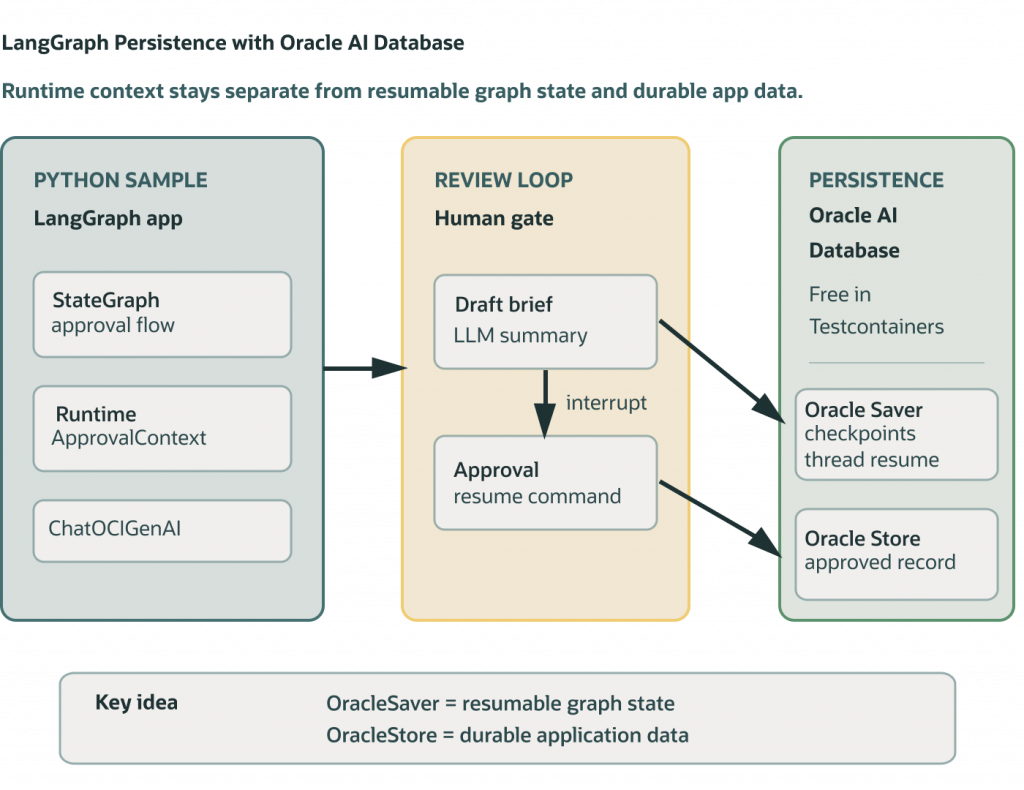
The langgraph_persistence sample shows how to build that pattern with LangGraph and Oracle AI Database. It evaluates a travel request, uses OCI Generative AI to draft a concise reviewer brief, checkpoints the graph state with langgraph-oracledb, interrupts for approval, resumes the same thread_id with the reviewer’s decision, and stores the approved record separately with OracleStore.
This sample keeps the workflow intentionally small so the persistence pattern is easy to follow: graph state is durable, human approval happens outside the running process, and the final approved request is stored as application data.
Sample Description
This sample demonstrates a LangGraph travel approval workflow that persists graph state in Oracle AI Database using langgraph-oracledb.
The workflow evaluates a travel request, generates a reviewer brief with OCI Generative AI, and then pauses for human approval. While the graph is interrupted, LangGraph checkpoints the current state in Oracle AI Database. After a reviewer provides a decision, the workflow resumes using the same thread_id and continues from the saved state.
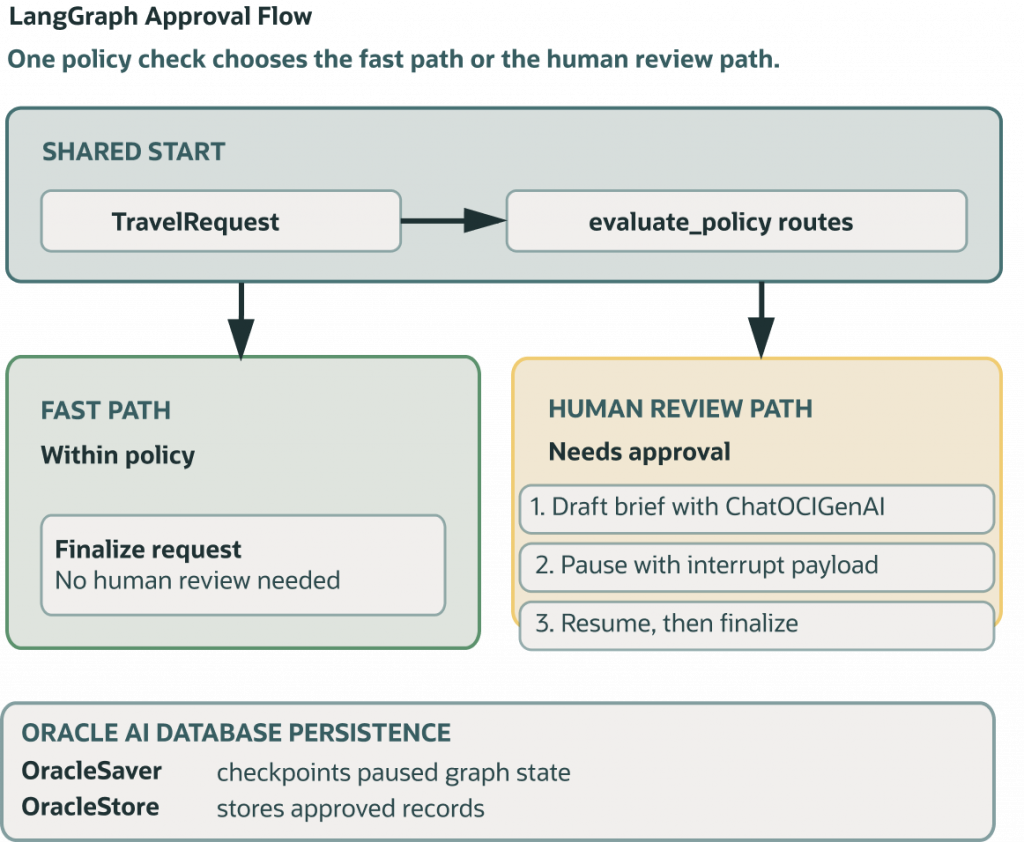
When a request is approved, the sample also writes a separate approved record through OracleStore, including the original request, approval decision, policy reason, and generated brief.
The accompanying diagrams show how the Python sample, LangGraph, OracleSaver, OracleStore, Testcontainers, OCI Generative AI, and Oracle AI Database fit together.
Prerequisites
- Python 3.13+
- Poetry
- Docker compatible environment to run Oracle AI Database Free
- Local OCI configuration for OCI Generative AI on-demand chat
Install dependencies from the python-oracle/ directory:
poetry installSet the OCI compartment before running the command-line sample:
export OCI_COMPARTMENT_ID=<your-compartment-ocid>The sample assumes an OCI Generative AI on-demand model and defaults to the model alias cohere.command-latest. It builds the regional service endpoint from the region in your DEFAULT OCI config profile, so no dedicated AI cluster endpoint is required.
Run the Sample
From the python-oracle/ directory:
poetry run python src/python_oracle/langgraph_persistence/travel_approval_graph.pyThe script starts Oracle AI Database Free with Testcontainers, creates the LangGraph checkpoint and store tables, runs the request, and prints the final outcome. For the default over-limit request, it also drafts an OCI-generated approval brief, pauses with interrupt() (which pauses graph execution), prints a checkpoint summary from OracleSaver, resumes with Command(resume=...), and reads the approved business record back from OracleStore.
To run the rejection branch:
poetry run python src/python_oracle/langgraph_persistence/travel_approval_graph.py --rejectLangGraph bits
thread_ididentifies the LangGraph run, used for the checkpoint summary, and the resume command.OracleSaveris the persistence checkpointer. It persists graph state so the human approval interrupt can survive outside the process.OracleStoreis the persistence store. The last graph node writes approved business records and the CLI reads the record back withstore.get(...).Runtime[ApprovalContext]carries the liveChatOCIGenAImodel into the graph. The model is runtime context, not checkpointed graph state — it can be easily reconstructed on a new run.- OCI Generative AI drafts reviewer context only after policy says approval is required. Auto-approved requests skip the model call and go straight to finalization.
Building the graph with OracleStore and OracleSaver
The OracleStore and OracleSaver objects are easily constructed with a database connection string:
with (
    OracleSaver.from_conn_string(conn_string) as checkpointer,
    OracleStore.from_conn_string(conn_string) as store,
):
    checkpointer.setup()
    store.setup()
Then, the store and checkpointer can be used to build our graph:
def build_graph(checkpointer: OracleSaver, store: OracleStore):
    builder = StateGraph(ApprovalState, context_schema=ApprovalContext)
    builder.add_node("evaluate_policy", evaluate_policy)
    builder.add_node("draft_approval_brief", draft_approval_brief)
    builder.add_node("request_approval", request_approval)
    builder.add_node("finalize_request", finalize_request)
    builder.add_edge(START, "evaluate_policy")
    builder.add_conditional_edges(
        "evaluate_policy",
        route_after_policy,
        {"approval": "draft_approval_brief", "finalize": "finalize_request"},
    )
    builder.add_edge("draft_approval_brief", "request_approval")
    builder.add_edge("request_approval", "finalize_request")
    builder.add_edge("finalize_request", END)
    return builder.compile(
        checkpointer=checkpointer,
        store=store,
    )
FAQ
- Why use OracleSaver? OracleSaver is used as the LangGraph checkpointer. It persists graph state under a thread_id so the workflow can survive a pause and resume later.
- Why use OracleStore? OracleStore stores the final approved business record. This is separate from checkpointing because application records and graph execution state have different purposes.
- What is stored as the approved record? The approved record includes the travel request, approval decision, final status, policy reason, and generated approval brief.
- What’s the difference between OracleSaver and OracleStore? The Saver (Checkpointer) is for checkpoints of in-progress work, and the Store (Durable memory) is for workflow history.
- What data is checkpointed? Checkpointers like OracleSaver save a snapshot of the graph state at each step, organized by
thread_id. Checkpoints enable human-in-the-loop workflows, time travel debugging, fault-tolerant execution, and conversational memory. - Why does
thread_idmatter? Thethread_idcorresponds to a specific checkpoints in graph state. The state can be inspected, replayed, and more from a giventhread_id. - Why use Oracle AI Database persistence? Use persistence when you want to keep information beyond a single graph run. Persistence helps when you want to continue a conversation, resume after an interruption, recover from a failure, or remember information across interactions.
References
- sample app -> travel_approval_graph.py
- Oracle AI Database testcontainers integration -> oracle_database_container.py
- Designing agent memory with Oracle AI Database
- langchain-oracle
How do I verify persistence across a pause or restart?
Pause the graph, restart the process, and resume the same thread using the stored checkpoint. Separately retrieve an approved cross-thread record and verify its namespace or user scope. Saving graph state does not by itself establish a memory extraction, retention, or authorization policy.
Continue the implementation: One Database for the Whole LangChain Ecosystem: Memory, Persistence, and Deep Agents on Oracle AI Database. Use the validation described above as the acceptance check for your next step.