
A document knowledge base with Oracle APEX, Oracle AI Database, AI Vector Search, and RAG
A collection of documents can hold valuable knowledge while still being difficult to use. Finding an answer may require opening several files, searching for related terms, and reconciling different versions. We built a Document Knowledge Base to make that content searchable and reusable through natural-language questions, generated drafts, and document comparisons.
The Document Knowledge Base combines Oracle APEX, PL/SQL, Oracle AI Database vector storage, and AI inference. Its core workflow is independent of the subject matter: organize a document collection, retrieve relevant passages, and use them to answer questions or create new content. Support articles, developer guides, operational runbooks, and product documentation are all examples of collections suited to this pattern.
Key Takeaways
- Ingest DOCX documents into stored files, metadata, text chunks, and embeddings.
- Use Oracle AI Vector Search and RAG to retrieve evidence for each question.
- Ask for source-grounded answers with filenames and headings to support review.
- Generate editable content from retrieved passages and prompt templates.
- Compare selected documents within a bounded context; check coverage before interpreting omissions.
Review generated results: tables, long passages, missing embeddings, or limited retrieval can leave evidence out. Check answers, drafts, and comparisons against the originals.
Implementation scope
Document Knowledge Base is a simple internal project, not a production deployment. It demonstrates a reusable workflow for finding answers, drafting content, and comparing documents. The collection supplies the subject matter: support guidance, developer documentation, operational procedures, onboarding material, or product knowledge. These broader examples illustrate how the pattern can be adapted; each needs suitable documents, prompts, and coverage checks.
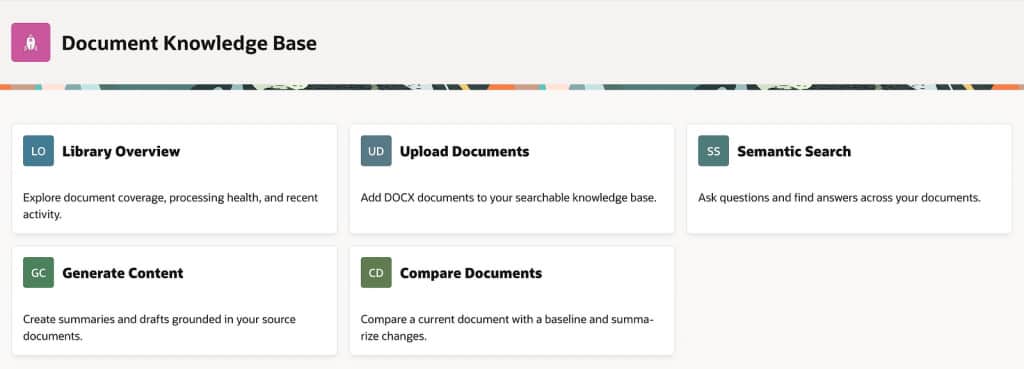
What users can do
The Document Knowledge Base organizes work around three capabilities:
- Ask a question. Semantic search retrieves relevant passages and generates an answer with source references. For a support collection, a question might be “How do I troubleshoot a connection timeout?”
- Create a draft. Retrieved content and template instructions guide an output such as a summary, knowledge article, or response draft. The document collection and prompt determine the subject and format.
- Compare documents. A selected document and baseline provide the evidence for a structured comparison. In a documentation collection, the task might be to summarize changes between two versions.
The current uploader adds DOCX files and metadata. Administration views show document coverage, ingestion status, and missing embeddings.
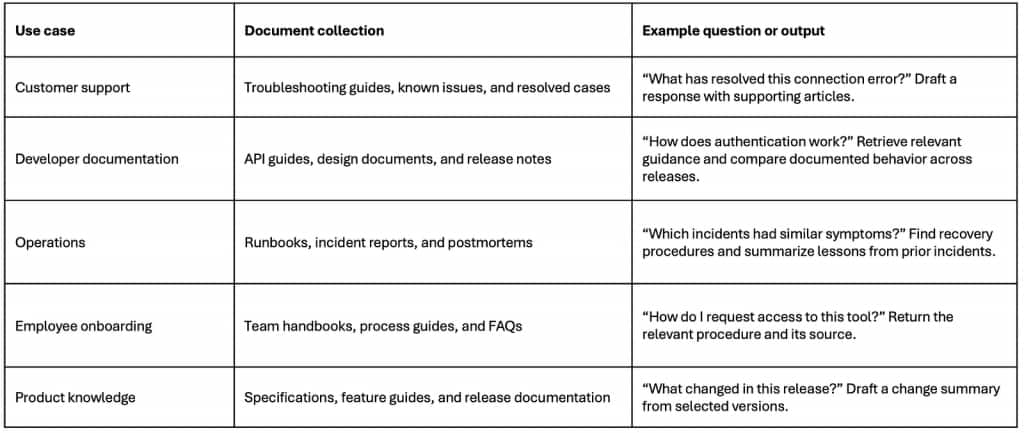
Use cases for a Document Knowledge Base
The collection and task give the knowledge base its purpose. These examples illustrate applications of the same architecture; each requires suitable source content and prompts.
How the architecture works
Oracle APEX supplies the browser interface, forms, and reports. PL/SQL packages extract text, retrieve passages, assemble prompts, and call the AI service. Oracle AI Database provides native vector storage and AI Vector Search alongside relational data. In this implementation, the schema stores original DOCX BLOBs, filenames, dates, hashes, processing status, extracted text, ordered chunks, and embeddings. It also stores search questions and query vectors, generated answers, reusable prompt templates, and assembled prompts and outputs for generated reports and comparisons. The answer package stores answer text, but does not persist its assembled prompt.
Keeping these records in Oracle AI Database lets SQL join evidence and metadata directly, apply category filters, and retrieve saved generation prompts and outputs without synchronizing a separate vector store. This makes the workflow easier to inspect and maintain; it does not by itself guarantee complete extraction or accurate answers.
The application has two main flows:
Document → Extract text → Split into chunks → Create embeddings → Store
Question → Create embedding → Find relevant chunks → Generate answer
This is retrieval augmented generation, or RAG. The model receives selected source passages with each request; we do not train it on the uploaded documents. Keeping vectors alongside relational data lets SQL combine semantic ranking with metadata filters and explicit document selection.
Our AI wrapper is configured for OCI Generative AI endpoints using OpenAI-compatible embedding and chat request formats. Endpoint URLs and model identifiers are configuration values. API secrets belong in APEX Web Credentials and are referenced by the REST call, keeping them out of application code. The checked-in endpoint defaults and model placeholders are setup values, not proof that those combinations are currently supported. Confirm both embedding and chat access in the target environment using the service’s current documentation.
Prerequisites and setup
- Oracle APEX and database support. Use an APEX workspace and parsing schema on an Oracle Database environment that supports
VECTOR,TO_VECTOR, andVECTOR_DISTANCE. Verify the installed APEX and database versions; the source does not establish a tested minimum APEX release. The custom packages useAPEX_ZIP,APEX_JSON, andAPEX_WEB_SERVICE. - OCI Generative AI access. Configure reachable HTTPS embedding and chat endpoints, authorized model IDs, regional availability, and the required service permissions. Set
EMBEDDINGS_URL,EMBEDDING_MODEL,CHAT_URL, andCHAT_MODEL. Test both calls; an OpenAI-compatible chat endpoint does not automatically imply compatible embedding support. The current vector columns and conversion expect 1,536 dimensions, so check the embedding-dimension diagnostic before ingestion. - APEX Web Credentials. For the project’s bearer-token setup, create an HTTP Header credential with header
Authorizationand secret valueBearer <API key>, restricted with Valid for URLs to the intended service prefixes. SetWEB_CREDENTIAL_STATIC_IDto that credential’s Static ID. The later project build instructions usecredentials-for-standards-ai, while the original seed usesopenai-api-key; match the active workspace credential rather than copying either blindly. Configure outbound network access as required by the database environment. - Schema, pages, and a small DOCX trial. Install the schema and ingestion, AI, search, answer, template, report, and comparison packages, check compilation, and connect the APEX page processes. Start with a representative DOCX and inspect extracted text, chunks, and embeddings before testing answers. The supplied source is not a complete, verified one-click APEX deployment. The current uploader is DOCX-only; PDF, HTML, Markdown, and images need additional parsers.
See Oracle’s Web Credentials guidance and OCI Generative AI API key and endpoint documentation for the supported authentication and service configuration.
Turning documents into searchable content
When a user uploads a DOCX file, the application retains the original file and calculates a SHA-256 hash to detect an identical upload. It uses APEX_ZIP and XMLTABLE to extract body paragraphs, detects headings, and groups text into chunks of approximately 5,000 characters. Each chunk retains its heading and connection to the source document.
Extraction limitation: the XPath reads direct body paragraphs, not paragraphs inside table cells. The helper takes at most 200 characters per XML text run and caps the assembled paragraph at 3,000 bytes. Long passages can therefore be incomplete before chunking; the original DOCX remains the reference for checking coverage. Chunks have no overlap.
The application creates an embedding for each chunk and stores it as VECTOR(1536, FLOAT32). An embedding is a list of numbers representing the text in a form that supports similarity comparisons. Related passages can be close together even when they use different words. For example, “unable to sign in” may match a passage about “authentication failures.”
The embedding function sends text to the configured model, then converts the returned JSON array into an Oracle vector. This excerpt shows the conversion inside our PL/SQL package:
l_response := embedding_response(p_text);
l_embedding_json := json_query(
  l_response, '$.data[0].embedding' returning clob);
select to_vector(l_embedding_json, 1536, float32)
into l_vector
from dual;embedding_response builds the JSON request with the configured embedding model and input text. Document chunks and questions use the same embedding model so their vectors can be compared.
Finding evidence and generating an answer
For each search, we embed the question once and store its vector. SQL ranks document chunks by cosine distance: a smaller distance means greater semantic similarity. The simplified query below shows the core operation using generic knowledge-base table names. Metadata filters can narrow the candidate documents before ranking.
select c.chunk_id, c.heading, c.chunk_text,
       vector_distance(c.embedding,
                       q.query_embedding, cosine) distance
  from kb_doc_chunks c
  join kb_search_queries q on q.search_id = :search_id
 where c.embedding is not null
 order by distance
 fetch first :top_n rows only;
We assemble the selected passages, filenames, headings, and document dates into a prompt. The instructions ask the model to answer the specific question, cite its sources, and say when the supplied material is insufficient. A shared function handles generation:
l_output := kb_ai_pkg.generate_text(
  p_system_prompt =>
    'Ground every claim in provided source material.',
  p_prompt => l_prompt
);
Inside this function, APEX_JSON constructs the chat request and APEX_WEB_SERVICE.MAKE_REST_REQUEST sends it using the configured Web Credential. The response text is extracted from choices[0].message.content and displayed in APEX.
Reusing the evidence for content and comparisons
Content generation adds a topic, output type, and template instructions to the retrieved context. A template defines the audience, structure, and tone while the source passages supply the evidence. Our implementation saves the assembled prompt and generated text and offers a Markdown download.
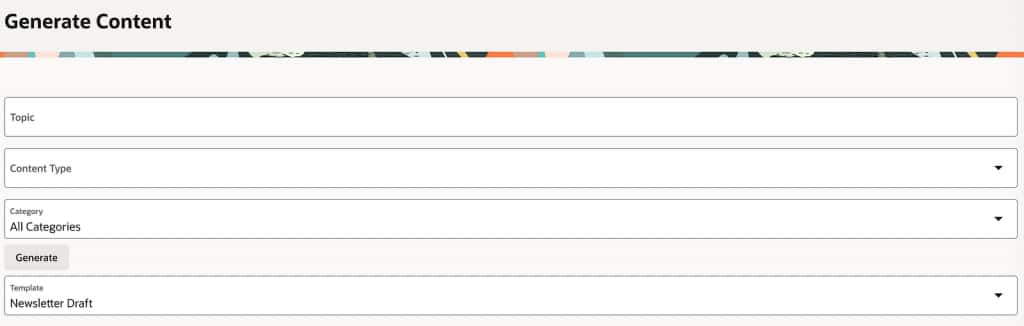
Document comparison answers a different question: “What changed between these two documents?” Users select a current document and a baseline, then generate a structured comparison with source references. The screenshot shows the current document and baseline selectors, an optional category filter, and the comparison action.
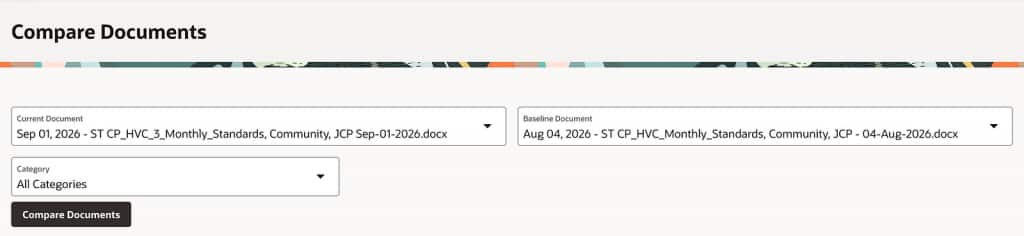
Unlike semantic search, this workflow takes a bounded set of chunks from each selected document in document order. The prompt labels the two sets as current and baseline and asks for supported changes. The comparison defaults to the first 10 embedded chunks per document, with a maximum of 15, subject to the optional category filter. Because context is bounded, an omitted item is not automatically evidence that it was resolved.
The reusable pieces are document storage, extraction, chunking, embeddings, retrieval, and generation. The domain determines the metadata, filters, and prompts. A support repository might filter by product and version; developer documentation might use API, language, and release. Adapting the application also requires parsers for the source formats and access controls appropriate to the collection. Our current uploader handles DOCX files.
Answer quality depends on the evidence supplied. Our current extractor focuses on body paragraphs, so table content and long passages need attention when assessing coverage. Similarity scores do not establish factual accuracy or freshness, and generated answers still need review against their sources.
The Document Knowledge Base brings these pieces into one workflow: add documents, ask questions, create drafts, and compare sources. Keeping documents, metadata, vectors, reusable prompts, and generated artifacts together in Oracle Database supports that workflow with familiar joins and filters. The next step is to validate extraction and retrieval against representative documents, then review generated outputs against their sources before broader use.
The images show the live Document Knowledge Base application. Code snippets are simplified examples using generic kb_ names; they are not standalone installation scripts.
Further reading: Oracle APEX web service API and Oracle vector distance functions.
FAQs
What is this app for?
Document Knowledge Base makes a DOCX collection searchable and reusable through questions, generated drafts, and selected-document comparisons. For example, a support team could retrieve troubleshooting guidance, a developer team could draft an API summary, or an onboarding team could help employees find procedures. These uses depend on the documents and prompts supplied.
Which file types are supported?
The current uploader and extractor handle DOCX. They do not implement PDF, HTML, Markdown, scanned images, or complete DOCX table extraction. Adding another format requires a parser and coverage validation.
What does RAG do here?
Retrieval augmented generation embeds a question, ranks stored chunks by semantic similarity, and supplies selected passages to the model as context. Instructions request source-grounded answers and source references. The comparison workflow instead takes bounded, ordered chunks from two explicitly selected documents.
Do uploaded documents train the model?
The application code makes embedding and generation calls; it does not train or fine-tune a model. Selected source text is sent to the configured inference service. That implementation fact is not a blanket statement about provider retention or data use: verify the chosen service, model, and applicable terms before uploading sensitive documents.
What limits coverage and answer accuracy?
Table cells are skipped, long XML runs and paragraphs can be truncated, and chunks have no overlap. Missing embeddings, metadata filters, and bounded retrieval or comparison can leave relevant evidence out. Similarity and source citations do not prove correctness or freshness. Check extracted coverage and review every generated answer, draft, and comparison against the original documents.