
A practical walkthrough for building a compact LangChain retrieval pipeline on Oracle AI Database, from document ingestion and vector storage to hybrid search, semantic caching, and chat history.
Key takeaways
langchain-oracledbconnects LangChain workflows directly to Oracle AI Database. The article shows how Oracle-specific LangChain classes can load, split, store, search, cache, and persist chat-related data in one workflow.OracleVSsupports both storage and semantic retrieval. After embeddings are saved in Oracle AI Database, those vectors are used to run similarity search and return the nearest matching documents for a user question.- Hybrid retrieval improves answer selection. Reciprocal Rank Fusion (RRF), is a method used to combine different search results into one single list. The sample combines semantic search from
OracleVSwith keyword/full-text search fromOracleTextSearchRetriever, then fuses the results into a single best match. - Caching and chat history are built into the workflow.
OracleSemanticCacheavoids regenerating answers for similar questions, whileOracleChatMessageHistorystores human and AI messages for conversation persistence. - The sample is designed to run locally. It uses Testcontainers with Oracle AI Database Free, a local embedding model, Python 3.13+, Poetry, and a Docker-compatible environment.
The langchain-oracledb package makes it easy to integrate LangChain concepts with your Oracle AI Database instance.
In this article, we’ll explore the langchain_retrieval sample, using langchain-oracledb for content retrieval. The sample composes various langchain-oracledb classes, including to load, split, save, and retrieve content. This post is a companion article to my prior post, LangGraph persistence with Oracle AI Database.
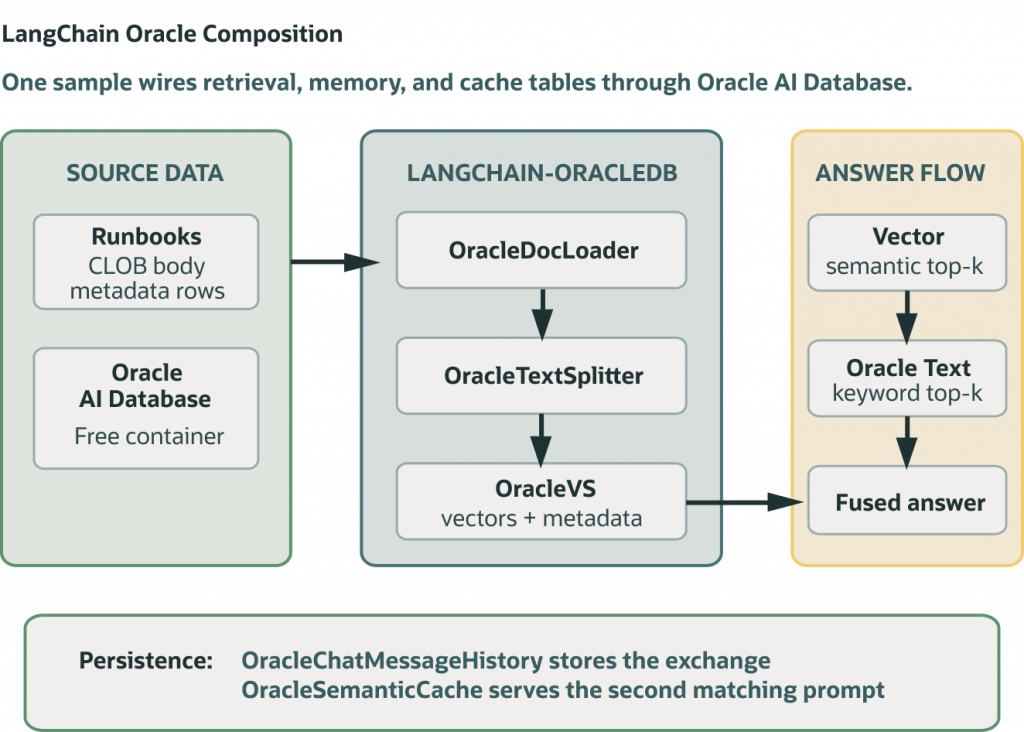
These are the langchain-oracledb classes we’re going to use:
# langchain-oracledb imports
from langchain_oracledb.cache import OracleSemanticCache
from langchain_oracledb.chat_message_histories import OracleChatMessageHistory
from langchain_oracledb.document_loaders import OracleDocLoader, OracleTextSplitter
from langchain_oracledb.retrievers import OracleTextSearchRetriever
from langchain_oracledb.vectorstores import DistanceStrategy, OracleVS
This sample uses Testcontainers with Oracle AI Database Free, and a local embedding model. If you want to jump to the code, start here: langchain_retrieval (GitHub)
Here’s what all the Oracle pieces look like together:
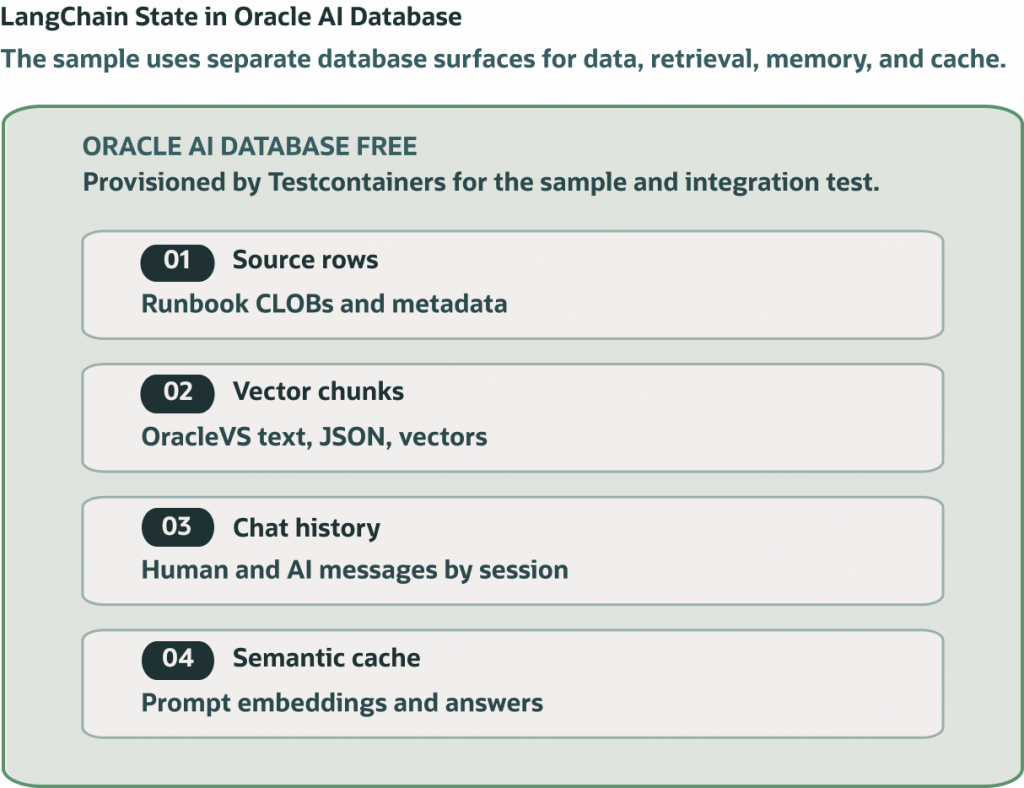
Create a vector store: load, split, and embed content
On startup, our sample populates a vector store with documents from a database table. It does this by chaining an OracleDocLoader to load documents, splitting those documents with OracleTextSplitter, and then storing them in a vector table with OracleVS. These utility classes avoid hand tuned logic, allowing you to easily build retrieval pipelines. Let’s break this down, step-by-step.
Load data
The OracleDocLoader class can be used to ingest documents from various sources. We’re going to use it to load documents from a database table, that’s populated at app startup:
loader = OracleDocLoader(
    conn=conn,
    params={
        "owner": conn.username,
        "tablename": SOURCE_TABLE,
        "colname": "BODY",
        "mdata_cols": ["RUNBOOK_ID", "TITLE", "PRODUCT"],
    },
)
Using a database connection, the loader is provisioned with a table name and any relevant columns to load. From this information, it returns a list of LangChain Document objects that are usable in any LangChain workflow.
Split text
OracleTextSplitter is handy to break documents into chunks for embedding. Using a few parameters, we can split the document by words, sentence, with a max size per chunk.
splitter = OracleTextSplitter(
    conn=conn,
    params={"by": "words", "max": 30, "split": "sentence", "normalize": "all"},
)
ids = [str(document.metadata["runbook_id"]) for document in source_documents]
Save and embed
With our loaded and split content, it’s time to save them into a vector store. The OracleVS class provides a nifty interface to do this for us, without much code:
embedding_model = embeddings or AllMiniLMEmbeddings()
return OracleVS(
    conn,
    embedding_model,
    table_name=VECTOR_TABLE,
    distance_strategy=DistanceStrategy.COSINE,
    mutate_on_duplicate=True,
)
Note that you should provide an embedding model when creating an OracleVS object. We’re using the popular local AllMiniLMEmbeddings model, which you can find on HuggingFace. We also supply a table name, a vector distance strategy, and an update policy.
Putting it all together
We now have all the pieces of an ingestion pipeline, using LangChain interfaces! Let’s see what it looks like, in one piece: load documents, split, and embed into OracleVS.
def load_source_documents(conn: oracledb.Connection) -> list[Document]:
    loader = OracleDocLoader(
        conn=conn,
        params={
            "owner": conn.username,
            "tablename": SOURCE_TABLE,
            "colname": "BODY",
            "mdata_cols": ["RUNBOOK_ID", "TITLE", "PRODUCT"],
        },
    )
    return [_normalize_document(document) for document in loader.load()]
def build_vector_store(
    conn: oracledb.Connection,
    source_documents: list[Document],
    embeddings: Embeddings | None = None,
) -> tuple[OracleVS, list[str]]:
    vector_store = create_vector_store(conn, embeddings)
    chunk_ids = add_documents_to_vector_store(conn, vector_store, source_documents)
    return vector_store, chunk_ids

def create_vector_store(
    conn: oracledb.Connection,
    embeddings: Embeddings | None = None,
) -> OracleVS:
    embedding_model = embeddings or AllMiniLMEmbeddings()
    return OracleVS(
        conn,
        embedding_model,
        table_name=VECTOR_TABLE,
        distance_strategy=DistanceStrategy.COSINE,
        mutate_on_duplicate=True,
    )

def add_documents_to_vector_store(
    conn: oracledb.Connection,
    vector_store: OracleVS,
    source_documents: list[Document],
) -> list[str]:
    splitter = OracleTextSplitter(
        conn=conn,
        params={"by": "words", "max": 30, "split": "sentence", "normalize": "all"},
    )
    ids = [str(document.metadata["runbook_id"]) for document in source_documents]
    return vector_store.add_documents(
        source_documents,
        text_splitter=splitter,
        ids=ids,
        add_chunk_metadata=True,
    )
The great thing about LangChain is that this is fairly compact. If I were to write this code without the library classes, it’d be several hundred lines of Python!
Now, let’s try retrieval and question answering
Retrieval is where things get a bit more interesting. langchain-oracledb offers a few nice helpers in this area:
OracleVSfor semantic searchOracleSemanticCacheto cache embeddings/answers. Embeddings are stored in Oracle AI Database.OracleTextSearchRetrieverfor keyword based full-text search, which complements semantic search- and,
OracleChatMessageHistoryto work with chat histories.
Let’s see how these fit together.
Semantic search
OracleVS, which helped us store embeddings, of course also allows us to retrieve them. This is quite easy using the Python interface:
def semantic_search(
    vector_store: OracleVS,
    question: str,
    *,
    product_filter: str | None = None,
    k: int = 4,
) -> list[RunbookHit]:
    metadata_filter = {"product": {"$eq": product_filter}} if product_filter else None
    documents_with_scores = vector_store.similarity_search_with_score(
        question,
        k=k,
        filter=metadata_filter,
    )
    return [
        _document_hit(document, score, "semantic", rank)
        for rank, (document, score) in enumerate(documents_with_scores, start=1)
    ]
We use an optional metadata filter to further refine our results, and return the nearest K results to the input question. Note that the input question is embedded using the same embedding model we initialized the vector store with.
Keyword search
We can supplement semantic search with text search using OracleTextSearchRetriever, which returns a separate score. This is done using text operators in the database to find relevant content:
def keyword_search(vector_store: OracleVS, question: str, k: int = 4) -> list[RunbookHit]:
    retriever = OracleTextSearchRetriever(
        vector_store=vector_store,
        k=k,
        return_scores=True,
    )
    return [
        _document_hit(document, float(document.metadata.get("score", 0)), "keyword", rank)
        for rank, document in enumerate(retriever.invoke(question), start=1)
    ]
Fusing results
Taking results from both similarity and full-text search, we can accumulate them into one result set. It’s important to note which result came from which search method, as this helps the consumer determine relevancy:
def fuse_hits(semantic_hits: list[RunbookHit], keyword_hits: list[RunbookHit]) -> RunbookHit:
    if not semantic_hits and not keyword_hits:
        raise RuntimeError("No runbook matched the question.")
    by_runbook: dict[int, RankAccumulator] = {}
    for hit in [*semantic_hits, *keyword_hits]:
        accumulator = by_runbook.setdefault(hit.runbook_id, RankAccumulator(hit))
        accumulator.score += 1.0 / (hit.rank + 1)
    return max(by_runbook.values(), key=lambda entry: entry.score).hit
Putting retrieval together to answer a question
We now have all the components needed to scaffold a basic question answering function. Our answer_question method combines OracleVS semantic search, OracleTextSearchRetriever full-text search, and OracleSemanticCache for answer caching:
def answer_question(
    conn: oracledb.Connection,
    vector_store: OracleVS,
    question: str,
    *,
    embeddings: Embeddings | None = None,
    product_filter: str | None = None,
) -> QuestionResult:
    embedding_model = embeddings or AllMiniLMEmbeddings()
    cache = OracleSemanticCache(
        conn,
        embedding_model,
        table_name=CACHE_TABLE,
        score_threshold=0.001,
    )
    cached_generations = cache.lookup(question, LLM_CACHE_KEY) or []
    cache_hit = bool(cached_generations)
    semantic_hits = semantic_search(vector_store, question, product_filter=product_filter)
    keyword_hits = keyword_search(vector_store, question)
    fused_hit = fuse_hits(semantic_hits, keyword_hits)
    answer = cached_generations[0].text if cached_generations else build_answer(question, fused_hit)
    if not cached_generations:
        cache.update(question, LLM_CACHE_KEY, [Generation(text=answer)])
    history = OracleChatMessageHistory(
        SESSION_ID,
        client=conn,
        table_name=HISTORY_TABLE,
    )
    if not cache_hit:
        history.add_messages([HumanMessage(content=question), AIMessage(content=answer)])
    return QuestionResult(
        question=question,
        answer=answer,
        cache_hit=cache_hit,
        semantic_hits=semantic_hits,
        keyword_hits=keyword_hits,
        fused_hit=fused_hit,
        history_count=len(history.messages),
    )
In a semantic cache, the score_threshold determines how similar an entry must be to signify a cache hit. Embeding is required for a semantic cache, so expect additional latency/work on cache lookups.
Time to take the sample for a spin
Let’s run it locally. You’ll need the following prerequisites, as the example spins up a disposable Oracle AI Database Free container:
- Python 3.13+
- Poetry
- Docker compatible environment
From python-oracle/ directory, Install dependencies:
poetry installThen run the sample:
poetry run python src/python_oracle/langchain_retrieval/runbook_retrieval.pyThe script starts the full Oracle AI Database Free image, expected output is similar to:
#### Loaded runbooks into Oracle AI Database ####
Source runbooks: 4
Vector chunks:   12

#### Retrieval ####
Question:      My VPN disconnects every few minutes on Wi-Fi, but it stays connected on Ethernet. What should I try?
Semantic top:  Stabilize VPN over Wi-Fi
Keyword top:   Stabilize VPN over Wi-Fi
Fused top:     Stabilize VPN over Wi-Fi

#### Response Persistence ####
For: My VPN disconnects every few minutes on Wi-Fi, but it stays connected on Ethernet. What should I try?
Use runbook: Stabilize VPN over Wi-Fi.
Why: it matches the network product area and says to Use this runbook when a VPN client disconnects every few minutes on Wi-Fi but stays connected on Ethernet.

Chat history messages: 2
Second lookup used OracleSemanticCache: True
The chunk count may vary if Oracle AI Database chunking behavior changes, but it should be greater than the four source runbooks.
References
- langchain-oracledb Python package
- LangChain-Oracle GitHub repository
- LangGraph persistence with Oracle AI Database
FAQs
- What problem does this article solve?
It demonstrates how to build a LangChain-based retrieval workflow using Oracle AI Database for ingestion, vector storage, search, caching, and chat history. - What is
langchain-oracledbused for?
It provides Oracle Database integrations for LangChain concepts, including document loaders, text splitters, vector stores, retrievers, semantic cache, and chat message history. - How does the sample ingest documents?
It reads documents from a database table usingOracleDocLoader, includes selected metadata columns, normalizes the documents, splits them into chunks, and stores the chunks in a vector table. - Why does the article split text before embedding it?
Splitting turns larger documents into smaller chunks that are better suited for embedding and retrieval; the sample uses word-based splitting with sentence boundaries and normalization. - What embedding model does the sample use?
The sample uses a localAllMiniLMEmbeddingsmodel by default, though the vector store creation function can accept another embedding model. - What is the difference between semantic search and keyword search here?
Semantic search finds meaning-based matches through vector similarity, while keyword search uses Oracle text search capabilities to find lexical matches; the sample combines both approaches. - How are final retrieval results chosen?
The sample ranks semantic and keyword hits, accumulates scores by runbook, and selects the strongest fused result as the best match for the question. - What does
OracleSemanticCacheadd?
It stores and retrieves prior answers for semantically similar questions, so repeated or near-repeated queries can reuse cached responses instead of rebuilding the answer. - What does
OracleChatMessageHistoryadd?
It persists the user question and AI response in Oracle Database, giving the workflow a durable chat history. - Who is this article most useful for?
It is most useful for developers building RAG-style applications with LangChain who want Oracle AI Database to handle document ingestion, vector search, hybrid retrieval, caching, and conversation persistence.