
This is article 5 of 8 in my Oracle AI Database Skills series.
Key Takeaways
- AI Profiles bind the model to a defined list of database objects. With
enforce_object_listenabled, generated SQL cannot reach tables you did not explicitly name — scope is a constraint, not just a suggestion. SHOWSQLreturns the candidate SQL without executing it, using schema metadata rather than table data. You see what the assistant intends before any data moves or any query runs.EXPLAINSQLsurfaces the model’s reasoning — the join choices, date windows, and grouping logic — so reviewers can catch wrong assumptions before they become surprises in a result set.DISABLE_DATA_ACCESSkeeps early experiments in a prompt-only lane: metadata-driven inspection continues, but actions that would send table data to the model are blocked until you re-enable them.
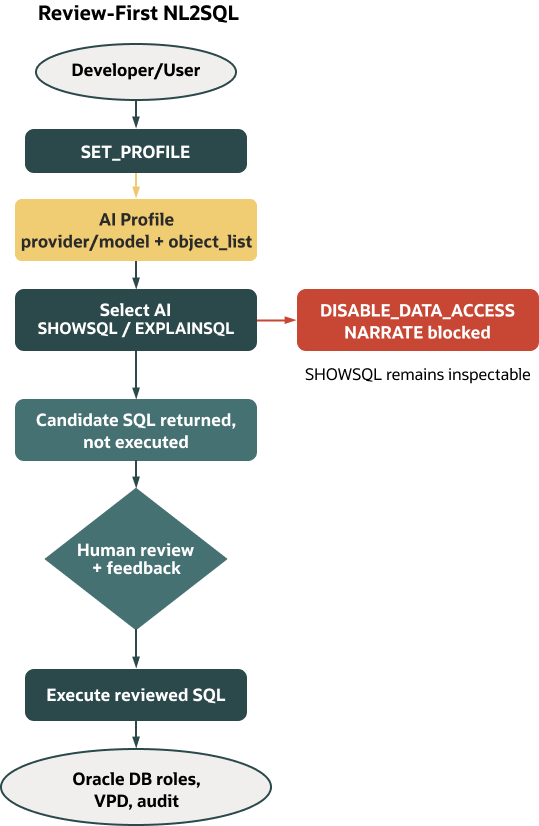
Natural-language-to-SQL is fast until it guesses your schema, misreads a join, or touches the wrong table. On Oracle, you don’t have to accept that trade-off. AI Profiles bind provider and model to a defined set of database objects; Select AI adds database-native, inspectable actions so you can review intent and generated SQL before anything runs. In practice, you scope a profile, inspect with SHOWSQL and EXPLAINSQL, capture feedback, and only then execute. You keep the speed of NL2SQL without giving up control.
This article builds on the managed MCP posture from Article 4, where we put a governed action surface in front of assistants. Here, we add an Oracle-native reasoning loop: Select AI’s profiles and actions make the model’s intent reviewable and controllable inside the database.
Version scope and sandbox assumptions
Select AI is available in Oracle Database 26ai and in Autonomous Database (Serverless, Dedicated, and Cloud@Customer). The examples assume Select AI is enabled, a provider credential exists (for example, created with DBMS_CLOUD for external providers), and any required network ACLs are in place. The HR sample schema is used for illustration with read-only access, and table/owner casing must match your environment. You’ll need EXECUTE on DBMS_CLOUD_AI and access to the referenced credential. Profiles are created via DBMS_CLOUD_AI.CREATE_PROFILE and take effect for the current session when set with DBMS_CLOUD_AI.SET_PROFILE. Supported providers and models vary by platform and region; consult the Providers and Models page for your environment.
Prompts that include punctuation or special characters parse more reliably when enclosed in single quotes (for example, SELECT AI SHOWSQL '...';). Some prompts work unquoted; if parsing fails, add quotes. All examples below use quoted prompts.
Action tokens and profile JSON keys can be release-sensitive; confirm exact spellings and supported values in your target release. For current behavior, providers/models, action syntax, conversations, and end-to-end examples, see the Select AI docs:
- Overview
- Providers and models
- Examples (profiles, actions, scoping, data-access toggle, feedback)
- Conversations and action syntax
Why reasoning quality matters for database AI
LLMs know SQL patterns; they don’t know your database. Ask, “How many employees were hired last quarter by department?” and an open-ended model can guess a table name, pick the wrong join key, or hard-code a date window that doesn’t match your calendars. The remedy is twofold: make the model schema-aware, and force an inspection step before anything executes.
AI Profiles handle schema awareness by binding the provider, model, and an object list the model may consider. Review then happens inside the database with SELECT AI SHOWSQL (candidate SQL) and SELECT AI EXPLAINSQL (rationale). That combination—scope plus inspection—turns NL2SQL from a clever demo into a workflow you can standardize. Per docs, for generation and inspection, SHOWSQL and EXPLAINSQL use database metadata (schemas/tables/columns/comments) rather than table contents by default. This keeps them safe defaults during review; consult docs for any action-specific exceptions in your release.
AI Profiles in practice: provider, credential, model, and scope
An AI Profile is a database object created with DBMS_CLOUD_AI.CREATE_PROFILE. It specifies which provider and model to use, which credential authorizes access, and which database objects are in bounds. The object_list does double duty: it gives the model the vocabulary it needs and, when enforced, constrains generation to the allowed objects. Profiles are selected per session with DBMS_CLOUD_AI.SET_PROFILE; after that, SELECT AI actions in the session use the bound provider/model and respect your scoping choices.
The following example enables HR headcount questions without inviting schema drift. The model string is illustrative—choose a provider/model combination supported in your environment and release.
BEGIN
  DBMS_CLOUD_AI.CREATE_PROFILE(
    profile_name => 'HR_READONLY',
    attributes   => '{
      "provider": "openai",
      "credential_name": "OPENAI_CRED",
      "model": "gpt-4o-mini",
      "object_list": [
        {"owner":"HR","name":"EMPLOYEES"},
        {"owner":"HR","name":"DEPARTMENTS"}
      ],
      "enforce_object_list": true,
      "case_sensitive_values": true
    }'
  );
END;
/
EXEC DBMS_CLOUD_AI.SET_PROFILE('HR_READONLY');
Notes:
- Replace provider, model, and credential with values supported in your release. Supported providers vary by platform and region; check the Providers and Models page.
- Verify attribute keys and supported values (for example,
case_sensitive_values) against your release; use JSON booleans (true/false), not quoted strings.
A few practical notes help avoid surprises. Profiles are session-scoped, so call DBMS_CLOUD_AI.SET_PROFILE in each session that will use SELECT AI (new SQL Developer tabs, pooled connections, and so on). Creating or using profiles requires appropriate privileges (for example, EXECUTE on DBMS_CLOUD_AI), access to the referenced credential, and any needed network ACLs. The object list can span multiple schemas; execution still honors your roles and any VPD policies. Keeping "enforce_object_list": true curbs schema drift, though the constraint isn’t absolute—if your environment uses synonyms or views, validate with SHOWSQL that generated SQL stays within intended objects. The `case_sensitive_values` attribute steers how string literal comparisons are produced; if your text data is mixed-case and recall matters more than exact match semantics, consider setting it to false while confirming the exact predicate shape your chosen provider/model generates. For example, with "case_sensitive_values": false a generated comparison might use a case-insensitive form (such as UPPER(e.email) = UPPER(:email)), but exact SQL varies by model and release. Finally, attribute keys such as enforce_object_list, case_sensitive_values, and any automated scoping modes are release-sensitive; verify names and supported values against current docs before relying on them.
Inspectable actions: SHOWSQL first, then EXPLAINSQL if needed
Once a profile is active, you can ask natural-language questions with database-native actions designed for review. SHOWSQL returns a candidate SQL statement without running it. Generation uses metadata—schemas, tables, and columns—rather than table contents.
SELECT AI SHOWSQL 'how many employees were hired last quarter by department?';
EXPLAINSQL summarizes the model’s intent so you can catch wrong assumptions before execution. Like SHOWSQL, it relies on metadata, not table data.
SELECT AI EXPLAINSQL 'how many employees were hired last quarter by department?';
Together, these two actions keep review and execution separate. SHOWSQL gives you something concrete to approve or adjust; EXPLAINSQL tells you why the model chose certain filters or join keys. Use them as your default path during early adoption. A third action, NARRATE, answers in natural language and can incorporate data when enabled; reserve it for contexts where your data-sharing posture allows model access to results and you have documented that decision (docs: Examples page).
Hardening the path: scoping, case handling, and data minimization
Start with guardrails. Enforce the object list so the model stays inside approved tables or views. Decide on case handling up front so string comparisons behave predictably. And be explicit about what data, if any, can leave the database during NL2SQL interactions.
Oracle provides an administrative toggle for data transfer. Calling DBMS_CLOUD_AI.DISABLE_DATA_ACCESS blocks actions that would send table data or results to the model. Metadata-only flows—SHOWSQL and EXPLAINSQL—continue to work when disabled. Data-bearing actions (for example, NARRATE, and in some releases certain chat or result-enriched flows) are blocked until re-enabled. See the Select AI docs for the per-release action matrix.
EXEC DBMS_CLOUD_AI.DISABLE_DATA_ACCESS;

-- Still allowed: metadata-driven candidate SQL (no data sent)
SELECT AI SHOWSQL 'total headcount by department?';

-- Expected to raise an error while disabled (data-bearing action)
SELECT AI NARRATE 'total headcount by department?';

EXEC DBMS_CLOUD_AI.ENABLE_DATA_ACCESS;
Treat this toggle as a policy switch you can document and audit. When disabled, reviewers can still shape and approve SQL; when enabled, teams can opt into natural-language answers in contexts where that’s appropriate. Roles, VPD, and auditing continue to apply to any approved SQL you run, regardless of whether the SQL was generated by Select AI (docs: Overview and Examples).
Guardrails to standardize in your runbooks: keep enforce_object_list enabled; choose case_sensitive_values deliberately; default to SHOWSQL/EXPLAINSQL during review; and use the data-access toggle to separate prompt-only review from data-bearing actions.
Quick scope test you can try
With the HR_READONLY profile above (only EMPLOYEES and DEPARTMENTS in scope), ask something that tempts the model to reach for HR.LOCATIONS:
-- LOCATIONS is out of scope; we expect generation to stay within allowed objects
SELECT AI SHOWSQL 'list each department with its city and headcount';
Review the candidate. With enforce_object_list on, generation is constrained to the allowed objects. If the candidate includes a disallowed object (for example, HR.LOCATIONS), do not approve it—either change the question or explicitly add the needed object to the profile and regenerate. Scope isn’t a security bypass; it’s a generation boundary that works best when the object list is precise. Synonyms and views can influence behavior, so verify the metadata your profile exposes. When you want to encapsulate joins and filters deliberately, consider scoping to views rather than base tables.
A small, governed NL2SQL demo
Here is a path your team can adopt without changing how you secure or audit the database. First, create and set a narrow profile; the HR_READONLY example above is sufficient for headcount questions, and keeping enforce_object_list enabled prevents drift to unapproved tables. Next, inspect with SHOWSQL and, when the intent needs clarification, EXPLAINSQL. For the HR schema, a typical review might begin with a candidate:
SELECT AI SHOWSQL 'list the number of employees hired in the last 90 days by department with department name';If the candidate looks structurally right but relies on SYSDATE - 90 and you need calendar quarters instead, either edit the date predicate yourself or nudge the prompt and generate another candidate. When you want to see the model’s assumptions—date windows, join keys, grouping logic—ask for a short rationale:
SELECT AI EXPLAINSQL 'list the number of employees hired in the last 90 days by department with department name';After review, execute the approved SQL manually under a read-only role. Generated or not, it is just SQL, so your roles, VPD, and unified auditing remain in force.
Feedback and evaluation loops
You’ll learn faster if you keep lightweight records of what you approved and why. A tiny table works well:
CREATE TABLE ai_sql_feedback (
  id             NUMBER GENERATED BY DEFAULT AS IDENTITY PRIMARY KEY,
  asked_at       TIMESTAMP DEFAULT SYSTIMESTAMP,
  profile_name   VARCHAR2(128),
  nl_question    CLOB,
  generated_sql  CLOB,
  corrected_sql  CLOB,
  rating         NUMBER, -- 1–5
  notes          CLOB
);
Record your decision after each review round:
INSERT INTO ai_sql_feedback (profile_name, nl_question, generated_sql, corrected_sql, rating, notes)
VALUES (
  'HR_READONLY',
  'list the number of employees hired in the last 90 days by department with department name',
  :paste_candidate_sql_here,
  :paste_corrected_or_approved_sql_here,
  4,
  'Approved after switching SYSDATE-90 to quarter boundaries'
);
Oracle also exposes a built-in feedback hook so you can record positive or negative signals tied to generated SQL. See DBMS_CLOUD_AI.FEEDBACK in the Select AI docs for the current procedure signature; confirm parameter names such as sql_text versus sql_id and accepted feedback types/ratings for your release (docs: Examples).
-- Example only; verify parameter names/values for your release (e.g., sql_text vs sql_id)
BEGIN
  DBMS_CLOUD_AI.FEEDBACK(
    feedback_type => 'SQL_QUALITY',             -- verify accepted values
    rating        => 4,                         -- verify rating scale
    sql_text      => :paste_candidate_sql_here, -- or use sql_id => '...' if supported
    notes         => 'Good structure; adjusted date window to fiscal quarter'
  );
END;
/
Keep the loop simple: store the question, what Select AI proposed, what you ran, and a short note. In reviews, patterns emerge quickly—repeated date-window mistakes, common join fixes, or object_list gaps you can close in profiles. If you depend on case-insensitive matching, pilot with a small test set that validates generated predicates against your data.
What changes when you do this under managed MCP
In Article 4 we hosted an MCP server on Autonomous Database to make the database the control plane for actions. Select AI fits neatly into that posture. An agent can plan and call tools inside the database, but the way it generates and explains SQL remains inspectable and scoped by the active profile. Your identity, roles, private endpoints, VPD, and auditing don’t get bypassed; they’re the runway. This is series context, not a formal product integration; Select AI behavior and governance follow the documented database APIs. The operational benefit is simple: teams can standardize on “SHOWSQL first,” even when an assistant is in the loop, and your audit trail still shows a normal query execution under the right account, module, and action once you approve the run.
Common failure modes, and how the Select AI pattern avoids them
Open-ended NL2SQL tends to fail the same ways: hallucinated table names, ambiguous joins, and fragile filters. An enforced object_list removes most schema drift by design. SHOWSQL gives reviewers something concrete to approve or fix, and EXPLAINSQL surfaces incorrect assumptions before they become surprises in production. When data sharing is sensitive or still under review, DISABLE_DATA_ACCESS keeps experiments in the prompt-only lane. None of this is exotic. It is a repeatable workflow you can hand to a junior developer—or an assistant—and expect the same outcome: first we scope; then we inspect; then we run; and we prove it in logs and policy after the fact.
What comes next
This same discipline carries into retrieval-augmented generation. In Article 6, we will combine Select AI with Oracle AI Vector Search so answers are grounded in embeddings stored next to the business data itself. You’ll use the same pattern: bind provider and model with a profile, scope what’s visible, inspect what will run, and keep governance in the path.
A tiny sequence to keep on a team wall
Further reading
- About Select AI (overview, prompt/data handling)
- Providers and models
- Examples (profiles, SHOWSQL/EXPLAINSQL/NARRATE, scoping, data-access toggle, feedback)
- Action syntax and conversations
Closing
NL2SQL doesn’t have to be a black box. On Oracle, you bind the model and the data surface with AI Profiles, inspect what the model intends with SHOWSQL and EXPLAINSQL, and execute only when you’re satisfied—under the same roles, VPD, and auditing you already trust. Start narrow. Keep enforce_object_list on. Use the data-access toggle when you’re in prompt-only mode. Log decisions. The result is faster iteration with guardrails you can explain—and prove.