
Why Automate the Patching Process?
Anyone who has managed a production environment knows that patching is rarely difficult because of one complicated command. The real challenge is approve outages, testing, executing dozens of small steps in the correct order, consistently, across every environment.
A typical GoldenGate patching window involve stopping Extracts and Replicats, stopping distribution paths, updating the GoldenGate home, restarting services, bringing the replication processes back online, and validating that data continues to move correctly. When these steps are performed manually, it is easy to miss something, especially during a late night maintenance window or when several deployments must be patched.
A written procedure helps, but an automated procedure goes further. It performs the same operations in the same order every time. It can verify the result of each API request, confirm that a process has actually stopped before continuing, wait for services to become available, logs the output, and stop the workflow when an unexpected condition is detected.
This makes patching repeatable, validated, and easier to implement across development, test, and production environments. It also creates a process that can be tested before the maintenance window instead of relying on someone to interpret a runbook while the system is offline.
Automation also makes it easier to establish a regular patching schedule. GoldenGate 26ai bundle patches are released quarterly in January, April, July, and October. When patching becomes predictable and repeatable, organizations are less likely to postpone updates because the procedure feels risky or overly manual.
Keeping GoldenGate current is not only about moving to a newer version number. Each bundle patch can include important security updates, bug fixes, stability improvements, performance enhancements, and new product capabilities. A consistent patching practice helps ensure that the replication environment benefits from those improvements instead of slowly falling behind.
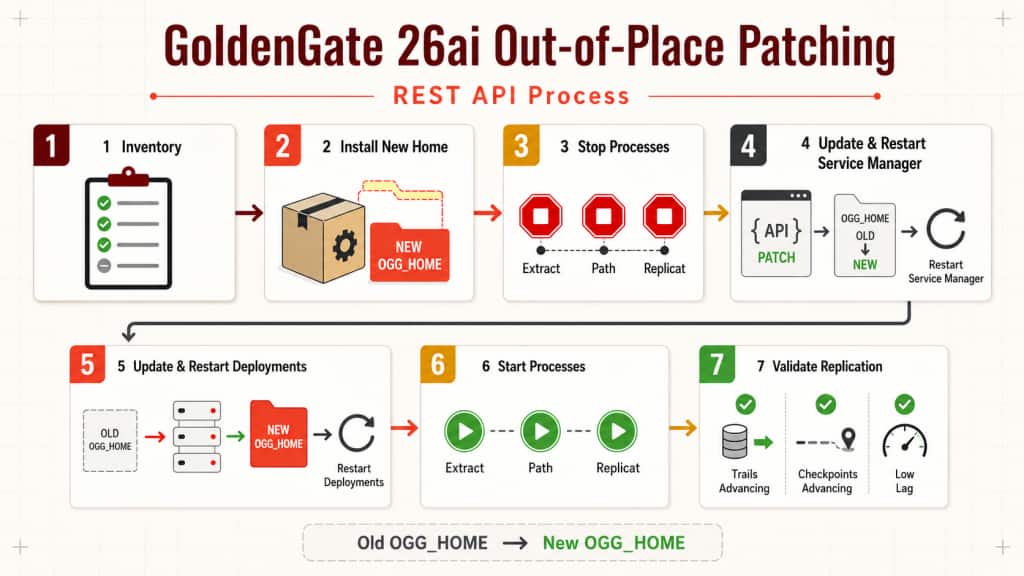
Out-of-place patching, combined with the GoldenGate REST APIs, provides a practical foundation for this automation. The new release is installed in a separate GoldenGate home, the environment is moved to the new binaries through controlled API operations, and every stage can be validated before the workflow continues.
This runbook patches an Oracle GoldenGate Microservices Architecture deployment by installing a new Oracle GoldenGate home and changing the Service Manager and deployment oggHome settings. It is an operational template, not a substitute for the patch README, certification matrix, or database-specific upgrade instructions.
Change gate: Do not start the outage until every pre-change check is complete, the backup is restorable, the database/topology-specific section that applies to the environment has been approved, and above all, thoroughly tested in non production environment.
Scope and constraints
- Use a new, empty Oracle GoldenGate home. Do not overwrite or delete the old home.
- Keep deployment configuration, data, archive, var, and SSL/wallet directories separate from
OGG_HOME, or explicitly validate their compatibility and availability after the home change. - This procedure changes Microservices deployments managed by Service Manager. XAG, clustered, and multi-node deployments need their product-specific orchestration procedure in addition to these API calls.
- A distribution path is stopped and started only when its topology and operational policy require it. Oracle’s base upgrade flow requires Extracts and Replicats to be stopped gracefully.
- The sample release paths are placeholders. Substitute actual absolute paths; do not infer a GoldenGate release from a directory name.
1. Preconditions and approval
Complete and record all of the following before scheduling the outage:
- Confirm that the target 26ai release is certified for the OS, database release, capture/apply mode, and topology.
- Read the target patch README, including prerequisites, installation steps, one-way changes, and rollback restrictions.
- Verify a tested backup of each deployment’s configuration, parameter files, wallets/certificates, credential store, deployment registry, and any external data/metadata required by the site recovery procedure.
- Adjust path, ports and URL to your environment.
- Confirm capacity, file ownership, mount availability, and permissions for the new home.
- Confirm that Service Manager and deployment REST accounts work. They can be different accounts and should be treated separately.
- Record the maintenance timeout, the business validation transaction, expected lag, the rollback decision owner, and the observation period.
- Test and validate all steps in a non production environment.
Database-specific gate
- Oracle Database: Verify the deployment
TNS_ADMINsetting and that it resolves the requiredtnsnames.oraandsqlnet.ora. - SQL Server: Perform the 26ai ODBC-driver and
odbc.inimigration described in the target release documentation before starting processes. - PostgreSQL: Complete the documented 26ai post upgrade steps before starting Extracts.
- Any other database: follow the target patch README and the database-specific GoldenGate upgrade guide. If it requires database-side or metadata changes, explicitly establish whether rollback to the old binaries remains supported.
2. Environment variables
Use secure input or a secret manager. Do not place secrets in scripts, source control, shell history, or shared command lines.
export SM_USER='oggsmadmin'
read -r -s -p 'Service Manager password: ' SM_PASSWORD; echo
export DEPLOY_USER='oggadmin'
read -r -s -p 'Deployment password: ' DEPLOY_PASSWORD; echo

export SM_URL='https://ogg-host.example.com:9011'
export ADMIN_URL='https://ogg-host.example.com:9012'
export DIST_URL='https://ogg-host.example.com:9013'
export RECV_URL='https://ogg-host.example.com:9014' # only if applicable

export OLD_OGG_HOME='/u01/app/oracle/product/ogg/gghome_old'
export NEW_OGG_HOME='/u01/app/oracle/product/ogg/gghome_26ai_target'
export MAINTENANCE_TIMEOUT=1800
Use CA-trusted TLS certificates in production. Do not use curl -k except in a non-production environment with an approved exception.
If you are using NGINX your host URL, path and ports might be different
3. Discover and record the current state
Do not assume a deployment is named WEST, or that every configured object is running. Capture the registry first, then inventory every managed deployment returned by it.
curl --fail --silent --show-error -u "$SM_USER:$SM_PASSWORD" \
  "$SM_URL/services/v2/deployments" | tee prechange-deployments.json | jq .

curl --fail --silent --show-error -u "$SM_USER:$SM_PASSWORD" \
  "$SM_URL/services/v2/deployments/ServiceManager" \
  | tee prechange-servicemanager.json | jq .
For each deployment, use that deployment’s Administration and Distribution endpoints and credentials to save:
curl --fail --silent --show-error -u "$DEPLOY_USER:$DEPLOY_PASSWORD" \
  "$ADMIN_URL/services/v2/extracts" | tee prechange-extracts.json | jq .

curl --fail --silent --show-error -u "$DEPLOY_USER:$DEPLOY_PASSWORD" \
  "$ADMIN_URL/services/v2/replicats" | tee prechange-replicats.json | jq .

curl --fail --silent --show-error -u "$DEPLOY_USER:$DEPLOY_PASSWORD" \
  "$DIST_URL/services/v2/sources" | tee prechange-paths.json | jq .

curl --fail --silent --show-error -u "$SM_USER:$SM_PASSWORD" \
  "$SM_URL/services/v2/deployments/DEPLOYMENT_NAME" | tee prechange-deployment.json | jq .
Also capture status/lag, trail positions, distribution checkpoints, recent critical events and logs, Extract open transactions, and the actual executable paths of Service Manager and each microservice. Record which objects are running; only those objects are eligible for restoration after the patch.
Check long-running transactions and Bounded Recovery before stopping Extract. Do not initiate patch procedures while there are long-running transactions active.
4. Install and validate the target home
Download the authorized target release, validate its checksum/signature, and install it according to its README into $NEW_OGG_HOME. The directory must be new and empty.
Before the outage, verify:
- the installer completed successfully and the new binaries/libraries are executable by the GoldenGate owner;
- host mounts and database client/network files needed by the target release are available;
- each deployment record’s
oggConfHome,oggDataHome,oggArchiveHome,oggEtcHome,oggVarHome,oggSslHome, andenvironmentvalues were reviewed against the new home; - wallet, certificate, credential-store, ODBC, and custom-library paths resolve after the home change;
- the old home remains intact and readable for the approved rollback window.
Do not copy deployment directories into the new software home.
5. Quiesce replication
Use the exact object names captured in the pre-change inventory. Stop Replicats, Dist Paths and Extracts gracefully. If the approved topology runbook calls for path control, stop the relevant paths after confirming their dependencies. A target-initiated path must be controlled through the service that owns it.
# Replicat
curl --fail --silent --show-error -u "$DEPLOY_USER:$DEPLOY_PASSWORD" \
  -X PATCH -H 'Content-Type: application/json' \
  -d '{"status":"stopped"}' \
  "$ADMIN_URL/services/v2/replicats/RWEST" | jq .

# Distribution path -- only when required by the topology/runbook
curl --fail --silent --show-error -u "$DEPLOY_USER:$DEPLOY_PASSWORD" \
  -X PATCH -H 'Content-Type: application/json' \
  -d '{"status":"stopped"}' \
  "$DIST_URL/services/v2/sources/DPWE" | jq .

# Extract
curl --fail --silent --show-error -u "$DEPLOY_USER:$DEPLOY_PASSWORD" \
  -X PATCH -H 'Content-Type: application/json' \
  -d '{"status":"stopped"}' \
  "$ADMIN_URL/services/v2/extracts/EWEST" | jq .
EWEST, DPWE, and RWEST are examples only. For production use, either derive the configured process and path names dynamically from the pre-change REST inventory, or maintain an approved, explicit list of the processes and paths in scope. Stop only the objects that were running before maintenance, in the dependency order defined for your topology.
Poll to a terminal stopped state before proceeding. Do not treat an accepted PATCH response as proof that a process stopped.
deadline=$((SECONDS + MAINTENANCE_TIMEOUT))
while :; do
  status=$(curl --fail --silent --show-error -u "$DEPLOY_USER:$DEPLOY_PASSWORD" \
    "$ADMIN_URL/services/v2/extracts/EWEST/info/status" | jq -r '.response.status') || exit 1
  [[ "$status" == stopped ]] && break
  (( SECONDS >= deadline )) && { echo 'Extract stop timed out'; exit 1; }
  sleep 5
done
Use the corresponding /replicats/{name}/info/status endpoint for Replicats. For a Distribution Path, retrieve /sources/{path} or /sources/{path}/info and confirm its documented state/checkpoint. If any object does not stop by the deadline, stop the runbook, investigate, and make the recorded continue-or-rollback decision; do not force-kill by default.
6. Move Service Manager to the target home
Change Service Manager first. The API supports changing oggHome and restarting in one request.
curl --fail --silent --show-error -u "$SM_USER:$SM_PASSWORD" \
  -X PATCH -H 'Content-Type: application/json' -H 'Cache-Control: no-cache' \
  -d "{\"oggHome\":\"$NEW_OGG_HOME\",\"status\":\"restart\"}" \
  "$SM_URL/services/v2/deployments/ServiceManager" | jq .
The REST endpoint will be temporarily unavailable. Poll it with the approved timeout, then verify that its returned oggHome equals $NEW_OGG_HOME.
deadline=$((SECONDS + MAINTENANCE_TIMEOUT))
until curl --fail --silent --show-error -u "$SM_USER:$SM_PASSWORD" \
  "$SM_URL/services/v2/deployments/ServiceManager" | jq -e \
  --arg home "$NEW_OGG_HOME" '.response.oggHome == $home' >/dev/null; do
  (( SECONDS >= deadline )) && { echo 'Service Manager restart timed out'; exit 1; }
  sleep 5
done
If a non-XAG Service Manager fails to return, verify its process path. Oracle documents this recovery action from the new home:
cd "$NEW_OGG_HOME/bin"
./ServiceManager
7. Move every user deployment
For each managed user deployment discovered in step 3, issue the following with its exact deployment name. Do not change only one deployment in a multi-deployment Service Manager.
export DEPLOYMENT='WEST' # substitute one discovered deployment name
curl --fail --silent --show-error -u "$SM_USER:$SM_PASSWORD" \
  -X PATCH -H 'Content-Type: application/json' -H 'Cache-Control: no-cache' \
  -d "{\"oggHome\":\"$NEW_OGG_HOME\",\"status\":\"restart\"}" \
  "$SM_URL/services/v2/deployments/$DEPLOYMENT" | jq .
Wait for the deployment to return, confirm its oggHome, and query /services/v2/deployments/{deployment}/services. Verify every required service is running before proceeding. A deployment restart normally restarts its configured microservices; use a separate service restart only when the returned service state requires it.
8. Technical validation before resuming replication
For every deployment, confirm and save evidence that:
- Service Manager and the deployment return the new
oggHome; - Administration, Distribution, Receiver, and Performance Metrics services that are configured for the deployment report
runningand respond at their configured endpoints; - the running processes resolve to
$NEW_OGG_HOME; - deployment configuration/data/SSL/wallet paths and the required aliases are accessible;
- no new critical events, reports, or logs indicate TLS, wallet, parameter, library, ODBC, or database-connectivity errors.
9. Restore the recorded running state
Start only the objects that were running before the outage, using the dependency order approved for the specific topology. A common order is Extract, then distribution path (if managed by this procedure), then Replicat.
curl --fail --silent --show-error -u "$DEPLOY_USER:$DEPLOY_PASSWORD" \
  -X PATCH -H 'Content-Type: application/json' -d '{"status":"running"}' \
  "$ADMIN_URL/services/v2/extracts/EWEST" | jq .

curl --fail --silent --show-error -u "$DEPLOY_USER:$DEPLOY_PASSWORD" \
  -X PATCH -H 'Content-Type: application/json' -d '{"status":"running"}' \
  "$DIST_URL/services/v2/sources/DPWE" | jq .

curl --fail --silent --show-error -u "$DEPLOY_USER:$DEPLOY_PASSWORD" \
  -X PATCH -H 'Content-Type: application/json' -d '{"status":"running"}' \
  "$ADMIN_URL/services/v2/replicats/RWEST" | jq .
Poll every object to running using its documented status resource. An abended, killed, or timeout state is a stop condition.
10. Acceptance validation
Before accepting the change:
- Compare all running objects to the pre-change inventory.
- Confirm Extract/Replicat trail sequence and RBA (or source-specific position) advance.
- Confirm Distribution Path checkpoints advance.
- Confirm Extract and Replicat lag returns to the agreed threshold.
- Review reports, logs, and critical events for the full agreed observation period.
- Execute the approved controlled source transaction and verify the expected result at the target.
- Record the reported target release and the process executable paths.
- Keep the old home unchanged until the change is formally accepted and the rollback window expires.
Rollback decision and procedure
Rollback is available only if the patch README, database-specific procedure, and observed state confirm that the old binaries remain compatible. Do not assume rollback is safe after one-way metadata, parameter, trail-format, or database-side changes.
If rollback is approved:
- Stop the affected Replicats, required paths, and Extracts gracefully; wait for
stopped. - PATCH Service Manager with
{"oggHome":"$OLD_OGG_HOME","status":"restart"}; wait for it to return and verify the old home. - PATCH every affected user deployment to
$OLD_OGG_HOMEwithstatus:"restart"; validate all services. - Restore only the pre-change running objects and complete the same checkpoint, lag, log, and end-to-end validation.
- Preserve all evidence, including the rollback decision and the issue that triggered it.
curl --fail --silent --show-error -u "$SM_USER:$SM_PASSWORD" \
  -X PATCH -H 'Content-Type: application/json' -H 'Cache-Control: no-cache' \
  -d "{\"oggHome\":\"$OLD_OGG_HOME\",\"status\":\"restart\"}" \
  "$SM_URL/services/v2/deployments/ServiceManager" | jq .
Regular Release Calendar Schedule
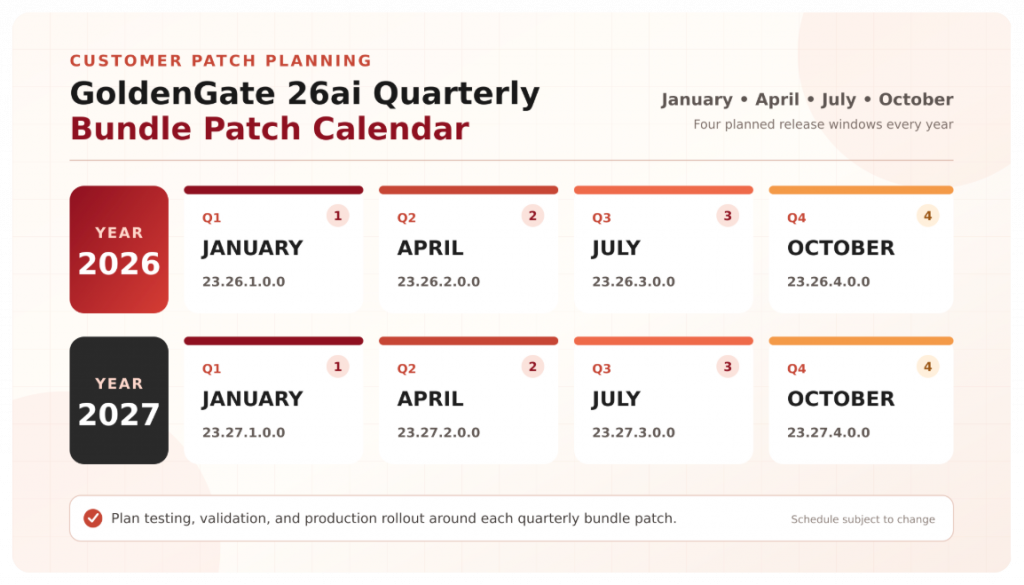
Schedule might be subject to change