
Introduction
We’ve reached a turning point in data pipelines: compute is no longer the bottleneck—data access is.
Even serverless Spark workloads can spend the majority of their runtime waiting on I/O, not processing.
Oracle Cloud Infrastructure (OCI) Data Flow is a fully managed Apache Spark service that processes extremely large datasets without any infrastructure to deploy or manage. DDN Infinia on the other hand, is a software-defined, S3-compatible key-value data intelligence platform that delivers high IOPS, low latency, and scalable throughput, eliminating traditional object storage bottlenecks and is available on OCI Marketplace.
By default, OCI Data Flow applications stores application code (scripts), input data, output data, and logs in OCI Object Storage; however, it can also integrate seamlessly with DDN Infinia to deliver significantly faster job completion times without compromising security. With this integration, data remains entirely within OCI private networks, ensuring secure, high-performance connectivity throughout the workflow.
As shown in Figure 1, this architecture is designed for both performance and security. Serverless Data Flow applications run within the Data Flow service tenancy and access OCI services through a Service Gateway, while simultaneously establishing private, direct connectivity to DDN Infinia via a Data Flow private endpoint.
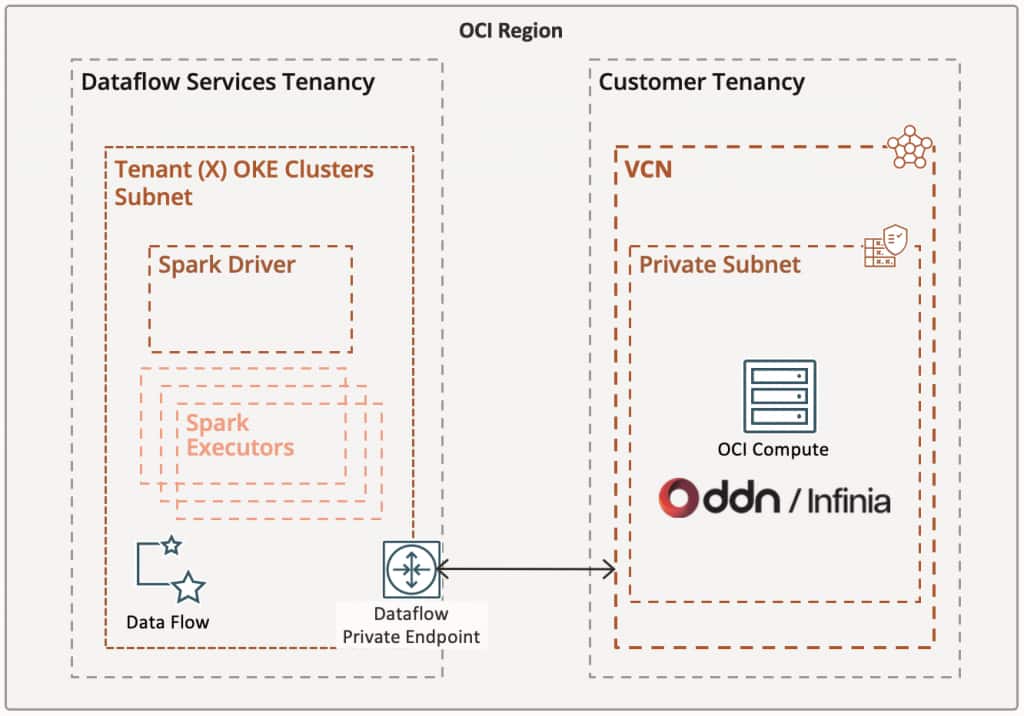
Figure 1 – OCI Data Flow and DDN Infinia integration architecture
The result is a fully private, high-throughput data pipeline, purpose-built to accelerate Apache Spark workloads at scale.
OCI Configuration Requirements
Certain configurations must be in place to properly establish the networking layer.
- When configuring the Data Flow Private Endpoint, make sure to select the correct VCN and its Private Subnet. The Private Subnet must have a route table rule to enable all services in Oracle Services Network via the associated VCN Service Gateway. Also ensure to populate the DNS zones to resolve field with the Infinia vhost address created for the S3 service.
- A Private zone is also required with a Type A entry, pointing to your DDN Infinia S3 IPs and its correspondent Infinia vhost (example below).
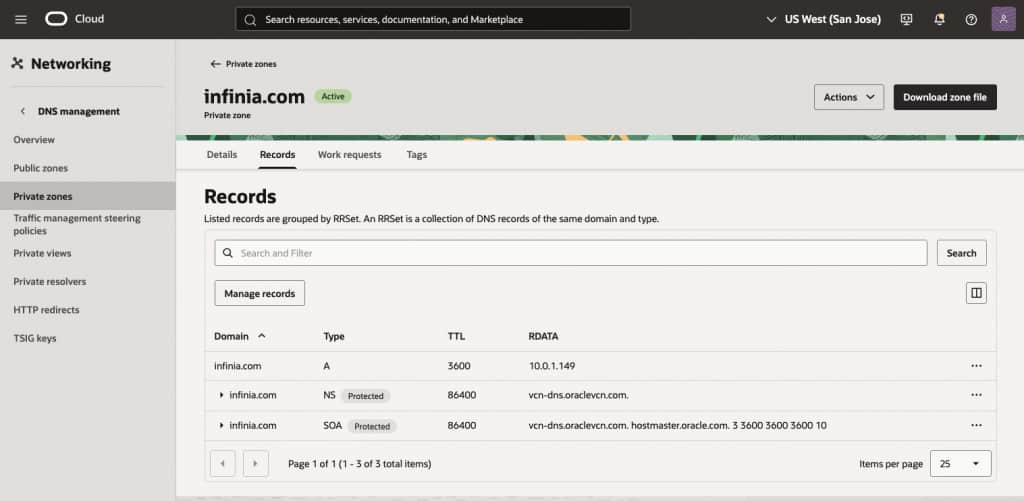
Figure 2 – Shows an example of a Private zone configured for the Infinia vhost (infinia.com)
- Create your Python Data Flow application using code similar to the example below to connect to the DDN Infinia S3 service. The Hadoop s3a filesystem for S3-compatible storage is used to simplify testing and integration:
# ------------------------------
# Configuration (Infinia S3)
# ------------------------------
ACCESS_KEY = "[ADD-INFINIA-S3-ACCESS_KEY-HERE]"
SECRET_KEY = "[ADD-INFINIA-S3-SECRET_KEY-HERE]"
ENDPOINT = "https://[INFINIA-VHOST]:8111"   # sample: https://infinia.com:8111
INPUT_PATH = "s3a://[YOUR-INFINIA-BUCKET]"
OUTPUT_PATH = "s3a://[YOUR-INFINIA-BUCKET]"

# Initialize Spark Session

spark = (
    SparkSession.builder
    .appName("Infinia-S3-Dataflow")
    .config("spark.hadoop.fs.s3a.access.key", ACCESS_KEY)
    .config("spark.hadoop.fs.s3a.secret.key", SECRET_KEY)
    .config("spark.hadoop.fs.s3a.endpoint", ENDPOINT)
    .config("spark.hadoop.fs.s3a.path.style.access", "true")
    .config("spark.hadoop.fs.s3a.connection.ssl.enabled", "true")
    .config("spark.hadoop.fs.s3a.endpoint.region", "us-east-1")
    .getOrCreate()
)
- Create at least one OCI S3 bucket to store your Spark code, the Data Flow logs and some required Spark JARS packages for Infinia.
DDN Infinia Configuration Requirements
The following configurations must be in place to properly establish the integration.
- Your DDN Infinia environment must reside in a private subnet within the same region as your Data Flow service to minimize latency. If your architecture spans multiple regions, you must configure VCN peering using an upgraded Dynamic Routing Gateway (DRG).
- Create an Infinia S3 service and have a vhost associate with it (example: infinia.com)
ubuntu@infinia-1:~$ redcli s3 config show
{
  "endpoints": [
    "https://10.0.1.149:8111"
  ],
  "epoch": 3,
  "non_tls_port": -1,
  "port": 8111,
  "services": [
    {
      "cluster": "cluster1",
      "dpprofile": "",
      "header": "host",
      "service": "redobj",
      "sid": 17,
      "subtenant": "red",
      "tenant": "red",
      "tid": 17,
      "uuid": "3d2e7f65-f92b-4776-a3d8-b47bc874274e",
      "vhost": "infinia.com"
    }
  ],
  "subnet": "",
  "version": 1
}- Create as many Infinia S3 Buckets as you need for your Data Flow job(s)
- Ensure the following packages are uploaded to your OCI bucket for use as Spark JARs. If they are missing, download them from the internet and upload them manually:
- Hadoop-aws-3.3.4.jar
- Java-sdk-bundle-1.12.262.jar
Creating your Data Flow Application
Now it’s time to bring all these components together when creating your Data Flow application. Ensure the following fields are properly configured:
- Language: we are going to use Python on this case.
- File URL: path to your application code that was uploaded into the OCI Bucket.
- Application log location: path to your OCI Bucket where logs will be stored.
- Under Advanced options, set the Delta Lake version to none, then enter the following Spark configuration properties:
spark.jars: oci://[your_oci_bucket]@[oci-namespace]/hadoop-aws-3.3.4.jar,oci://[your_oci_bucket]@[oci-namespace]/aws-java-sdk-bundle-1.12.262.jar
spark.executor.extraJavaOptions: -Dcom.amazonaws.sdk.disableCertChecking=true
spark.driver.extraJavaOptions: -Dcom.amazonaws.sdk.disableCertChecking=true
Network configuration: select Secure access to private subnet, then select the Private endpoint
Performance comparison
The following S3 performance tests focus on write and read operations for large objects, measuring throughput and time to complete each phase.
DDN Infinia was deployed across six VM.Standard.E4.Flex nodes (20 OCPUs total, 64 GB RAM and 16x 1.5 TB Block Storage), forming a single logical storage cluster that exposed a unified S3-compatible namespace. We recommend a minimum of seven server nodes for the initial Infinia storage configuration for high-availability as well as no interruptions to data access in the event of one or more server node being taken offline (due to maintenance).
Please note that this particular Infinia cluster was built with a price-performance focus. Infinia deployed on bare metal nodes with NVMe drives will deliver ultra-low latency and significantly higher performance, as demonstrated in the “Supercharge Your AI Workloads with Oracle Cloud and DDN” blog referenced below.
The results below are based on the exact same code running across 1, 2 and 3 executors. The executor is a VM.Standard.E4.Flex node with 2x OCPUs and 16 GB RAM.
| Metric | 1 executor | 2 executors | 3 executors |
| Files | 512 | 512 | 512 |
| File size | 100 MB | 100 MB | 100 MB |
| Total data | 50 GB | 50 GB | 50 GB |
| Total run time | 17m 9s | 11m 19s | 9m 44s |
| WRITE: Time | 674.2 s (11.2 min) | 461.2 s (7.7 min) | 400.7 s (6.7 min) |
| WRITE: Throughput | 0.637 Gbps | 0.931 Gbps | 1.072 Gbps |
| READ: Time | 217.9 s (3.6 min) | 110.2 s (1.8 min) | 74.5 s (1.2 min) |
| READ: Throughput | 1.97 Gbps | 3.90 Gbps | 5.77 Gbps |
Table 1 – Data Flow jobs to write and read 50GB of data across multiple executors against DDN Infinia
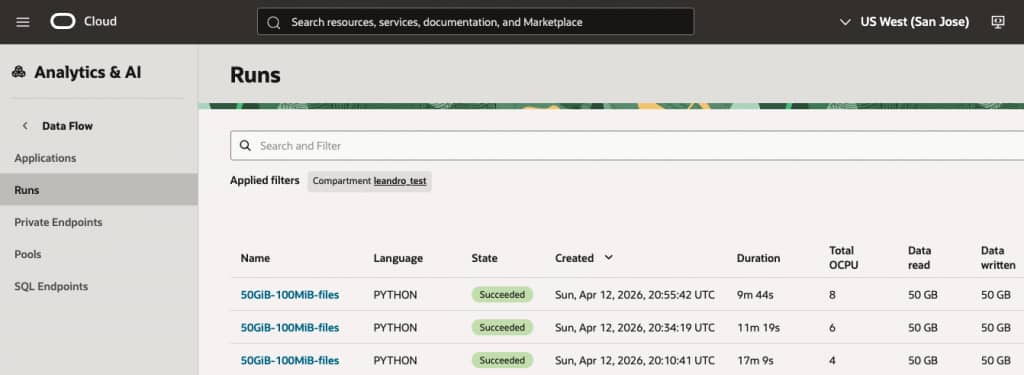
Figure 3 – Data Flow jobs final state showing total duration time per run
The benchmarking results demonstrate that the architecture scales effectively with additional executors. Increasing the executor count from 1 to 3 resulted in a 43% reduction in total run time (from 17m 9s down to 9m 44s), proving that the storage backend, specifically the DDN Infinia and OCI networking layer, is successfully handling increased parallel demand.
Key Performance Highlights
- Near-Linear Read Scaling: Read performance showed exceptional scaling. Moving from 1 to 3 executors increased throughput from 1.97 Gbps to 5.77 Gbps. This represents a 2.9x performance gain for a 3x increase in compute, indicating almost zero bottlenecking in the storage retrieval process.
- Write Throughput Gains: While writes are naturally more intensive, they still saw significant improvement. Throughput increased by approximately 68% when moving to 3 executors. The total write time was reduced by 4.5 minutes, which is a vital metric for data ingestion pipelines.
- Data Consistency: Throughout the tests, the data load remained constant at 512 files (100 MB each), ensuring that the performance variances recorded are strictly a result of the executor scaling and not fluctuations in data distribution.
Summary
The integration of OCI Data Flow with DDN Infinia delivers a fully private, high-performance Apache Spark platform on Oracle Cloud Infrastructure, purpose-built for data-intensive enterprise workloads. By combining scalable compute with consistently high-throughput storage, this solution eliminates traditional data pipeline bottlenecks and enables predictable, near-linear performance as workloads grow.
Benchmark testing with a 50 GB dataset demonstrates multi-Gbps read throughput and no observable storage-side constraints, allowing organizations to scale Spark executors efficiently and achieve significantly faster job completion times. This performance consistency ensures that infrastructure investments translate directly into measurable gains, rather than being limited by I/O inefficiencies.
From a business perspective, the impact is substantial. Faster processing accelerates time-to-insight, enabling more timely and informed decision-making across analytics, AI/ML, and operational use cases. At the same time, improved resource utilization reduces cost per workload by ensuring compute capacity is fully leveraged without idle time caused by storage limitations.
The fully private architecture further strengthens the value proposition by enhancing data security and simplifying compliance with regulatory requirements, making the solution suitable for sensitive and mission-critical workloads.
Ultimately, OCI Data Flow and DDN Infinia provide a scalable, secure, and cost-efficient data processing foundation that not only improves operational performance but also enables organizations to respond more quickly to business demands—turning data processing speed into a meaningful competitive advantage.
Visit DDN website to learn more about the Infinia on OCI solution or contact oracle@ddn.com
References
OCI Dataflow Private Endpoint Use Cases
Dataflow – Configuring a Private Network
Supercharge Your AI Workloads with Oracle Cloud and DDN
DDN Infinia on Oracle Cloud Marketplace
Author

Leandro Torolho
DDN Solutions Architect