
Every database migration team wants the same outcome: move the data safely, keep downtime low, and avoid a complicated cutover weekend. For Oracle PDB migrations, the initial data load is usually the longest part of that journey.
Oracle GoldenGate is widely used to capture ongoing changes during a migration. But when both the source and target are Oracle PDBs, there is another capability worth considering before building a traditional GoldenGate initial-load process: the refreshable PDB.
A refreshable PDB can create the initial target copy and keep it synchronized through redo-based refreshes until cutover. Used in the right scenario, it can make a PDB migration more direct, easier to test, and less disruptive.
This guide extends that pattern beyond a one-time migration. The resulting target PDB can become a database that supports read-only reporting, BI, and workload offloading. A refreshable PDB is used to provision the large initial copy. Oracle GoldenGate then maintains the target with near-real-time source changes after a controlled handoff.
Architecture
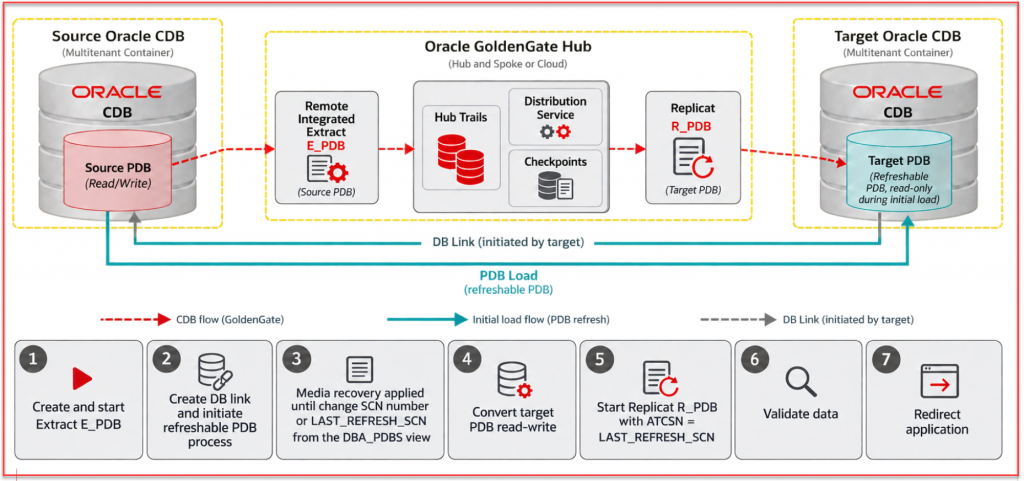
The solution has two paths from the source PDB:
- PDB refresh path: A database link allows the target CDB to create and periodically refresh a clone of the source PDB.
- GoldenGate path: Extract captures source transactions into a trail. The trail is delivered to the target GoldenGate deployment, where Replicat applies changes after the PDB refresh handoff point.
The paths overlap during provisioning. GoldenGate capture starts before the clone is created, so the changes needed after the final refresh remain available in the trail.
For this example, the source PDB is ORCLPDB1, the target PDB is CLONEPDB1, and the database link is CLONE_PDB_LINK .
Prerequisites
Confirm the following before starting:
- Source and target Oracle Database versions, patch levels, character sets, installed options, and storage layout support the planned PDB clone.
- The source CDB uses
ARCHIVELOGmode and local undo mode, which are required for a refreshable clone PDB. Size archived redo retention for the clone and refresh period. Oracle Multitenant Administrator’s Guide - The target CDB can reach the source through a secure database link. The link account has the required privilege on the source PDB; Oracle documents
CREATE PLUGGABLE DATABASEandSYSOPERas alternative privilege paths for that account. Grant only what your chosen method needs. Oracle Multitenant Administrator’s Guide - Oracle Managed Files or file-name conversion is configured, with enough space for the cloned PDB. Plan how new source data files will be mapped during later refreshes.
- TDE keystores, directory objects, database links, scheduler jobs, external integrations, services, and application settings have been reviewed for the target environment.
- GoldenGate users, privileges, and credential aliases are configured for the database and GoldenGate releases in use.
- Supplemental logging and GoldenGate
TRANDATAorSCHEMATRANDATAare enabled for the replicated objects before change capture begins. - Source archived redo and GoldenGate trails will be retained until the target has caught up and validation is complete.
- The replicated tables have suitable keys, and the team has reviewed its requirements for DDL, sequences, and objects outside the GoldenGate mapping.
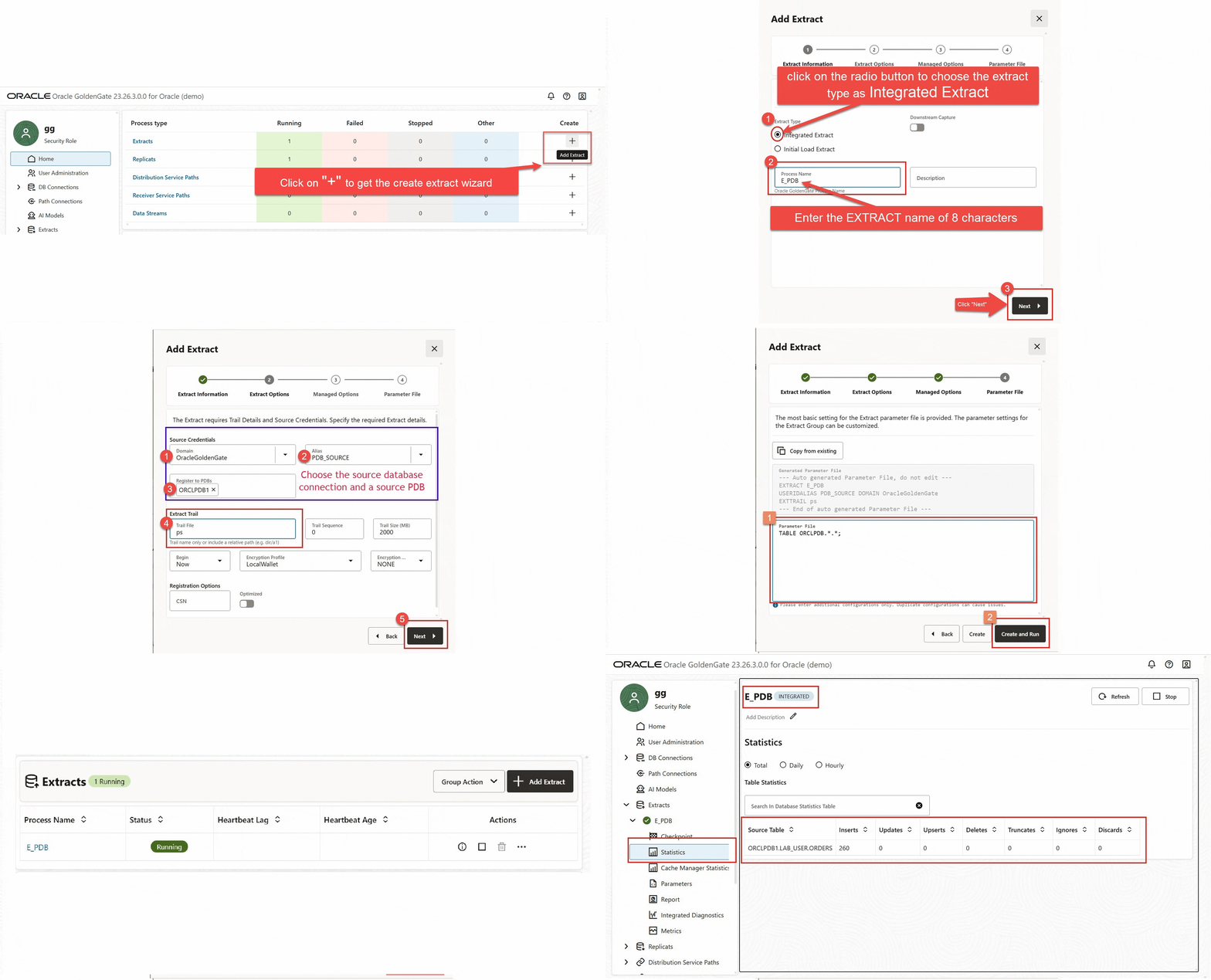
Step 1: Configure GoldenGate capture before creating a refreshable PDB.
Configure and start Extract on the source before creating the refreshable PDB. Configure trail delivery to the target GoldenGate deployment and confirm that source changes are reaching the target trail.
Keep Extract and trail delivery running during the initial clone, subsequent refreshes, and final handoff. Check process status and reports for errors, and confirm that trail retention can cover the full provisioning period. Replicat will be created later but must not apply changes to the refreshable clone while that clone remains read-only.
Step 2: Create the refreshable PDB.
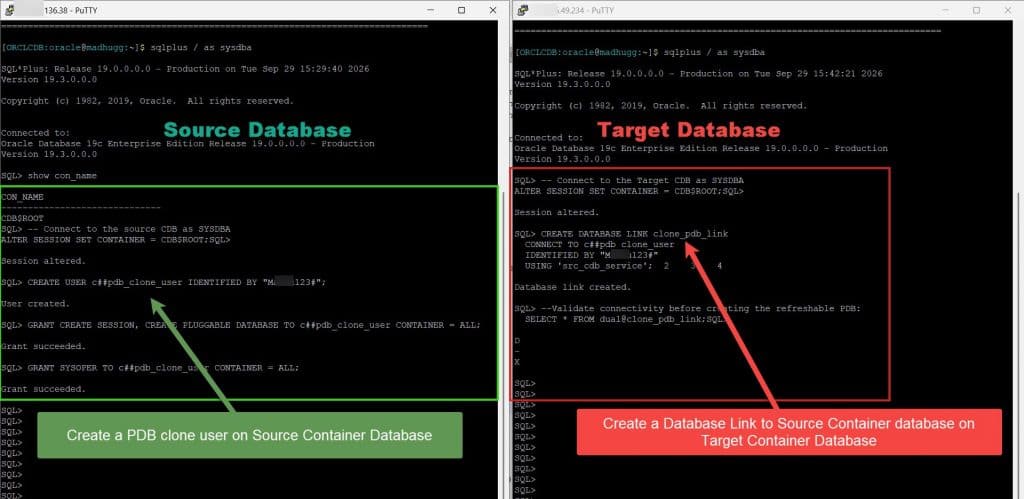
2.1 Create the source clone account
Create a dedicated account for the database link and grant the privileges required by your approved clone procedure. The example below uses a common user connecting to the source CDB root:
-- Run in the source CDB root as an authorized administrator.
ALTER SESSION SET CONTAINER = CDB$ROOT;

CREATE USER c##pdb_clone_user
  IDENTIFIED BY "<secure_password>"
  CONTAINER = ALL;

GRANT CREATE SESSION, CREATE PLUGGABLE DATABASE
  TO c##pdb_clone_user
  CONTAINER = ALL;
2.2 Create and test the database link
Create the database link in the target CDB root. In this example, src_cdb_service connects to the source CDB root:
-- Run in the target CDB root as an authorized administrator.
ALTER SESSION SET CONTAINER = CDB$ROOT;

CREATE DATABASE LINK clone_pdb_link
  CONNECT TO c##pdb_clone_user
  IDENTIFIED BY "<secure_password>"
  USING 'src_cdb_service';

SELECT * FROM dual@clone_pdb_link;
A successful connection test confirms basic connectivity. Also confirm that the link account can access the intended source PDB for the clone operation. Protect the database-link credentials and follow your normal rotation process.
2.3 Create the refreshable clone
From the target CDB root, create the clone using the approved storage location:
CREATE PLUGGABLE DATABASE CLONEPDB1
FROM ORCLPDB1@clone_pdb_link
CREATE_FILE_DEST = '/backup/u02/oradata'
REFRESH MODE EVERY 60 MINUTES;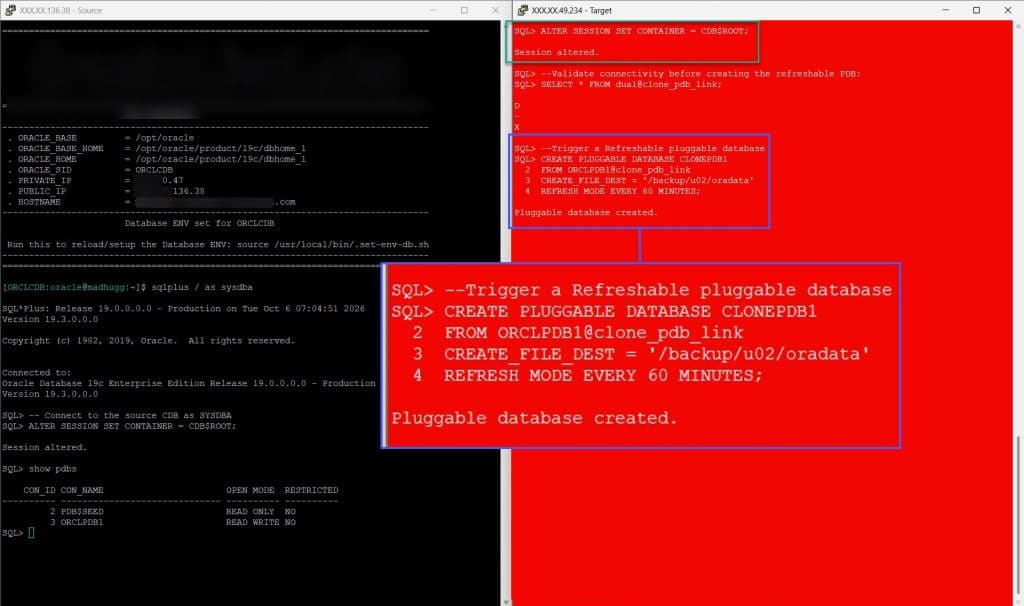
After the refreshable PDB has been created, record the SCN from the DBA_PDBS view or the alert log
SET PAGES 333 lines 333
col PDB_NAME for a20
SELECT PDB_NAME, STATUS, REFRESH_MODE, REFRESH_INTERVAL,LAST_REFRESH_SCN FROM DBA_PDBS;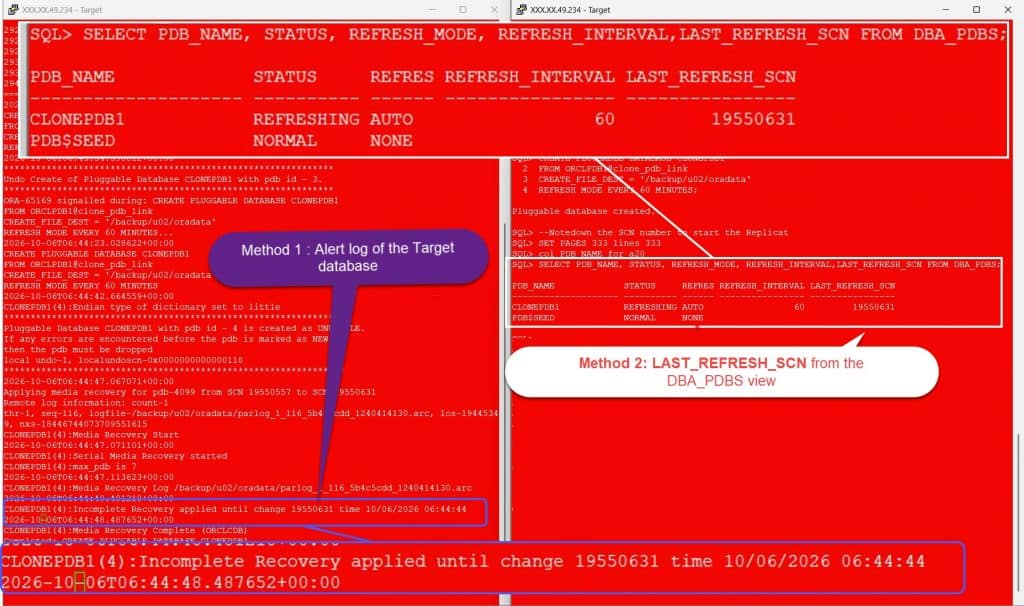
Before switching to GoldenGate replication, perform the final refresh of the refreshable PDB. After the refresh completes successfully, record its LAST_REFRESH_SCN from the DBA_PDBS view. This SCN identifies the refresh boundary used to determine where Replicat should begin applying changes.Once the final refresh is verified and its SCN is recorded, convert the clone to an ordinary PDB and open it in read/write mode:
--Change REFRESH MODE to NONE
ALTER PLUGGABLE DATABASE CLONEPDB1 REFRESH MODE NONE;

--Open the PDB to READ WRITE mode
ALTER PLUGGABLE DATABASE CLONEPDB1 OPEN;
SELECT PDB_NAME, STATUS, REFRESH_MODE, REFRESH_INTERVAL,LAST_REFRESH_SCN FROM DBA_PDBS;
show pdbs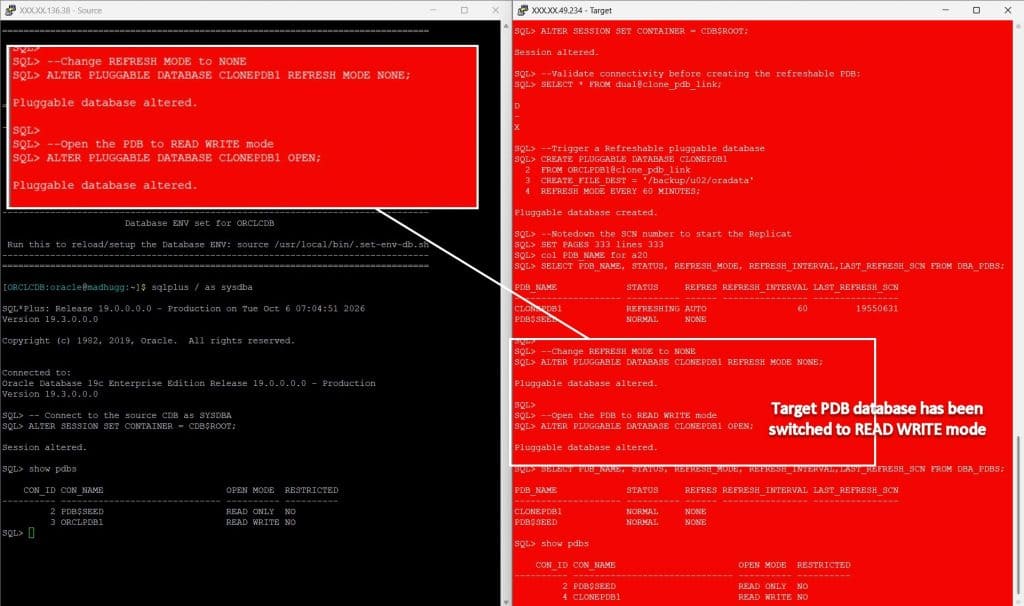
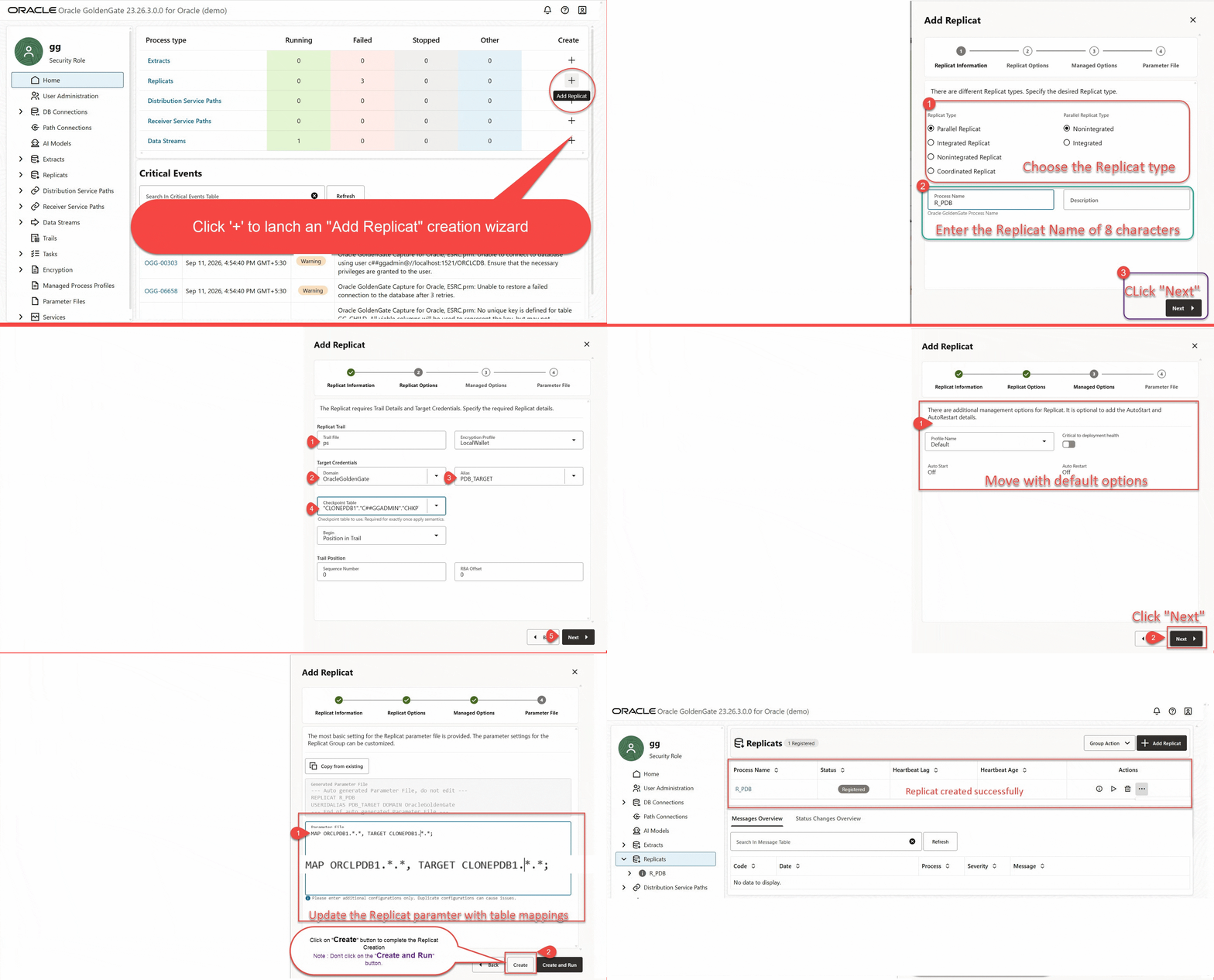
Step 3 : Configure and start Replicat
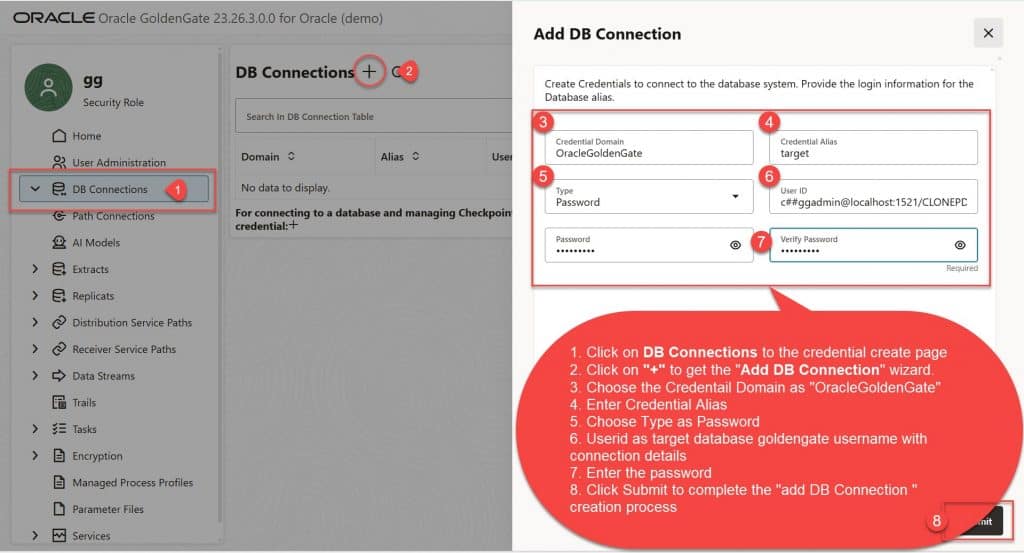
3.1 Configure the target connection
Create a GoldenGate credential alias for the target PDB. Verify that the Replicat user can connect to CLONEPDB1 and has the privileges required to apply changes to the mapped objects.
3.2 Configure checkpoints
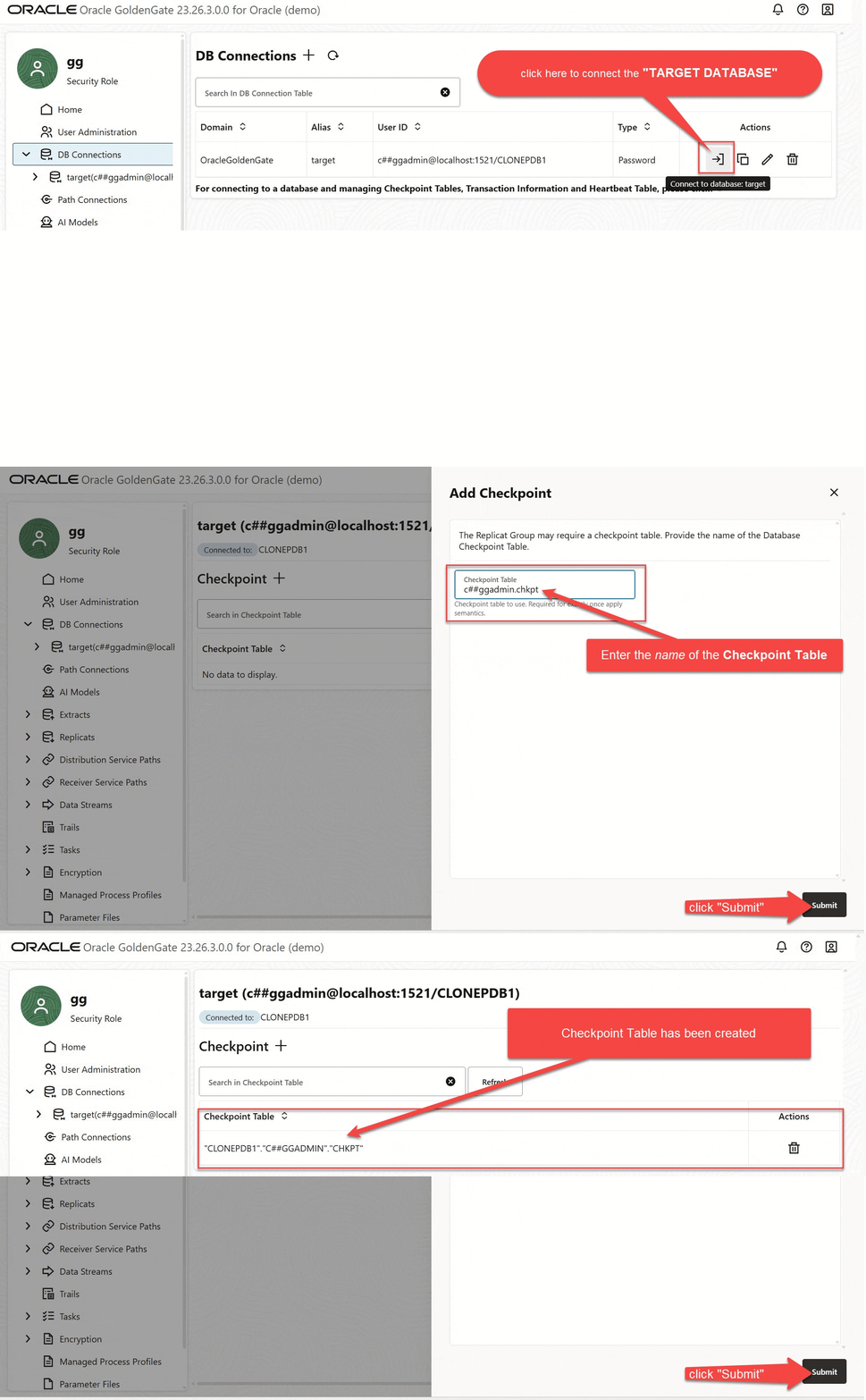
Create and associate a checkpoint table where required for the Replicat mode and GoldenGate release used in your deployment. Checkpoint behavior differs by Replicat mode and release. The configuration below shows the settings used in this example. Checkpoints allow Replicat to resume from its recorded trail position after an interruption. Oracle GoldenGate ADD REPLICAT reference
3.3 Create Replicat
Create a Replicat that reads the delivered target trail and maps the selected source PDB objects to their corresponding objects in CLONEPDB1. Review the mapping rules, Replicat mode, credential alias, and checkpoint settings before starting it.
Do not start Replicat at the beginning of the trail: the refreshable PDB already contains changes through the final refresh boundary. The start position must exclude changes already present in the clone and include changes committed afterward.
3.4 Start Replicat at the validated SCN
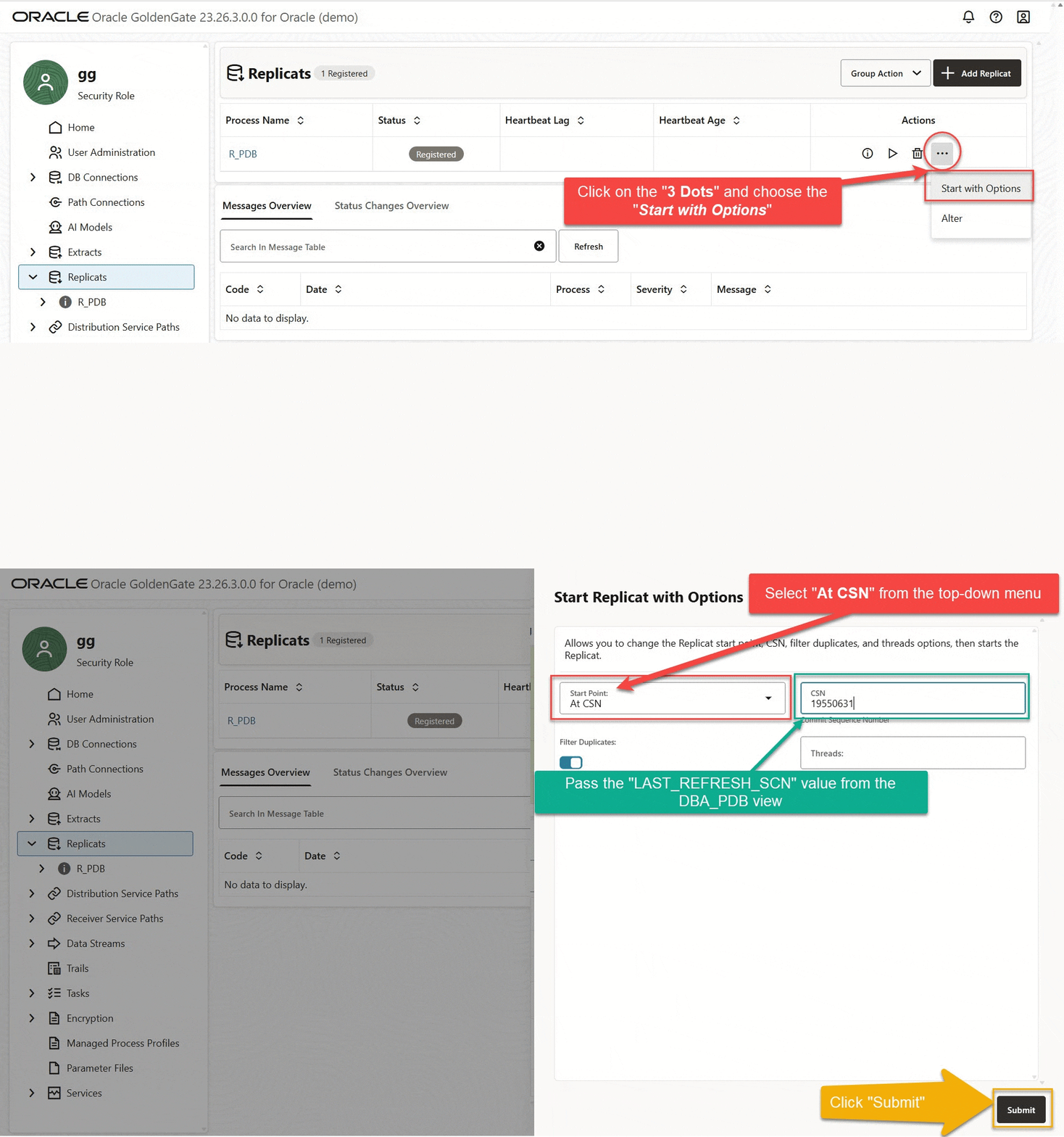
Check the Replicat report to confirm the accepted start position. Monitor for errors and allow Replicat to catch up with the source workload. Validate the SCN boundary during a rehearsal with known transactions committed immediately before and after the final refresh.
Step 4: Validate data and reporting access
A healthy Replicat is necessary, but it does not by itself prove that the target data is correct. Validate the handoff and ongoing apply:
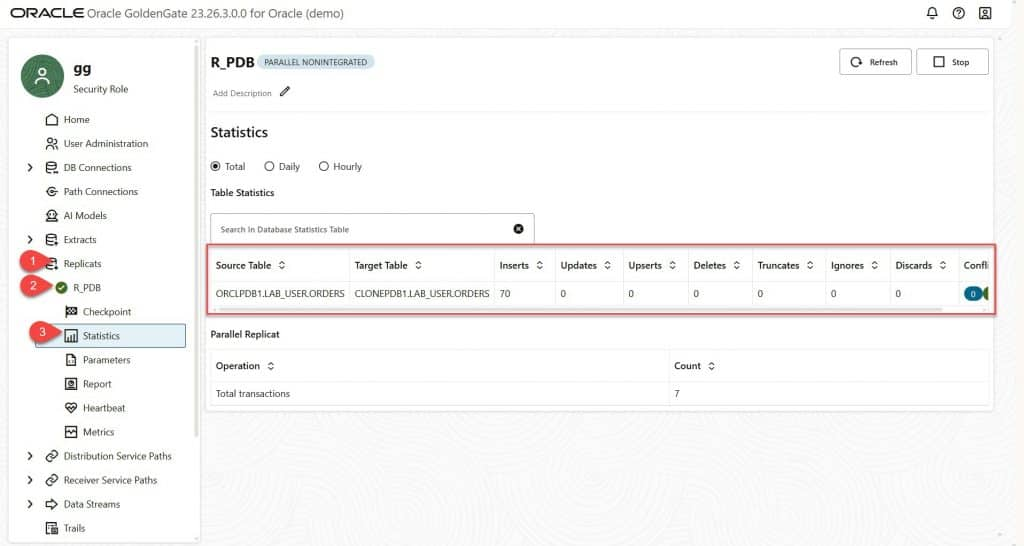
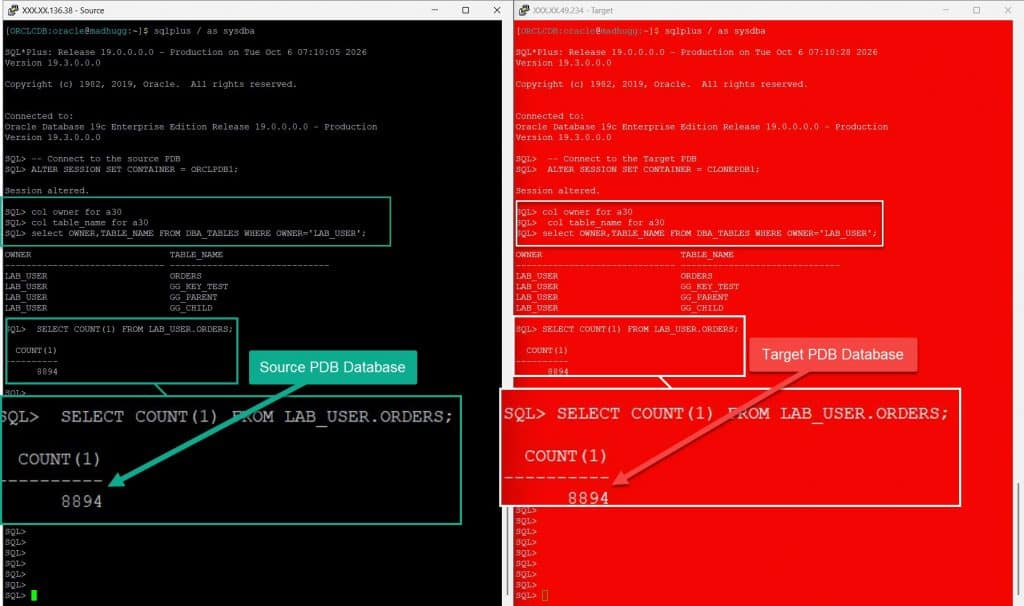
- Compare row counts for representative tables on source and target.
- Check known inserts, updates, and deletes committed around the final refresh boundary. Confirm that each appears once with the expected final values.
- Compare important tables or business keys with your approved reconciliation method, such as Oracle GoldenGate Veridata.
- Confirm that Extract and Replicat reports show no unresolved errors and that replication lag is within the reporting requirement.
- Verify that reporting accounts have read-only privileges, even though
CLONEPDB1is open read/write for GoldenGate apply.
Record the final refresh SCN, Replicat start position, validation results, and observed lag as handoff evidence.
Replicat statistics:
Database row counts:
Once validation passes, expose the reporting service to approved consumers and continue monitoring replication lag and apply errors.
Conclusion
A refreshable PDB can simplify the bulk initial copy for a compatible Oracle-to-Oracle PDB deployment. GoldenGate can then maintain the converted target with near-real-time changes, making it useful for reporting, BI, and workload offload.
The success of this approach depends on a tested handoff. Start capture before cloning, retain the required redo and trails, perform a final refresh, record its SCN, convert the clone, and start Replicat at the transaction boundary proven by validation. With those controls in place, the team can avoid a separate GoldenGate row-by-row initial load while delivering a target that stays current after provisioning.