
Over the last year, Apache Iceberg has become a standard table format for open lakehouse architectures. Alongside that momentum, OCI GoldenGate’s Apache Iceberg support has continued to evolve, and we have published several blogs covering different real-time open lakehouse architectures powered by Oracle GoldenGate.
In this blog, I’ll take a deeper look at how to configure OCI GoldenGate to create real-time Apache Iceberg-based open lakehouses on OCI Object Storage.
What you will build
In this blog, you will configure OCI GoldenGate Big Data to capture changes from a source database and replicate them in real time into Apache Iceberg tables stored on OCI Object Storage. The target architecture uses the OCI Object Storage Amazon S3 Compatibility API, an Apache Iceberg Hadoop catalog, and OCI GoldenGate’s Apache Iceberg handler to create and continuously update Iceberg tables without requiring an external processing engine.
Why OCI GoldenGate for Apache Iceberg CDC?
- No processing engine needed: OCI GoldenGate uses the Apache Iceberg Java API directly, enabling it to create Iceberg tables and replicate data into them in real time without requiring an external processing engine.
- Real time Iceberg lakehouse across platforms: OCI GoldenGate supports a broad set of object storage services and Apache Iceberg catalogs, giving teams the flexibility to build real-time lakehouse architectures on the platform that best fits their needs.
- OCI GoldenGate Multicloud: OCI GoldenGate brings Oracle’s fully managed, cloud-native CDC service to multicloud environments such as Oracle Database@Azure and Oracle Database@Google Cloud. This lets teams run real-time Apache Iceberg replication close to their data and analytics platforms, align consumption with their preferred cloud commercial model where applicable, and avoid self-managing GoldenGate infrastructure across clouds.
Prerequisites:
Configure Object Storage Amazon S3 Compatibility API to connect to OCI Object Storage.
- Create an OCI Object Storage Bucket and obtain a unique namespace.
- Enable OCI Policies to work with Amazon S3 Compatibility API.
- Create a Customer Secret Key
- Configure a new path-style endpoint for the application that includes the namespace name and the region identifier. For example: https://<namespace>.compat.objectstorage.<region>.oci.customer-oci.com
Apache Iceberg replication is supported by the OCI GoldenGate Big Data deployment type. Create an OCI GoldenGate Big Data deployment.
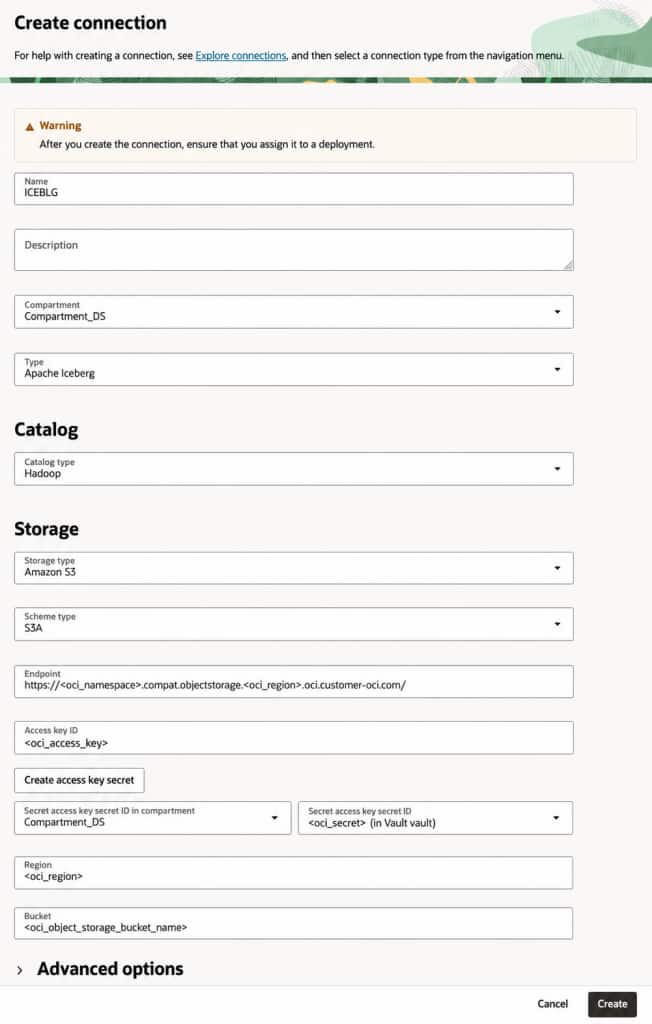
Create Apache Iceberg connection
- For details about the OCI GoldenGate Apache Iceberg connection, you can refer to OCI GoldenGate documentation.
- We will use Hadoop as the catalog type for this blog. You can also use Nessie, Polaris and REST catalogs for OCI Object Storage.
- We will use Amazon S3 as storage type to connect to OCI Object Storage S3 API endpoint. You can refer to OCI GoldenGate Amazon S3 connection documentation for more details.
- Leave the Schema type as S3A.
- Fill the rest of the fields as needed.
- Create the connection and assign to your OCI GoldenGate Big Data deployment.
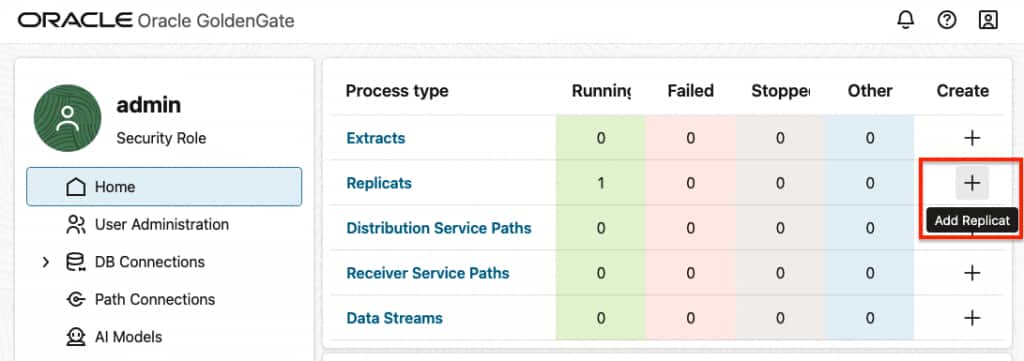
Create Apache Iceberg Replicat
- Click + Add Replicat
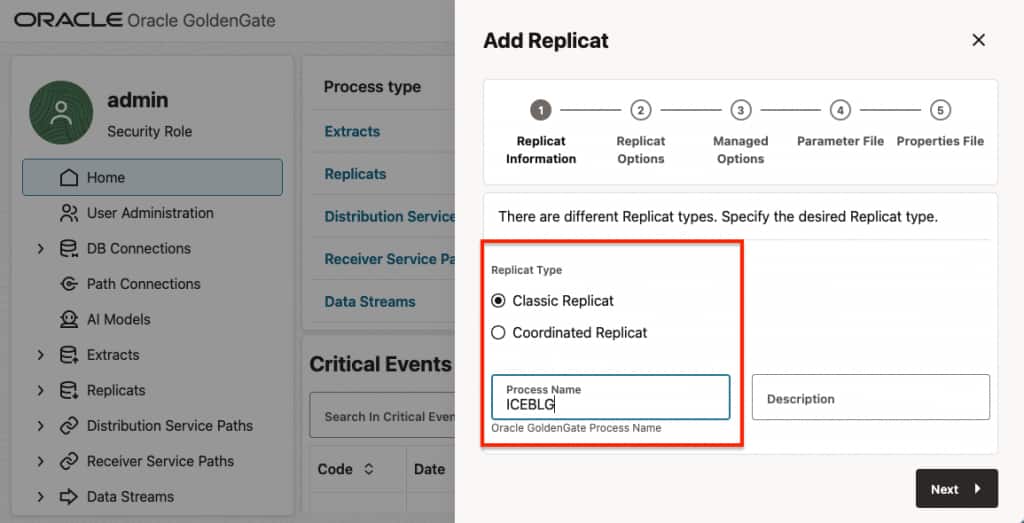
- Select Replicat Type and provide a Process Name.
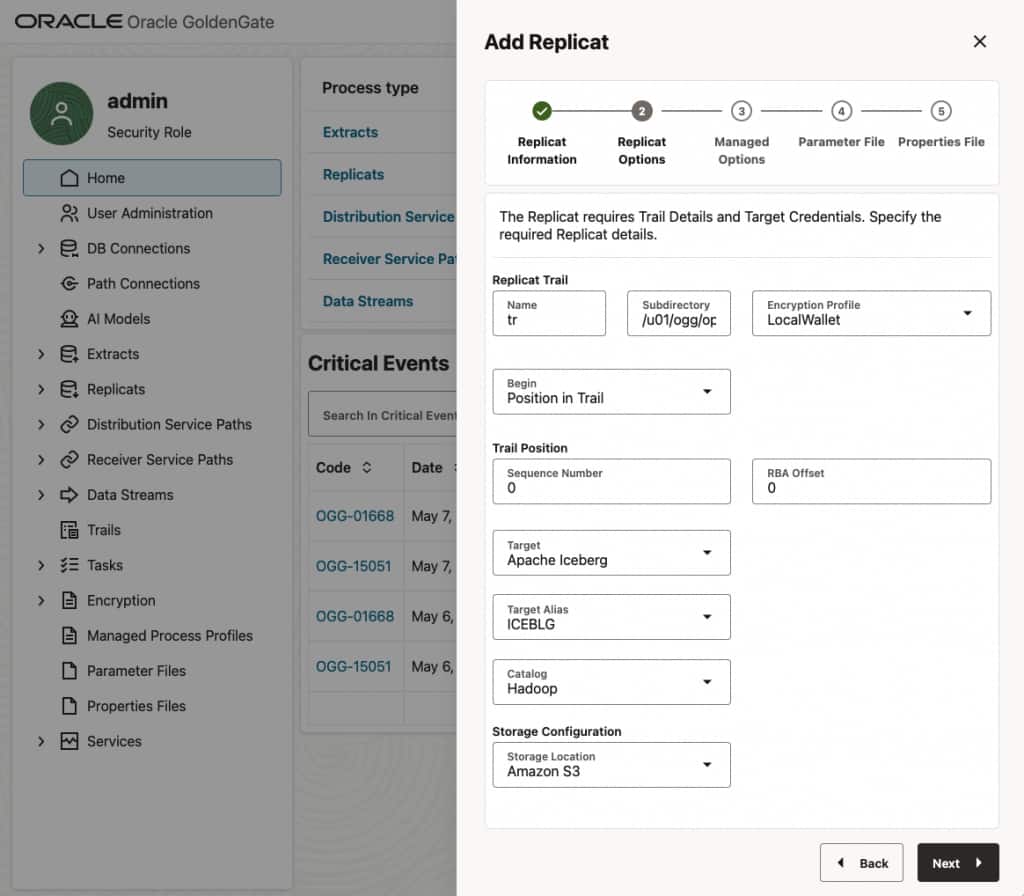
- In Replicat Trail Name, provide a trail file name.
- Select Apache Iceberg for Target.
- Select your connection for Target Alias.
- Select Hadoop as Catalog.
- Select Amazon S3 as Storage Configuration.
- Leave Managed Options as is.
- In Parameter File, define source-to-target mapping. If you use as
MAP *.*, TARGET *.*;,OCI GoldenGate creates the target table names based on the source table names. You can also add optional parameters in the parameter file as needed.
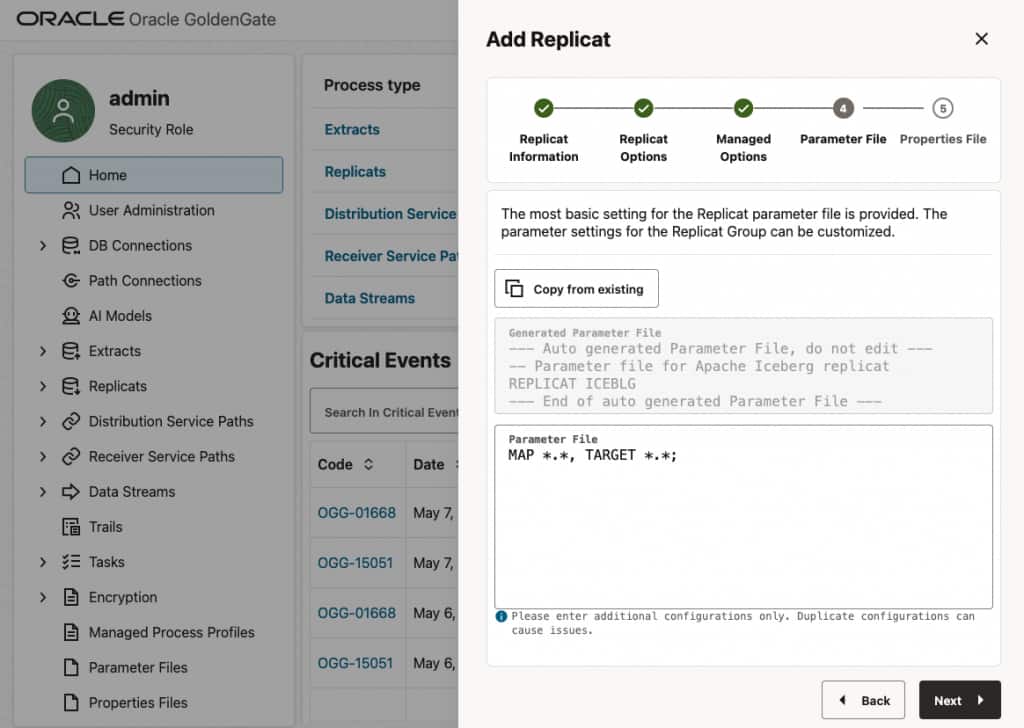
- In Properties File, update required replicat properties.
gg.eventhandler.iceberg.warehouseLocationdefines the path to Iceberg warehouse within the OCI Object Storage bucket. For example,gg.eventhandler.iceberg.warehouseLocation=/blog_warehouse- Add the following property to the replicat properties file:
gg.eventhandler.iceberg.awsS3PathStyleAccess=true - Optionally add the following property to the replicat properties file:
gg.handler.iceberg.inactivityRollInterval=5s
Optionally, you can usegg.handler.iceberg.inactivityRollIntervalto roll files after a period of no incoming records. This is useful for development or low-volume test scenarios where you want OCI GoldenGate to flush data to Apache Iceberg shortly after activity stops. For example:gg.handler.iceberg.inactivityRollInterval=5s
For more details about Apache Iceberg replicat properties, refer to Oracle GoldenGate documentation.
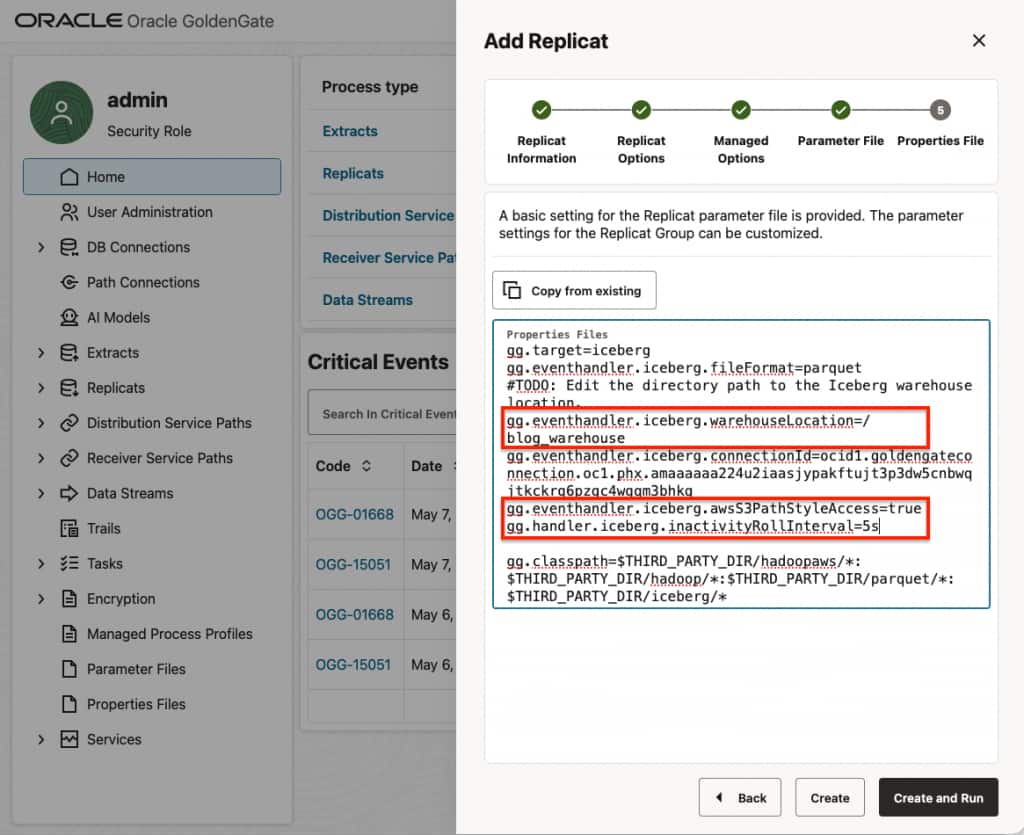
- Create and Run the replicat.
- Confirm Replicat Statistics and Apache Iceberg tables in the OCI Object Storage bucket.
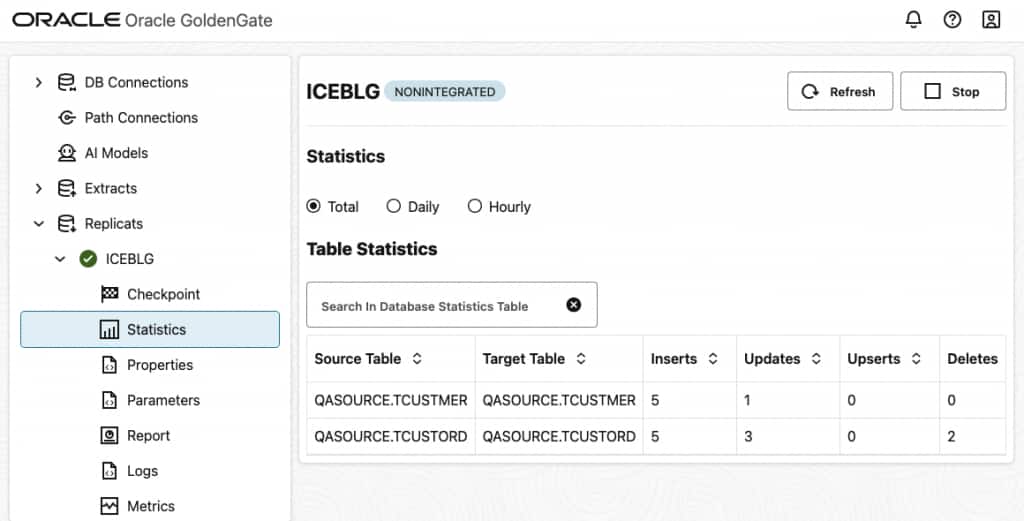
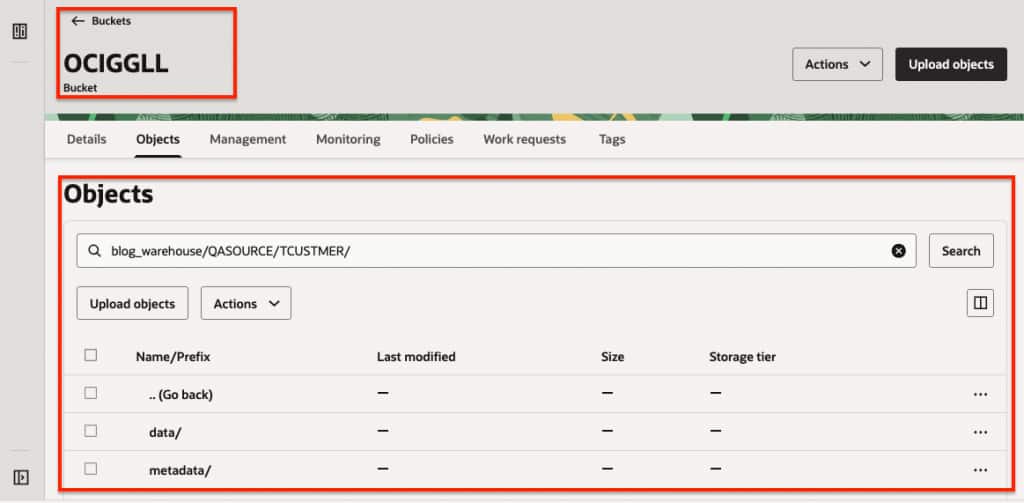
Best Practices and Recommendations
- It is recommended to use uncompressed operations for Apache Iceberg replication. Oracle GoldenGate Extract can be configured to produce uncompressed operations. While adding the Extract, use LOGALLSUPCOLS parameter. LOGALLSUPCOLS causes Extract to automatically include the full before image for UPDATE operations in the trail record.
- If a source table does not have a primary key (PK), users can define a substitute key by including a KEYCOLS clause in the Extract. If the source table does not have a PK and KEYCOLS is not specified in the Extract, OCI GoldenGate Apache Iceberg replication fails.
- OCI GoldenGate Apache Iceberg replication supports merge-on-read. To improve merge-on-read performance, Apache Iceberg replication performs internal aggregation. The default aggregation window is 15 minutes and is configurable. The longer the aggregation period, the more operations Oracle GoldenGate can aggregate, which is especially beneficial for long-running transactions. You can configure this by adding gg.handler.iceberg.fileRollInterval to the Replicat properties file. For example: gg.handler.iceberg.fileRollInterval=30m
Limitations
Currently, Oracle Autonomous AI Database does not support merge-on-read with Apache Iceberg tables. This limits its ability to query Apache Iceberg tables created by OCI GoldenGate, because OCI GoldenGate Apache Iceberg replication supports merge on read.
For other known limitations, refer to Oracle GoldenGate documentation.
Conclusion
OCI GoldenGate makes it straightforward to build a real-time Apache Iceberg lakehouse on OCI Object Storage by combining enterprise-grade CDC with open table formats and OCI Object Storage. With support for Apache Iceberg catalogs, S3-compatible storage, automatic table creation, and direct use of the Iceberg Java API, OCI GoldenGate removes the need for an additional processing engine while keeping the architecture flexible and scalable.
In this blog, we configured OCI GoldenGate Big Data to replicate source database changes into Apache Iceberg tables on OCI Object Storage using the Amazon S3 Compatibility API. We also reviewed important configuration options such as path-style access, warehouse location, source-to-target mapping, operation aggregation, and key handling.
As Apache Iceberg continues to become a foundation for open lakehouse architectures, OCI GoldenGate provides a powerful CDC layer for keeping Iceberg tables continuously updated with operational data. This enables teams to build real-time analytics architectures on OCI Object Storage while preserving openness, flexibility, and the reliability expected from Oracle GoldenGate.