
This blog explores a groundbreaking new AI feature now available in Oracle GoldenGate 26ai.
With Release Update 23.26.1.0.0, Oracle GoldenGate 26ai launches with built-in AI capabilities to generate vector embeddings directly within GoldenGate’s Replicat process on the fly. This innovation streamlines real-time data replication by embedding semantic understanding, provided by AI models, into your data pipelines.
To set the context, GoldenGate 26ai supports multiple AI model providers for generating vector embeddings, allowing maximum flexibility in your GoldenGate deployments. The spotlight here for this blog is to utilize the Oracle Cloud Infrastructure (OCI) services for text-to-embeddings functionality, a key enabler for advanced AI-driven tasks like semantic search and similarity matching. OCI provides a suite of foundational AI services that can be leveraged across diverse applications, including: OCI Generative AI, Language Models, Speech Recognition, Vision Processing, and Document Understanding—among many others. In addition to Oracle’s own Generative AI (GenAI) service on OCI, GoldenGate integrates with other leading providers such as OpenAI, Cohere, Gemini, Hugging Face or any custom integrations that may utilize ONNX or OpenAI APIs.
This represents another quantum leap in the evolution of AI integration. Traditionally the processes for generating embeddings could be labor intensive and mostly offline, for example:
- First, developers would typically access AI services directly through the OCI Console for quick prototyping and testing.
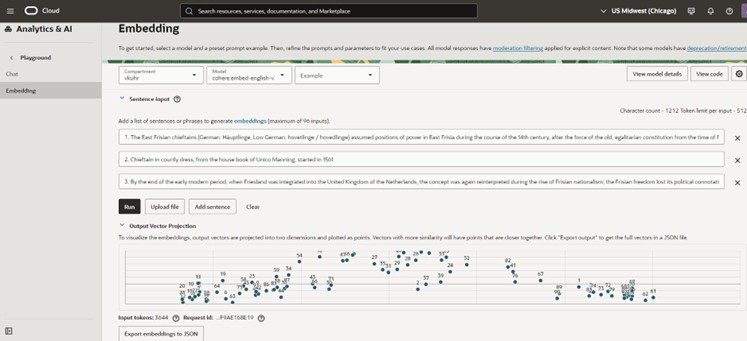
- Second, developers might build custom client applications to retrieve AI services from OCI as a backend server.

- Now, with Oracle GoldenGate 26ai, the power of an AI Service is embedded natively within GoldenGate itself, eliminating the need for labor-intensive or bulk processing dependencies and enabling seamless, low-latency processing during the replication (or loading) of data objects.
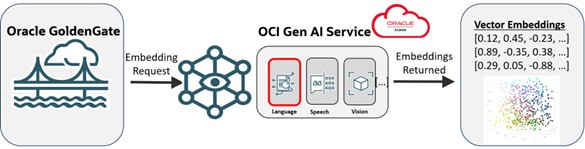
This new AI Service capability with Oracle GoldenGate 26ai is designed to work with any of the many supported databases that can accept Vector datatypes, including the Oracle AI Database 26ai. For the remainder of this technology-focused blog, I provide a step-by-step walkthrough of implementing AI functionality within GoldenGate 26ai, including configuration, provider setup, and practical examples to get you started.
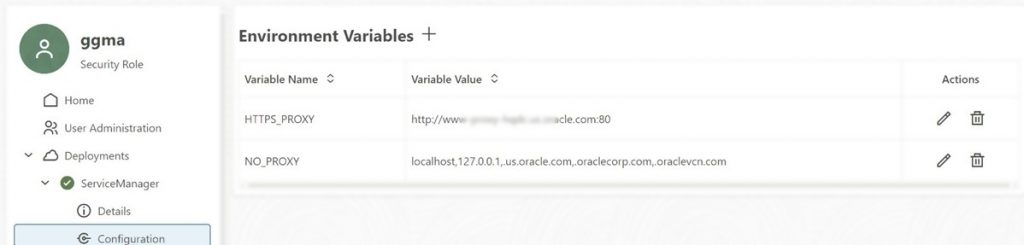
1. Service Manager: Configuration: Add HTTPS Proxy
Before defining the properties for AI providers and their models, ensure the following prerequisites are met: Your GoldenGate environment is likely deployed within a corporate network, which isolates it from the public internet for security reasons. Since AI services (e.g., OCI GenAI or third-party providers) operate outside this internal network, you’ll typically need to configure an HTTP proxy to enable secure outbound connectivity. In GoldenGate, specify proxy details using parameters HTTP_PROXY and NO_PROXY. This setup ensures reliable access while maintaining compliance with corporate security policies.
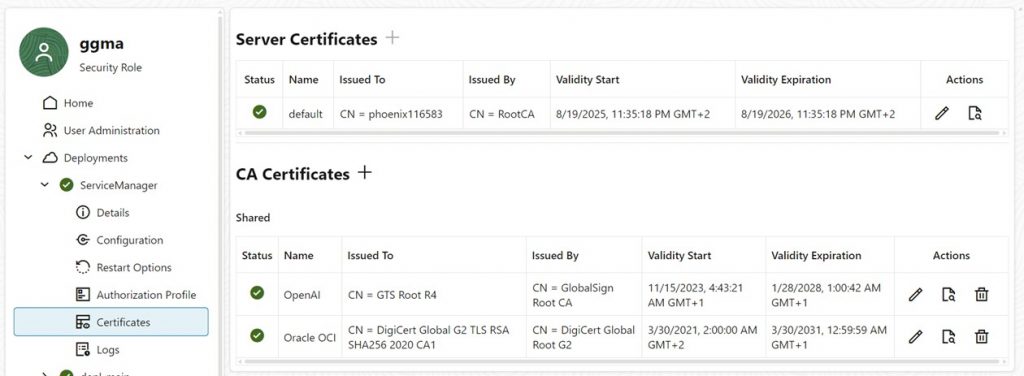
2. Service Manager: Certificates: Provide certificates for AI Service Providers
To ensure secure communication, you’ll need to supply the necessary certificates for the chosen AI service provider. It’s highly recommended to operate GoldenGate in a secure environment, such as one with TLS encryption and proper certificate validation, to protect sensitive data during replication.
Retrieve the required CA (Certificate Authority) certificates using the OpenSSL command:
openssl s_client -showcerts -connect <server_name>:443
Service names are api.openai.com and inference.generativeai.us-chicago-1.oci.oraclecloud.com are used (see Base URL in the next step).
3. Service Manager: AI : Definition of Provider and Model
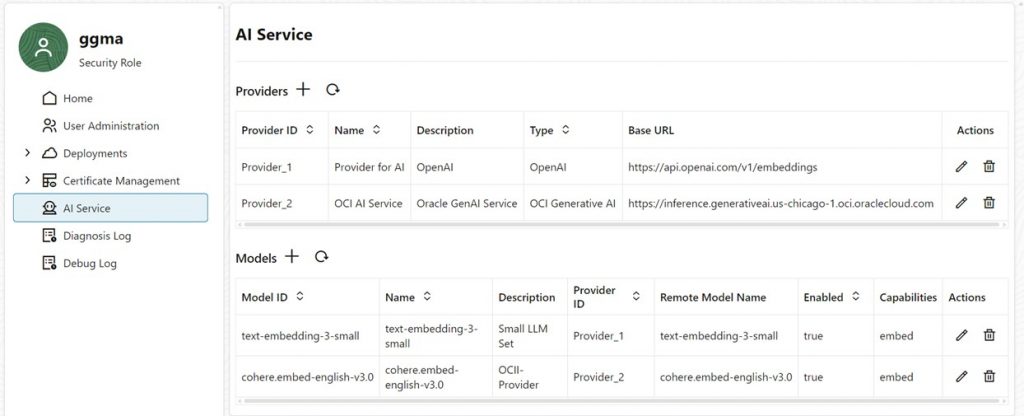
Now, from within Service Manager use the AI Service configure the details for your selected AI provider and the specific model you’ll use. This step involves specifying connection and authentication parameters to enable GoldenGate to interact with the external AI service. The GoldenGate AI Service is a new microservice in the GoldenGate 26ai deployment, it has responsibility to provide one or more connections to local and remote models. For our example in this blog we are using embedding models, but in the future this same service will also provide LLM functionality across other GoldenGate microservices as well.
The Provider section specifies the Base URL of the external AI service and typically requires an API key for authentication. When connecting to Oracle AI Cloud Service, additional information is required, including the Base URL, API key, and cloud-specific details such as OCIDs for the tenancy, compartment, and user, as well as the key fingerprint.
In the Model section, specify the name of the embedding model. This refers to the remote model hosted by the provider, which GoldenGate will invoke during replication.
4. Service Manager: Services
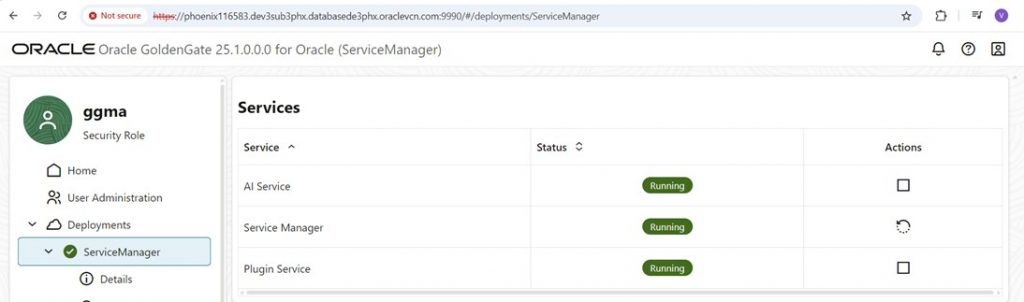
You can double check within the Service section of the Service Manager that the AI Service is enabled and running.
5. Deployment: AI Models
So far, the AI configuration was done within the Service Manager deployment. It’s time to switch to the user deployment and double check that the models are available for Replication.

6. Replicat: Parameter Setting
In Oracle GoldenGate 26ai’s Replicat process, a powerful new built-in function aiservice enables on-the-fly generation of vector embeddings.
This function integrates seamlessly with your configured AI providers and models, transforming text data into semantic vectors during replication.
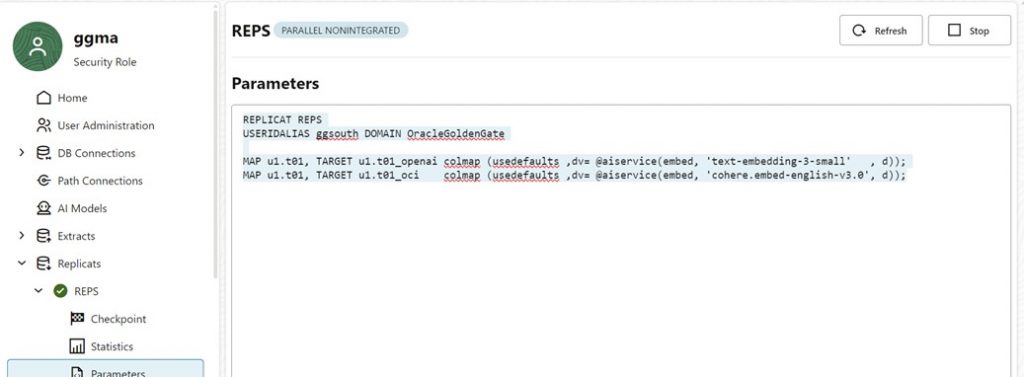
Consider a scenario where a single source table is replicated to two different target tables, each using a distinct embedding model from separate providers (e.g., OCI GenAI for one and OpenAI for the other).
This demonstrates the flexibility of multi-provider support. Standard columns (a, b, c and d – where d is a VARCHAR2 column containing text) are mapped directly to the targets without modification, ensuring data integrity. A new target column dv (defined with the database datatype VECTOR, e.g., in Oracle Database 23ai) is populated by passing the text from d to the aisservice function.
This generates and stores the corresponding vector embeddings based on the specified provider and model. This approach keeps replication efficient: Embeddings are computed in real-time without external ETL steps, reducing latency and complexity. Ensure your target database supports the VECTOR datatype (e.g., Oracle AI Database 26ai with Vector Search enabled).
Sumary
Oracle GoldenGate 26ai (Release Update 23.26.1.0.0) revolutionizes data replication by introducing native AI capabilities for generating vector embeddings on-the-fly within the GoldenGate Replicat process.
In this blog, I leverage OCI’s Generative AI services to show you how to add semantic enhancements into your real-time pipelines without laborious external processes or bulk processing of data.
This guide outlines setup—proxies, certs, configuration, and the use of the aisservice function—for efficient, secure integration without external tools.