
In this blog, I demonstrate how to configure your GoldenGate Distribution Path to use an HTTPS Proxy, enabling secure routing of data changes from your GoldenGate source system within a protected corporate network to an external OCI GoldenGate Cloud target environment.
The challenge:
Organizations often restrict or block user and application access to specific resources to improve security, maintain compliance with internal policies, and safeguard sensitive information. Such measures help prevent unauthorized entry, minimize vulnerability to external threats, and tightly control interactions between internal systems and external networks. Consequently, implementing an HTTP proxy is essential for securely managing connections to ensure adherence to organizational standards.
The breakthrough solution:
With Oracle GoldenGate 23ai, harnessing the power of the (secured) WebSocket protocol (WS/WSS, which leverages HTTP) makes it possible to configure a Distribution Path that uses an HTTPS Proxy with ease. In fact, the setup is as user-friendly as configuring your web browser’s proxy! When creating your DistPath using the Web-UI, simply access the Advanced Option section in the workflow. Flip the switch to enable an HTTP Proxy, and instantly fields for the Proxy Hostname and Port appear—making secure, seamless cloud replication more accessible than ever before.

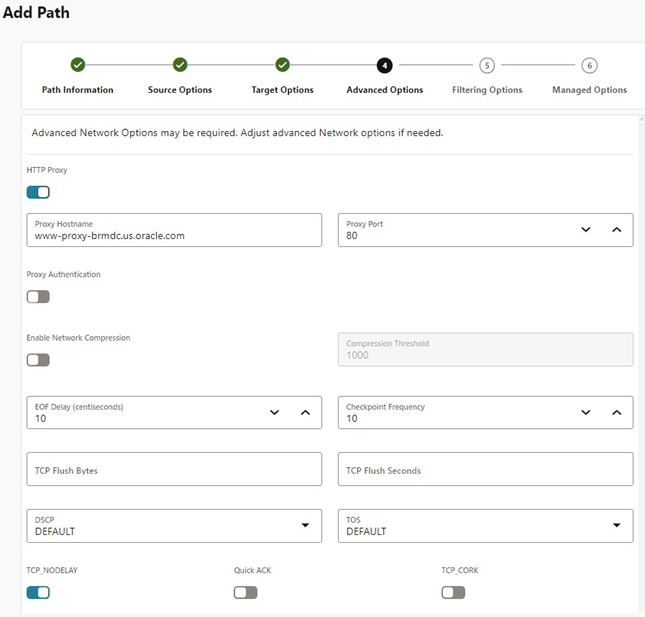
Once addressed, the Distribution Path can be created, and you can start routing data changes from your protected corporate network to another target system. In my case, I am distributing the changes to a GoldenGate OCI deployment.
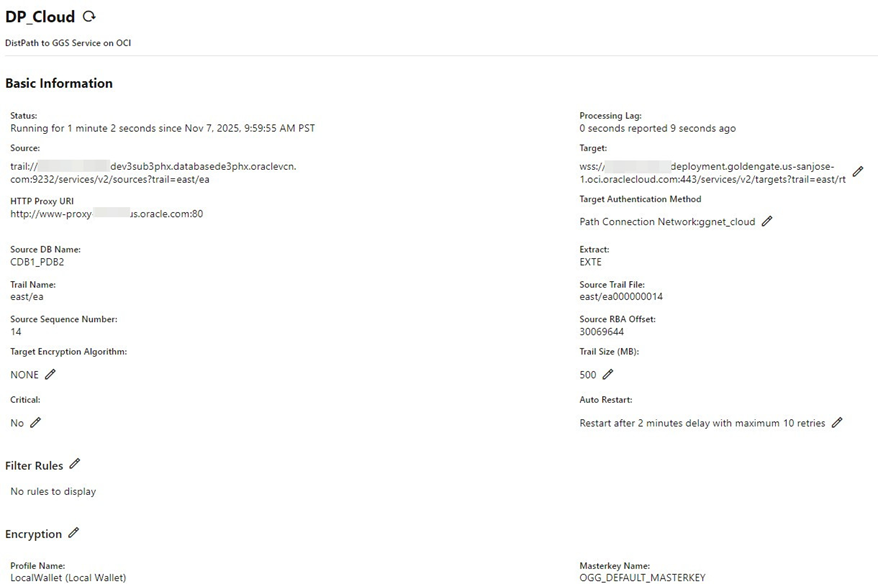
The approach using a HTTPS Proxy within the Web-UI takes 3 steps: enabling the HTTP Proxy and setting the Hostname and Port for the Proxy. As GoldenGate uses REST API calls underneath, you could even shorten the setup simply using a single REST API call using the proxy within the target object for the Create Distpath request. By the way, configuring an HTTP Proxy for GoldenGate is strikingly similar to how you would enable an HTTP Proxy for SQL*Net (Oracle Database connection protocol).
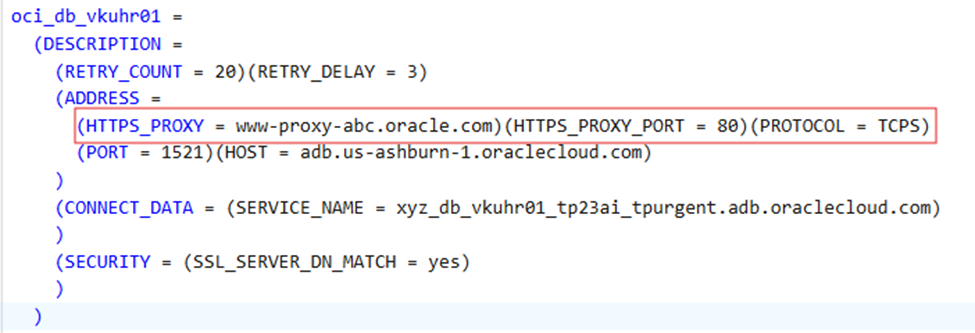
Both approaches allow you to securely bridge on-premises environments and cloud services while maintaining compliance with organizational security and networking standards. By leveraging familiar proxy configurations, you can streamline cloud adoption and ensure secure, manageable connectivity for both data replication and database access.