
In May 2024, Oracle GoldenGate announced powerful new features for Database AI—including native support for the VECTOR data type and real-time embedding generation. These enhancements let you replicate, store, and leverage vectors and embeddings efficiently, even across heterogeneous environments, such as different cloud platforms or database technologies.
See release notes for more details.
This blog demonstrates how to replicate embeddings in real-time using Oracle GoldenGate. By making embeddings instantly available as part of your data pipeline, you can seamlessly power your RAG applications and LLMs with the latest business context and content.
First, let’s clarify the concept.
An embedding is a list of numbers (a vector) that represents data—such as text, product descriptions, or even images—in a meaningful way for AI models. For example, instead of storing a product description as plain text, its embedding captures the semantic meaning as a high-dimensional vector.
Embeddings are essential for AI use cases like recommendations, semantic search, deduplication, content matching and especially RAG, where LLMs need to retrieve relevant, up-to-date information efficiently.
With Oracle GoldenGate 23ai, the @DBFUNCTION column conversion function was introduced. This allows you to map a column in your replication mapping to a database function that runs inside the database, triggered by DML operations.
Why is this critical for our use-case? It means that you can now generate embeddings on-the-fly, as new data arrives or changes—eliminating batch jobs and ensuring your downstream AI and search systems are always fed with fresh, relevant vectors.
Imagine an e-commerce site. Every time a new cleaning product is listed or updated, GoldenGate immediately generates an embedding for it. This makes products instantly searchable for AI-powered question-answering, recommendations, or similarity searches. For example, when a user asks a chatbot, “Which cleaning products are eco- friendly?” the LLM can use up-to-date embeddings to deliver accurate and trusted results in real-time.
In this example I used ALL-MiniLM-L12-V2 model, which can be downloaded from Hugging Face or Oracle Documentation Page. Instructions could be found in this blog.
Table that I want to replicate is related to products and their product description. First, let’s create a function CREATE_PRODUCT_VECTOR.
CREATE OR REPLACE FUNCTION CREATE_PRODUCT_VECTOR(
p_product_name IN VARCHAR2,
p_product_description IN VARCHAR2,
p_category IN VARCHAR2,
p_sub_category IN VARCHAR2
) RETURN VECTOR
IS
v_product_vector VECTOR(384, FLOAT32);
BEGIN
SELECT VECTOR_EMBEDDING(
ALL_MINILM_L12_V2
USING (
'PRODUCT NAME:' || p_product_name ||
' PRODUCT DESCRIPTION:' || p_product_description ||
' CATEGORY:' || p_category ||
' SUBCATEGORY:' || p_sub_category
) AS data
) AS embedding
INTO v_product_vector
FROM dual;
RETURN v_product_vector;
END CREATE_PRODUCT_VECTOR;
Database function CREATE_PRODUCT_VECTOR takes product fields and generates a 384-dimensional vector embedding, aggregating relevant product information into a dense, AI-friendly format.
We do a Select to check if it is working so far.

Then, we use this function in our replicat mapping. GoldenGate will invoke this function every time a product record is replicated—writing both the original data and its embedding to the target system, in real time.
Now let’s put everything together.
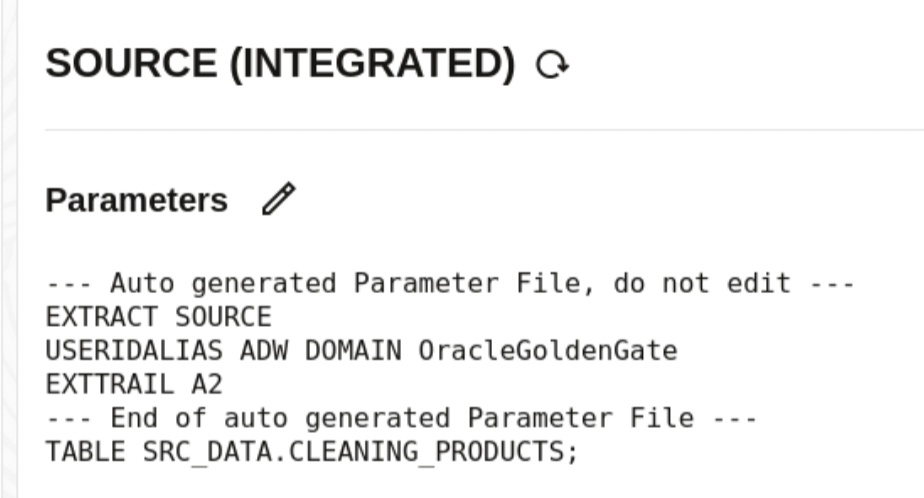
Our extract will be a standard one without any special parameters or functions.
Our replicat on the other hand, beside CLEANING_PRODUCTS table replication will include an additional line: to store newly generated vectors in a different table (to which RAG will be connected to) and call CREATE_PRODUCT_VECTOR function for embedding :
EMBEDDING = @DBFUNCTION(ADMIN.CREATE_PRODUCT_VECTOR(:PRODUCT_NAME, :PRODUCT_DESCRIPTION, :CATEGORY, :SUB_CATEGORY))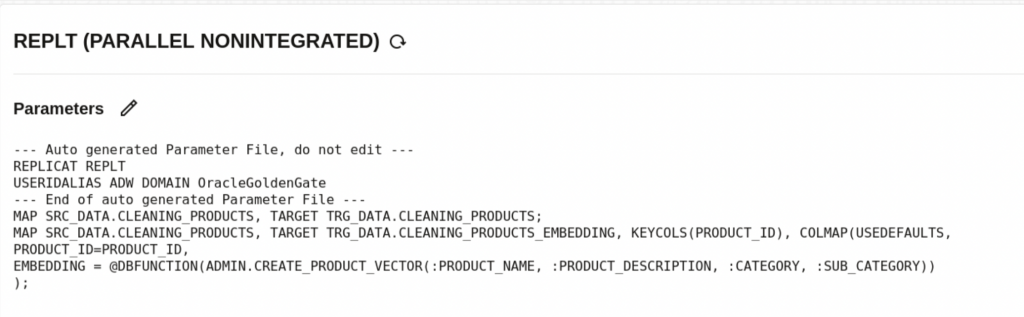
- @DBFUNCTION – tells GoldenGate to call a database function for each new or updated row being replicated. Instead of just transferring plain source data, GoldenGate will ask the database to run the function and use its result.
- :PRODUCT_NAME, :PRODUCT_DESCRIPTION, :CATEGORY, :SUB_CATEGORY – CREATE_PRODUCT_VECTOR is a custom PL/SQL function that takes several product attributes as input and returns their embedding—a vector representation of that product.
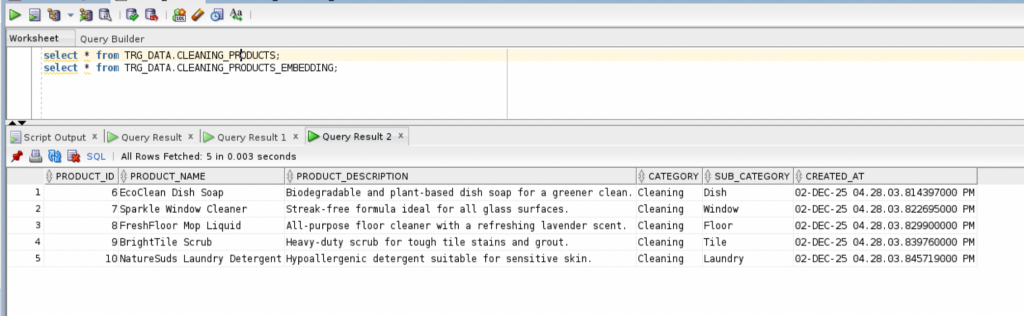
Making a couple of inserts we could see that data is generated in both tables, relational format and embedding:
INSERT INTO SRC_DATA.CLEANING_PRODUCTS
(PRODUCT_NAME, PRODUCT_DESCRIPTION, CATEGORY, SUB_CATEGORY)
VALUES
('EcoClean Dish Soap', 'Biodegradable and plant-based dish soap for a greener clean.', 'Cleaning', 'Dish');

INSERT INTO SRC_DATA.CLEANING_PRODUCTS
(PRODUCT_NAME, PRODUCT_DESCRIPTION, CATEGORY, SUB_CATEGORY)
VALUES
('Sparkle Window Cleaner', 'Streak-free formula ideal for all glass surfaces.', 'Cleaning', 'Window');

INSERT INTO SRC_DATA.CLEANING_PRODUCTS
(PRODUCT_NAME, PRODUCT_DESCRIPTION, CATEGORY, SUB_CATEGORY)
VALUES
('FreshFloor Mop Liquid', 'All-purpose floor cleaner with a refreshing lavender scent.', 'Cleaning', 'Floor');

INSERT INTO SRC_DATA.CLEANING_PRODUCTS
(PRODUCT_NAME, PRODUCT_DESCRIPTION, CATEGORY, SUB_CATEGORY)
VALUES
('BrightTile Scrub', 'Heavy-duty scrub for tough tile stains and grout.', 'Cleaning', 'Tile');

INSERT INTO SRC_DATA.CLEANING_PRODUCTS
(PRODUCT_NAME, PRODUCT_DESCRIPTION, CATEGORY, SUB_CATEGORY)
VALUES
('NatureSuds Laundry Detergent', 'Hypoallergenic detergent suitable for sensitive skin.', 'Cleaning', 'Laundry');
Checking end result with: Select * from CLEANING_PRODUCTS and CLEANING_PRODUCTS _EMBEDDING

Conclusion:
By combining Oracle GoldenGate’s real-time replication with in-database embedding generation, you can efficiently feed fresh, semantically-rich data directly into your LLM and RAG applications. This seamless pipeline ensures your AI systems always work with the latest business context, unlocking smarter, more relevant, and trusted insights for your users.
If you want to see a full demo, you have the link for the recording: