
In my previous blog, “Which Replicat to Choose?”, I broke down the different Oracle GoldenGate Replicat types and when to use them. To recap: Parallel Replicat is the go-to choice for high-volume replication environments. It excels at applying DML changes to your target database using multiple appliers in parallel—all while maintaining transactional integrity.
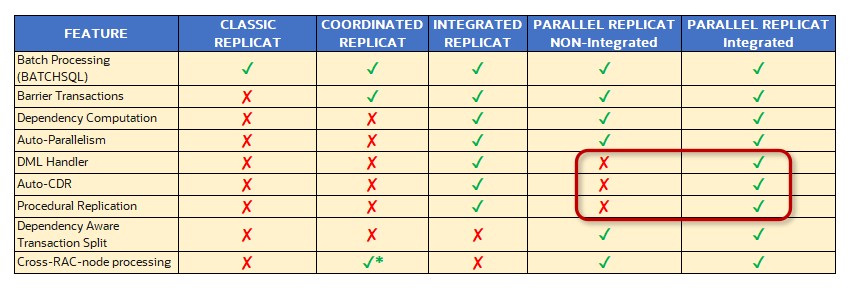
Parallel Replicat comes in two flavors:
- Non-Integrated Mode: Preferred when network latency is low—this mode is all about maximizing performance.
- Integrated Mode: Ideal when you need database-centric features (think Auto CDR, Procedural Replication, or Apply Handler), or when network latency is higher (above 4ms).
The Challenge:
What if your requirements change, and you need to switch modes? Perhaps you’re introducing new integrated features or need a fallback strategy—but the switch between modes can seem daunting.
The Solution: Oracle GoldenGate 23.10
With Oracle GoldenGate Release Update 23.10, making this change easy! You can now transition your Parallel Replicat from non-integrated to integrated mode—or vice versa—with a single command.
Switch to integrated mode on-the-fly whenever you add new features that require it.
Seamlessly revert to non-integrated mode if you need to fall back, or if you opted into integrated mode unnecessarily.
The Bottom Line
Moving Parallel Replicat between modes is now a simple, safe, and swift process —just a single command to adapt your replication environment as your needs evolve.
Let’s walk through the procedure:
1. Stop Replicat gracefully: STOP REPLICAT repn |