
Oracle Spatial Studio is a self-service web tool providing access to the spatial capabilities of Oracle AI Database, including Autonomous AI Database. It provides no-code geospatial data preparation, map visualization, and spatial analysis. In addition, technical users can access SQL generated by Spatial Studio and enhance their SQL-based appdev. Spatial Studio also provides APIs for programmatic integration such as automating processing and embedding interactive maps into other applications. Details are available at Using Oracle Spatial Studio on Autonomous AI Database.
We’re pleased to announce that Spatial Studio is now available as an Oracle-managed tool within Autonomous AI Database Serverless, making it easier than ever to get started. By removing installation barriers previously associated with the customer-managed application, Spatial Studio can now be accessed quickly and seamlessly as one of Autonomous AI Database’s built-in tools. Initially, Spatial Studio is available in Oracle Cloud Infrastructure commercial regions in the OC1 realm as listed in Regions and Availability Domains. This enhancement provides greater convenience and a more streamlined user experience for our customers.
Accessing Spatial Studio in Autonomous AI Database
Autonomous AI Database is Oracle’s fully managed database service supporting workloads including transaction processing, data lakehouse, AI, and analytics, reducing the need for multiple specialty databases. Autonomous AI Database automatically includes built-in web tools for low-code application development (APEX), deploying REST services (ORDS), and machine learning (OML). Autonomous AI Database is available on multi-tenant (serverless) across leading hyperscalers and single-tenant (dedicated) architectures.
Additionally, Autonomous AI Database includes Database Actions, a web-based interface that provides user administration, development, data loading, monitoring, and more. Database Actions is also the launchpad for built-in tools, now including Spatial Studio. When an instance of Autonomous AI Database is created, instances of all built-in tools are also automatically provisioned. More info on Database Actions is available at Connect with Built-In Oracle Database Actions.
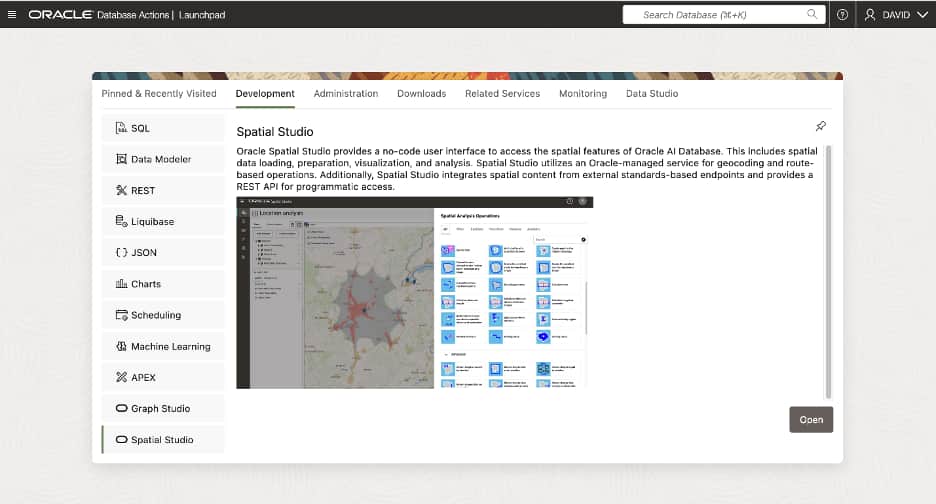
To access Spatial Studio, a user must be granted a set the privileges listed in Set Up Spatial Studio Users and Privileges. A user may then access Spatial Studio from the OCI Console or from Database Actions as explained in Access Spatial Studio From Database Actions. Spatial Studio is accessed by clicking on “Spatial Studio” in the tools list or mousing over “Spatial Studio” and clicking the Open button (see Figure 1).
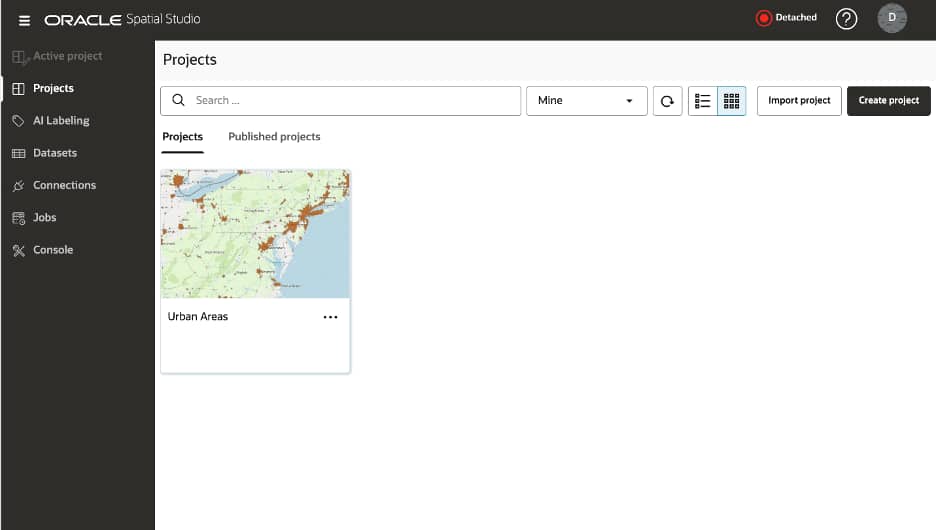
The user then signs in with database credentials. Once logged in, the navigation panel on the left can be expanded and collapsed by clicking the hamburger icon (see Figure 2 below).
What’s new about Spatial Studio in Autonomous AI Database
Spatial Studio as an Oracle-managed tool has some key differences from the customer-managed version:
- Flexible shape: A default compute shape is automatically provided which is sufficient for typical activities such as uploading data (less than 50 MB), geocoding a small dataset, and map visualizations. Some features and thresholds are limited in this state. There is no extra cost with the default shape. To remove limitations, a “compute environment” may be attached. This is explained at About the Compute Environment in Spatial Studio. The cost of using a compute environment is explained at Autonomous AI Database Serverless Billing for Database Tools. An icon in the top banner indicates whether Spatial Studio is using the default shape (“Detached”) or attached to a compute environment (“Attached”). Attaching and detaching are performed by clicking the icon.
- Hit the ground running: A default connection is automatically created for the connected user’s schema. An additional connection can be made to work with data in another Autonomous AI Database instance. More information on connections is at Create a Connection to an Autonomous AI Database Instance.
- Greater AI preparedness: A new “AI Labeling” page is available when Spatial Studio is attached to a compute environment. This provides the creation of labels for training raster segmentation and objection detection models. An upcoming release of Oracle Spatial AI in Autonomous AI Database will add support for training and using these models. Also, labels can be exported in standard formats for use in other platforms. Information about this new page can be found at About AI Labeling.
Why Use Spatial Studio with Autonomous AI Database?
In addition to providing Spatial Studio as an Oracle-managed tool, Autonomous AI Database provides numerous advantages for geospatial use cases.
- A built-in tool (Oracle APEX) provides low-code web application development with support for maps and location analysis powered by Oracle Spatial.
- Other built-in tools support publishing geospatial services (Oracle REST Data Services) and geospatial machine learning (Oracle Spatial AI). The portfolio of built-in tools with Autonomous AI Database is described at About Autonomous AI Database Built-in Tools.
- Spatial integration with AI agents, chat, natural language to SQL (NL2SQL), and RAG are supported though Autonomous AI Database Select AI which uses LLMs and schema metadata to generate queries.
- SQL functions are included for geocoding, reverse geocoding, routing, and iso-time/distance areas. These leverage an Oracle-managed service and do not require any additional licensing or data acquisition and are described at Geocoding API in Oracle Autonomous Database Serverless.
- For more information, please visit Use Oracle Spatial with Autonomous AI Database
For More Information
The addition of Spatial Studio to the Autonomous AI Database built-in tools makes it easier than ever to get started with spatial analysis and mapping. And the integration of other built-in tools with Oracle Spatial makes Autonomous AI Database the best choice for geospatial data exploration, analysis, visualization, service delivery, and custom application development.
To get started: