
Oracle AI Database makes it possible for users to import ONNX models and performs scoring operations according to the function of the model. In particular, it is possible to import embedding models in ONNX format and generate vector embeddings using the VECTOR_EMBEDDING scoring operations. Embedding models are becoming larger, and concurrent inference can multiply memory usage when each database process loads its own copy of the model. The Oracle AI Database addresses this challenge by sharing large ONNX model across database processes, which can help reduce repeated per-session memory loading while supporting concurrent VECTOR_EMBEDDING workloads.
Why ONNX embedding models can be memory intensive
Oracle AI Database can import ONNX format models and perform scoring operations based on the model function like classification, regression, clustering, embedding. For embedding models, Oracle AI Database can generate vector embeddings by using the VECTOR_EMBEDDING scoring operation.
Embedding models are usually much larger than traditional machine learning models such as regression or classification models. Their size often ranges from dozens of MB to low-digit GB. Most of this size comes from initializers: constant numeric values organized as matrices or tensors and used as operands across model layers. In many embedding models, more than 95% of the model size comes from these initializers.
With a monolithic ONNX model, each database process that generates embedding creates an ONNX Runtime session and loads the model, including its initializers, into process-private memory. As concurrency increases, this per-process loading pattern can increase memory usage quickly.
From per-session loading to shared memory
For ONNX model execution, two memory areas are especially relevant. The Program Global Area (PGA) is private to a server process, so memory loaded there is not shared across sessions. The Managed Global Area (MGA) supports managed shared memory segments that can be coordinated by Oracle AI Database processes. When ONNX External Data is used with INMEMORY, large model components can be populated into shared memory backed by MGA instead of being repeatedly loaded for each session.
In the tested environment this changes the scaling behavior. In the monolithic case, each process loads its own copy of the model initializers. With external data and INMEMORY enabled, the model’s shared components are loaded once per node and reused by concurrent sessions on that node.
How ONNX External Data works in Oracle AI Database
We can deploy the same ONNX model in Oracle AI Database in two ways, and the deployment approach can have significant performance implications.
Option 1 – Model “A” Monolithic (23.4)
Here the .onnx file retains both the graph and every constant operand. So, in this option we cannot import large models into Oracle AI Database. Also, we cannot enabled INMEMORY because ONNX model is monolithic and doesn’t have external data. In this option, PGA is consumed and MGA doesn’t have any footprint of the ONNX model.
Option 2 – Model “A” with External Components (New feature)
This packaging keeps the graph definition inside the .onnx file but moves constant operands; matrix weights, tensors, lookup tables, and other static compute artifacts into dedicated external data files. The resulting .onnx bundle is tiny (often just a few kilobytes and typically under 1 GB). So, this option enables user to import large ONNX model into the Oracle AI Database because the model has external data. During execution, Oracle loads those constants directly into its in-memory structure. If INMEMORY is enabled , the MGA contains all the components (raw bytes of ONNX model, external data and Metadata) and it remains stable as parallel-session counts increase, reducing pressure on MGA when generating embeddings or running inference.
In short, both deployments will have the same size of the ONNX model once inside the Oracle AI Database. The difference is in how the model is packaged and loaded. With Option 1, the graph and large weights remain inside a single .onnx file, which can run into ONNX file-size limitations for larger models. With Option 2, ONNX External Data keeps the graph in the .onnx file and moves large weights and tensors into separate external data files. This packaging allows Oracle AI Database to import larger ONNX models and, when INMEMORY is enabled, share those large model components more efficiently across sessions.
The memory architecture can also be viewed as follows:
- SGA is a shared workspace used by the database instance.
- PGA is a private workspace for one server process.
- MGA is a managed shared area that selected database processes can use for coordinated memory segments, including INMEMORY ONNX model components.
Enable and verify INMEMORY
You can verify whether a model is eligible for INMEMORY by checking EXTERNAL_DATA in ALL_MINING_MODELS view. Models where EXTERNAL_DATA is set to YES can be enabled with DBMS_VECTOR.inmemory_onnx_model. After enabling INMEMORY, use v$im_onnx_segment to inspect the populated components, including metadata, initializers, and prepacked weights.
SQL> select model_name, round(model_size/(1024*1024),1) as "Size (MB)", EXTERNAL_DATA, INMEMORY from all_mining_models;

MODEL_NAME Size (MB) EXTERNAL_DATA INMEMORY
-------------------- ---------- ----------------- --------
MINILML6 	127.3 		YES 		NO


SQL> execute DBMS_VECTOR.inmemory_onnx_model('MINILML6'); #Enable INMEMORY for the ONNX Model
PL/SQL procedure successfully completed.


SQL> select model_name, round(model_size/(1024*1024),1) as "Size (MB)", EXTERNAL_DATA, INMEMORY from all_mining_models;

MODEL_NAME Size (MB) EXTERNAL_DATA INMEMORY
-------------------- ---------- ----------------- --------
MINILML6 	127.3 		YES 		YES

SQL> select address, round(seg_size/(1024*1024),1) as "Size (MB)", type, populate_status from v$im_onnx_segment where name = 'MINILML6';

ADDRESS         Size (MB)     TYPE 		POPULATE_STATUS
---------------- ---------- ----------------- --------------
0000400007800000 0.1         METADATA 			ENABLED
0000400002000000 126.7     INITIALIZER 		    ENABLED
0000400007C00000 81     PREPACKED WEIGHTS 	    ENABLED
Performance observations using ONNX External Data with INMEMORY enabled
The following comparison uses the MINILML6 model in two formats: a monolithic model and the same model imported with external data and INMEMORY enabled. In ALL_MINING_MODELS, both cases show a model size of 127.3 MB. However, their runtime memory behavior differs significantly.
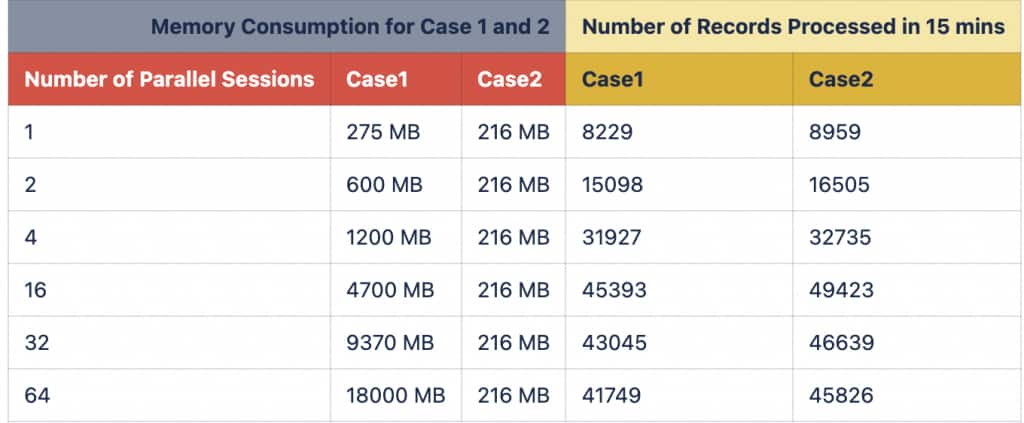
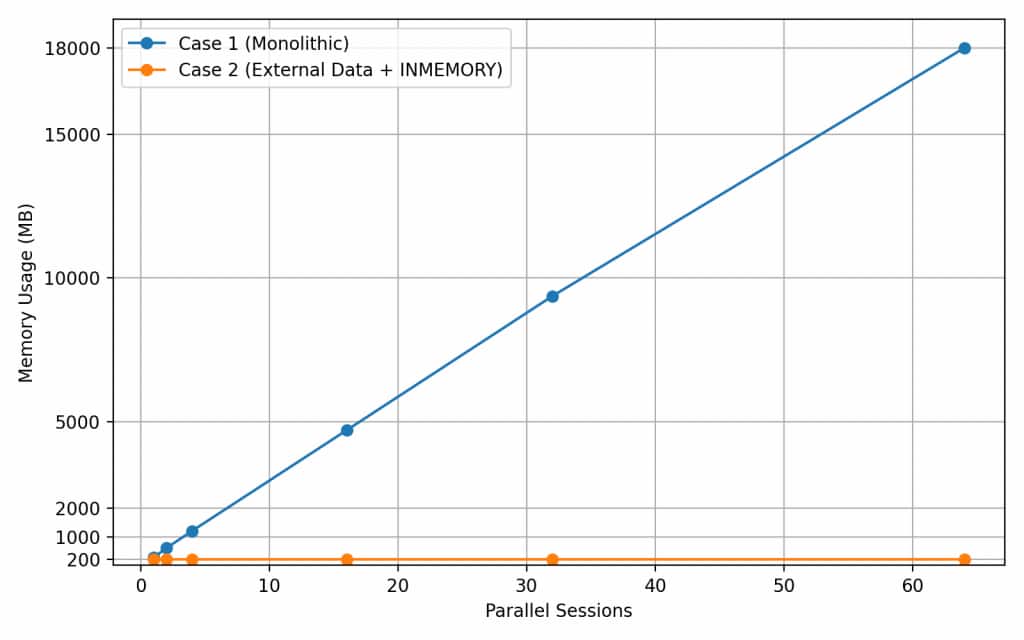
With the monolithic model, memory usage increases as parallel sessions increase because each process loads its own model components into PGA. With external data and INMEMORY enabled, the shared model components are populated into MGA, and in the benchmark configuration used the memory footprint remains stable at approximately 216 MB on the same node across the tested concurrency levels.
The one-node RAC results show the primary memory benefit. In Case 1, memory grows from 275 MB at one parallel session to 18000 MB at 64 parallel sessions. In Case 2, memory remains at 216 MB across the same tested session counts. Throughput improvements were observed in the tested workload configuration, with the size of the gain varying by concurrency level.
It’s important to note that while the database footprint remains consistent, the physical size of the .onnx file differs between the two approaches. In the external data configuration, constant operands—such as matrix weights, tensors, lookup tables, and other static computation artifacts—are moved out of the main ONNX file into separate external data files, leading to a leaner core model and significantly improved memory efficiency in the tested environment. For more details, refer to the above SQL code block.
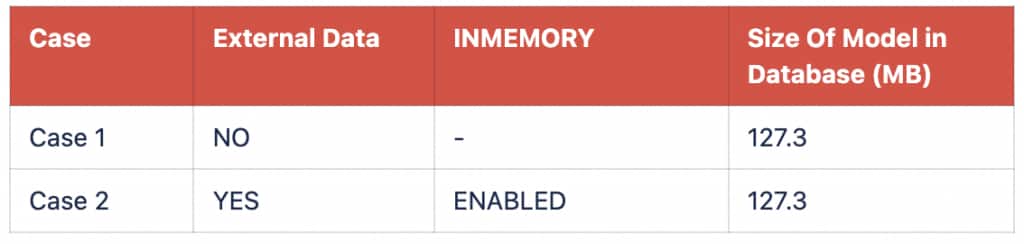
Table -1 : With RAC 1 Node Enable
Note: Environment Detail
- RAM: 44GB with 4 Node. 6 CPUs on each Node.
- Model Name: Intel Xeon Processor (Skylake, IBRS)
- Results are specific to the benchmark environment described below and may vary based on hardware configuration, workload characteristics, model selection, text length, and deployment architecture.
Benchmark results are based on the test environment and workload configuration described in this blog. Results may vary depending on hardware configuration, workload characteristics, model selection, text length, software versions, deployment architecture, and system configuration.
RAC considerations
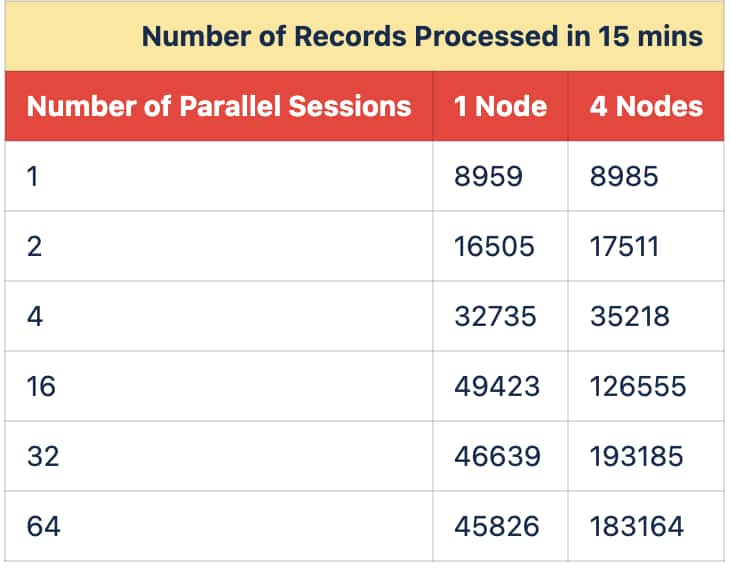
Each RAC node gets a copy of the model. The sharing benefit is per node: sessions on the same RAC node can reuse the in-memory model components on that node, while each additional RAC node maintains its own in-memory copy. Therefore, total cluster memory scales by node count, not by session count.
Table -2 : Comparison of RAC NODES when INMEMORY is ENABLED
Note: Results are specific to the benchmark environment described below and may vary based on hardware configuration, workload characteristics, model selection, text length, and deployment architecture.
The RAC comparison shows higher throughput at larger concurrency levels when the workload is distributed across four nodes. This is expected because more nodes provide additional compute capacity, while INMEMORY keeps the model components shared within each node.
The following figure further illustrates the comparison of processed records with External Data Enabled with INMEMORY vs Disabled in 1 Node RAC Database (Refer Table-1)
Code Snippet:
The following pseudocode describes the workload driver: Each thread establishes a JDBC session and keeps it open for the configured workload window, such as 15 minutes or one hour. During that window, each thread repeatedly executes an INSERT statement that calls VECTOR_EMBEDDING with the MINILML6 model and inserts the generated embedding into the target database table. Because each connection remains pinned to a thread, the test simulates steady, long-lived clients generating embeddings and inserting rows in parallel.
In the benchmark tables, the workload uses 1, 2, 4, 16, 32, and 64 parallel sessions. The driver creates N database connections, where N is the number of parallel sessions. Each connection continues generating embeddings with the ONNX model until the workload loop finishes.
 #Creating new connection in JAVA layer
Connection conn;
PoolDataSource pds = PoolDataSourceFactory.getPoolDataSource();
conn=pds.getConnection();
connThread = pds.getConnection();
CallableStatement cs = connThread.prepareCall(sql);
while (start_time < t_end) {
     cs.execute(); #DBexecution
} #whileloopEnds

#SQL Code. The length of Text Data (l_Text) is varying from 101 to 6543 chars and each call has different Text Data
INSERT /+ append/ INTO vector_table
(COL1)
VALUES
(
VECTOR_EMBEDDING(MINILML6 USING l_Text AS Data)
);
Best practices
- Use ONNX External Data for larger embedding models or for workloads where many sessions call VECTOR_EMBEDDING concurrently.
- Enable INMEMORY for external-data models that serve concurrent inference or embedding-generation workloads.
- Monitor ALL_MINING_MODELS to confirm EXTERNAL_DATA and INMEMORY status.
- Use v$im_onnx_segment to inspect populated model components and their memory footprint.
- Test with the expected concurrency level and representative text lengths before production rollout.
- For RAC deployments, remember that model sharing is per node.
Conclusion
ONNX External Data can provide benefits beyond a packaging format in Oracle AI Database deployments. In Oracle AI Database, it can enable more efficient shared use of large ONNX model components for scalable AI workloads. When combined with INMEMORY, external data can help reduce repeated per-session memory loading and keep the model memory footprint stable as concurrency increases on the same node.
The benchmark results show the clearest advantage in memory behavior, especially as the number of parallel sessions grows. Throughput also improves in the tested scenarios, with larger gains visible in the RAC comparison at higher concurrency. For workloads that depend on concurrent embedding generation, this provides a practical approach that can help organizations scale concurrent embedding workloads while managing memory pressure
For More Information
For more details about ONNX similarity search and OML4Py for Advance AI Vector Search, please check out the following links.
Enhance Your Semantic Similarity Search with Multilingual Support
OML4Py: Leveraging ONNX and Hugging Face for AI Vector Search