
Your databases hold some of your organization’s most critical and sensitive data. Protecting that data requires more than securing the infrastructure. It means maintaining visibility into your database security posture, knowing where sensitive data resides and who can access it, monitoring database activity, and restricting database access to only authorized SQL statements. As your Exadata Database Services environment grows, applying those security controls consistently across every database becomes increasingly important.
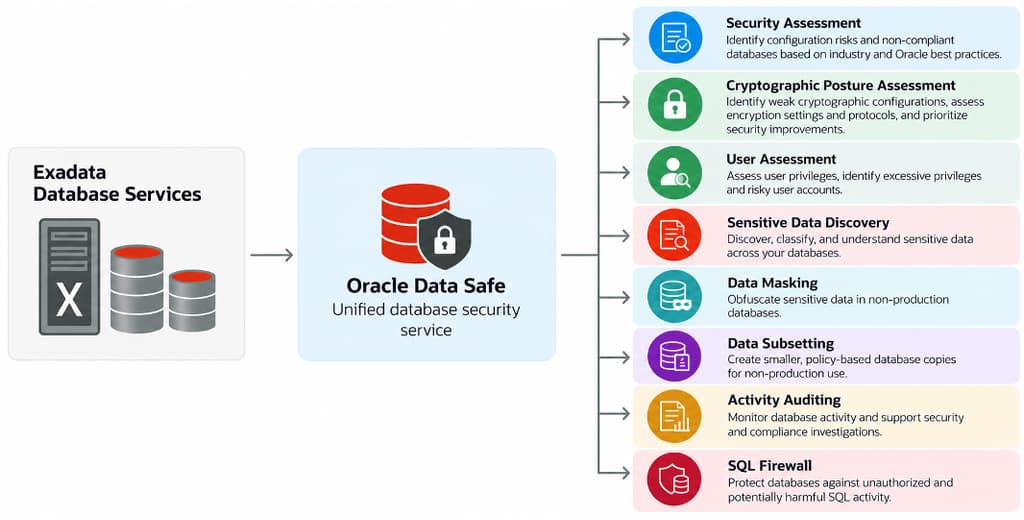
Oracle Data Safe helps you address these challenges. As a unified database security service, it helps you continuously assess your security and cryptographic posture, discover and protect sensitive data, monitor database activity, assess user privileges, and restrict database access to authorized SQL statements. These capabilities help you strengthen database security, support compliance efforts, and gain better visibility into your databases—all without deploying additional security infrastructure.
Until now, extending these security capabilities across Exadata Database Services required registering each pluggable database individually with Data Safe. As organizations provision more databases, this manual onboarding adds administrative effort and increases the risk that some databases are overlooked, potentially leaving gaps in security visibility and coverage.
Now, Data Safe is integrated directly into the Exadata database lifecycle, eliminating the need to register each pluggable database (PDB) individually. Enable Data Safe once at the container database (CDB) level, and all existing and future PDBs are registered automatically. This helps maintain consistent Data Safe security visibility as your Exadata estate grows.
This integration is available for Oracle Exadata Database Service on Dedicated Infrastructure, Exadata Database Service on Cloud@Customer, and Oracle Exadata Database Service on Exascale Infrastructure.
Data Safe is included with Oracle Database cloud services, so you can start strengthening your database security without additional licensing or software, subject to applicable service entitlements and usage limits.
What’s New
You can enable Data Safe when provisioning a new CDB or on an existing CDB. Once enabled, the CDB and its PDBs are registered automatically with Data Safe as part of the normal database lifecycle.
As part of the registration, the Data Safe service account is created in the database, and the required database privileges are granted to the account for these core capabilities:
- Security Assessment helps you identify configuration risks, evaluate database settings against security best practices and benchmarks, and track changes to your database security posture.
- Cryptographic Posture Assessment helps you identify weak or outdated cryptographic configurations, assess encryption settings and protocols, and prioritize improvements to your database’s cryptographic security posture.
- User Assessment helps you assess user privileges, identify highly privileged accounts, and track changes in user risk.
- Sensitive Data Discovery helps you discover what types of sensitive data you have and where.
- Activity Auditing gives you visibility into database activity and helps support audit requirements. You can configure audit policies and enable audit collection based on your requirements.
Security Assessment, User Assessment, and Cryptographic Posture Assessment run automatically after registration, giving you immediate visibility into your database security and cryptographic posture without additional setup. Sensitive Data Discovery and Activity Auditing are also available, allowing you to initiate discovery jobs and configure auditing at any time based on your requirements.
Data Masking, Data Subsetting, and SQL Firewall remain under your explicit control, allowing you to use these capabilities based on your specific security and data protection requirements. To use these capabilities, you grant the additional required privileges to the Data Safe service account from the Data Safe console. This gives you the flexibility to enable additional security features beyond the core capabilities.
How it works
When Data Safe is enabled for a CDB, a registration policy is created at the CDB level. This policy enables automatic registration of the CDB, all existing PDBs, and any PDBs created later.
For new CDBs, Data Safe is enabled by default in the CDB creation flow when the required Data Safe permissions are in place. The CDB is registered with Data Safe during provisioning, and any PDB created later is registered automatically.
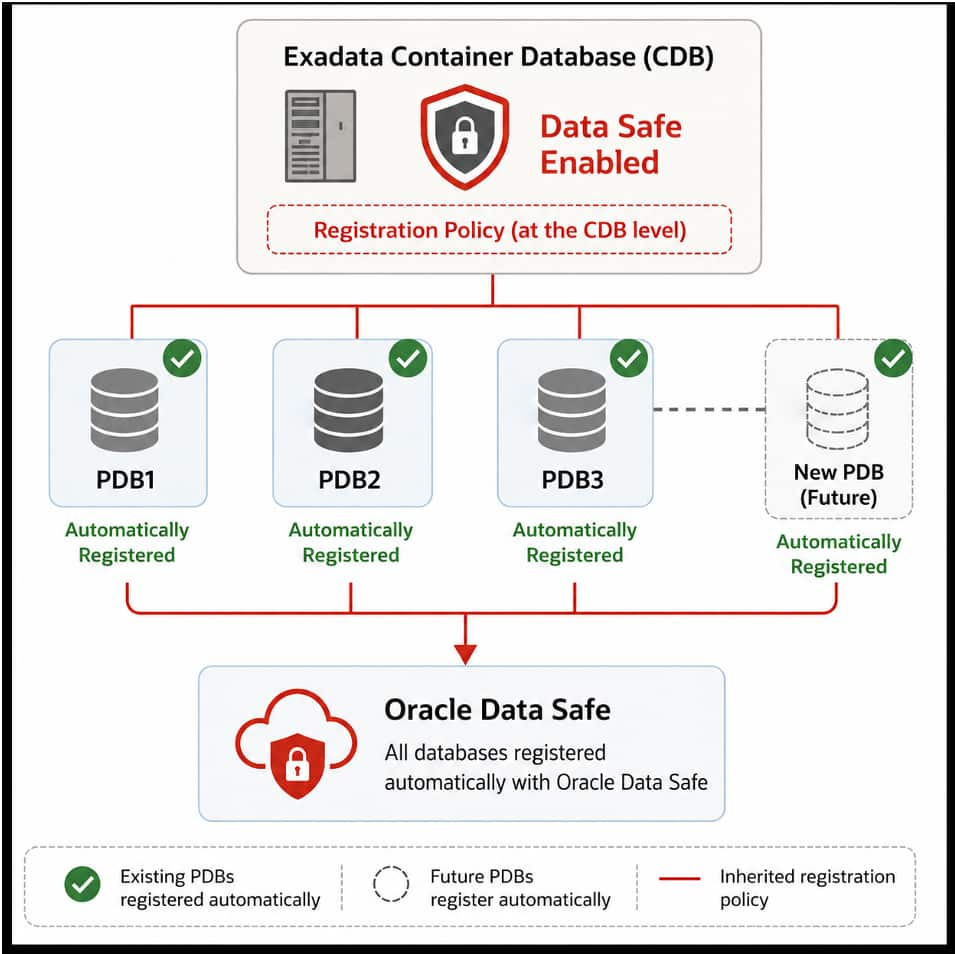
When Data Safe is enabled on an existing CDB, the CDB and all its existing PDBs are registered automatically, and any new PDBs are registered as they are created. This helps reduce the risk of gaps in security visibility as your database estate grows. If you disable Data Safe for the CDB later, existing registrations remain in place, but new PDBs are no longer registered automatically.
You’ll find Data Safe in the new Security section of the Database information tab, right alongside Key Management. The View details option in the three-dot menu next to Data Safe lets you check the registration status of your CDB and its PDBs.

Connectivity setup depends on your deployment model. On Exadata Database Service on Dedicated Infrastructure and Exascale Infrastructure, a Data Safe private endpoint is selected or created for you when you enable Data Safe.
On Exadata Database Service on Cloud@Customer, you first establish connectivity using a Data Safe private endpoint or one or more Data Safe on-premises connectors, and then select the appropriate option when enabling Data Safe.
Get started today
With Oracle Data Safe now integrated into Oracle Exadata Database Service on Dedicated Infrastructure, Cloud@Customer, and Exascale Infrastructure, enabling Data Safe for the CDB automatically registers its existing and future PDBs, helping maintain consistent security visibility as your database estate grows.
As Data Safe is included with Exadata Database Services, you can start strengthening your security posture today without having to deploy additional software.
For more information, see Automatic Data Safe Registration for Exadata Database Services in the Oracle Data Safe documentation.