
Generative AI—and especially large language models (LLMs)—are rapidly changing how organizations turn raw data into usable insight, lowering the barrier to tasks that once required deep specialist expertise. For example, LLMs have been simplifying and accelerating AppDev in areas such as natural-language-to-code generation and refactoring, automated test creation and edge-case discovery, documentation and API reference generation, and incident-response assistance through faster log summarization and guided troubleshooting.
One area of great opportunity is graph modeling: Oracle Graph Studio’s graph modeler now includes an AI-enabled option that automatically analyzes user-selected database tables and generates a suggested graph definition. The modeler is powered by Oracle Select AI and LLMs, allowing users to create models without the need to understand underlying table structures or learn graph SQL syntax; they can create a property graph from the AI-generated suggestion with no code, then refine the model as needed. The result is a faster path from data to insight, uncovering patterns across complex relationships.
How Generative AI Accelerates Graph Modeling
Graph analytics can help answer complex questions, by enabling developers to navigate relationships in data that are not otherwise obvious. Some examples are tracking down logistical bottlenecks in a supply chain, finding product-component dependencies in manufacturing processes, and following the flow of money in a financial system. The first step in using the power of graph analytics is to create a graph from data in tables, consisting of vertices and relationships.
For developers used to thinking in terms of row and column structures, viewing data as vertices and relationships between them, and creating a graph for that view of data can require a bit of a learning curve. If they are unfamiliar with the tables in the schema, identifying which tables should be made vertices, determining which tables contain the information that connects two vertices, can be non-trivial. Primary key relationships and foreign key relationships in the tables can be helpful, but not all table schemas have them. It can be tedious to manually determine how the tables are connected and then create the graph definition (writing the CREATE GRAPH statement).
Oracle Graph Studio is a fully managed, self-service graph data management and analytics environment available in Oracle Autonomous AI Database Serverless for storing, managing, and analyzing data as a graph. The graph modeler tool in Graph Studio has been simplifying the process of creating a graph, providing a no-code interface for developers unfamiliar with graphs. This tool now has the option of using generative AI to automate the creation of the graph definition. In this new option, generative AI can analyze hundreds of tables to find the different ways in which data is connected, and identify the optimal graph that can be created from the tables. Users can set up a profile to use an LLM of their choice through Oracle Select AI’s AI profile, making graph creation a simple task even when there are no foreign key constraints, the number of tables are large, or the connections in data are not explicit. The proposed graph definition by generative AI can be modified by developers as needed. As you can see, this lowers the bar for those who are not familiar with graph analytics but also simplifies the graph creation process for experts.
How the New Graph Modeler Option Works
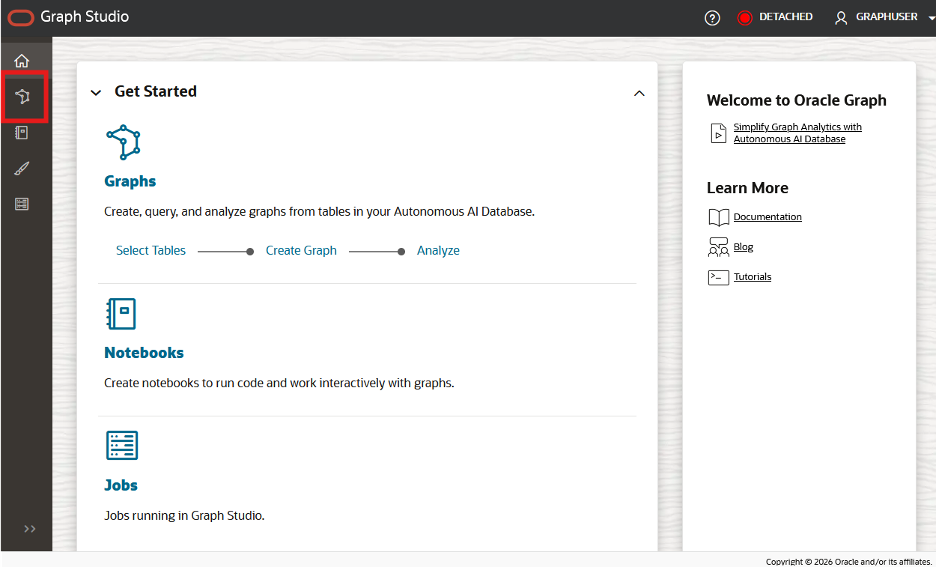
With the help of generative AI, creating a new graph model in Graph Studio is simple. When you log into Graph Studio, the Graph Modeler feature can be invoked by clicking the ‘Graphs’ icon on the left (Figure 1).
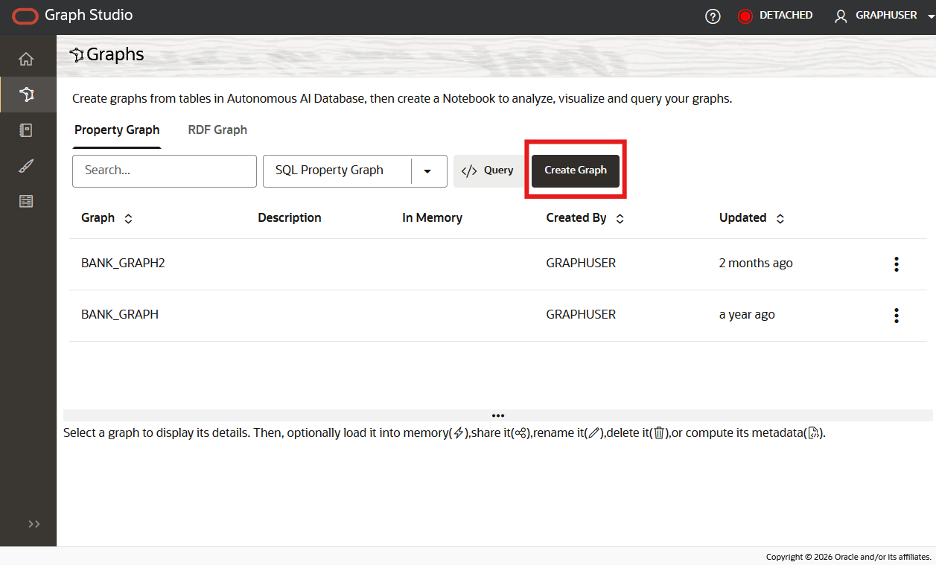
To create a new graph, you click on the ‘Create Graph’ icon (Figure 2).
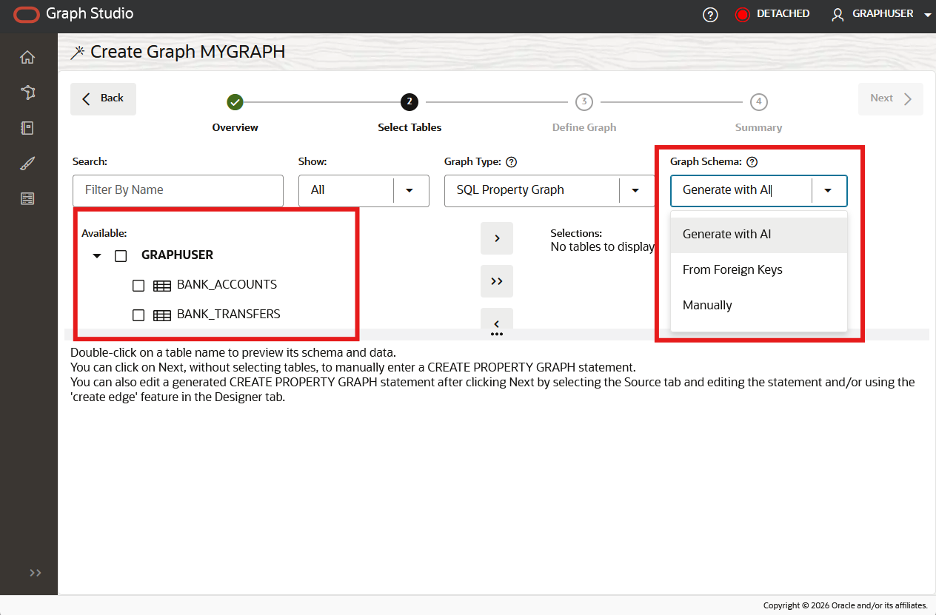
After typing in your graph name and clicking ‘next’ you see the option to select tables on the left, and on the right the option to use ‘Generate with AI’ to create the graph (Figure 3).
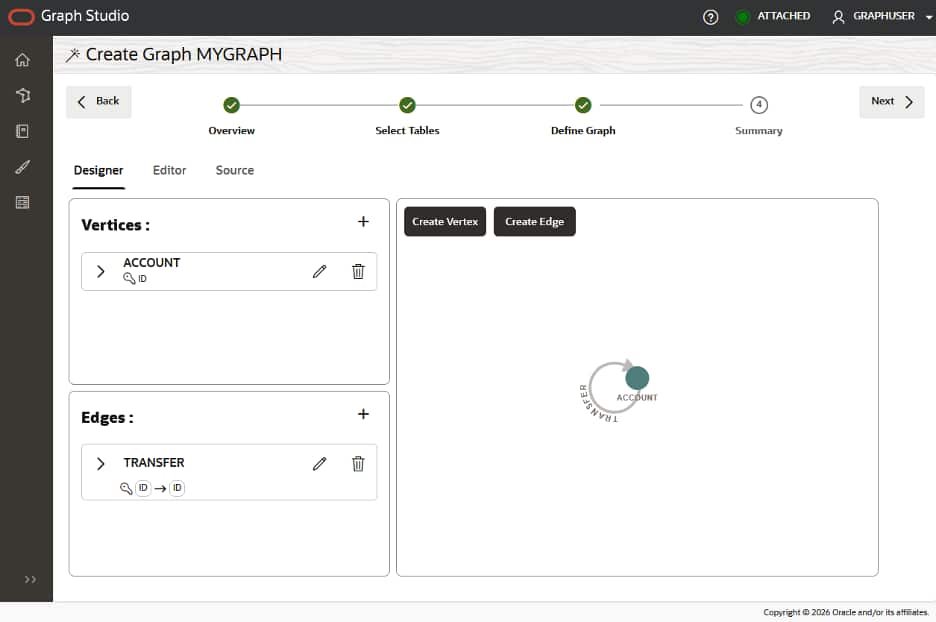
Then you select the SELECT AI profile you would like to use, and a graph definition will be created for you (figure 4). You can see that you add additional vertices or edges, or edit the definition in Source, if needed.
Get Started
With the new generative AI option in Oracle Graph Studio’s graph modeler, teams can move from relational tables to a workable graph definition in minutes, without having to decipher complex schemas or write graph SQL. By automatically proposing a graph definition from user-selected tables and allowing easy refinement, Graph Studio helps both newcomers and experts accelerate graph initiatives and start uncovering relationship-driven insights faster.
Try Autonomous AI Database and Graph Studio for free on Oracle Free Tier. For more information on Oracle Graph: