

Mission-critical databases need disaster recovery as quickly as the business demands. Oracle Data Guard has long helped organizations protect mission-critical workloads and support business continuity.
Oracle Data Guard Automatic Failover for Oracle Exadata Database Service on Exascale Infrastructure further strengthens Oracle’s commitment to business continuity. It provides customers with an expanded operational choice, automating Oracle Data Guard Observer deployment, health monitoring, and failover orchestration to simplify disaster recovery operations and reduce recovery time.
Automation for Oracle Data Guard Automatic Failover
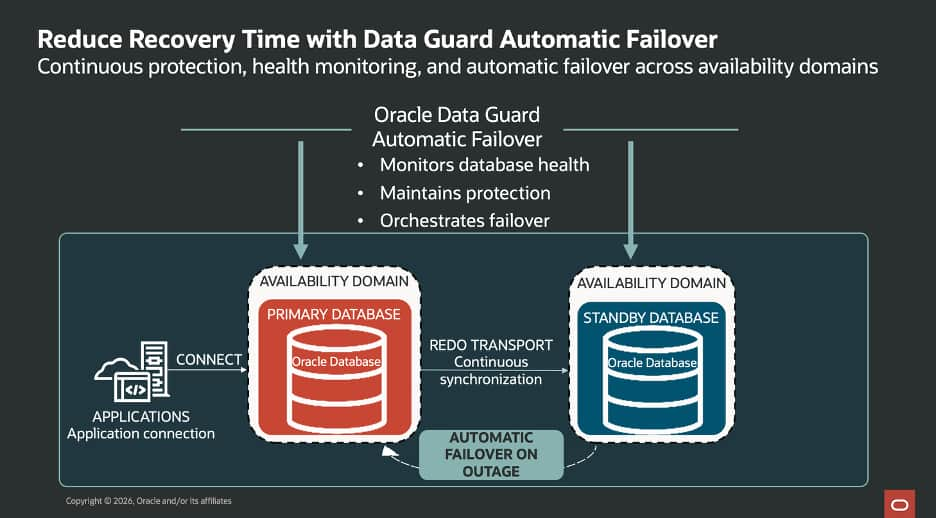
Many organizations use an Oracle Data Guard standby database to protect critical workloads from database or infrastructure failures., In case of an outage of the primary database, however, operations teams currently need to recognize the event, assess the situation, and then initiate a database role transition by making the standby database the new primary database. These steps require coordination during an outage and can add to recovery time.
Oracle Data Guard Automatic Failover automates Observer deployment, database monitoring, and failover orchestration. Connection details for both database roles are provided for administrators to use with their applications. When configured failover conditions are met, Oracle Data Guard Observer promotes the standby database to the primary role automatically, enabling application workloads to continue to operate on the new primary database, eliminating the need for manual intervention. This helps operations teams focus on restoring normal business service rather than coordinating the mechanics of a database failover.
Oracle Data Guard Automatic Failover helps protect data integrity, maintain the availability of critical workloads, and reduce overall recovery time. Customers retain full control over their primary and standby databases, while Oracle automates the underlying health monitoring and failover orchestration through capabilities such as:
- Automatic failover for an existing Data Guard configuration with a guided console workflow.
- Creation of a new standby with automatic failover enabled by default.
- Management of failover targets with multiple standbys as application and resilience requirements evolve.
- Download of connection details for the primary and standby databases to support application connectivity after a database role transition.
Key takeaways
Data Guard Automatic Failover on Oracle Exadata Database Service on Exascale Infrastructure helps organizations strengthen their availability posture by providing:
- Faster recovery: Eliminates database manual failover steps that can delay recovery during an outage.
- Data protection: Supports rapid automatic failover with a configurable maximum data-loss threshold, including zero-data-loss configurations.
- Streamlined operations: Automates database health monitoring and failover orchestration, reducing operational efforts required to maintain Disaster Recovery readiness.
- Improved business resilience: Helps critical applications continue operating on the newly promoted standby when configured failover conditions are met.
Getting started
Data Guard Automatic Failover is available for Oracle Exadata Database Service on Exascale Infrastructure in OCI commercial regions and Multicloud.
You can configure and enable this capability using the OCI Console, REST APIs, SDKs, or Terraform.
Ready to get started? Follow this step-by-step how to guide to enable and configure Data Guard Automatic Failover
Learn more in the Oracle documentation: Oracle Data Guard on Oracle Cloud.