
Modern data platforms are rarely built around a single engine. Data science teams may prepare and enrich data in Databricks, data engineering teams may manage that data as Delta Lake tables, and application teams may still need to query the same business data from Oracle Database. The challenge is not just connecting the systems. The real challenge is doing it without creating another copy of the data.
Open table formats help solve this problem. Apache Iceberg gives different engines a shared way to understand table metadata, schema, snapshots, and files in cloud object storage. That is why many customers are adopting Iceberg-style access patterns for cross-engine analytics and lakehouse interoperability.
At the same time, Databricks customers often want to keep using Delta Lake because it is deeply integrated with Databricks pipelines, performance features, and governance workflows. Databricks UniForm, or Universal Format, bridges these worlds by allowing a Delta table to publish Iceberg-compatible metadata for other engines.
This post was written in collaboration with the Oracle Autonomous Database development team, with special thanks to Ming Yang for his guidance and technical contributions.
In this post, we show how Oracle Autonomous Database can query a Databricks Delta table through UniForm. Databricks continues to own and manage the Delta table, while Oracle reads the data as an external table without moving or copying it.
Use case
A data engineering team already owns a curated customers table in Databricks. Their Databricks jobs continue to write, optimize, and govern the table as Delta. An Oracle application team wants to use the same customer data from Oracle Autonomous Database without building a separate export pipeline.
The pattern is simple: keep customers as a Delta table, enable UniForm on the table, grant a Databricks service principal access, and let Oracle Autonomous Database read the table through the Databricks Iceberg-compatible interface. Oracle gets the table definition from Databricks and reads the underlying files from Azure Data Lake Storage Gen2.
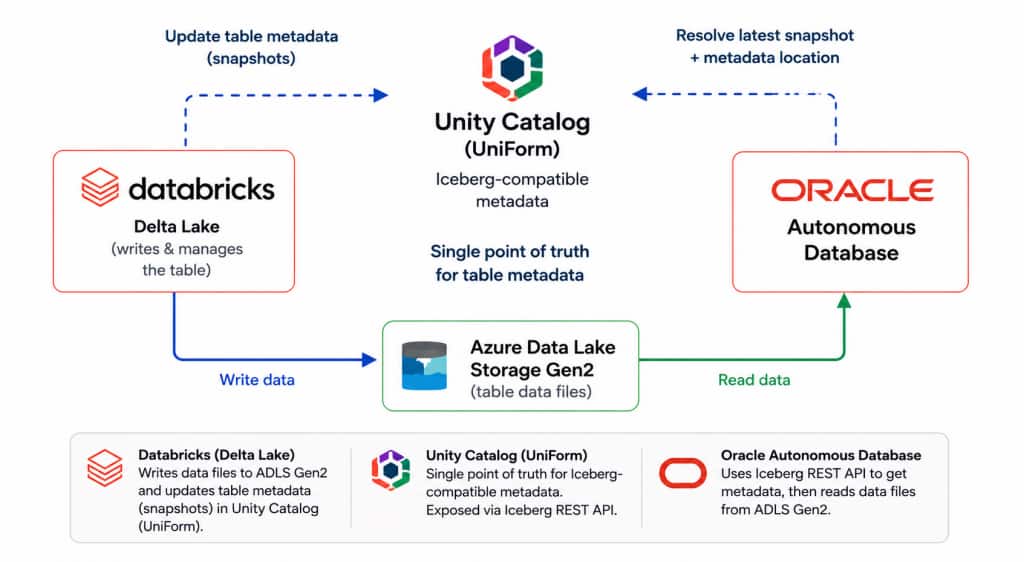
Figure 1. Unified Data and Metadata Layers
What we build
The flow has two parts. In Databricks, we create the customers table with UniForm enabled and prepare a service identity for Oracle. In Oracle Autonomous Database, we allow outbound HTTPS access, store the Databricks and Azure credentials, and create an external table that points to the Databricks table.
Databricks setup
On the Databricks side, we prepare the Delta table for UniForm and create the service principal that Oracle will use. The account console steps create the identity and add it to the workspace; the workspace steps generate OAuth credentials and grant access to the catalog, schema, and table.
Step 1. Create the ‘customers‘ Delta table with UniForm enabled
Run the following in Databricks SQL, this creates a Delta table and enables UniForm at table creation time.
USE CATALOG data_lake_pm;
USE SCHEMA default;
DROP TABLE IF EXISTS customers;
CREATE TABLE customers (
  customer_id BIGINT,
  first_name  STRING,
  last_name   STRING,
  email       STRING,
  city        STRING,
  state       STRING,
  country     STRING,
  created_at  TIMESTAMP
)
TBLPROPERTIES (
  'delta.columnMapping.mode' = 'id',
  'delta.enableIcebergCompatV2' = 'true',
  'delta.universalFormat.enabledFormats' = 'iceberg'
);

INSERT INTO customers VALUES
  (1, 'John',  'Smith',   'john.smith@example.com',   'Seattle',       'WA', 'US', current_timestamp()),
  (2, 'Mary',  'Johnson', 'mary.johnson@example.com', 'San Francisco', 'CA', 'US', current_timestamp()),
  (3, 'Alex',  'Brown',   'alex.brown@example.com',   'Austin',        'TX', 'US', current_timestamp());
Step 2. Add a service principal
In the Databricks account console, create a service principal for Oracle access. This gives Oracle a durable machine identity instead of relying on an individual user’s credentials.
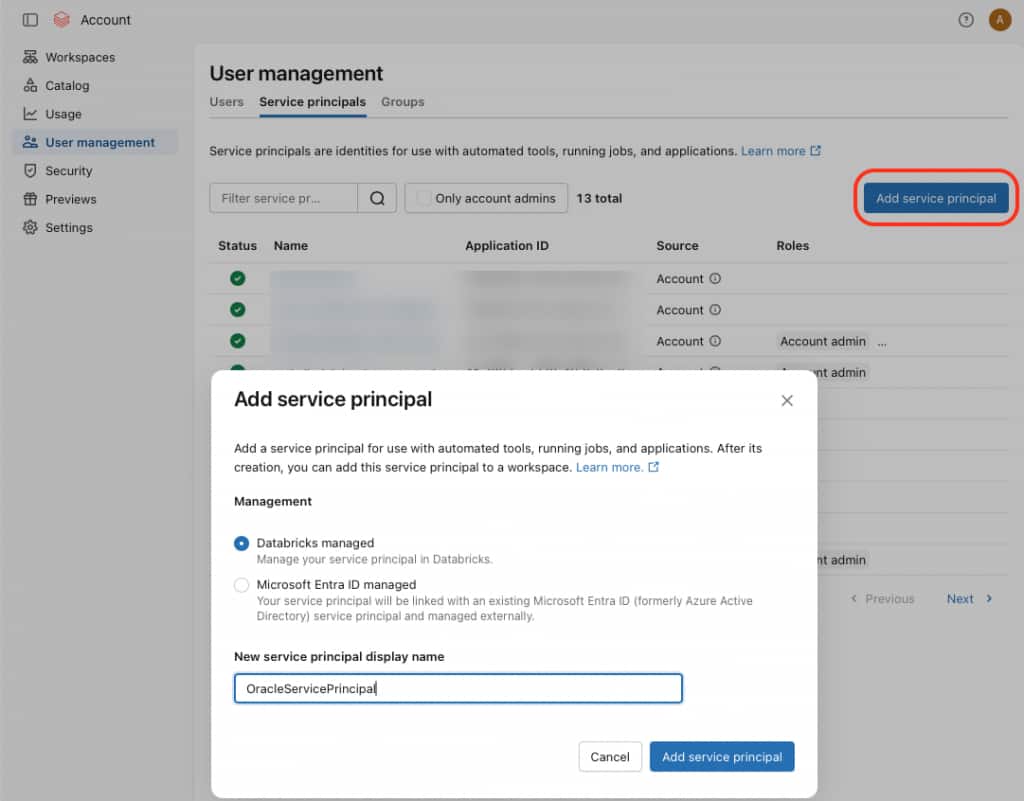
Figure 2. Add a Databricks service principal for Oracle access.
Step 3. Grant workspace access to the service principal
From the workspace permissions page, add Oracle Service Principal to the target workspace with the User permission. This allows the service principal to operate in the workspace where the table is registered.
Figure 3. Grant the service principal access to the workspace.
Step 4. Generate the OAuth client ID and client secret
In the target workspace, open the service principal details page and generate an OAuth secret. Save the application ID and generated secret; Oracle will use these values in the UNITY_OAUTH credential.
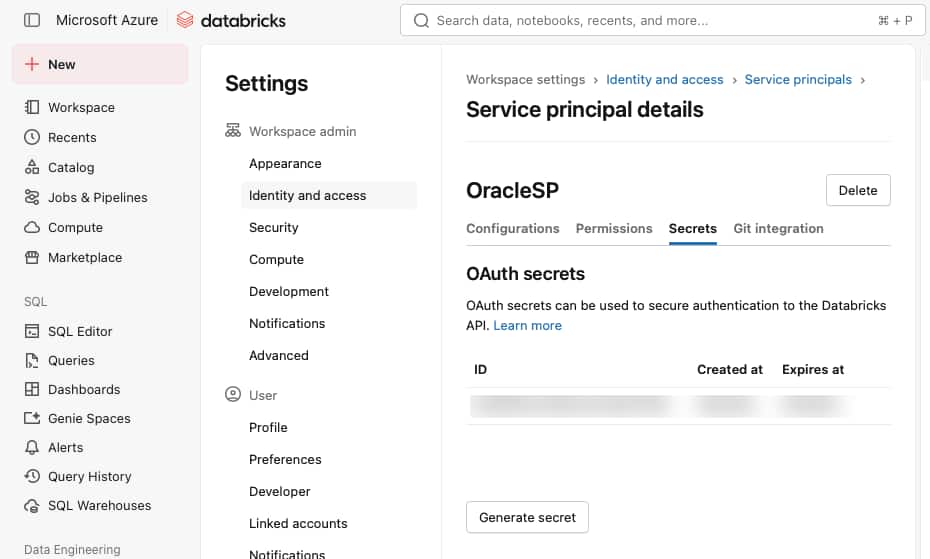
Figure 4. Generate and store the OAuth credentials for the service principal.
Step 5. Grant catalog, schema, and table access
Run the following in Databricks SQL. Use the service principal application ID in the TO clause.
GRANT USE CATALOG ON CATALOG data_lake_pm
TO `databricks-service-principal-application-id`;

GRANT USE SCHEMA ON SCHEMA data_lake_pm.default
TO `databricks-service-principal-application-id`;

GRANT SELECT ON TABLE data_lake_pm.default.customers
TO `databricks-service-principal-application-id`;

GRANT EXTERNAL USE SCHEMA ON SCHEMA data_lake_pm.default
TO `databricks-service-principal-application-id`;
Oracle Autonomous Database setup
Now switch to Oracle Autonomous Database. The database needs a short setup sequence before it can create the external table.
First, allow outbound HTTPS calls to the Databricks workspace and Azure storage account. Then create two credentials: one for the Databricks REST endpoint used by Iceberg clients, and one for Azure Data Lake Storage Gen2. Finally, create an Oracle external table that points to the Databricks catalog path for customers.
Step 1. Allow outbound HTTPS access
Run these commands as the schema that will create the external table, or replace <db-schema> with the correct schema name.
BEGIN
  DBMS_NETWORK_ACL_ADMIN.APPEND_HOST_ACE(
    host           => 'azure-storage-account.blob.core.windows.net',
    lower_port     => 443,
    upper_port     => 443,
    ace            => xs$ace_type(
                         privilege_list => xs$name_list('http'),
                         principal_name => 'db-schema',
                         principal_type => xs_acl.ptype_db));
END;
/

BEGIN
  DBMS_NETWORK_ACL_ADMIN.APPEND_HOST_ACE(
    host           => 'databricks-workspace-host',
    lower_port     => 443,
    upper_port     => 443,
    ace            => xs$ace_type(
                         privilege_list => xs$name_list('http'),
                         principal_name => 'db-schema',
                         principal_type => xs_acl.ptype_db));
END;
/
Step 2. Create the Databricks and Azure credentials
UNITY_OAUTH authenticates to the Databricks REST endpoint used by Iceberg clients. Use the Databricks application ID and OAuth client secret from Databricks step 4.
BEGIN
  BEGIN
    DBMS_CLOUD.DROP_CREDENTIAL('UNITY_OAUTH');
  EXCEPTION WHEN OTHERS THEN NULL;
  END;

  DBMS_CLOUD.CREATE_CREDENTIAL(
    credential_name => 'UNITY_OAUTH',
    username        => 'databricks-service-principal-application-id',
    password        => 'databricks-oauth-client-secret'
  );
END;
/
AZURE_BLOB_CRED authenticates to the Azure Data Lake Storage Gen2 account that stores the table files.
BEGIN
  BEGIN
    DBMS_CLOUD.DROP_CREDENTIAL('AZURE_BLOB_CRED');
  EXCEPTION WHEN OTHERS THEN NULL;
  END;

  DBMS_CLOUD.CREATE_CREDENTIAL(
    credential_name => 'AZURE_BLOB_CRED',
    username        => 'azure-storage-account-name',
    password        => 'azure-storage-account-key-or-sas-token'
  );
END;
/
Step 3. Create the Oracle external table
The external table maps Oracle table CUSTOMERS to Databricks table data_lake_pm.default.customers. Oracle retrieves table metadata through Databricks and reads the underlying files from Azure Data Lake Storage Gen2.
BEGIN
  DBMS_CLOUD.CREATE_EXTERNAL_TABLE(
    table_name      => 'CUSTOMERS',
    credential_name => 'AZURE_BLOB_CRED',
    file_uri_list   => '',
    format          => '{
      "access_protocol": {
        "protocol_type": "iceberg",
        "protocol_config": {
          "iceberg_catalog_type": "unity",
          "rest_catalog_endpoint": "https://databricks-workspace-host/api/2.1/unity-catalog/iceberg-rest",
          "rest_catalog_prefix": "catalogs/data_lake_pm/",
          "rest_authentication": {
            "rest_auth_cred": "UNITY_OAUTH",
            "rest_auth_endpoint": "https://databricks-workspace-host/oidc/v1/token"
          },
          "table_path": ["default", "customers"]
        }
      }
    }'
  );
END;
/

SELECT * FROM CUSTOMERS;
Conclusion
This pattern lets Databricks remain the owner of the Delta table while giving Oracle users governed SQL access through UniForm. The table is not copied, converted, or rewritten for Oracle. Databricks continues to write and optimize Delta data, the catalog continues to govern the table, and Oracle Autonomous Database reads it as an external table.
For teams standardizing on Delta inside Databricks but opening selected data products to other engines, UniForm provides a practical interoperability path: enable UniForm on the Delta table, grant a service principal access, and point Oracle to the catalog and table path.