
Every new APEX release can introduce new APEXlang components, new options for existing properties, and changes to file structure. When uptaking a new APEX release, it’s important to upgrade existing APEXlang apps to the new release’s APEXlang format. This article explains the simple steps required and the types of changes to expect.
Why is Upgrading Needed?
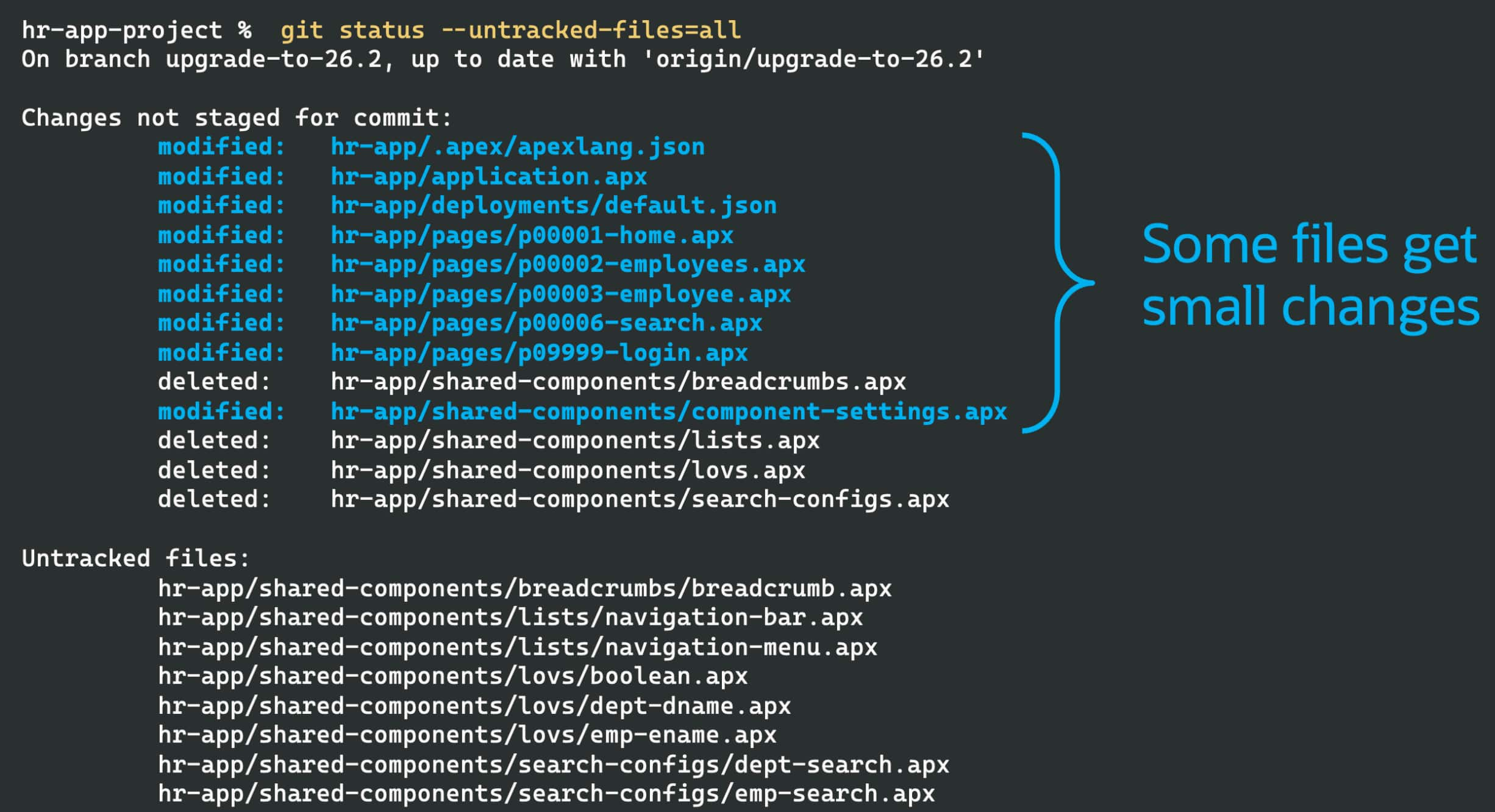
After an APEX upgrade, exporting your app in APEXlang may produce source code changes like:
- The version number in the hidden file
.apex/apexlang.jsonalways changes. - Components previously stored in a single file may now be in separate files.
- Default, redundant, or obsolete content may be omitted to improve readability.
- Files or directories may be renamed, added, or removed as structures evolve.
If your team stores APEXlang files in a Git repository as the definitive copy of your app, import and re-export each app after upgrading APEX as described below. Do this before modifying the app using the new release. Otherwise, your files stay in an older APEXlang structure and you cannot use the new APEX release’s latest features.
By doing the re-export right after an APEX upgrade, you isolate the structural changes into a single commit, separate from unrelated app changes for features or fixes.
Tip: If you primarily develop apps in the App Builder and periodically export in APEXlang format to retain project history, your next app export will use the latest APEXlang format.
Re-Export Your App to Upgrade Format
Once you’ve installed a new APEX release, upgrading your app’s APEXlang format is simple. Just export the app again using the new release. You can do this using the APEX App Builder, or you can use SQLcl’s apex export command with the -force flag. In the example below, we change directory to hr-app-project, then start SQLcl using a predefined named connection called dev. It contains the credentials for the parsing schema of your development environment’s APEX workspace.
$ cd hr-app-project
hr-app-project$ sql -name dev
SQL> apex export -applicationid 12345 -exptype apexlang -force
SQL> exit
The -force option removes any “orphan” files that are no longer part of the new export. For example, when moving from APEX 26.1 to 26.2, several kinds of shared components change from all being listed in a single .apx file to instead each occupying its own separate .apx file.
Importing, then Exporting the Latest Version from Source Control
If the latest state of your app is already checked into a source control system like Git – for example, in a repository named hr‑app‑project – then use the combination of apex import followed by apex export to upgrade the application. SQLcl uses the app’s current APEXlang version to validate and import it, then the apex export command writes it out in the upgraded format. Again, the -force option ensures any “orphaned” files get removed. In the example below, we change directory to the project repository root hr-app-project, then start SQLcl using a predefined named connection called dev.
$ cd hr-app-project
hr-app-project$ sql -name dev
SQL> apex import -input hr-app
SQL> apex export -applicationid 12345 -exptype apexlang -force
SQL> exit
If your team uses a formal review approach for development, you’ll perform the apex import and apex export steps above after first creating a new Git branch to work in. Then, after pushing the commits to the branch, you can create a merge request for a colleague to review and merge into your main branch.
Tip: New releases of SQLcl, ORDS, and the SQL Developer extension for Visual Studio Code accompany each new APEX release. Their latest versions are always equipped to handle the new APEXlang version, or any previous one. So, when upgrading to a new APEX release, always also upgrade SQLcl, ORDS, and the SQL Developer extension for VS Code.
Understanding Changes After an APEXlang Upgrade
Your first APEXlang upgrade may show a larger diff than you expect, but these changes don’t affect how your app behaves. Let’s study four areas where you may notice differences.
Your App’s Current APEX Version Changes
Each APEX release has a version number. On export, it’s recorded in your app’s .apex/apexlang.json file. This value lets the APEXlang compiler validate and import the app using the right set of rules about legal components and properties. For example, an app exported in APEX 26.1 has the following in its apexlang.json file:
{"mmdVersion" : "26.1.0+3102"}In contrast, after exporting your application using APEX 26.2, this file will change to:
{"mmdVersion" : "26.2.0+3479"}Shared Components Separated into Individual Files
Several kinds of shared component definitions used to list all occurrences in a single .apx file. Now each one is grouped into an appropriately named new directory as a separate .apx file. Affected component types include List of Values, Lists, Breadcrumbs, Data Load Definitions, Report Layouts, Report Queries, Search Configurations, Email Templates, JSON Sources, and Duality View Sources.
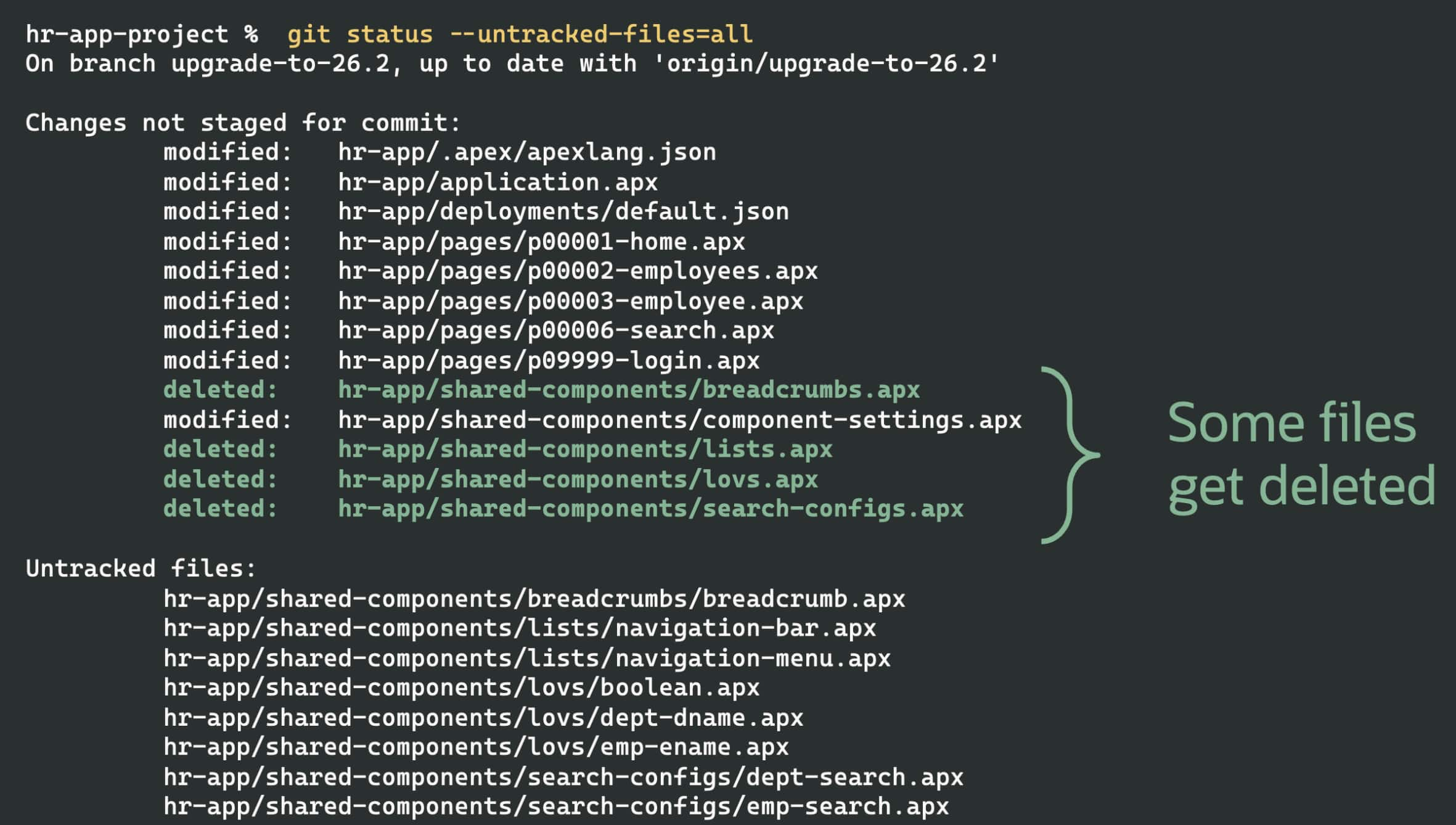
The figure below shows an example after upgrading a simple hr-app application that contains LOVs, lists, breadcrumbs, and search configurations. Notice that the breadcrumbs.apx, lists.apx, lovs.apx, and search-configs.apx files get deleted.
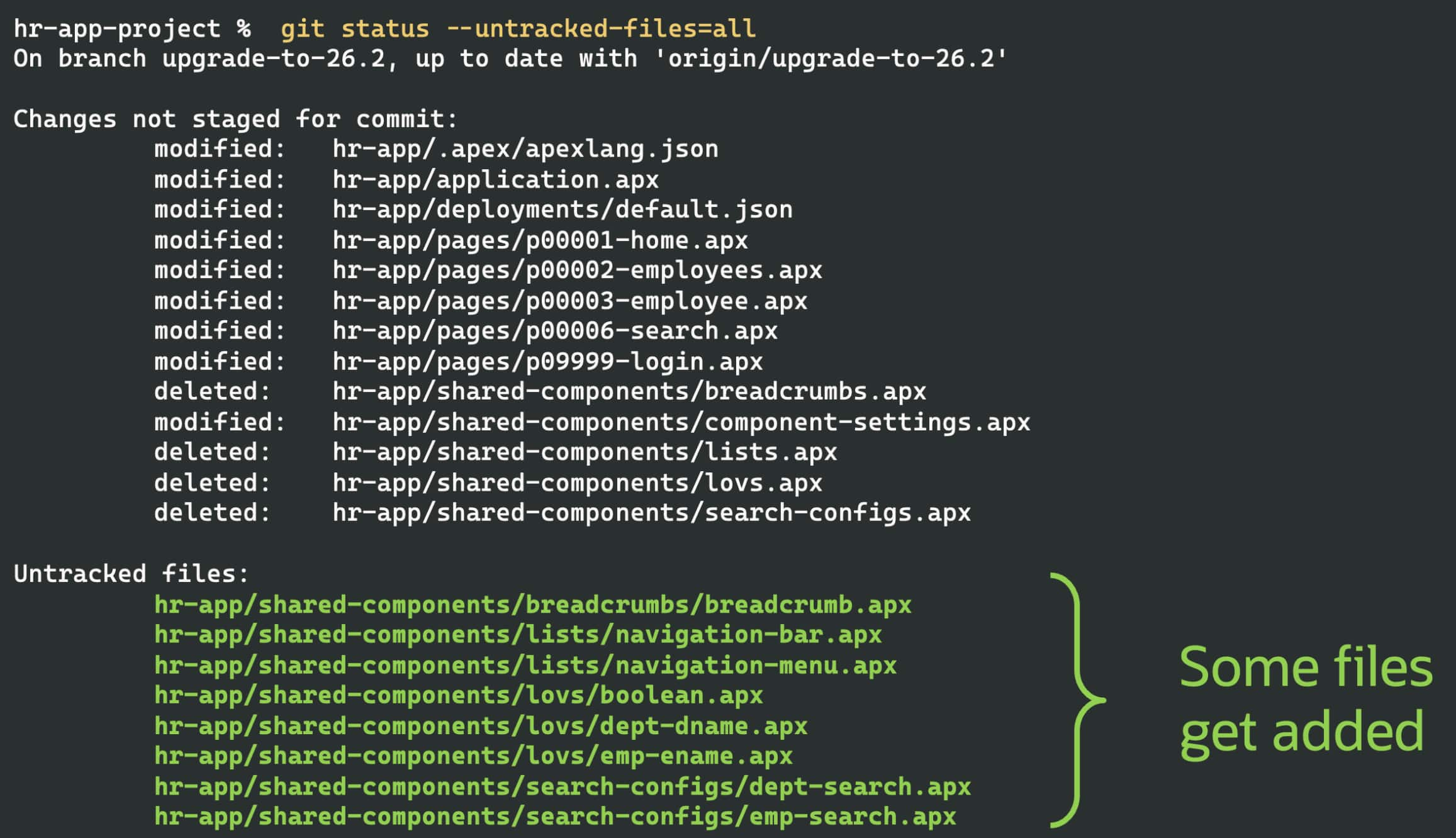
In their place, as shown below, new .apx files are created for each shared component, organized into new directories named breadcrumbs, lists, lovs, and search‑configs.
Changed Defaults Lead to More Concise Files
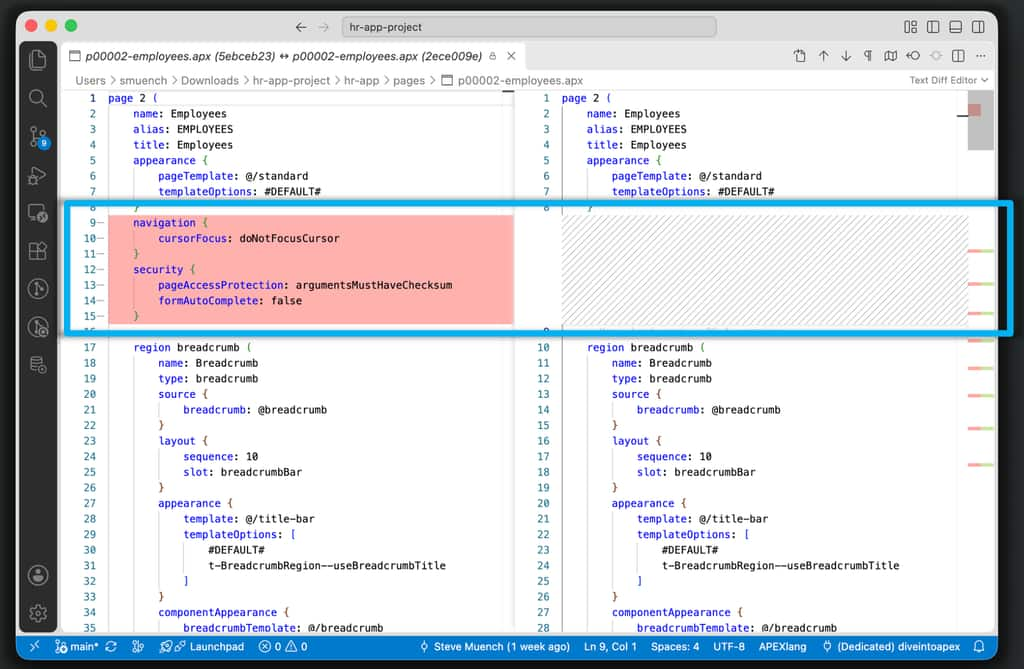
Some APEXlang property default values have been optimized to align with the initial value used by APEX App Builder wizards. Since properties assigned to their default value are omitted from the .apx file, this can mean certain properties (and sections containing them) may get deleted from your existing .apx files.
For example, notice in the VS Code diff viewer below for the p00002-employees.apx file that the navigation.cursorFocus property, and the pageAccessProtection and formAutoComplete properties in the security group were removed when the application was exported in APEX 26.2. This occurred since the previous values now represent the new defaults for these properties in APEXlang 26.2. Therefore, APEX omits them from the file for brevity.
New Directories Introduced
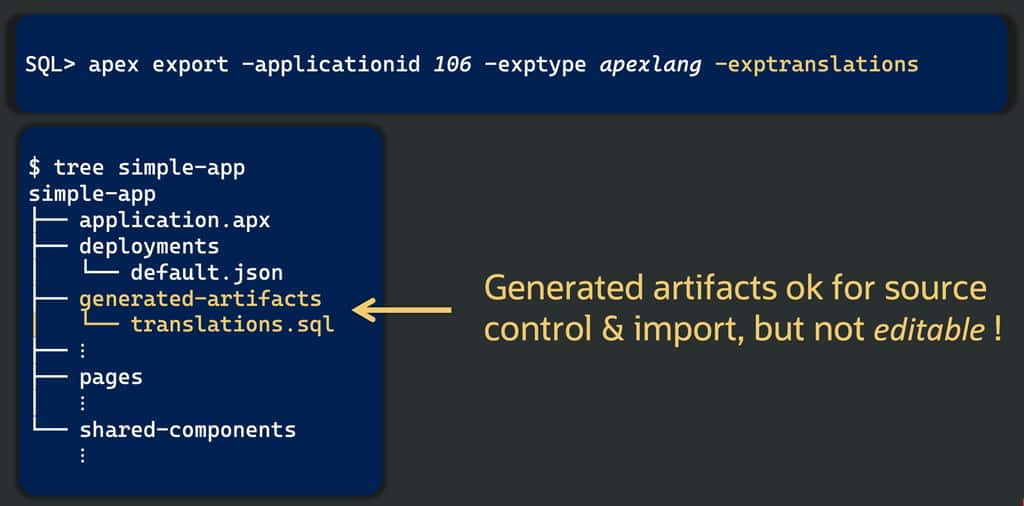
In addition to the new shared component directories mentioned above, a new directory like generated-artifacts may appear in your project after the upgrade. It contains .sql files reflecting translation repository strings for multilingual applications and may contain other similar .sql files.
Caution: Unlike other files in an APEXlang project, those in the
generated-artifactsdirectory are not editable.
Summary
Upgrading your app’s APEXlang format takes just a re-export with the new APEX release, or an import followed by an export when your source of truth lives in Git. Do it right after upgrading APEX, commit the structural changes on their own, and you’re ready to use the new release’s latest features.
Watch the demo
Upgrading APEXlang for a New APEX Release