

Oracle APEX 26.2 introduces several new features and enhancements. In this blog, we will take a closer look at four notable updates:
- Enhancements to APEXlang Imports
- Preserving Application-Based Translations in APEXlang Exports
- Simplifying APEXlang Imports with Subscription Mapping
- Public APIs for Application Locking and Working Copies.
- Enhanced Mail Queue Reporting in Instance Administration.
- Removal of REST Workshop and the transition to SQL Developer Web for REST API authoring.
1. Enhancements to APEXlang Import
a) Preserving Application-Based Translations in APEXlang Exports
Oracle APEX 26.2 now includes the translation repository in an APEXlang export. The translation data is packaged as SQL artifacts, together with the APEXlang application export.
During import, APEX uses the application component information in the export to connect each translation record to the right component. This works for the two import paths that matter most:
- Installing the application as a new application.
- Replacing an existing application with an updated APEXlang import.
For a replacement import, APEX retains the internal identities of translatable components. This allows existing translation records to stay connected to the correct regions, items, buttons, shared components, and other translatable parts of the application.
For a new installation, APEX establishes the translation repository for the newly created application and resolves the component references during import.
The result is the same in both cases: translation data remains connected to the application instead of becoming a separate migration task.
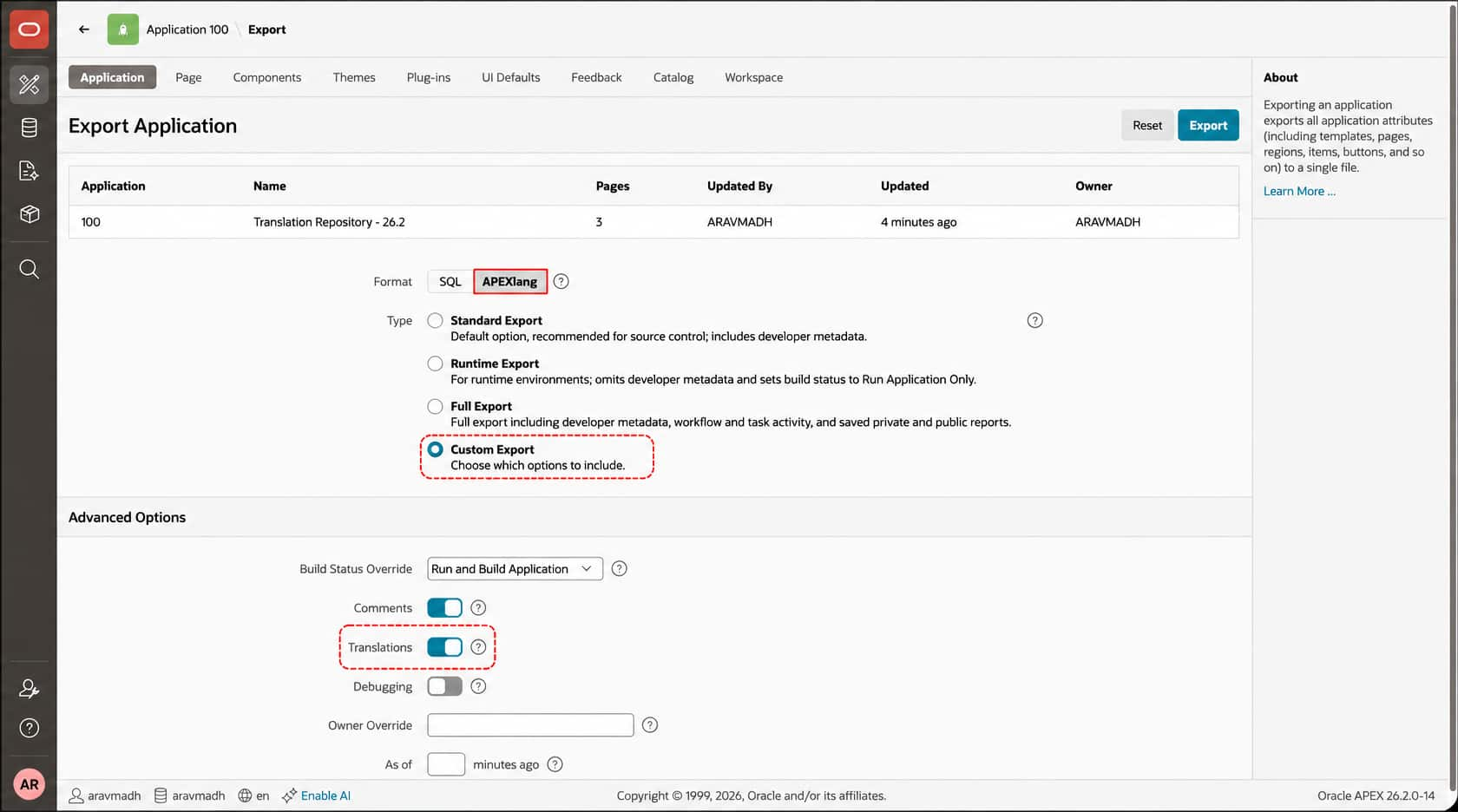
From App Builder
App Builder → Select your application → Export → APEXlang → Custom Export → Toggle Translation → Export
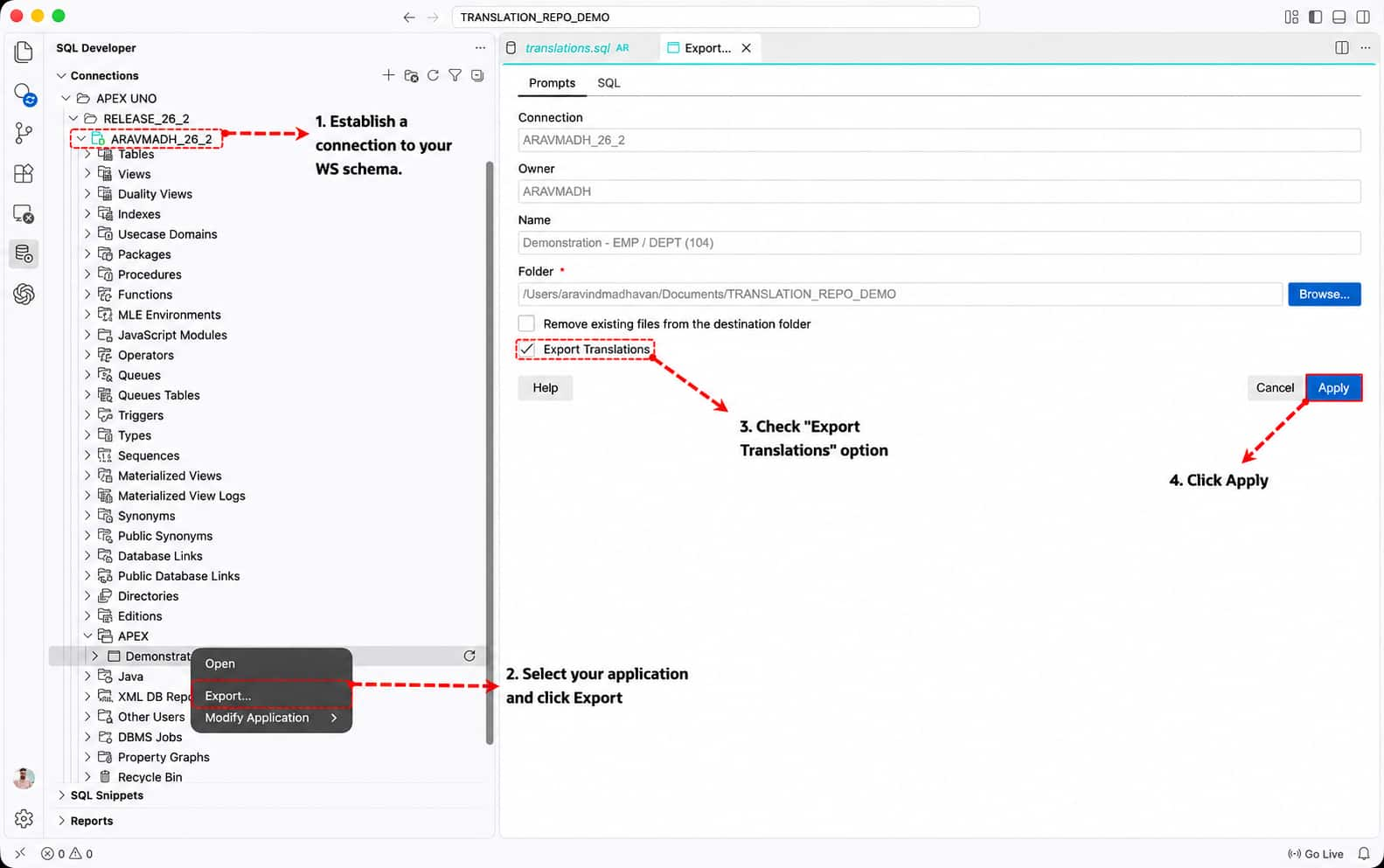
Using the SQL Developer Extension
Requires APEX 26.2 and SQL Developer Extension 26.3.0.
Using SQLcl Command Line
Requires SQLcl 26.3.
---- EXPORT ----
apex export -applicationid <application_id> -exptype APEXLANG -expTranslations -dir "<directory>"

Ex:-
apex export -applicationid 104 -exptype APEXLANG -expTranslations -dir "/Users/Downloads/apex_exports"

---- IMPORT ----

apex import -input "<directory>"

Ex:-
apex import -input "/Users/Downloads/apex_exports/demonstration-emp-dept"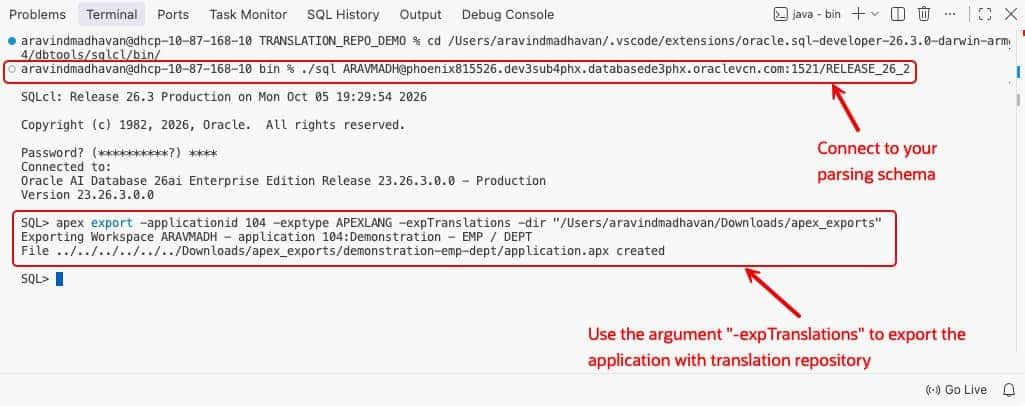
Each option creates the same APEXlang export directory with a generated-artifacts folder containing a translations.sql file for the application’s translations and language mapping under application.apx
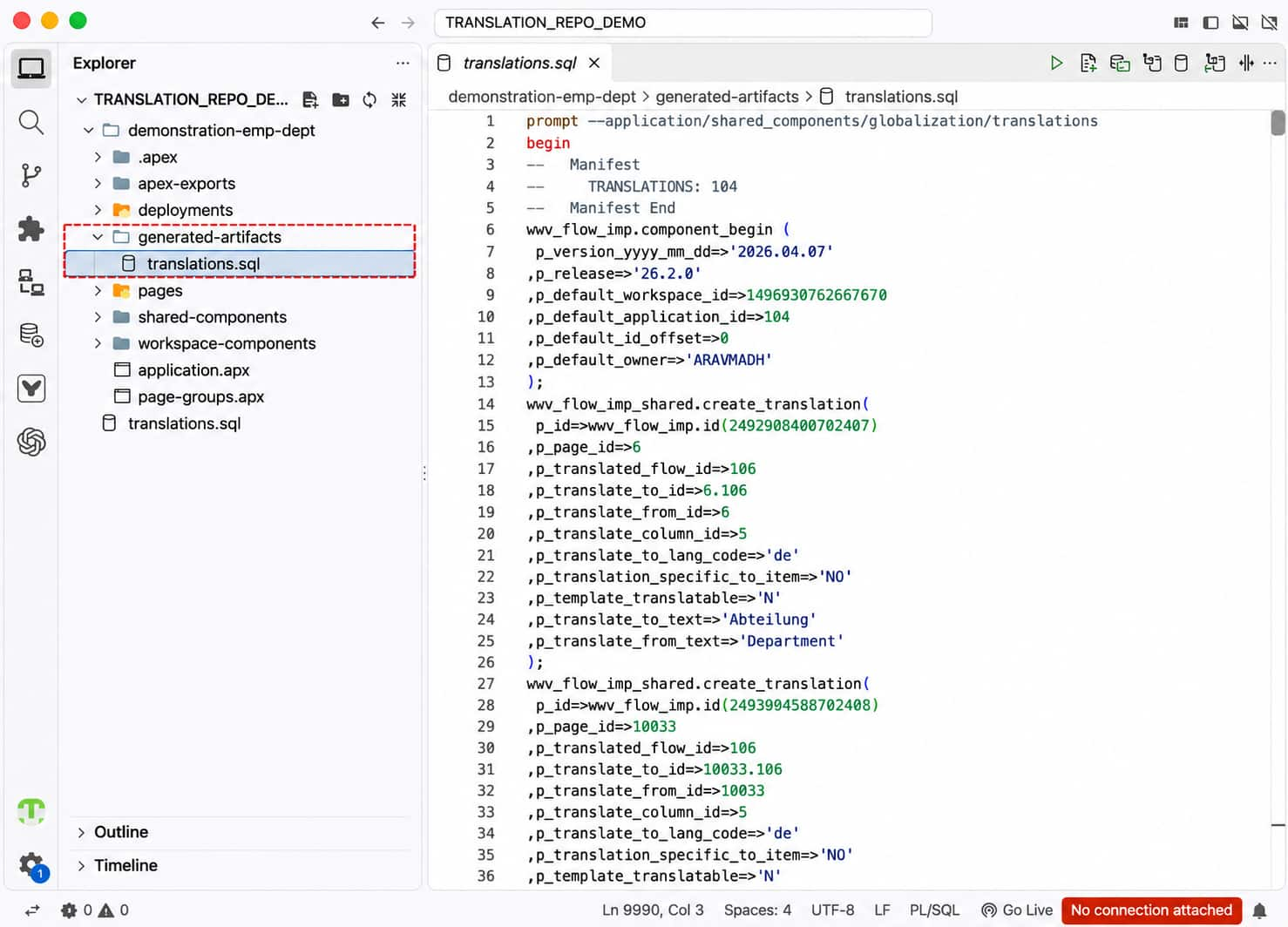
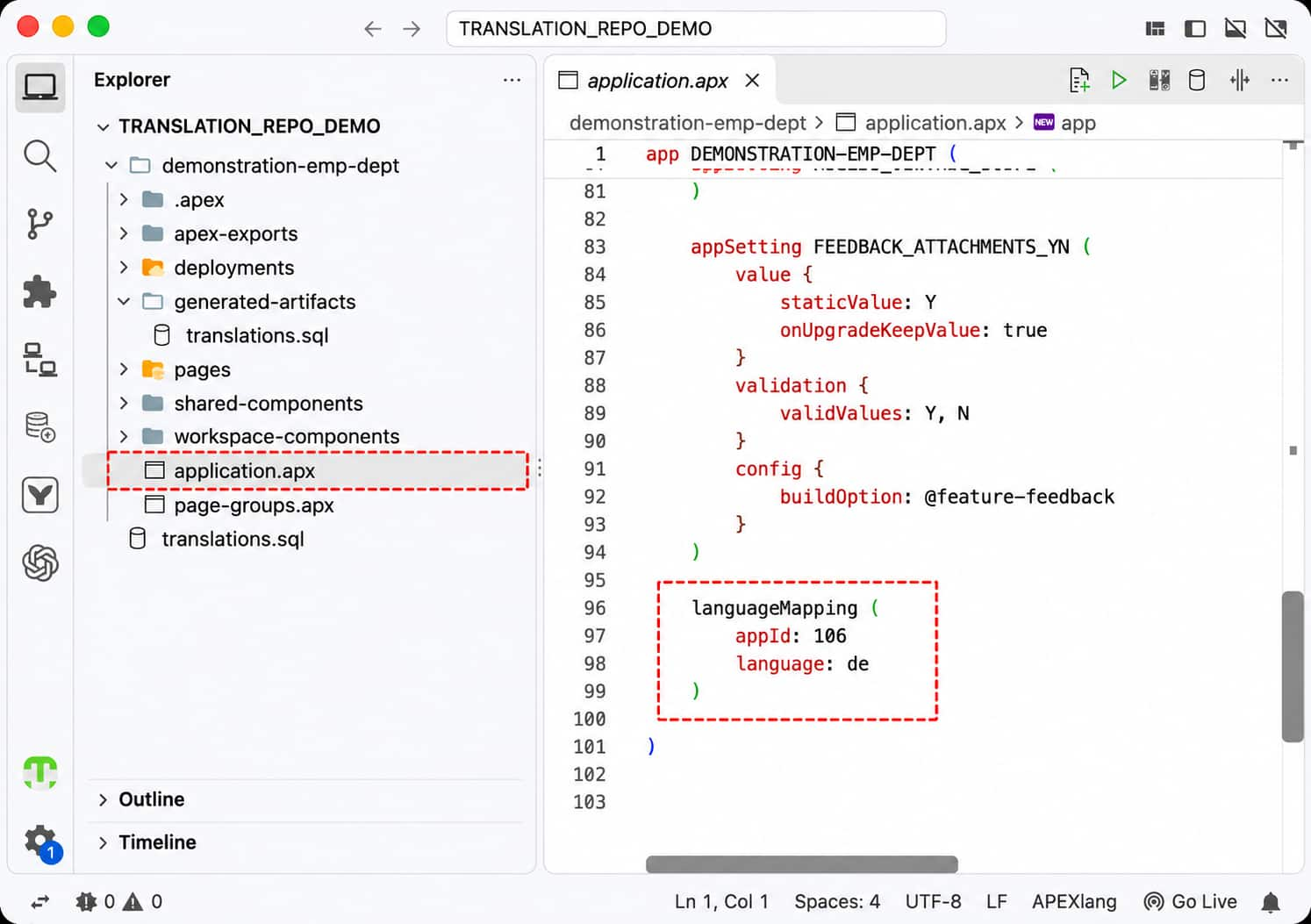
application.apxNote: Translation support requires APEX 26.2. Use SQL Developer Extension for VS Code v26.3 or SQLcl v26.3.
b) Simplifying APEXlang Imports with Subscription Mapping
When you import an APEXlang application in App Builder, Oracle APEX now checks whether the exported application contains master application IDs that need to be mapped.
The import flow is deliberately simple:
- If no mapping is needed, select Install and continue with the import.
- If mappings are needed, App Builder shows Next instead. It takes you to the existing subscriptions step, where you map the source master application IDs to the applications in the target workspace.
There is no new mapping page to learn. The enhancement reuses the existing subscription-mapping interface, including the subscription-mode settings and validation that developers already use for SQL imports.
The existing APEXlang requirements for ORDS and the workspace REST configuration still apply. This change only makes sure the import follows the correct path when subscriptions need attention.
In the example below, the child application subscribes to shared navigation and authorization components from a master application.
In the development workspace, the master application is 700. In the test workspace, it is 800.
When you import the APEXlang export into a different workspace, App Builder detects the reference to application 700. Instead of allowing a direct install, it opens the familiar subscription-mapping step. You map 700 to 800, choose the appropriate subscription mode, and continue.
The imported components now point to the correct master application in the test workspace.
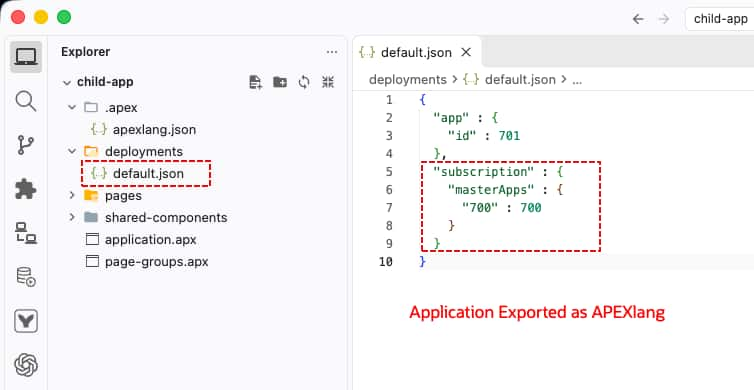
default.json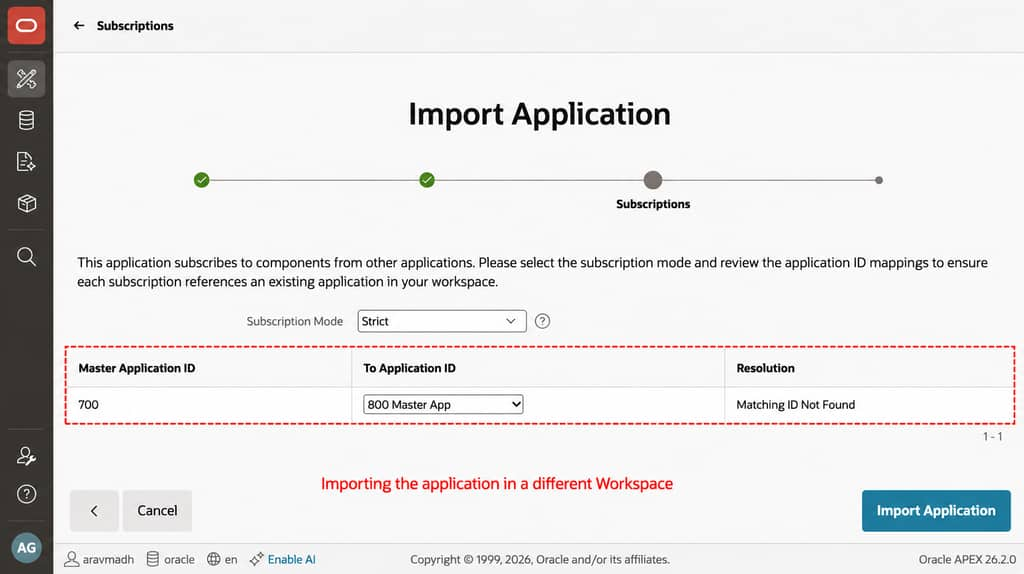
2. Application Locking and Working Copy APIs
Oracle APEX 26.2 introduces public PL/SQL APIs in APEX_APPLICATION_ADMIN to lock and unlock applications and create Working Copies programmatically. These APIs support scripted development workflows, including SQLcl Projects, reducing the manual steps required in App Builder.
APEX_APPLICATION_ADMIN.LOCK_APPLICATION | Lock the Main application to control editing access in App Builder. |
APEX_APPLICATION_ADMIN.UNLOCK_APPLICATION | Unlock an application. |
APEX_APPLICATION_ADMIN.CREATE_WORKING_COPY | Create a Working Copy of the Main application. |
A Working Copy is a copy of an application’s definition where changes can be made and tested before selected changes are merged into the Main application.
These new APIs allow application locking and Working Copy creation to be included in command-line workflows, particularly SQLcl Projects. This supports AI-assisted development and CI/CD automation through documented public PL/SQL APIs. For example, when an AI coding assistant is asked to add a manager approval page to an expense application, it can first call CREATE_WORKING_COPY through SQLcl. The changes can then be applied to the Working Copy for review and testing before selected changes are merged into the Main application. CI/CD scripts can also call LOCK_APPLICATION to restrict App Builder editing while an application update is in progress, then call UNLOCK_APPLICATION when the update is complete.
For more information, see About Working Copies and the CREATE_WORKING_COPY API reference .

3. Enhanced Mail Queue Reporting
Oracle APEX 26.2 expands the Mail Queue page into a dashboard for monitoring email delivery and troubleshooting delays and errors across workspaces. For example, if managers are not receiving expense approval requests, an instance administrator can find the queued emails, review send errors, and check whether the workspace has reached its email delivery limit. Reports and charts bring these details together to help identify potential blockers and review email delivery performance.
Open Administration Services → Manage Instance → Manage Meta Data → Mail Queue to explore the following tabs.
a) Mail Queue Overview
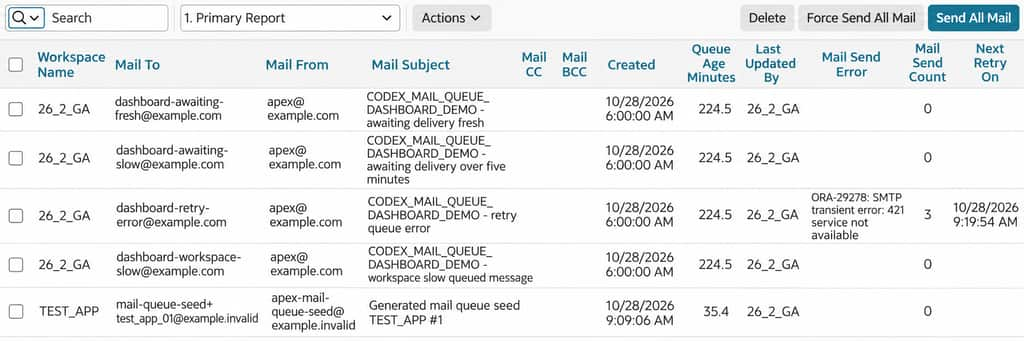
Use the interactive report to find queued emails by workspace, recipient, or subject. For each email, review how long it has been in the queue, how many times APEX has attempted to send it, the latest send error, and when the next retry is scheduled. Saved reports provide quick access to emails awaiting delivery, emails waiting longer than five minutes, and emails with delivery errors.
b) Mail Queue Metrics Dashboard
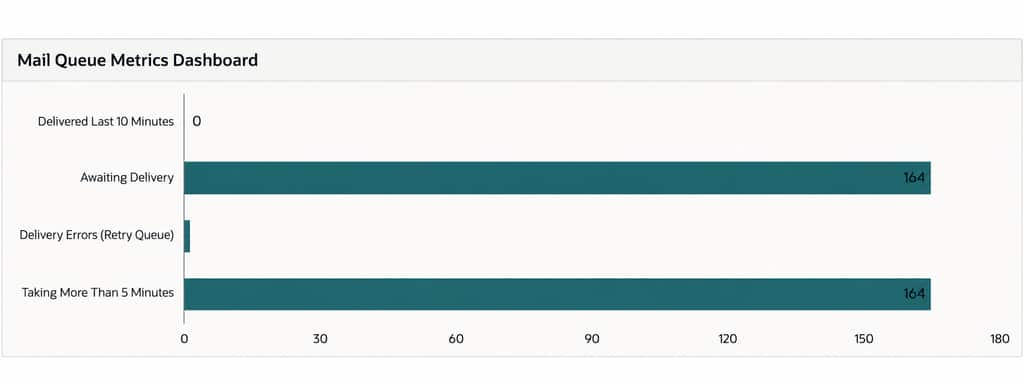
Check recent delivery activity alongside the current backlog: emails delivered in the last 10 minutes, emails awaiting delivery, emails with delivery errors in the retry queue, and emails waiting longer than five minutes. These metrics help administrators identify whether email delivery is progressing or whether queued messages, errors, or longer waits need attention.
c) Operational & Triage
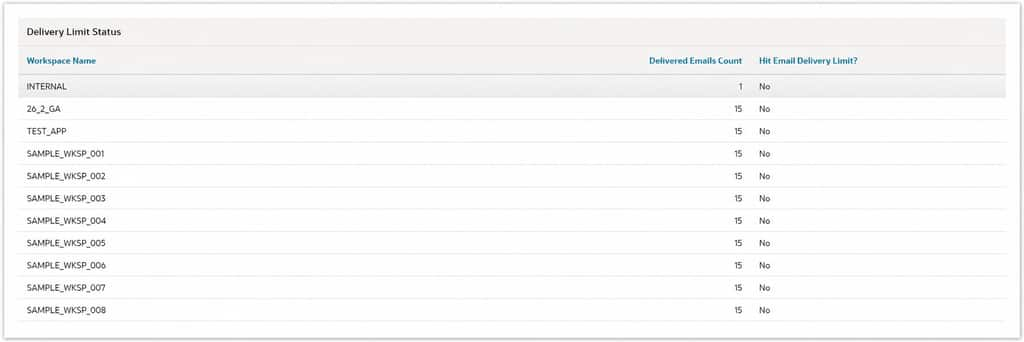
Review workspace reports to identify high email volumes, emails that took longer than five minutes to deliver, and workspaces that reached their email delivery limit in the last 24 hours. Delivery timestamps and durations help administrators investigate delays, while delivery-limit information helps explain why a workspace cannot send additional emails.
d) Trending
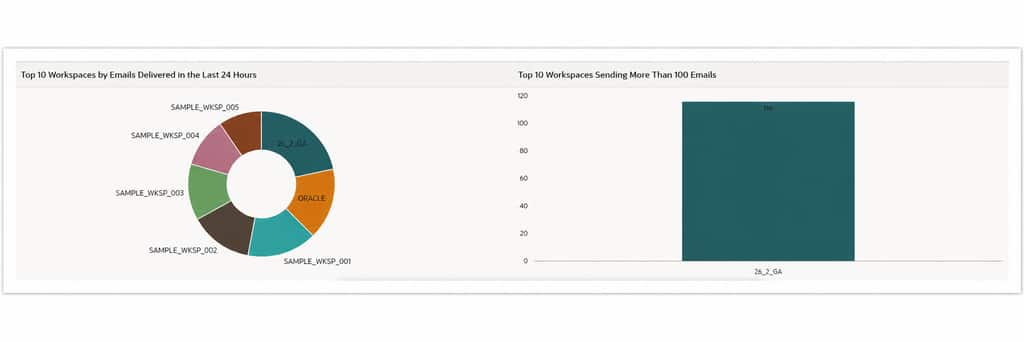
Compare email activity across workspaces using charts of the top 10 workspaces by emails delivered in the last 24 hours and workspaces sending more than 100 emails. These charts help administrators identify which workspaces account for the highest email volumes.
e) Monitoring
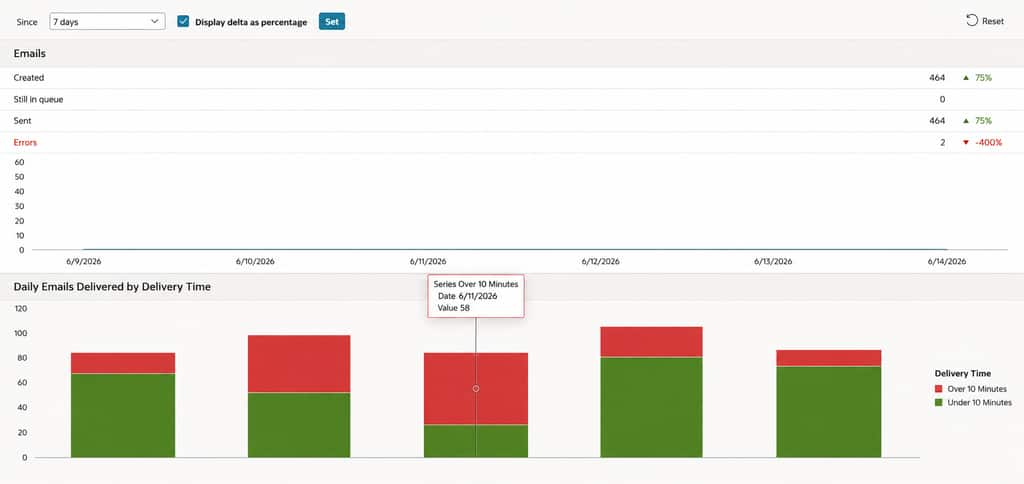
Review the Emails Sent Summary for a selected period to see emails created, queued, sent, and with delivery errors. Compare these counts with the previous equivalent period, using counts or percentages to see changes in email activity. Daily delivery charts show how many emails were delivered in under or over 10 minutes, helping administrators review delivery performance over time.
4. Manage REST APIs in SQL Developer Web
Oracle APEX 26.2 removes REST Workshop, the RESTful Services authoring interface in SQL Workshop. REST API authoring moves to SQL Developer Web, providing a consistent place to create and maintain Oracle REST Data Services (ORDS) APIs. Existing ORDS REST modules and metadata remain available for management in SQL Developer Web. See Desupported Features
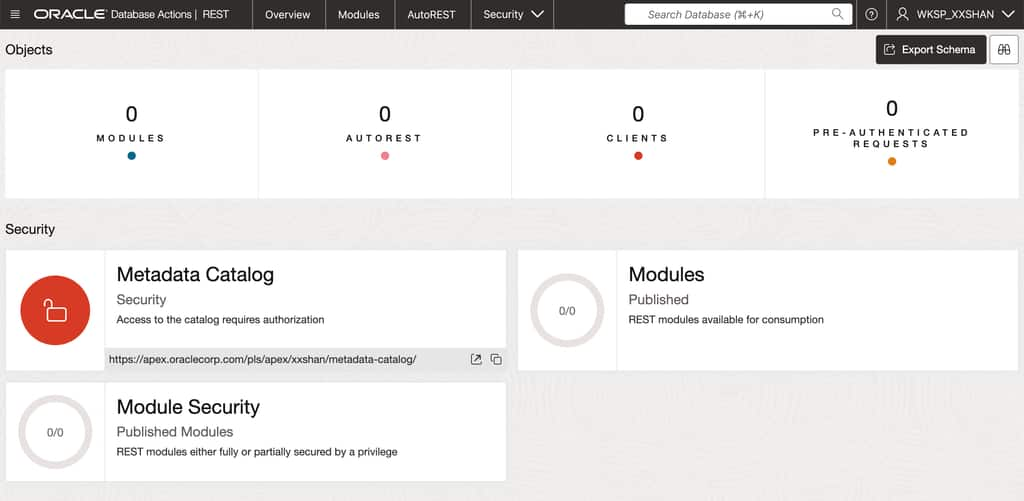
APEX continues to support consuming REST services through REST Data Sources. APEX applications can use those sources to bring REST service data into reports, charts, and other components.
Creating or managing ORDS REST APIs in SQL Developer Web requires a REST-enabled database schema.
- Open SQL Workshop → SQL Developer Web. APEX lists the accessible workspace schemas and shows whether each is REST-enabled.
- If the schema is not REST-enabled, select Enable, configure its ORDS Schema Attributes, and save.
- Select the schema name to open SQL Developer Web and create or manage its ORDS REST APIs.
For a REST-enabled schema, select Configure to change its REST access settings or schema alias.
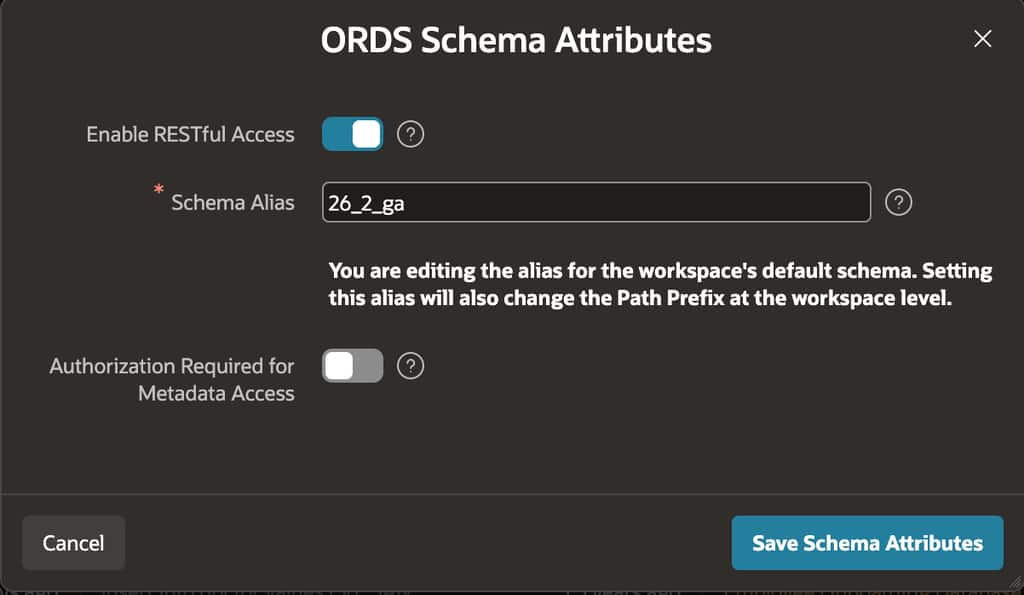
SQL Developer Web must be enabled in Administration Services, the selected schema must be REST-enabled, and ORDS must run over HTTPS. For more information, see the SQL Workshop Guide and desupport guidance.
Summary
Oracle APEX 26.2 introduces enhancements that simplify application development and administration. Key updates include preserving translations during APEXlang imports, improved subscription mapping, new public APIs for application locking and Working Copies, enhanced Mail Queue reporting for monitoring email delivery, and centralized REST API management through SQL Developer Web.