
Why This Was More Than Email Automation
The project began with a practical workflow: read incoming business emails, generate draft replies, and let users review them before sending. The engineering goal, however, was broader. The implementation was designed as a reusable framework where email ingestion, message storage, prompt construction, model invocation, human review, and observability are separate capabilities that can evolve independently.
That separation matters. A one-off automation tends to hardcode message formats, model prompts, vendor assumptions, and UI behavior into a single flow. This framework instead uses database-driven configuration, canonical message storage, provider-neutral GenAI orchestration, and administrative controls. That makes the same foundation reusable for additional email categories, departments, model providers, training datasets, and future AI-assisted workflows.
Design principle: the application never asks the model to own the workflow. The database and APEX application own identity, state, permissions, message history, validation, auditability, and final user actions. GenAI is used as a controlled reasoning and drafting service inside that enterprise boundary.
What This Series Will Cover
This post introduces the architecture problem: AI-assisted email workflows are useful only when they are grounded in trusted enterprise data, validated server-side, observable, and reviewable by humans. A quick model call is not enough for production use; the capability needs a framework.
The rest of this series goes deeper into the individual capabilities that make the framework reusable and supportable:
- GenAI Email Oracle APEX Framework – Architecture Overview (this post)
- GenAI Email Oracle APEX Framework – Outlook Integration
- GenAI Email Oracle APEX Framework – GenAI Orchestration
- GenAI Email Oracle APEX Framework – APEX Application Layer
- GenAI Email Oracle APEX Framework – Deployment Guide
What GenAI Is Useful For
Generative AI is a class of AI designed to produce new content from context and instructions. In this framework, it is used to draft email replies by combining the latest incoming message, previous conversation context, business-specific examples, and model instructions.
GenAI is especially useful for language-heavy tasks where the output needs to be drafted, summarized, rewritten, classified, or adapted to a tone or format. It is not a replacement for the system of record, business validations, permissions, or final human judgment. The framework therefore uses GenAI as a drafting assistant inside a controlled application workflow.
- Good fit: drafting replies, summarizing threads, extracting intent, rephrasing text, checking overlap in training examples, and generating first-pass content.
- Not a good fit by itself: deciding trusted recipients, bypassing workflow approvals, replacing database validation, or sending external communications without review.
The Architecture
The framework is organized into five main layers. Each layer has a narrow responsibility, which keeps the implementation testable, extensible, and easier to package as a platform capability.
The framework’s AI Gateway is the database-tier integration boundary for both OCI Generative AI chat models and OCI text-embedding models. In this architecture, the gateway is implemented by the MANAGE_GEN_AI and MANAGE_EMBEDDINGS PL/SQL packages; it is not a separate hosted gateway service.
MANAGE_GEN_AI package assembles prompts, sends chat requests, normalizes responses, and records chat usage. MANAGE_EMBEDDINGS package calls the configured remote OCI embedding service to generate vectors for valid training questions and runtime query text. During vector retrieval, MANAGE_GEN_AI obtains the query vector through MANAGE_EMBEDDINGS, searches GENAI_MODELS_DETAIL_VECTOR table for the nearest valid Q&A examples, and adds the selected examples to the chat prompt. Chat calls and embedding/vector-search operations are recorded separately in GENAI_USAGE_TRACKING and GENAI_VECTOR_USAGE_TRACKING tables.
Outlook ingestion, canonical email storage, and the APEX human-review workflow remain separate layers. This keeps email state and user approval in the application while the AI Gateway coordinates both model paths inside the database tier.
Scope note: This series focuses on the framework architecture, database packages, APEX layer, Microsoft Graph integration, and GenAI orchestration. It does not include the environment-specific security and network changes that may be required in a real deployment, such as inbound or outbound network rules, private endpoint configuration, proxy server setup, firewall rules, corporate routing, DNS changes, TLS inspection policies, or security approvals. Those controls are deployment-specific and should be handled through the standard infrastructure and security processes for the target environment
Chat inference and embedding inference use separate region settings. The database region is determined by the deployment environment and is not set by the APEX export. See the Deployment Guide for environment-specific defaults and model-catalog discovery details.
- Ingestion: Connects to Outlook through Microsoft Graph, retrieves unread messages, stages them, and marks processed messages as read.
- Canonical Store: Persists email metadata, body content, conversation identifiers, generated replies, and processing flags in relational tables.
- Context Builder: Splits the latest message from history, normalizes HTML and plain text, and builds structured prompt sections for the model.
- AI Gateway: Coordinates OCI GenAI chat and OCI text-embedding requests. It builds provider-specific chat payloads and normalizes chat responses; it also generates vectors for valid training questions and runtime queries through the configured OCI embedding service, retrieves the closest valid examples, and records chat and vector usage separately.
- APEX Experience: Provides administration, testing, diagnostics, dashboards, email review, saving, and sending workflows.
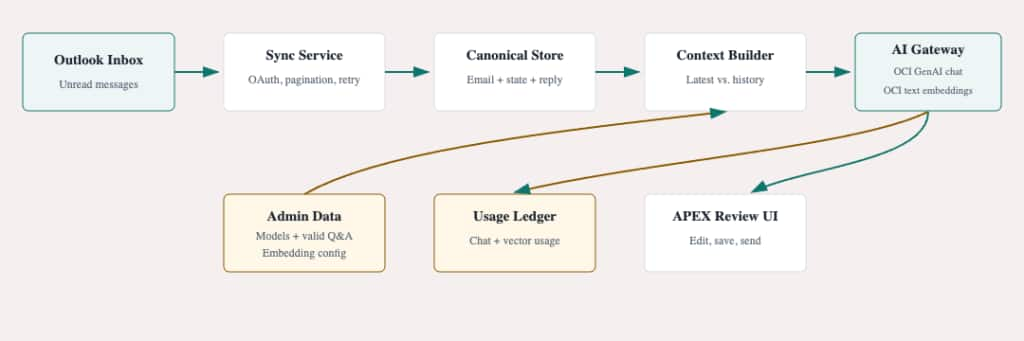
The framework keeps mailbox access, data persistence, prompt context, model invocation, human approval, and observability as separate concerns.
Minimal runtime footprint: Runtime orchestration remains in Oracle Database, PL/SQL, and APEX. The application makes outbound calls to Microsoft Graph for mailbox operations, OCI Generative AI for chat responses, and the configured OCI embedding service for training-question and runtime-query vectors. No separate application server, worker host, or AI proxy is required.
Core Data Model
The framework is data-driven. Business behavior is configured in tables rather than scattered across UI code. The most important data categories are:
| Entity | Description |
| Email staging | Temporary holding area for Microsoft Graph responses before merge and normalization. |
| Canonical email records | Durable source of email metadata, body content, conversation IDs, processing state, and generated reply bodies. |
| Model headers | Stores model vendor, version, model identifier, and general instructions. |
| Training examples | Stores representative incoming messages and desired replies used to guide model behavior. |
| Embedding vectors | Stores vectors for valid training questions in the separate GENAI_MODELS_DETAIL_VECTOR table. MANAGE_EMBEDDINGS generates them through the configured remote OCI embedding service. |
| Usage tracking | Captures chat-model usage, user/session context, token counts, request and response sizes, status, and errors in GENAI_USAGE_TRACKING. |
| Vector Search usage tracking | Records embedding-generation and vector-search activity in GENAI_VECTOR_USAGE_TRACKING table; those metrics are available on the vector-usage dashboard. |
Technical Contract Between Layers
The design becomes reusable because each layer exchanges a small, stable contract instead of sharing internal implementation details. The email workflow does not need to know how OAuth works. The model gateway does not need to fetch Outlook messages. The review UI does not need to build provider-specific JSON.
| Mailbox-to-store contract: Persist each message with a workflow type, source message ID, conversation ID, timestamp, subject, sender, recipients, body content, and processing state. | Store-to-AI contract: Generate a reply from trusted identifiers: workflow email type, email ID, selected vendor and version, and optional end-user trace context. |
| AI-to-review contract: Return the suggested reply body as Markdown after response cleanup, with chat usage recorded before the result reaches the APEX page. | Review-to-send contract: Compose the outgoing message from database-backed recipients and subject; use the user-edited reply body as the only user-controlled content. |
Example of framework-level call using the real service entry point:
l_reply_body := manage_gen_ai.get_email_answer( p_vendor => l_vendor,
                                               p_version => l_version,
                                               p_email_id => l_email_id,
                                               p_email_type => 'EMAIL_TO_SALES',
                                               p_end_user => l_end_user );
-- The service uses the selected email and settings to prepare a suggested reply.
-- The application records the request and returns the draft for review.

-- On an APEX page, the application supplies these values from its validated
-- settings. The names of those settings vary by page
End-to-End Flow
- An administrator or user triggers email synchronization for a configured email workflow.
- The system authenticates to Microsoft Graph, retrieves unread inbox messages, stages the payloads, and merges them into canonical email storage.
- A user opens an email review experience and selects a configured model vendor/version.
- The system validates the selected email and model server-side, then builds the prompt from trusted database state.
- The latest email is separated from prior conversation context, HTML content is converted where needed, and structured prompt delimiters identify the message to answer versus background context.
- The model gateway retrieves instructions and examples, optionally using vector similarity to select the closest examples.
- The provider-specific OCI request is generated and sent.
- The response is extracted, cleaned, and returned as an editable draft reply.
- The user can save the draft, revise it, or send it using the application workflow.
- Every model call is recorded for audit, diagnostics, and usage analytics.
Example Extension Scenario
Because the workflow type is a routing key, adding another email-assisted business process does not require rewriting the architecture. A new workflow can reuse the same ingestion, storage, AI gateway, usage tracking, and review pattern while changing only configuration, filtering, instructions, and training examples.
New workflow onboarding checklist:
1. Define an EMAIL_TYPE value in EMAIL_READ, for example EMAIL_TO_SALES.
2. Call MANAGE_OUTLOOK_MAIL.sync_unread_emails with that email type.
3. Configure a row in GENAI_MODELS_HEADER with the vendor, version, model name, and instructions.
4. Add representative examples in GENAI_MODELS_DETAIL.
5. Refresh vectors for valid training questions with MANAGE_EMBEDDINGS.update_embedding_vector. The procedure uses the configured remote embedding service.
6. Reuse the review pattern that calls MANAGE_GEN_AI.get_email_answer.
7. Monitor chat calls in GENAI_USAGE_TRACKING and embedding-generation/vector-search activity in GENAI_VECTOR_USAGE_TRACKING through the chat-usage and vector-usage dashboards.
This scenario describes a possible future extension; it is not a second workflow delivered in the current application export. The current APEX queue and email-detail page process EMAIL_TO_SALES. To make another workflow available, add its APEX queue filters, navigation, and review/send behavior, and configure the corresponding model/version and training examples. Supporting another email type in the PL/SQL package alone does not add that workflow to the APEX user interface.
Security and Trust Boundaries
The framework treats browser-submitted values as untrusted. The UI can pass identifiers and user choices, but the database layer re-validates email IDs, workflow type, vendor/version combinations, model selection, and action modes before performing DML or invoking external services.
This pattern is especially important for AI workflows. The generated reply is useful, but the application remains the system of record. Recipients, original email content, saved draft state, and send actions are derived from trusted database records rather than editable browser fields.
Operational Readiness
Observability was included as part of the architecture, not added later. Each model invocation records who triggered it, which model was used, what application context it came from, related email metadata, request size, response size, token usage, status, and error details. Dashboards and trace reports make the framework supportable in production and suitable for cost and quality analysis.
The result is a reusable enterprise capability: a controlled pattern for using GenAI in business workflows where data provenance, validation, auditing, and human approval are just as important as the generated text.
Key Takeaways
- Separate ingestion, storage, context preparation, model invocation, and user action into independent layers.
- Keep the runtime footprint small: Oracle Database and APEX orchestrate the workflow without additional virtual machines or background process hosts.
- Keep prompts and examples data-driven so model behavior can be changed without code releases.
- Use vector retrieval to scale from static examples to contextually relevant examples.
- Track every AI request for auditability, troubleshooting, and operational insight.
- Keep the human review step explicit when the output affects customer or stakeholder communication.
Further Reading
- OCI Generative AI documentation covers the managed GenAI service used by the framework for chat completions.
- OCI Generative AI text-embeddings explains how to create text embeddings with OCI Generative AI.
- OCI Generative AI models by region shows which models are available in each OCI region, including US Midwest (Chicago) and US West (Phoenix), including text-embedding models.
- Microsoft Graph Outlook Mail REST API documentation covers the mailbox APIs used for unread message synchronization.
- Oracle APEX documentation covers the application platform used for the human review and administration experience.
- The current implementation generates vectors through OCI embedding models using the configured remote embedding service; it does not download or run a local ONNX model. Evaluating and deploying an ONNX-based alternative is outside the scope of this project. If you are interested in ONNX models, you can go to Hugging Face.
- Oracle AI Vector Search User’s Guide is the official Oracle documentation for vector data, vector indexes, and vector search in Oracle AI Database.