
The APEX_AI.GENERATE API was introduced in Oracle APEX 24.1 and lets you generate a response from a given prompt. You can provide a prompt, select a configured Generative AI service, and control settings such as temperature. But what if you want to go a bit further and request a specific task based on a file, such as analyzing an image, extracting certain data, or summarizing text?
In Oracle APEX 26.1, APEX_AI.GENERATE can also work with attachments and tools, allowing the AI service to use uploaded files and registered tool callbacks as additional context.
How to Implement It
There are multiple use cases for this API; let’s review them.
Basic Case
Users can define the prompt and attach the files to be processed.
- Create a blank page in your APEX application.
- Create the following items:
- PX_PROMPT
- Type: Text Field
- Label: Prompt
- PX_INPUT
- Type: File Upload
- Label: Input
- Display As: Inline Dropzone
- Allow Multiple Files: Yes
- Storage Type: Table APEX_APPLICATION_TEMP_FILES
- Purge File at: End of Request
- PX_OUTPUT
- Type: Rich Text Editor
- Format: Markdown
- PX_PROMPT
- Create the following button:
- SUBMIT
- Label: Submit
- Action: Submit Page
- SUBMIT
- Create a page process. Copy and paste the following PL/SQL code:
declare
    l_attachments apex_ai.t_attachments := apex_ai.t_attachments();
begin
    for rec in (
        select mime_type,
               blob_content,
               filename
          from apex_application_temp_files
    ) loop
        l_attachments.extend;
        l_attachments(l_attachments.count).mime_type    := rec.mime_type;
        l_attachments(l_attachments.count).content_blob := rec.blob_content;
        l_attachments(l_attachments.count).file_name    := rec.filename;
    end loop;

    :PX_OUTPUT :=
        apex_ai.generate(
            p_service_static_id => 'your-ai-service',
            p_prompt            => :PX_PROMPT,
            p_attachments       => l_attachments
        );
end;
Finally, save and run the page.
Get a JSON Output
Use JSON output when your use case involves:
- Extracting fields such as customer_name, invoice_date, amount
- Classifying into fixed values such as priority, sentiment, and category
- Returning arrays/objects for later processing
- Storing the result in a JSON column
- Passing the response to another API/process without regex/string parsing
In this example, users will upload an image file to be analyzed to get three outputs:
- A description of the image
- A transcription of any text present in the image
- The list of colors in HEX format
- Create a blank page in your APEX application.
- Create the following items:
- PX_INPUT
- Type: File Upload
- Label: Input
- Display As: Inline Dropzone
- Storage Type: Table APEX_APPLICATION_TEMP_FILES
- Purge File at: End of Session
- PX_DESCRIPTION
- Type: Text Field
- Label: Description
- Read Only Type: Always
- PX_TEXT
- Type: Text Field
- Label: Text
- Read Only Type: Always
- PX_COLORS
- Type: Text Field
- Label: Colors
- Read Only Type: Always
- PX_INPUT
- Create the following button:
- SUBMIT
- Label: Submit
- Action: Submit Page
- SUBMIT
- Create a page process. Copy and paste the following PL/SQL code:
declare
    l_file        apex_application_temp_files%rowtype;
    l_attachments apex_ai.t_attachments := apex_ai.t_attachments();
    l_result      sys.json_object_t;
begin
    select *
      into l_file
      from apex_application_temp_files
     where name = :P3_INPUT;

    l_result := sys.json_object_t(
        apex_ai.generate(
            p_prompt               => 'Analyze the image',
            p_attachments          => apex_ai.t_attachments(
                apex_ai.t_attachment(
                    mime_type    => l_file.mime_type,
                    content_blob => l_file.blob_content,
                    file_name    => l_file.name
                )
            ),
            p_response_json_schema => q'~{
                "type": "object",
                "properties": {
                    "description": {
                        "type": "string",
                        "description": "A brief description of the image."
                    },
                    "text": {
                        "type": "string",
                        "description": "Transcribe any text present in the image."
                    },
                    "colors": {
                        "type": "string",
                        "description": "The colors present in the image, as comma delimited hex values."
                    }
                },
                "required": [
                    "description",
                    "text",
                    "colors"
                ],
                "additionalProperties": false
            }~'
        )
    );

    :P3_DESCRIPTION := l_result.get_string('description');
    :P3_TEXT        := l_result.get_string('text');
    :P3_COLORS      := l_result.get_string('colors');
end;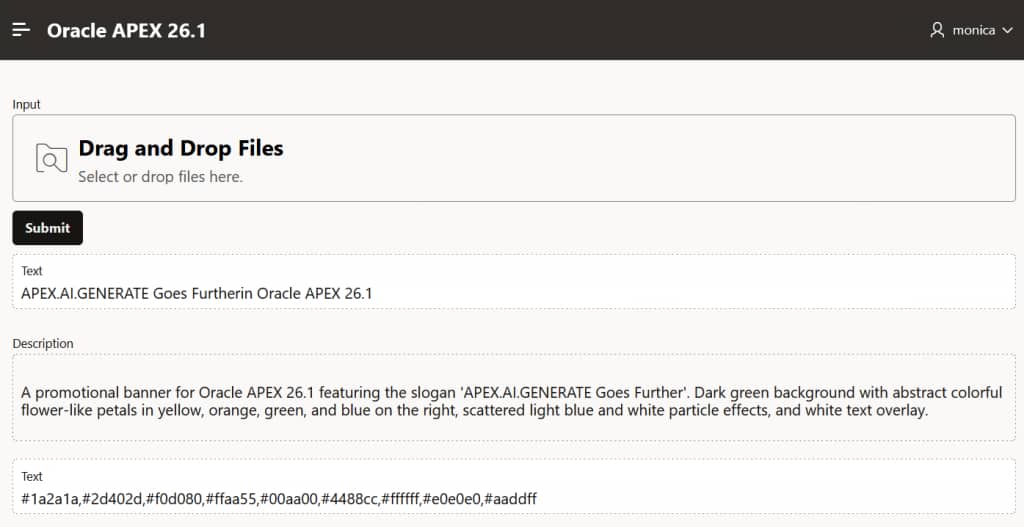
Integrated with AI Tools
The following example shows how to register a tool that the AI model can call when it needs live data to answer a prompt. For this, you need to create the following database objects:
-- fx_convert_currency - Performs the actual currency conversion.
create or replace function fx_convert_currency (
    p_amount in number,
    p_from   in varchar2,
    p_to     in varchar2,
    p_date   in date default trunc(sysdate)
) return number
as
    l_url      varchar2(32767);
    l_response clob;
    l_json     json_object_t;
    l_rates    json_object_t;
    l_result   number;
begin
    if p_amount is null then
        raise_application_error(-20000, 'Amount is required.');
    end if;

    if p_from is null or p_to is null then
        raise_application_error(-20001, 'Both from_currency and to_currency are required.');
    end if;

    if upper(trim(p_from)) = upper(trim(p_to)) then
        return p_amount;
    end if;

    l_url :=
           'https://api.frankfurter.app/'
        || to_char(trunc(nvl(p_date, sysdate)), 'YYYY-MM-DD')
        || '?amount=' || to_char(p_amount, 'TM9', 'NLS_NUMERIC_CHARACTERS=.,')
        || '&from='   || upper(trim(p_from))
        || '&to='     || upper(trim(p_to));

    l_response := apex_web_service.make_rest_request(
        p_url         => l_url,
        p_http_method => 'GET'
    );

    l_json  := json_object_t.parse(l_response);
    l_rates := l_json.get_object('rates');

    if l_rates is not null and l_rates.has(upper(trim(p_to))) then
        l_result := l_rates.get_number(upper(trim(p_to)));
    end if;

    if l_result is null then
        raise_application_error(
            -20002,
            'No exchange rate returned for '
            || upper(trim(p_from)) || ' to ' || upper(trim(p_to))
        );
    end if;

    return l_result;
end fx_convert_currency;
/

-- convert_currency - Acts as the APEX AI tool callback procedure.
create or replace procedure convert_currency (
    p_param  in            apex_ai.t_tool_exec_param,
    p_result in out nocopy apex_ai.t_tool_exec_result
)
as
    l_as_of_date varchar2(30);
    l_amount     number;
    l_from       varchar2(10);
    l_to         varchar2(10);
    l_converted  number;
begin
    l_amount     := p_param.args_json.get_number('amount');
    l_from       := p_param.args_json.get_string('from_currency');
    l_to         := p_param.args_json.get_string('to_currency');
    l_as_of_date := p_param.args_json.get_string('as_of_date');

    l_converted := fx_convert_currency(
        p_amount => l_amount,
        p_from   => l_from,
        p_to     => l_to,
        p_date   => case
                        when l_as_of_date is not null then
                            to_date(l_as_of_date, 'YYYY-MM-DD')
                        else
                            trunc(sysdate)
                    end
    );

    p_result.result :=
           to_char(l_amount, 'FM9999999990D999999', 'NLS_NUMERIC_CHARACTERS=.,')
        || ' '
        || upper(l_from)
        || ' = '
        || to_char(l_converted, 'FM9999999990D999999', 'NLS_NUMERIC_CHARACTERS=.,')
        || ' '
        || upper(l_to)
        || case
               when l_as_of_date is not null then
                   ' as of ' || l_as_of_date
               else
                   ' using latest available rate'
           end;
end convert_currency;
-- Anonymous block - Tests the tool end-to-end.
declare
l_response clob;
begin
l_response :=
apex_ai.generate(
p_service_static_id => 'my-ai-service',
p_prompt => 'How much is 100 USD in Euros?',
p_tools => apex_ai.t_tools(
apex_ai.t_tool(
name => 'convert_currency',
description => 'Converts money between currencies using an exchange rate for a given date (or latest available)',
parameters => apex_ai.t_tool_parameters(
apex_ai.t_tool_parameter(
name => 'amount',
data_type => apex_ai.c_tool_param_type_number
),
apex_ai.t_tool_parameter(
name => 'from_currency',
description => 'ISO 4217 currency code to convert from (e.g., "USD").'
),
apex_ai.t_tool_parameter(
name => 'to_currency',
description => 'ISO 4217 currency code to convert to (e.g., "EUR").'
),
apex_ai.t_tool_parameter(
name => 'as_of_date',
description => 'Optional date for the rate in YYYY-MM-DD format. If omitted, the latest rate will be returned.',
is_required => false
)
),
callback_procedure => 'convert_currency'
)
)
);
sys.dbms_output.put_line('l_response:' || l_response);
end;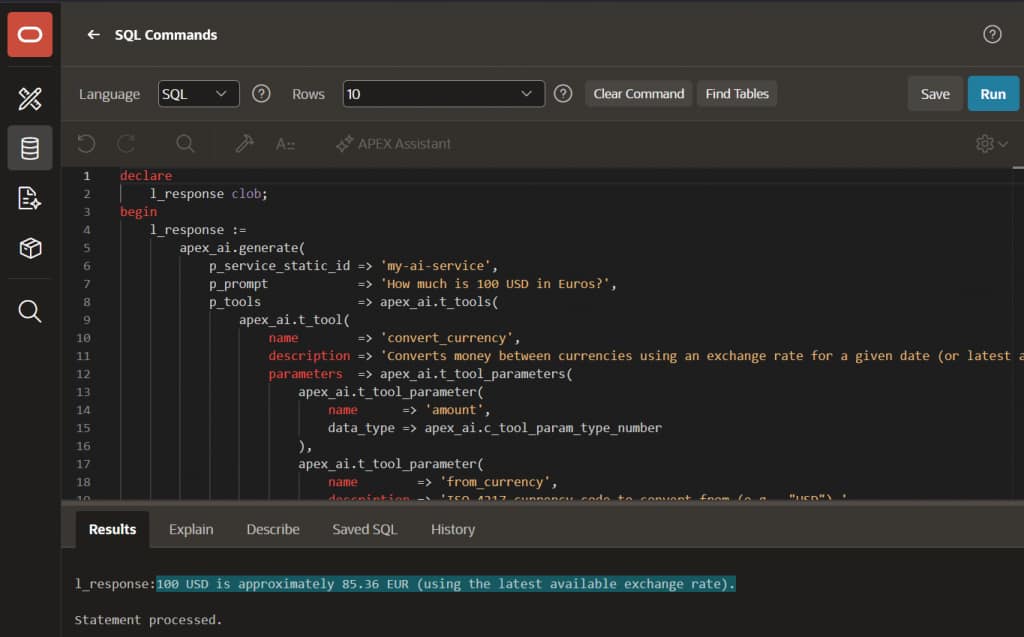
Benefits
- Context-aware: AI understands your actual documents, not just descriptions.
- Structured outputs: JSON Schema-guided structured output.
- Multi-modal support: Text + images + PDFs + AI Tools in one call.
- No middleware: Native APEX → AI provider pipeline.
Limitations & Caveats
- Provider support: File type support varies by AI provider and model. Always test with your specific service.
- Size limits: Size limits vary by provider and model. Chunk large files or summarize first.
Summary
AI Attachments transform APEX_AI.GENERATE from a plain chat into a document-processing system with specific tools to use when needed. Whether you’re building invoice processors, contract analyzers, or support ticket summarizers, this feature delivers real ROI with minimal code.
Try this feature and other new features in APEX 26.1 on Oracle Cloud, oracleapex.com, or download this release from apex.oracle.com/download.