
REST Data Sources enable developers to access to Representational State Transfer (REST) services or generic JSON data feeds in applications and use the data in Oracle APEX components.
Oracle APEX provides direct integration of REST Data Sources across all modern region and component types, including Classic Reports, Interactive Reports, Calendars, and JET Charts. A REST Data Source can contain one or many operations which are the references to a concrete external web service. Configurations at the REST source level are shared across all contained operations.
With Oracle APEX 26.1, REST Data Sources receive a strong set of enhancements as below that make integrations more dynamic, resilient, secure, and enterprise-ready.
- Template Directives in Request Body Templates
- Dynamic Default Values for REST Source Parameters
- Full CRUD Support for OData REST Services
- Refresh Token Support in OAuth Web Credentials
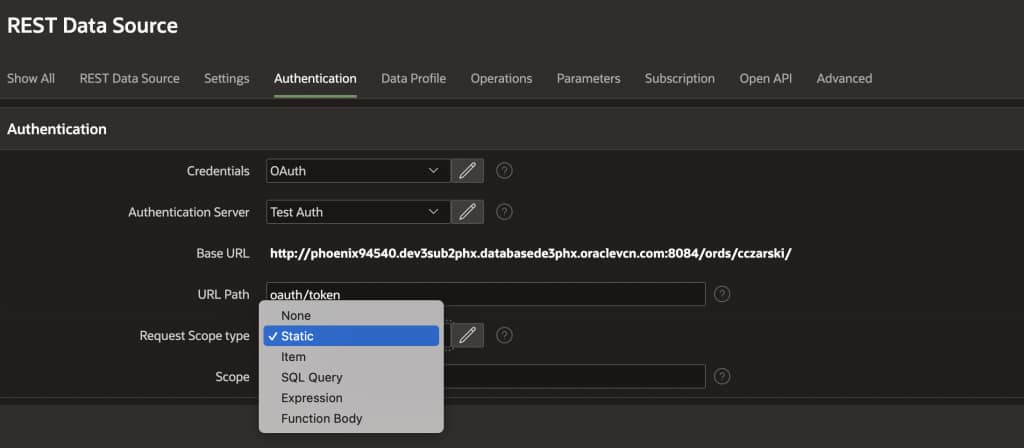
- Decide OAuth Scope at Invocation Time
- Client and User Assertions for OAuth
- OAuth2 Password Flow Support
- Unlimited Attributes support for Authentication, Authorization, and REST Source Plug-ins
This blogpost walks through in-detail on these enhancements and why it matters.
Template Directives in Request Body Templates
When working with REST APIs, request payloads often vary based on context. A single operation might need to send different fields depending on business logic.
Imagine you are building an APEX application that integrates with a Task Management API. When creating a task, the API expects different fields depending on the task type. For example, as shown below for a task type “feature”, task needs a priority field, while a “bug” task needs a severity field. In the past, handling this in APEX meant either maintaining two separate REST operations or pre-assembling the body in PL/SQL before the call.
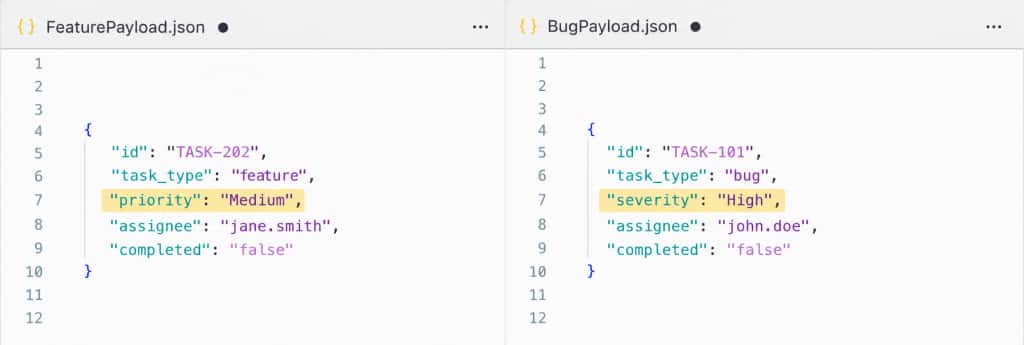
In Oracle APEX 26.1, with the support of template directives in request body, you can add the conditional logic directly within the payload definition as shown in the below snippet.
{
  "id": "#TASK_ID#",
  {case TASK_TYPE/}
  {when bug/}
  "severity": "#SEVERITY#",
  {when feature/}
  "priority": "#PRIORITY#",
  {endcase/}
  "assignee": "#ASSIGNEE#",
  "completed": "#COMPLETED#"
}
At runtime:
- Substitutions (#PLACEHOLDER#) are resolved first.
- Template directives are then evaluated based on an evaluation parameter such as TASK_TYPE per this example.
- The final payload contains only the fields required by the API.
This behavior is controlled by enabling the Supports Template Directives setting on the REST Source operation.
This enhancement removes the need for multiple operations or custom logic just to construct slightly different payloads.
Dynamic Default Values for REST Source Parameters
REST calls frequently depend on runtime context, such as the currently logged-in user, a session value, or a value derived from the database. Previously, this often required pre-processing steps to populate page items before invoking a REST Data Source.
For example, if you are invoking an Fusion Workers REST API where you want to show the details of all the directs of a manager based on the status, then you would write a Local Post Processing SQL command as below after calling the REST API right?
SELECT DISTINCT
    personid,
    displayname,
    manageremail,
    assignmentstatus
FROM
    APEX$SOURCE_DATA
WHERE
    LOWER(manageremail) = LOWER(:APP_USER)
    AND assignmentstatus = :P1_STATUS;
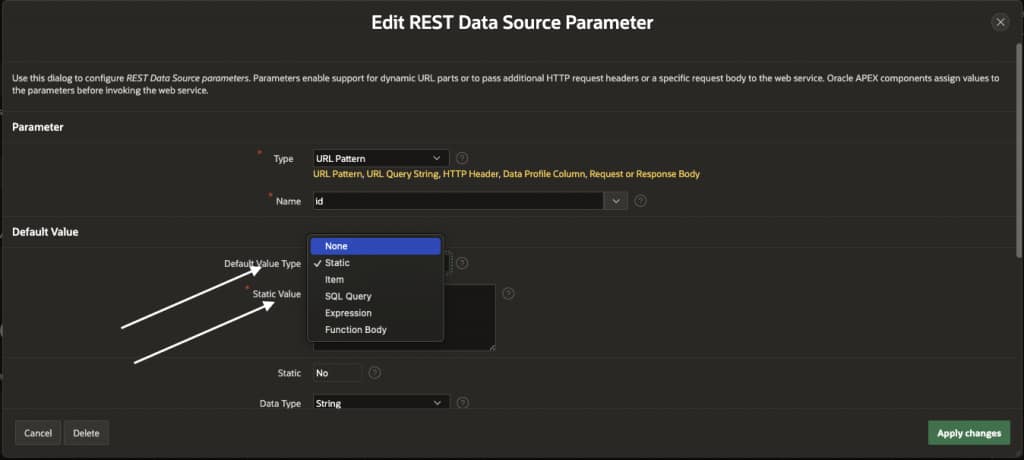
With APEX 26.1 this is simplified, as parameter values can now be defined dynamically using a Default Value Type:
- Static – a fixed hardcoded value.
- Item – resolved from a page or application item at runtime.
- SQL Query – a single-row, single-column SQL query evaluated at request time.
- Expression – an inline PL/SQL or JavaScript expression.
- Function Body – a full PL/SQL or JavaScript function for more complex logic.
When a manager logs in, it should automatically filter to show only his active directs. Rather than pre-populating a page item with the current user’s Email ID after the REST call, the parameter can now derive its value directly:
No pre-processing or post-processing process. No auxiliary page item. The parameter resolves its own value at runtime and the REST call goes out with exactly the right filter applied.
When Expression or Function Body is selected, a Default Value Language selector appears, letting you choose between PL/SQL and JavaScript (MLE). The Page Designer code editor adapts its syntax mode automatically.
This makes parameters self-contained and removes the need for auxiliary page items or extra pre-processing logic.
Full CRUD Support for OData REST Services
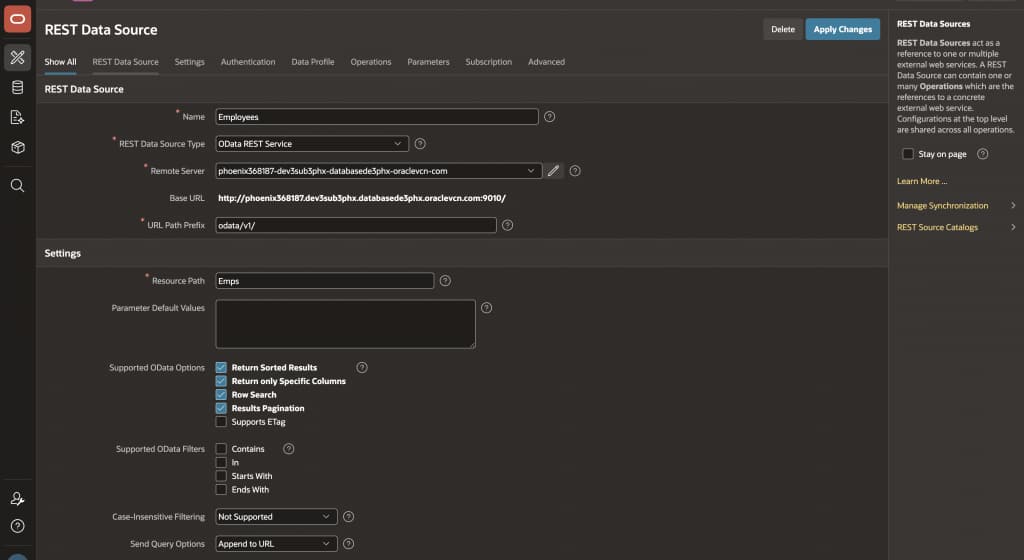
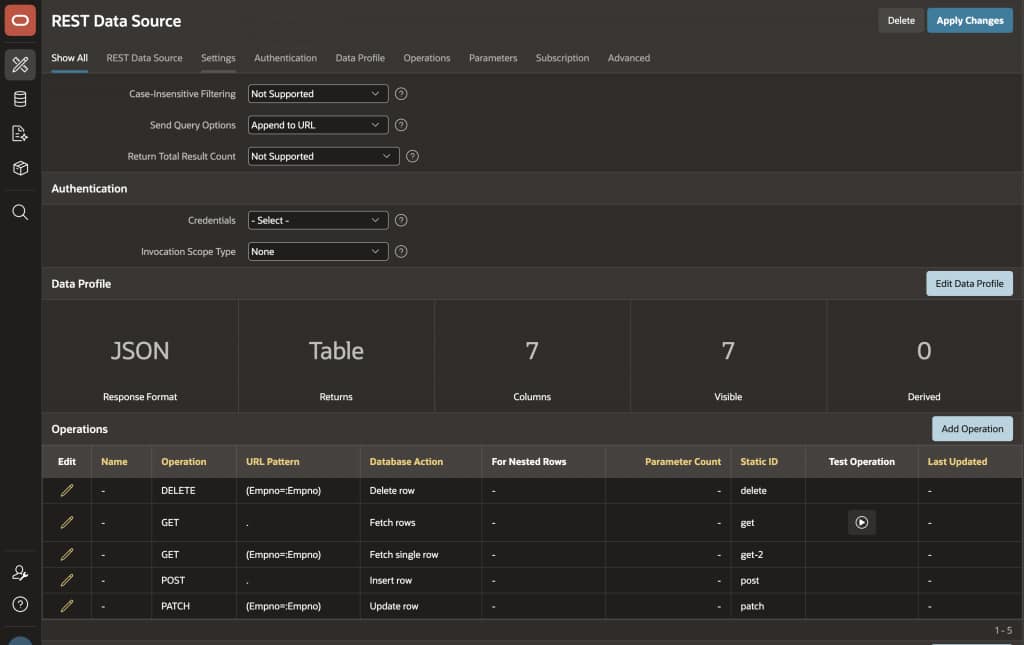
Until APEX 26.1, the built-in OData adapter was read-only. You could connect to Microsoft 365, Azure, PowerApps Dataverse, SAP, and similar platforms that expose OData v4.01 compliant services, to display data, but writing back required custom code outside the standard APEX flow.
That changes completely in this release. OData REST Sources now support native Create, Update, and Delete operations, completing the full CRUD picture.
Discovery Does the Heavy Lifting
When you create an OData REST Data Source, APEX now reads the service metadata, detects supported DML capabilities from standard OData annotations, and auto-generates the corresponding POST, PATCH, and DELETE operations with the correct URL patterns.
Discovery also picks up metadata that makes payloads accurate and reliable:
- Properties that shouldn’t appear in a request are automatically excluded – computed properties are never sent, immutable properties are dropped from updates, and nullable properties or those with server-side defaults are omitted from inserts when their value is null.
- Enumeration types are discovered with their allowed values, and validation expressions are generated at the data profile column level – so invalid values are caught before the request is even sent.
- Complex types are automatically serialized from a flat representation into the correct hierarchical JSON format.
- ETag support is detected and handled end-to-end, with an
APEX$ETAGcolumn added to the data profile automatically when supported.
Concurrency Protection Out of the Box
If two users attempt to update the same record simultaneously, OData ETag-based concurrency control prevents silent overwrites. APEX includes the ETag in update and delete requests, and if the record has changed since it was last fetched, the service rejects the request. APEX handles this gracefully and surfaces the familiar "Data has changed" message.
Meaningful Error Handling Out of the Box
When working with write operations, handling errors gracefully is just as important as executing the request itself.
APEX streamlines error handling for OData REST interactions by interpreting the detailed responses returned by the service, instead of exposing only generic HTTP status codes.
If a request fails due to a backend validation or business rule, for example, an “Invalid Salary” condition, the OData service typically returns a descriptive error message in its response payload. APEX parses this response and surfaces the exact message directly in the user interface.
This means users see clear, actionable feedback instead of ambiguous errors, while developers do not need to implement custom error parsing or mapping logic. Error handling becomes consistent, declarative, and aligned with the behavior of the underlying service.
For example, instead of a generic 400 Bad Request, the UI can directly display: “Salary must be within the allowed range.”
Writing Back Is as Declarative as Reading
Once discovery completes, wire an Interactive Grid or From to your OData source, enable Automatic Row Processing, and APEX handles payload construction, endpoint routing, and response handling. For programmatic scenarios, APEX_EXEC gives the same capabilities via PL/SQL.
OAuth Web Credentials: Refresh Token Support
Here is a scenario many APEX developers have run into. A user signs in to an application using Social Sign-In, and the application also uses that OAuth credential to make REST API calls. Everything works for about an hour (or till the token expiry time). Then the access token expires, REST calls start failing, and the only fix is to close the session and log back in.
APEX 26.1 fixes this with native Refresh Token support for OAuth Web Credentials.
When an access token expires, APEX now checks whether a refresh token is stored. If one exists, it silently exchanges it for a new access token; no login prompt, no session interruption, no user noticing anything at all.
Nothing changes in how you configure REST Data Sources, Social Sign-In, or APEX_WEB_SERVICE.MAKE_REST_REQUEST. This improvement operates entirely behind the scenes.
OAuth Scope at Invocation Time
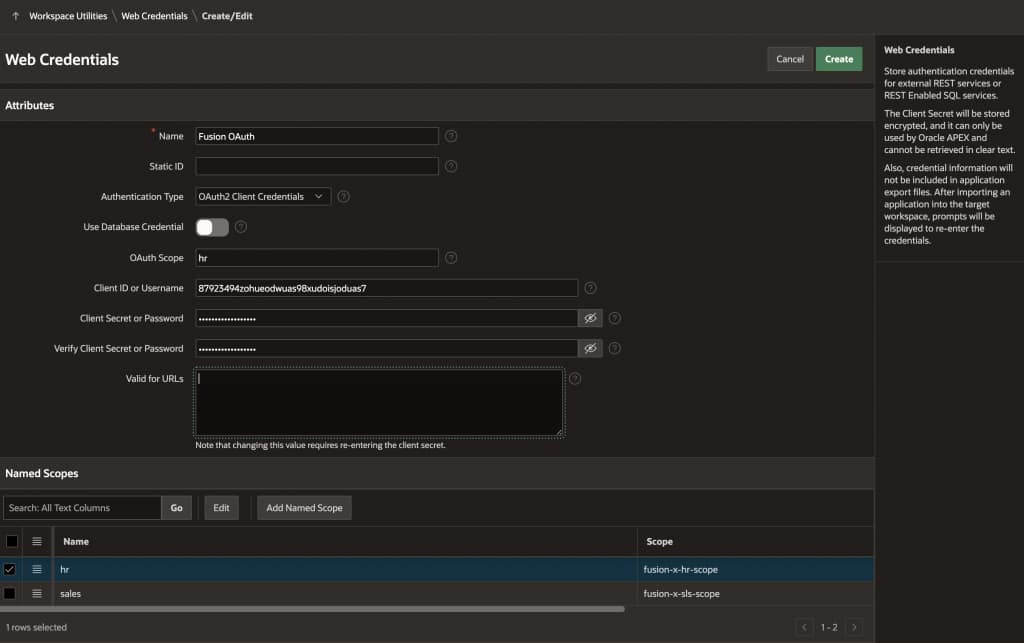
Consider an APEX application that integrates with Fusion SaaS. It needs to call both an HR API and a Finance API, each requiring a different OAuth scope. Previously, this meant creating a separate Web Credential for each scope, leading to a growing list of credentials for what is essentially the same identity.
In APEX 26.1, a single Web Credential can serve multiple APIs with different scope requirements. The scope is now specifiable at invocation time: On the REST Data Source itself, or in the APEX_WEB_SERVICE API call.
-- Call the HR API
apex_web_service.make_rest_request(
    p_url                  => 'https://fusion.example.com/api/employees',
    p_http_method          => 'GET',
    p_credential_static_id => 'FusionCred',
    p_scope                => 'hr'
);

-- Call the Finance API using the same credential, different scope
apex_web_service.make_rest_request(
    p_url                  => 'https://fusion.example.com/api/invoices',
    p_http_method          => 'GET',
    p_credential_static_id => 'FusionCred',
    p_scope                => 'finance'
);
APEX maintains separate access tokens per scope. If a valid token for the requested scope already exists, it is reused. If not, a new token is requested for that scope alone.
Client and User Assertions for OAuth
Some enterprise APIs, particularly Fusion Applications, have strict security policies that prevent issuing a single all-powerful token. Each API call must use a token granted for the minimum required scope, and that token must carry the identity of the actual signed-in user, not just the application.
APEX 26.1 adds support for signed Client and User Assertions, enabling APEX to act as a Trusted Client with the Identity Provider.
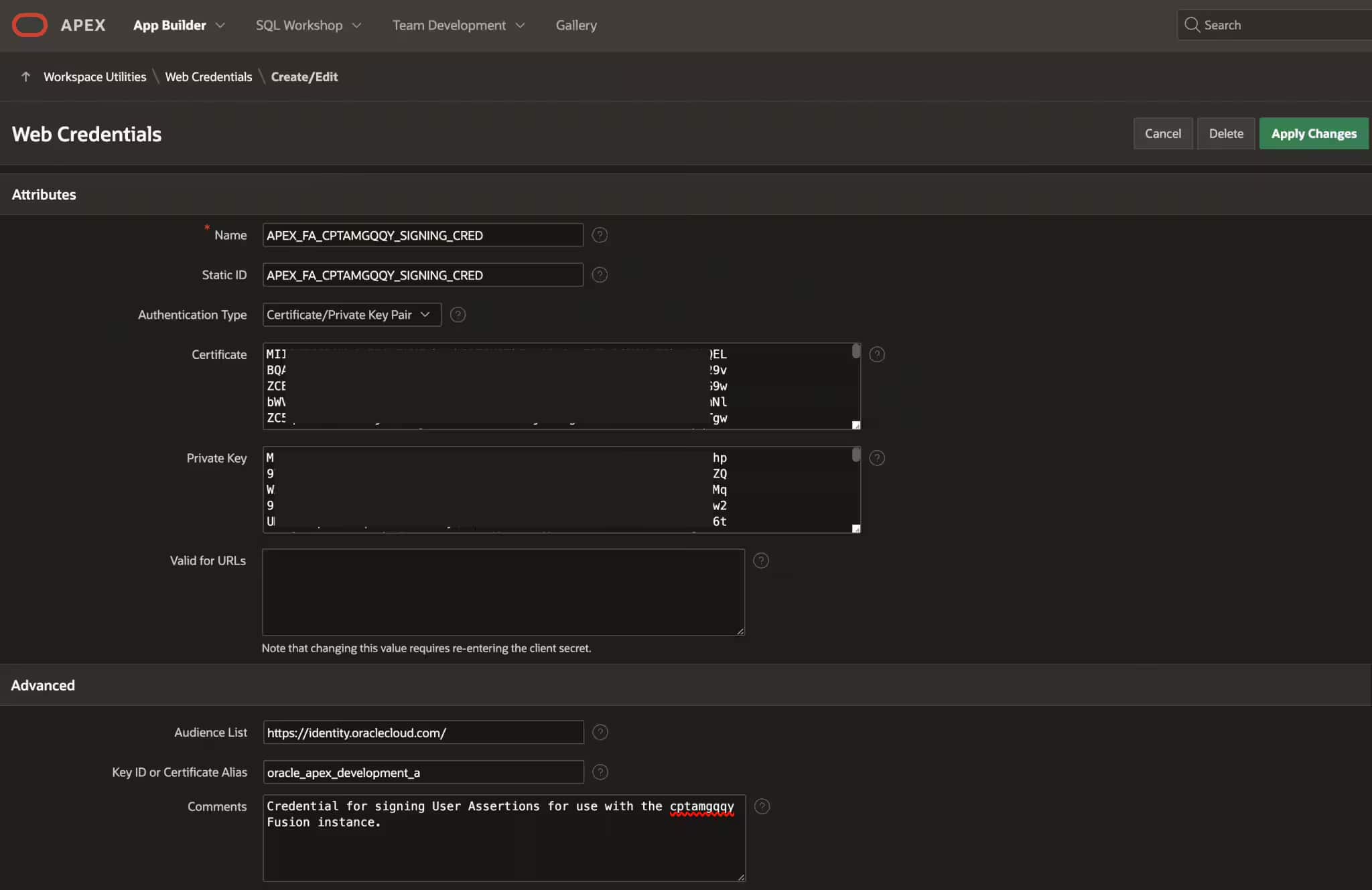
When requesting a new access token, APEX can now generate a signed JWT assertion: either a Client Assertion proving the application’s identity, or a User Assertion asserting the currently signed-in user’s identity. These are cryptographically signed using RS256 with a private key, giving the Identity Provider a verifiable claim about who is making the request.
Configuration
A new Certificate/Private Key Pair credential type stores the certificate, private key, Key ID, and Audience used for signing. This signing credential is linked to an OAuth Web Credential via a new Referenced Credential field.
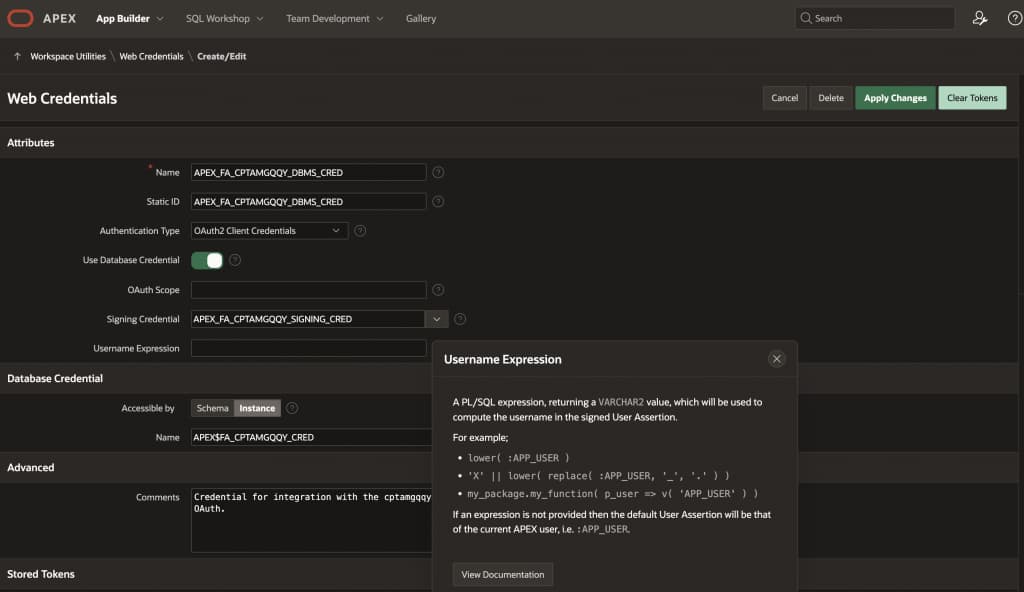
A Username Expression field allows a PL/SQL expression to compute the asserted username when it differs from APP_USER.
This feature also adds RS256 support to the APEX_JWT public API, extending beyond the previously available HS256 symmetric algorithm to the asymmetric signing standard that Identity Providers widely require.
OAuth2 Password Flow Support
Some REST APIs, including Oracle BugDB and certain HR Secure View APIs, only support the OAuth2 Password Flow. This flow requires a username, password, Client ID, and Client Secret to all be passed to the token server together. Until APEX 26.1, developers integrating with these APIs had to build and maintain custom token-handling logic themselves.
APEX 26.1 adds OAuth2 Password as a native Web Credential type.
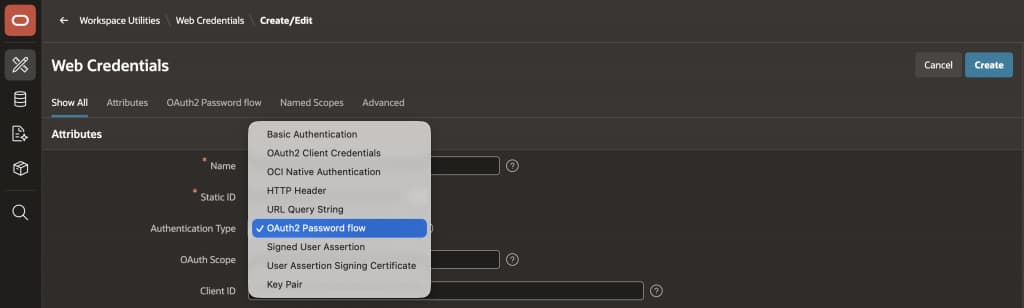
Because this flow involves two sets of credentials, the configuration references a second Web Credential of the OAuth Client Credentials type for the Client ID and Secret portion, keeping all sensitive values within APEX’s secure credential infrastructure.
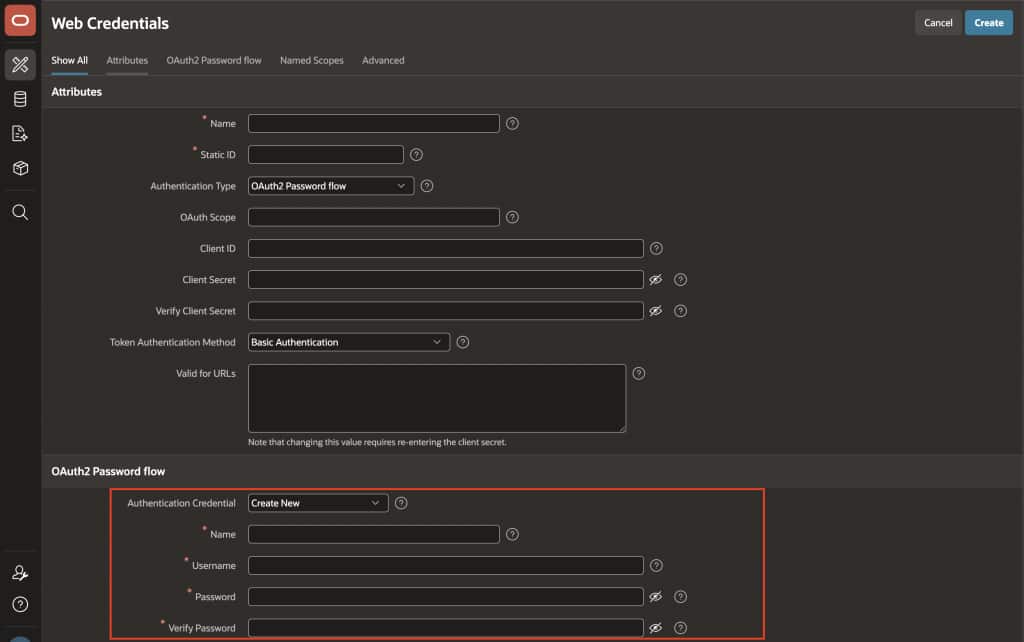
The Authentication Method setting controls how credentials are sent: Basic Auth header, request body, or a combination, to match whatever the token server expects.
If the token server returns a refresh token, APEX stores and uses it automatically, benefiting from the refresh token support introduced in this same release. The result, integrations with Password Flow APIs work through the standard REST Data Source and APEX_WEB_SERVICE flow with no custom token management code required.
Unlimited Attributes for Authentication, Authorization, and REST Source Plug-ins
For developers building custom Authentication, Authorization, or REST Source plug-ins, APEX 26.1 removes the 15-attribute ceiling. Attributes are now stored as a JSON object indexed by meaningful static IDs instead of numbered slots.
New plug-ins use API Version 3, which exposes attributes through a typed interface:
l_host     varchar2(4000) := p_xxxx.attributes.get_varchar2( 'ldap_host' );
l_port     number         := p_xxxx.attributes.get_number( 'ldap_port' );
l_use_ssl  boolean        := p_xxxx.attributes.get_boolean( 'use_ssl' );
Existing plug-ins keep working exactly as before. p_xxxx.attribute_nn remains fully supported and all native plug-ins are migrated automatically on upgrade.
Final thoughts
The REST Data Source updates in Oracle APEX 26.1 are a cohesive set of improvements that address real integration challenges developers hit every day.
Template directives make request bodies expressive. Dynamic parameter defaults eliminate pre-processing workarounds. OData DML turns a read-only adapter into a genuine CRUD integration point. Refresh tokens and invocation-level scope make OAuth credentials more flexible and more resilient. Signed assertions unlock enterprise security requirements that were previously blockers. The Password Flow brings APIs that previously required custom code into the standard APEX credential model. And unlimited plug-in attributes give developers the room to build without artificial constraints.
If your applications talk to external REST APIs, this release has something meaningful for you.