
Security in AI Data Platform Workbench works best when you look at it as a three-part model. OCI IAM controls who can provision or access the service. Inside the product, AI Data Platform uses role-based access control to decide what those users can do with workspaces and other objects. Audit Logs then preserve the record of what happened afterward.
That separation matches how real teams operate. A cloud administrator may control who can create or access the Workbench. A platform administrator may manage roles and permissions inside AI Data Platform. Workspace owners may manage collaboration inside their own workspaces. An auditor may need visibility into activity without also needing broad operational control.
Start with OCI IAM
OCI IAM is the outer security boundary for AI Data Platform. The first distinction to make is between administrator policies and non-admin user policies. Administrator IAM policies are needed to provision and manage AI Data Platform Workbench. These policies are for the smaller group responsible for standing up the service, configuring it, and maintaining the platform at the OCI layer.
A representative administrator policy looks like this:
allow group <identity_domain>/<aidp_admin_group> to manage ai-data-platforms in compartment id <aidp_compartment_ocid> That policy gives an administrator the ability to create and manage AI Data Platform Workbench.
Non-admin user IAM policies are different. They are for users who need to sign in to the Workbench and use AI Data Platform features, but who are not responsible for provisioning or administering the service itself.
A representative non-admin user policy looks like this:
allow group <identity_domain>/<aidp_user_group> to use ai-data-platforms in compartment id <aidp_compartment_ocid> That policy allows users to access an existing AI Data Platform Workbench without giving them administrative control over it. This distinction matters because most teams do not want every AI Data Platform user to be an OCI-level administrator. A smaller admin group should manage the platform, while a broader user group should be able to work inside it.
External tables and external volumes
AI Data Platform Workbench users who create external tables or volumes that work with external Object Storage locations need access to the relevant bucket and object metadata in the external data compartment with the following policies
allow group <identity_domain>/<user_group> to read buckets in compartment id <external-data-CompartmentId>

allow group <identity_domain>/<user_group> to inspect objects in compartment id <external-data-CompartmentId>
For example, a user can open AI Data Platform Workbench but cannot see the Object Storage location needed to create an external table or external volume. In that case, the issue is usually not related to the access within AI Data Platform Workbench, but it is missing OCI IAM access to the external bucket and objects for the user.
Private network
AI Data Platform Workbench users who create a workspace with private network access enabled need permission to inspect the networking resources that appear in the setup flow, including the VCN, subnet, and network security group and hence requires the following policy
allow group <identity_domain>/<user_group> to inspect virtual-network-family in compartment id <network_compartment_ocid>A common symptom is that a user starts the private-network workspace flow, but the VCN, subnet, or NSG options do not appear. In that case, the user is usually missing OCI IAM visibility into those network resources.
OCI Generative AI models
AI Data Platform Workbench users who want to work with OCI Generative AI models need IAM permission to use the relevant GenAI resources in the target compartment with the help of this policy
allow group <identity_domain>/<user_group> to use generative-ai-family in compartment id <genai_compartment_ocid>For example, a user can sign in to AI Data Platform Workbench, but no OCI Generative AI models appear in the catalog when they try to use OCI GenAI models. In that case, the user usually misses adding OCI Generative AI permissions rather than access to the AI Data Platform Workbench itself.
For the full set of AI Data Platform Workbench IAM policies, including additional policies for external Object Storage, OCI Generative AI, private networking, logging, metrics, and related service integrations, refer to Oracle’s IAM policy guide for AI Data Platform Workbench.
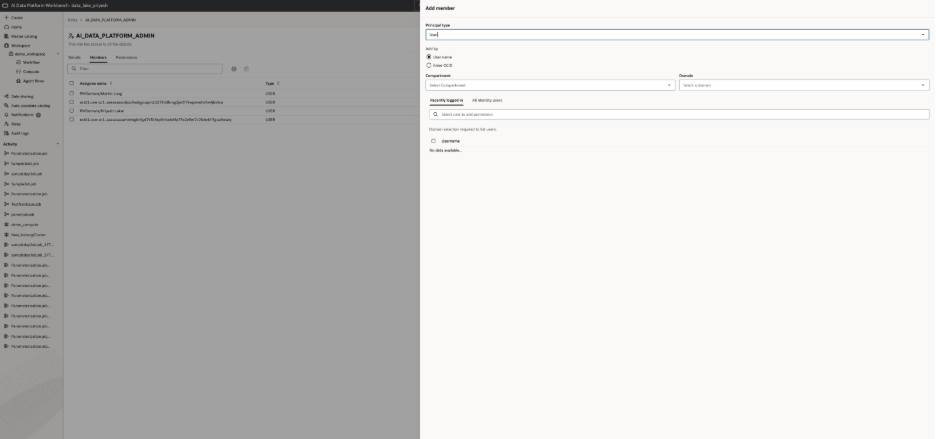
OCI IAM controls who can provision or access AI Data Platform Workbench before in-product permissions take over
RBAC is the in-product control model
Once a user reaches AI Data Platform, access is governed by role-based access control.
AI Data Platform Workbench manages permissions through roles, and permissions can be assigned to users, groups, or roles. This makes it possible to separate platform administration, workspace ownership, day-to-day collaboration, compute creation, and audit visibility instead of treating all users the same way.
The two built-in system roles that matter most are AI_DATA_PLATFORM_ADMIN and AUDITOR.
AI_DATA_PLATFORM_ADMIN is assigned to the user who creates the Workbench and has administrator permissions across AI Data Platform objects, including granting and revoking permissions.
AUDITOR can view the full audit trail across the Workbench. AI_DATA_PLATFORM_ADMIN is a member of AUDITOR by default.
That gives teams a practical operating model:
- OCI administrator controls service-level access
AI_DATA_PLATFORM_ADMINgoverns the Workbench inside AI Data Platform- workspace owners manage access inside their own workspaces
AUDITORreviews activity across the platform

AI Data Platform uses RBAC to separate platform administration, workspace operations, and audit visibility.
How roles are managed in AI Data Platform
Role management happens directly from the Roles page.
- Open Roles
- Click New Role
- Name the role
- Open the role’s Members tab
- Click Add Members
- Add a User, Group, or another Role
This is where RBAC becomes operational. Teams can create roles that reflect real responsibilities such as workspace operators, catalog stewards, or audit reviewers, and then assign members through the UI instead of managing access one user at a time.
Control who can create workspaces
Workspace creation is one of the clearest examples of the boundary between OCI access and in-product control.
CREATE_WORKSPACE is included in AI_DATA_PLATFORM_ADMIN by default, but it can also be granted separately from the Workspace Listing screen.
That means a user may be allowed into AI Data Platform and still not be allowed to create a new workspace. Organizations can use that control to limit workspace creation to a smaller set of trusted owners while most users work inside existing spaces.
Use the actual workspace permission levels
Once a workspace exists, AI Data Platform uses built-in permission levels to control what users can do inside it.
The three main levels are:
- USER
- PRIVILEGED_USER
- ADMINISTRATOR
USER can create files and folders in the root and manage the Shared Folder.
PRIVILEGED_USER includes the USER capabilities and also allows compute creation.
ADMINISTRATOR can update or delete the workspace and manage its permissions.
This gives teams a practical way to separate general contributors, users who need to create compute, and workspace owners who manage access and lifecycle.
How workspace permissions are managed
Workspace permissions are managed from the workspace itself.
- Open Workspace
- Use the workspace Actions
- Click Permissions
- Click New Permission
- Choose the permission level
- Grant it to a User, Group, or Role
This is how AI Data Platform Workbench applies RBAC in day-to-day collaboration. Analysts can be regular workspace users. More advanced technical users can be privileged users who create compute. Workspace owners can be administrators.
Workspace permissions separate general collaboration, compute creation, and full workspace administration.
Make Audit Logs part of the main story
Auditability is what turns access control into something teams can trust.
AI Data Platform Audit Logs capture activity across , roles, catalogs, schemas, tables, volumes, workspaces, workspace files, and workspace folders. Each record includes details such as object name, object type, operation, request details, timestamp, initiating user, source, and status.
That means teams can answer very practical questions:
- Who changed a workspace permission?
- Who modified a role?
- Who updated a governed object?
- Did it succeed or fail?
Those are the kinds of questions that matter during compliance reviews, access investigations, and operational troubleshooting.
How Audit Logs are used in AI Data Platform
The AI Data Platform flow is simple:
- Open Audit Logs
- Search by object name, object type, or payload details
- Filter to the relevant action
- Review the user, timestamp, source, and status fields
This is where the AUDITOR role becomes especially useful. It gives organizations a defined way to grant full audit visibility without also giving those users broad operational control over the platform itself.
That separation supports a cleaner division of duties. Operators manage the platform. Workspace owners manage collaboration. Auditors review the trail afterward.
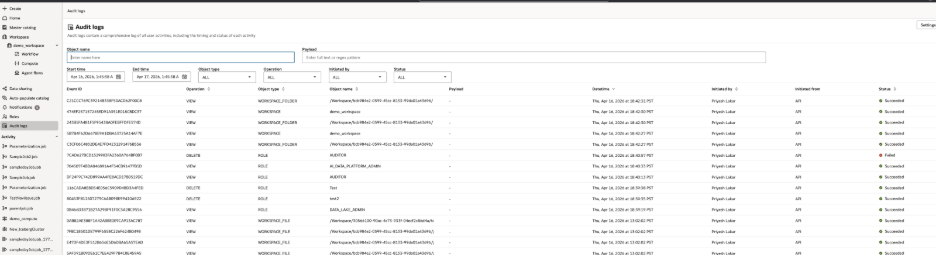
Audit Logs help teams trace changes across workspaces, permissions, catalogs, compute, and other governed objects
Why this model works
The core idea is simple. OCI IAM answers the cloud-level question: who can provision or access AI Data Platform Workbench.
AI Data Platform RBAC answers the in-product question: what can those users do once inside.
Audit Logs answer the operational question: what actually happened.
Together, those layers make AI Data Platform easier to secure, easier to govern, and easier to investigate. For more information, including additional IAM policy details for AI Data Platform Workbench and related OCI resources, refer to the Oracle AI Data Platform documentation and other resources mentioned below: