
This post outlines a concrete, repeatable approach to operationalizing generative AI—without relying on vague transformation narratives. Using built-in capabilities of Oracle AI Data Platform (AIDP) Workbench, teams can:
- Discover approved OCI foundation models in Catalog Explorer under the reserved schema default.oci_ai_models
- Invoke those models directly from Spark SQL using the query_model function
- Scale the same pattern to batch inference on Spark DataFrames using PySpark
What makes this approach enterprise-ready is governance. Model discovery happens inside the Master Catalog UI, invocation follows a consistent SQL/PySpark contract, and access is controlled through a two-layer security model (OCI IAM + Workbench permissions).
This enables organizations to operationalize GenAI as a governed data transformation step—observable, permissioned, and scalable—rather than a one-off integration.
Why data and ML teams should care
From a practitioner’s standpoint, this approach aligns naturally with existing workflows:
- Catalog-native discovery: Models are browsed the same way as data assets in catalog
- SQL-first integration: Inference is expressed as a projection (SELECT … query_model(…))
- Spark-scale execution: The same logic runs across large datasets without redesign
- Governed access: IAM + AIDP Workbench RBAC permissions + audit logs provide traceability
Pre-requisites
Two prerequisites must be satisfied:
- Users must have USE permissions on foundation models
Users must have access to the OCI LLM models defined in the IAM policy. This is a two step process where user or group must have access to both the OCI LLM model as well as the AIDP Workbench. While there are many ways to define these policies, here is the minimum IAM Policies that must exist before a user sees OCI LLM models in their catalog in AIDP Workbench:
- Grant access to use foundation models:
Allow group <group-name> to use generative-ai-family in compartment <compartment-name>
Workbench access to ensure user is in the same group specified above:
Allow group <group-name> to use ai-data-platform-family in compartment <compartment-name>
- The AIDP Workbench must be deployed in the same region as the models
OCI LLM models are being rolled out to new OCI regions. Visit our website to get the most latest availability information of models. Here is a general level guidelines – click on a region to see the latest availability:
| Region | Region Code | Notes |
| North America | ||
| US East (Ashburn) | us-ashburn-1 | Primary GenAI region, most complete model set |
| US Midwest | us-chicago-1 | Primary GenAI region, most complete model set |
| US West (Phoenix) | us-phoenix-1 | Strong coverage for xAI. Some availability for Cohere, ChatGPT models as well. |
| South America | ||
| Brazil East (São Paulo) | sa-saopaulo-1 | Limited rollout. Availability of Cohere and Llama models. |
| Europe | ||
| Germany Central (Frankfurt) | eu-frankfurt-1 | Main EU GenAI region. Many Cohere, Gemini, Llama, and ChatGPT models are available |
| EU Sovereign Central(Frankfurt) | eu-frankfurt-19 | Limited availability of few Cohere, Llama and ChatGPT models. |
| UK South (London) | uk-london-1 | Good EU coverage. Most Cohere, Gemini, Llama, and ChatGPT models are available |
| UK Gov South (London) | uk-gov-london-1 | Limited availability of few Cohere, Llama and ChatGPT models. |
| Middle East | ||
| Saudi Arabia Central (Riyadh) | me-riyadh-1 | Limited availability of few Cohere, Llama and ChatGPT models. |
| UAE East (Dubai) | me-dubai-1 | Limited availability of few Cohere and ChatGPT models. |
| Asia Pacific | ||
| Japan Central (Osaka) | ap-osaka-1 | APAC primary region. Many Cohere, Llama and ChatGPT models are available. |
| India South (Hyderabad) | ap-hyderabad-1 | Expanding model support for Many Cohere, Llama and ChatGPT models |
When the above-mentioned pre-requisites are met, models appear in default.oci_ai_models catalog.
Catalog Explorer: Discovering foundation models
Once you open a Workbench instance, users navigate to:
Master catalog → default → oci_ai_models to view the available OCI LLM models.
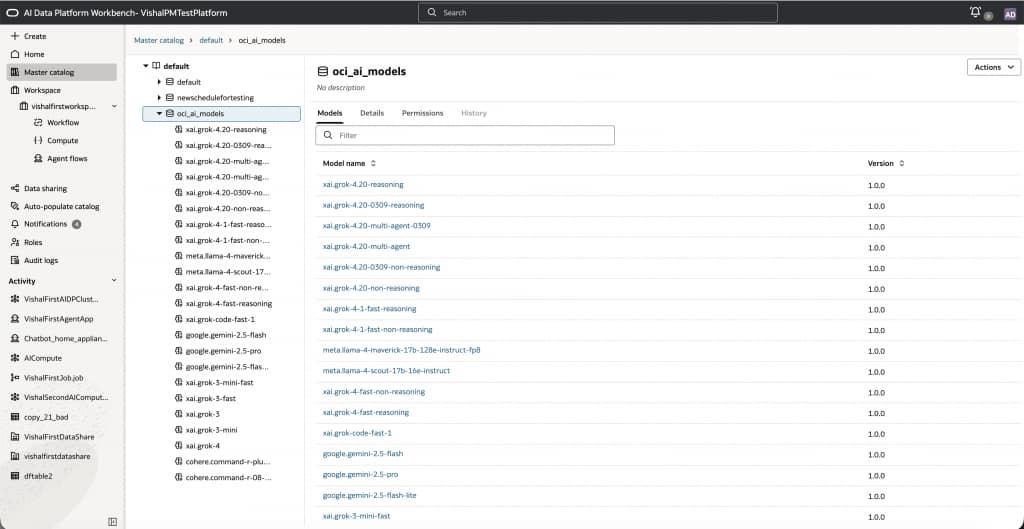
Note that models are presented as catalog objects, with attributes such as Model name and Version.
This design reinforces a key principle:
foundation models are first-class governed assets, not external services.
Users can filter, browse, and directly integrate models into notebooks and pipelines using the familiar 3 part namespace just like catalog tables.
Model details and usage templates
Selecting a model (for example, xai.grok-4.20-reasoning) reveals a usage panel with ready-to-use templates.
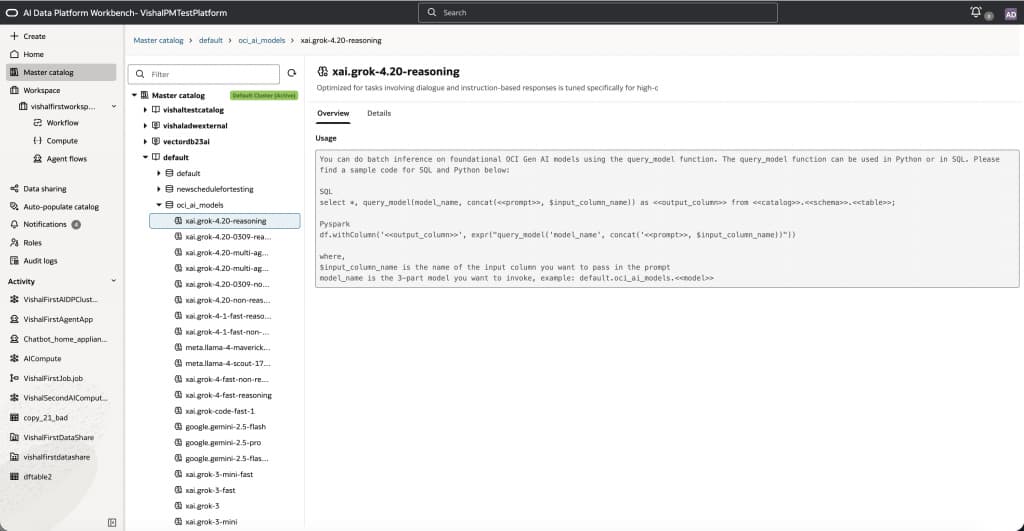
As seen in the figure above, the overview provides description of the selected model including:
- SQL examples using query_model(…)
- PySpark examples using expr(“query_model(…)”)
- The required model identifier format using 3 part namespace: default.oci_ai_models.<model_name>
This serves as a consistent, reusable contract for both experimentation and production workflows.
SQL model invocation
Before we dive deeper, we can do a quick health check by running a health check query which showcases how OCI models can be invoked directly from SQL using 3 part namespace. To do this, we will navigate to the workspace and create a .SQL file from where we can execute this SQL. Note that you could do the same thing from a notebook as well as discussed in the next section in this post.
SELECT
  query_model(
    'default.oci_ai_models.google.gemini-2.5-flash-lite',
    'Return ONLY the text: OK'
  ) AS healthcheck;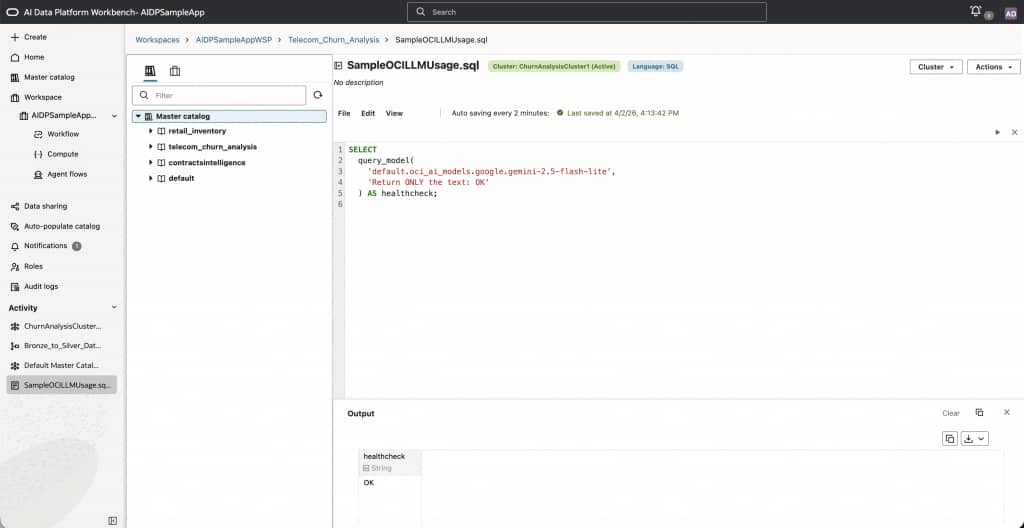
As seen in the figure above, this prints “OK” which lets us know the system is healthy. In the next step, let’s do something more interesting. In Feb 2026, we hosted a live webinar where we showed how to build a churn prediction models for sample telecom data. Using OCI LLM we can analyze the results of the predictions using the openai.gpt-5.4 model as below:
WITH first_20 AS (
  SELECT *
  FROM telecom_churn_analysis.gold.monthly_churn_analysis
  LIMIT 20
),
payload AS (
  SELECT concat_ws(
           '\n',
           collect_list(
             concat(
               *
             )
           )
         ) AS rows_text
  FROM first_20
)
SELECT
  query_model(
    'default.oci_ai_models.openai.gpt-5.4',
    concat(
      'You are an expert data scientist and data analyst. ',
      'Here are the records. Analyze the outcomes, interpret the Churn_Rate predictions, ',
      'and write in clear business-friendly English.\n\n',
      rows_text
    )
  ) AS summary
FROM payload;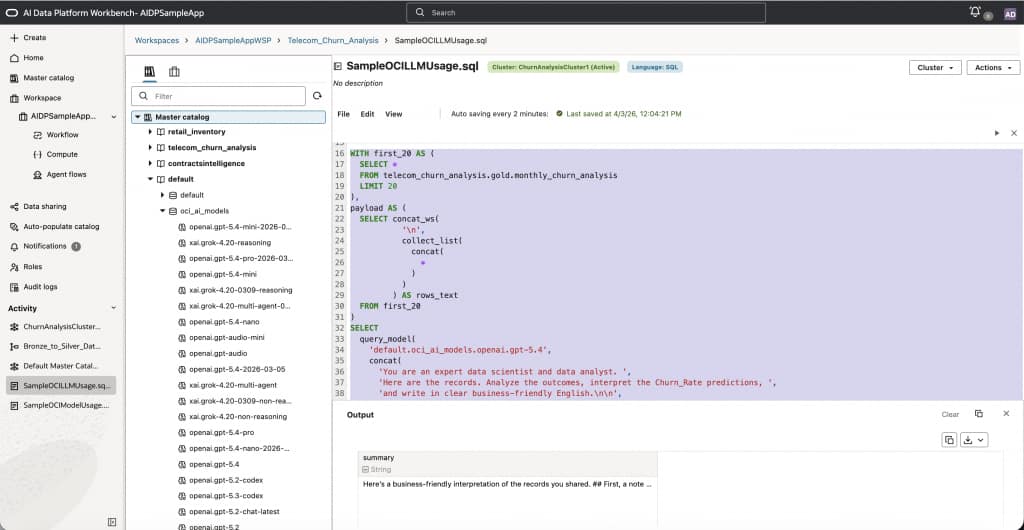
As seen in the figure below, the output is printed and we can download it or copy it. Using SQL to directly invoke OCI LLM model enables:
- Direct model invocation via catalog path using 3 part namespace
- Prompt construction using table data
- Output enrichment as a new column
Python model invocation in notebooks (PySpark)
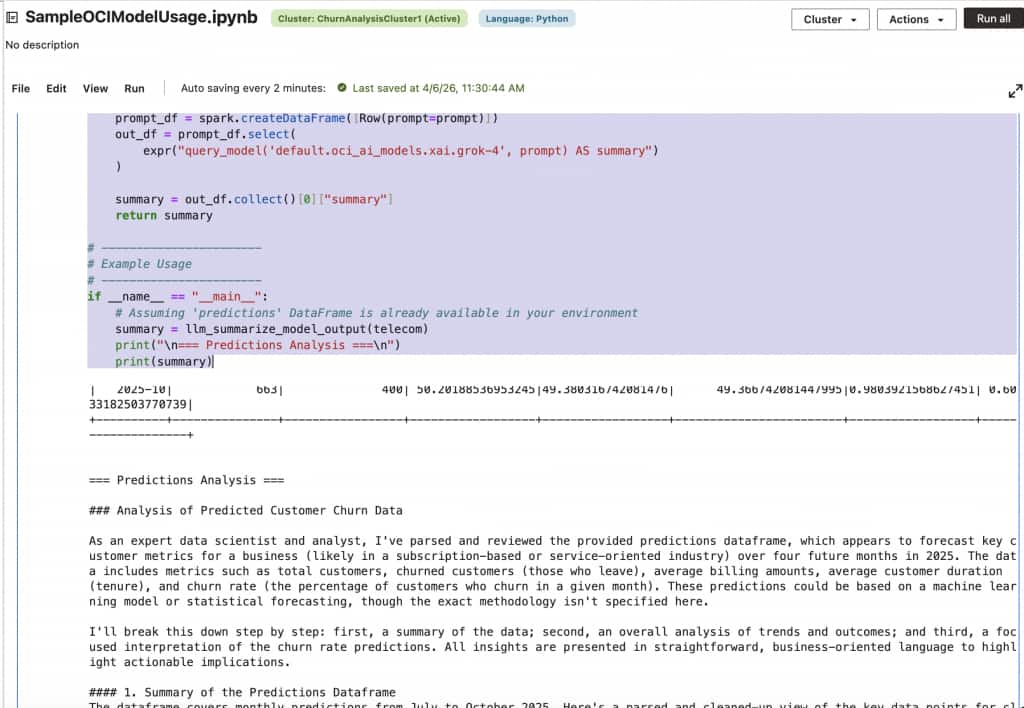
We can run the same query as previous in PySpark syntax where we can again use 3-part namespace to invoke OCI LLM models using expr(“query_model(‘default.oci_ai_models.xai.grok-4’, prompt) AS summary”. See the example below:
telecom = spark.read.table("telecom_churn_analysis.gold.monthly_churn_analysis")
telecom.show(20)

# -----------------------
# Function to parse & summarize
# -----------------------
def llm_summarize_model_output(predictions_df):
    # Convert DataFrame to string representation
    # You can customize this based on what information you want to include
    raw_text = predictions_df._jdf.showString(20, 20, False)  # Shows first 20 rows

    # Prompt for LLM
    prompt = f"""
You are an expert data scientist and data analyst.
Here is the dataframe predictions:

{raw_text}

Your task:
- Parse this predictions dataframe.
- Analyze the outcome.
- Interpret the Churn_Rate prediction.
- Write in clear business-friendly English.
"""

    print(raw_text)
	# Send prompt to LLM through query_model
    prompt_df = spark.createDataFrame([Row(prompt=prompt)])
    out_df = prompt_df.select(
        expr("query_model('default.oci_ai_models.xai.grok-4', prompt) AS summary")
    )

    summary = out_df.collect()[0]["summary"]
    return summary

# -----------------------
# Example Usage
# -----------------------
if __name__ == "__main__":
    # Assuming 'predictions' DataFrame is already available in your environment
    summary = llm_summarize_model_output(telecom)
    print("\n=== Predictions Analysis ===\n")
    print(summary)
Here is what this example looks like when run via an AIDP notebook.
Batch inference on Spark DataFrames
Batch inference is implemented using Spark DataFrames. For example, in the following sample the query_model function is called for every row in the Dataframe.
from pyspark.sql.functions import expr, col, coalesce, lit

MODEL = "default.oci_ai_models.google.gemini-2.5-flash-lite"

df_scored = (
    df
    .withColumn("review_safe", coalesce(col("review"), lit("")))
    .withColumn(
        "sentiment",
        expr(
            f"""
            query_model(
                '{MODEL}',
                concat('Return ONLY Positive, Negative, or Neutral. Review: ', review_safe)
            )
            """
        )
    )
)
This approach maintains consistency by reusing the same query_model function across SQL and PySpark. Since this is being invoked for every record in the Dataframe, for large datasets, scaling inference requires careful handling of concurrency and limits. Here are some key considerations and recommendations:
- Tune spark partitions deliberately rather than relying on defaults. Each partition can drive concurrent model requests, so increasing the number of partitions can improve parallelism, but it can also overwhelm the model endpoint or hit tenancy-level request limits. If partition counts are too high, jobs may slow down due to throttling, retries, or uneven execution. If partition counts are too low, the cluster may be underutilized and throughput may suffer. Start with a moderate number of partitions, observe request latency and job runtime, and then scale up gradually. When the workload shows signs of throttling or instability, reduce concurrency with
coalesce()to lower the number of active partitions without introducing a full shuffle. When the workload is stable and additional throughput is needed, userepartition()to increase parallelism in a controlled way. In most production scenarios, it is better to favor predictable, steady throughput over peak concurrency. - Keep prompts compact and focused. Large prompts increase token volume, raise latency, and reduce the number of rows that can be processed efficiently. For batch inference, prompts should include only the columns required for the task instead of passing an entire row. This not only improves performance but also reduces cost and makes outputs easier to interpret.
- Design the pipeline for idempotency and restartability. Rather than processing the same records repeatedly, write inference results to a managed table keyed by a stable identifier, then rerun only the rows that do not yet have results. This pattern is especially useful when processing millions of records, because it avoids recomputation and makes recovery from partial failures much simpler.
- Input validation is equally important. Empty strings, nulls, and malformed text should be filtered or normalized before invoking the model. A simple pre-processing step can prevent unnecessary inference calls and reduce noisy outputs. For example, rows with missing review text can be excluded before batch scoring, while nullable columns can be normalized with
coalesce()so the prompt remains well formed. - Treat large-scale inference as an iterative optimization problem. A good rollout pattern is to begin with a small sample, validate output quality and job behavior, then expand to a larger partitioned run. This makes it easier to identify the right balance between model quality, cost, and runtime before moving the workflow into production.
- Use fast, low-cost models for bulk processing.
- Route edge cases to reasoning models.
- Persist results to avoid re-computation.
In summary, here are the best practices:
- Start with a small sample before running full-table inference
- Use
coalesce()to reduce concurrency when throttling appears - Use
repartition() onlywhen higher parallelism is proven safe - Keep prompts minimal and include only necessary columns
- Persist outputs and rerun only missing or failed rows
- Filter null or invalid inputs before calling the model
End-to-end workflow for Batch Inference
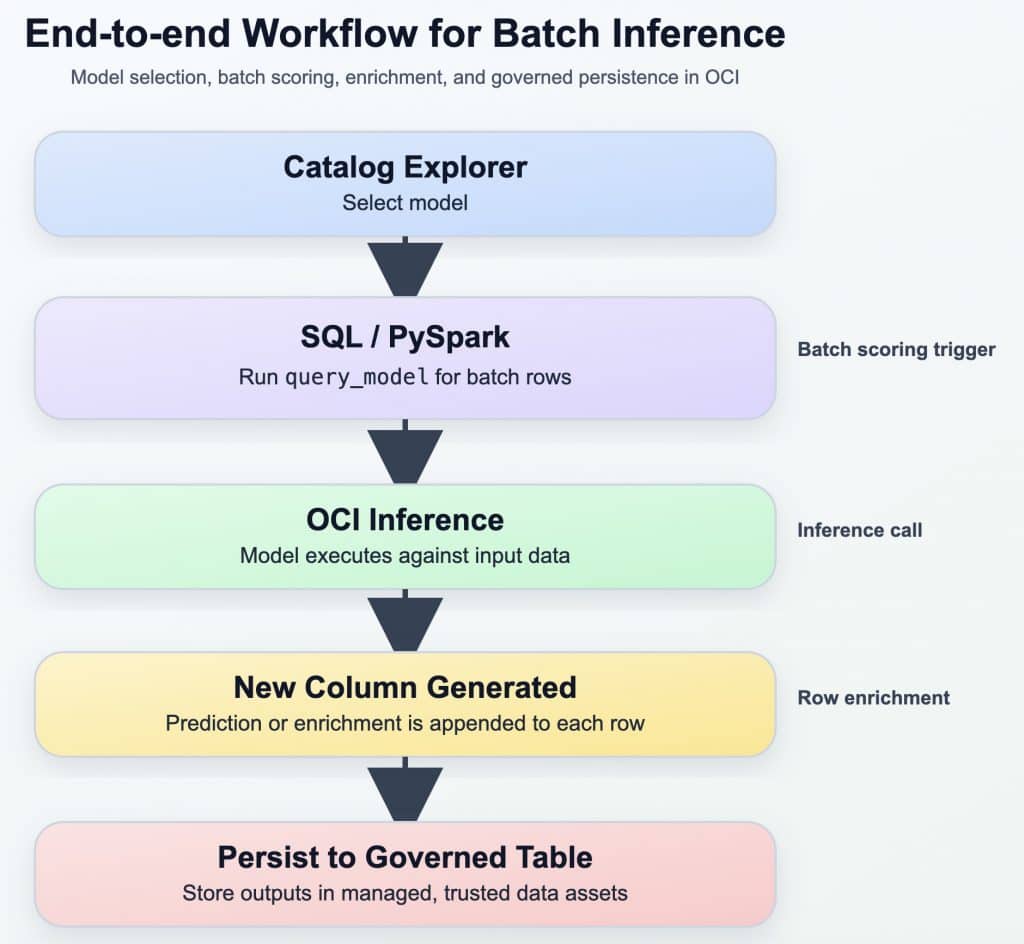
Using the above mentioned best practices and the workflow, the entire end to end workflow can be redone for the previous example as below:
from pyspark.sql.functions import col, coalesce, lit, expr, when

# Fast / low-cost model for bulk inference
FAST_MODEL = "default.oci_ai_models.google.gemini-2.5-flash-lite"

# Reasoning model for edge cases
REASONING_MODEL = "default.oci_ai_models.xai.grok-4.20-reasoning"

# 1. Read only rows that do not already have results, to avoid recomputation
# Assumes a target table exists with review_id and sentiment columns
existing_results = spark.table("telecom_churn_analysis.gold.monthly_churn_predictions") \
    .select("review_id", "sentiment")

df_base = (
    df.join(existing_results, on="review_id", how="left")
      .where(col("sentiment").isNull())
      .where(col("review").isNotNull() & (col("review") != ""))
      .withColumn("review_safe", coalesce(col("review"), lit("")))
)

# 2. Bulk pass: use a fast, low-cost model first
df_bulk = (
    df_base
    .coalesce(20)  # keep concurrency moderate
    .withColumn(
        "sentiment_fast",
        expr(
            f"""
            query_model(
                '{FAST_MODEL}',
                concat(
                    'Return ONLY one label: Positive, Negative, or Neutral. ',
                    'If uncertain, return ONLY Ambiguous. Review: ',
                    review_safe
                )
            )
            """
        )
    )
)

# 3. Route only edge cases to a reasoning model
df_final = (
    df_bulk
    .withColumn(
        "sentiment_final",
        when(
            col("sentiment_fast") == "Ambiguous",
            expr(
                f"""
                query_model(
                    '{REASONING_MODEL}',
                    concat(
                        'You are analyzing customer sentiment. ',
                        'Return ONLY one label: Positive, Negative, or Neutral. ',
                        'Review: ',
                        review_safe
                    )
                )
                """
            )
        ).otherwise(col("sentiment_fast"))
    )
    .select(
        "review_id",
        "review",
        col("sentiment_final").alias("sentiment")
    )
)

# 4. Persist results so future runs only process missing rows
df_final.write.mode("append").saveAsTable(
    "telecom_churn_analysis.gold.monthly_churn_predictions"
)
Final takeaway
OCI AI Data Platform enables organizations to integrate generative AI directly into existing data workflows without requiring external integrations, data movement, or workarounds to governance models. Instead, generative AI becomes a seamless extension of familiar tools such as SQL transformations, Spark pipelines, and governed data assets. This approach allows teams to adopt GenAI in a way that is practical, scalable, and aligned with enterprise requirements.
For more information, please visit: