
As AI and data adoption grows, teams need a structure that makes ownership, access, and promotion obvious. AI Data Platform structure should start with the data: related datasets stay together under one governance boundary, catalogs separate data domains or sources, Workspaces represent code environments, and medallion layers describe data maturity.
The goal is not to prescribe one rigid enterprise blueprint rather a practical starting point: organize related data together, use RBAC for access boundaries, and create new instances only when the data or governance requirements are genuinely separate.
Why structure matters as AI Data Platform adoption grows
We recommend teams start with the information architecture approach first. Data engineers need to ingest raw data. Analysts need trusted transformations. Marketing wants campaign and churn signals. Sales wants pipeline metrics. Production teams need stronger controls than exploratory users.
Without structure, raw notebooks sit beside production workflows, permissions become hard to reason about, and users struggle to find the right asset. A clear instance, catalog, Workspace, and medallion model gives teams a shared language: bronze for raw and ingested data, silver for cleaned and conformed data, and gold for curated business outputs.
Understanding the role of the AI Data Platform instances, Workspaces, and medallion layers
A useful way to think about the hierarchy is this:
- AI Data Platform instances represents a broader governance boundary for related datasets, users, and workloads.
- A catalog represents a data boundary inside the instance, usually for a related domain, funnel, data source, or data product family.
- A Workspace typically represents an environment where users can save code and configuration such as dev, QA, or prod.
- Each catalog can contain QA and prod datasets, schemas, folders, or table namespaces.
- Each environment dataset can follow medallion architecture with bronze, silver, and gold layers.
| Level | What it represents | Typical examples | Primary design question |
| AI Data Platform instance | Governance boundary for related data, users, and workloads | Customer and user funnel instance, Finance instance | Should these datasets share the same governance boundary? |
| Catalog | Related data boundary inside a instance | Sales, Marketing, Product Usage | Which related domain, source, or data product family does this data belong to? |
| Workspace | Environment where users build, validate, or operate assets | Sales Dev, Sales QA, Sales Prod | Which environment is this work happening in? |
| Environment dataset or schema | QA or production data area inside a catalog | qa, prod, qa_bronze, prod_gold | Is this data for validation or production use? |
| Medallion layer | Data maturity inside each environment dataset | bronze, silver, gold | Is the data raw, conformed, or business-ready? |
For example, one customer-funnel instance might contain sales_catalog, marketing_catalog, and shared_customer_catalog. Sales and Marketing can each have dev, QA, and prod Workspaces, while each catalog holds QA/prod bronze, silver, and gold datasets. That is the core model: The AI Data Platform instance equals governance boundary, catalog equals data boundary, Workspace equals environment, and medallion layer equals data maturity.
Start with data and catalog boundaries
We recommend users start by grouping data, not teams. Similar data should usually stay in the same instance and be organized through catalogs, schemas, datasets, and RBAC. Different data sources or data product families can become separate catalogs inside that instance.
For example:
- Sales CRM data can live in a sales catalog.
- Marketing campaign, engagement, web, email, lead, attribution, retention, and customer_churn data can live in a marketing catalog.
- Product usage data can live in a product usage catalog.
- Shared customer or account entities can live in a shared customer catalog or in a curated schema agreed across teams.
All of those catalogs can live inside one instance when the data is part of the same business flow. RBAC lets administrators grant Sales users access to sales datasets, Marketing users access to marketing datasets, and cross-functional teams access to shared customer or funnel datasets without forcing a separate instance for each group.
Thus, you only really need to create a new instance only when datasets are completely discrete, or when teams should not share governance, or when compliance, security, residency, or operational controls require a stronger boundary.
Catalog design guide
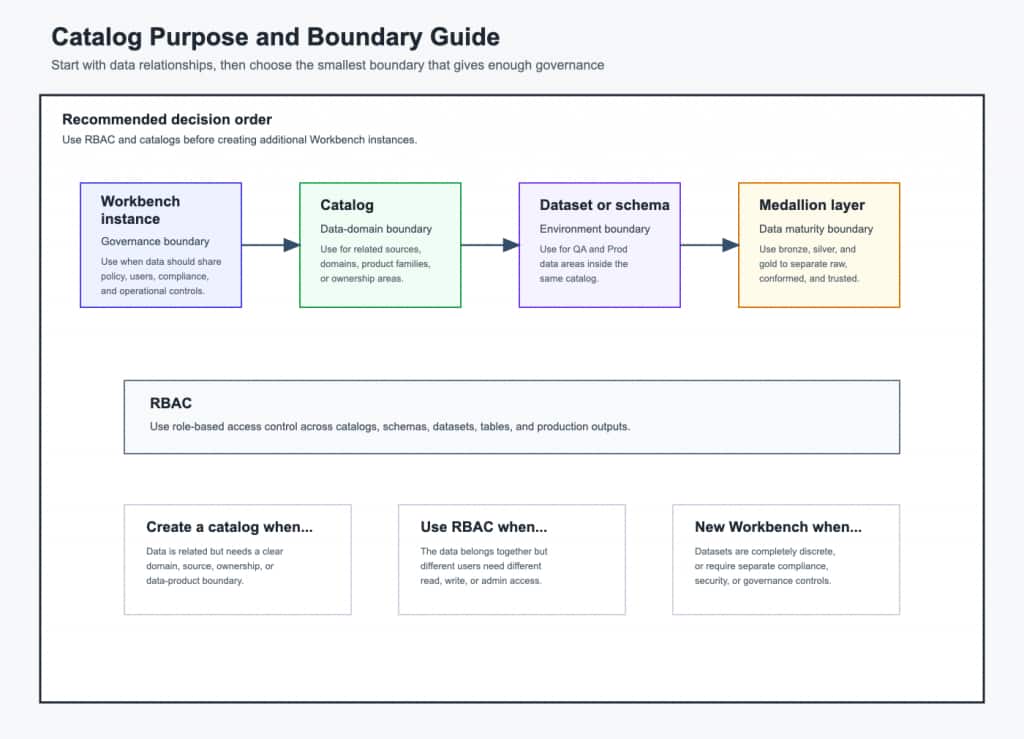
Catalog purpose and boundary guide
| Decision | Use this construct | Example | Why |
| Related data should share governance | Same instance | Customer and user funnel instance | Keeps related data joinable, searchable, and governed together |
| Data belongs to a distinct source or domain | New catalog | Sales, Marketing, Product Usage | Gives the data a clear ownership and organization boundary |
| Same catalog needs validation and controlled production areas | QA and prod datasets or schemas | QA bronze, Prod gold | Separates testing from trusted production data |
| Data needs raw, conformed, and curated stages | Medallion layers | Bronze, Silver, Gold | Makes data maturity visible |
| Same data needs different user permissions | RBAC | Sales read/write, Marketing read-only, Platform admin | Controls access without unnecessary instance sprawl |
| Data requires a hard compliance or governance split | New instance | Regulated data separated from general analytics | Adds a stronger boundary only when justified |
| Catalog purpose | What goes there | Typical owner | Access pattern |
| Source-aligned catalog | Data from a major system or source family | Source system or data engineering team | Narrow write access, broader controlled read access |
| Domain catalog | Data for a business domain such as Sales or Marketing | Domain data owner | Domain write access, cross-functional read access as needed |
| Shared entity catalog | Common customer, account, contact, product, or identity entities | Shared data owner or platform team | Governed shared read access, tightly controlled writes |
| Data product catalog | Published reusable products such as customer 360 or lead scoring features | Product or analytics owner | Broad read access, limited production write access |
| Restricted catalog | Sensitive data requiring tighter controls | Security, compliance, or delegated data owner | Explicitly approved access only |
The screenshot below shows this pattern in AI Data Platform. The instance keeps related customer-funnel data together, while catalogs separate Sales, Marketing, and shared customer data. Each catalog can then expose QA and prod medallion schemas.
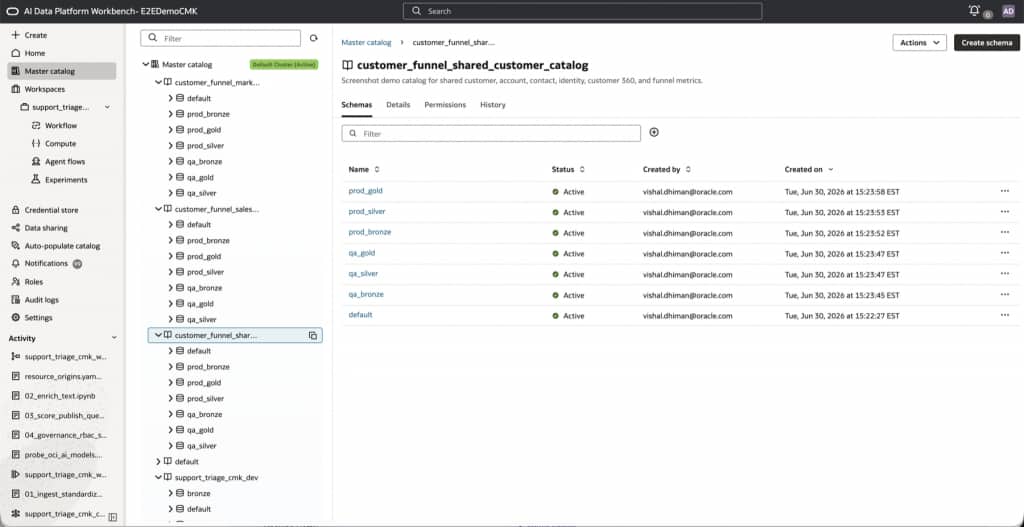
Figure: A single AI Data Platform instance can contain multiple related catalogs, and each catalog can contain QA and prod bronze, silver, and gold schemas.
What to notice:
- The catalog tree keeps Sales, Marketing, and shared customer catalogs visible in the same instance.
- The selected shared customer catalog uses consistent qa_* and prod_* schema names for bronze, silver, and gold.
- The schema table makes status, ownership, and creation time visible for each layer.
Map Workspaces to environments and catalogs to data domains
Medallion architecture usually belongs inside catalogs, not directly in the Workspace list. Start with catalogs for related data domains or sources:
- A sales catalog for CRM, opportunity, pipeline, and account activity data.
- A marketing catalog for campaign, engagement, lead, web interaction, attribution, retention, and customer_churn data.
- A product usage catalog for adoption, behavior, and activation data.
Each catalog can contain QA and prod datasets or schemas. Each environment dataset then uses bronze, silver, and gold:
- QA bronze, silver, and gold layers for development, testing, validation, and business review.
- Prod bronze, silver, and gold layers for production-controlled data products and workflows.
| Inside one catalog | Purpose | Example names |
| QA bronze | Candidate raw ingestions and profiling outputs | QA raw CRM |
| QA silver | Test transformations and validation logic | QA account matching |
| QA gold | Candidate business-ready outputs for review | QA pipeline forecast |
| Prod bronze | Controlled raw history or source snapshots | Prod CRM history |
| Prod silver | Trusted conformed entities and reusable transformations | Prod account master |
| Prod gold | Curated business-ready datasets and features | Prod customer 360 |
Workspaces represent where the work happens. For example, Sales Dev, Sales QA, and Sales Prod Workspaces can publish to or consume from:
- sales_catalog.qa_bronze, sales_catalog.qa_silver, and sales_catalog.qa_gold
- sales_catalog.prod_bronze, sales_catalog.prod_silver, and sales_catalog.prod_gold
This keeps environment maturity and data maturity separate: a user entering Sales Dev expects active development work, while a user entering Sales Prod expects controlled workflows that publish to production medallion layers.
Recommended architecture for shared Sales and Marketing data
Sales and Marketing often depend on the same customer, account, lead, campaign, churn, and revenue signals. Keep them in the same customer-funnel instance unless compliance, residency, security, or operating-model rules require separation. Use catalogs and RBAC for practical boundaries:
- Sales catalog for CRM, opportunity, account, pipeline, and sales activity datasets
- Marketing catalog for campaign, engagement, web, email, lead, attribution, retention, and customer_churn datasets
- Optional shared customer catalog for cross-domain entities such as account master, contact master, identity resolution, customer 360, and funnel metrics
Each catalog can contain QA and prod datasets with their own bronze, silver, and gold layers:
- QA bronze, silver, and gold for development, testing, and validation
- Prod bronze, silver, and gold for production-controlled data products
For example, sales_catalog.qa_bronze can hold candidate CRM ingestions, while sales_catalog.prod_gold can hold production-ready sales pipeline metrics. Similarly, marketing_catalog.qa_silver can hold test campaign-touch or churn feature logic, while marketing_catalog.prod_gold can hold production-ready engagement, attribution, and churn-risk outputs.
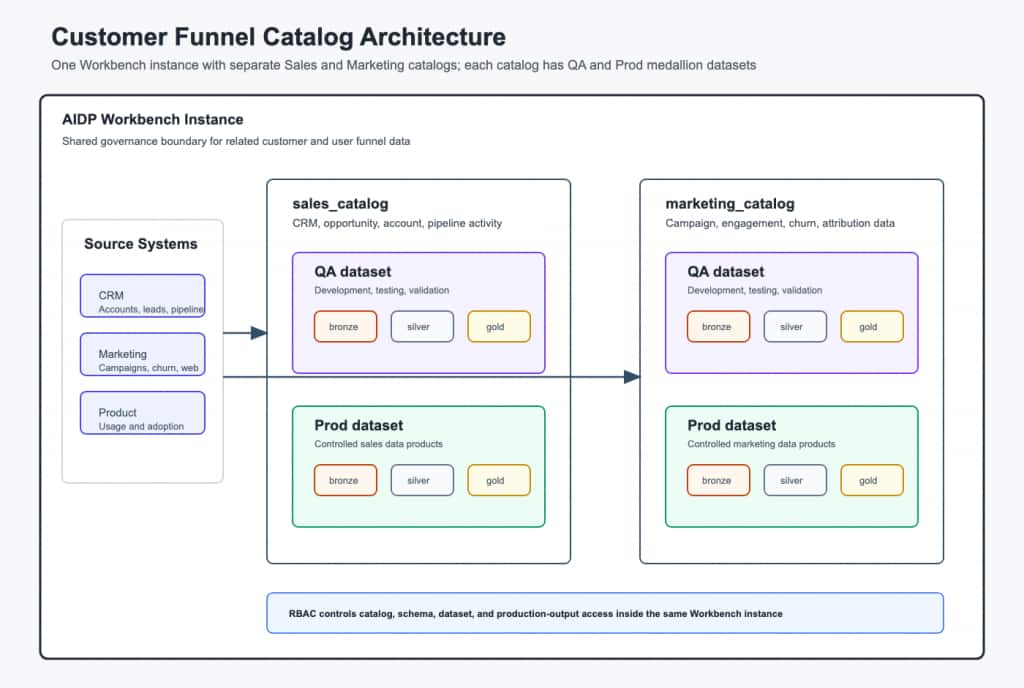
Shared Sales and Marketing medallion container architecture
This gives both teams a shared governance boundary without forcing them into one catalog or one Workspace. Make silver the collaboration layer where shared definitions are agreed: lead-to-account mapping, campaign-touch deduplication, opportunity-stage standardization, customer identity resolution, and churn-risk inputs. Gold should publish trusted outputs with clear owners and refresh behavior.
Use dev, QA, and prod Workspaces for each domain
For teams that need stronger development operational discipline, use Workspaces as environment containers. This is especially useful when Sales and Marketing outputs influence forecasting, segmentation, lead routing, churn prevention, or executive reporting.
Each domain can maintain dev, QA, and prod Workspaces:
- Dev Workspaces support experimentation, new transformations, feature trials, and workflow changes.
- QA Workspaces support validation, business review, data quality checks, and release approval.
- Prod Workspaces run controlled workflows that publish trusted outputs into the prod datasets or schemas inside the relevant catalog.
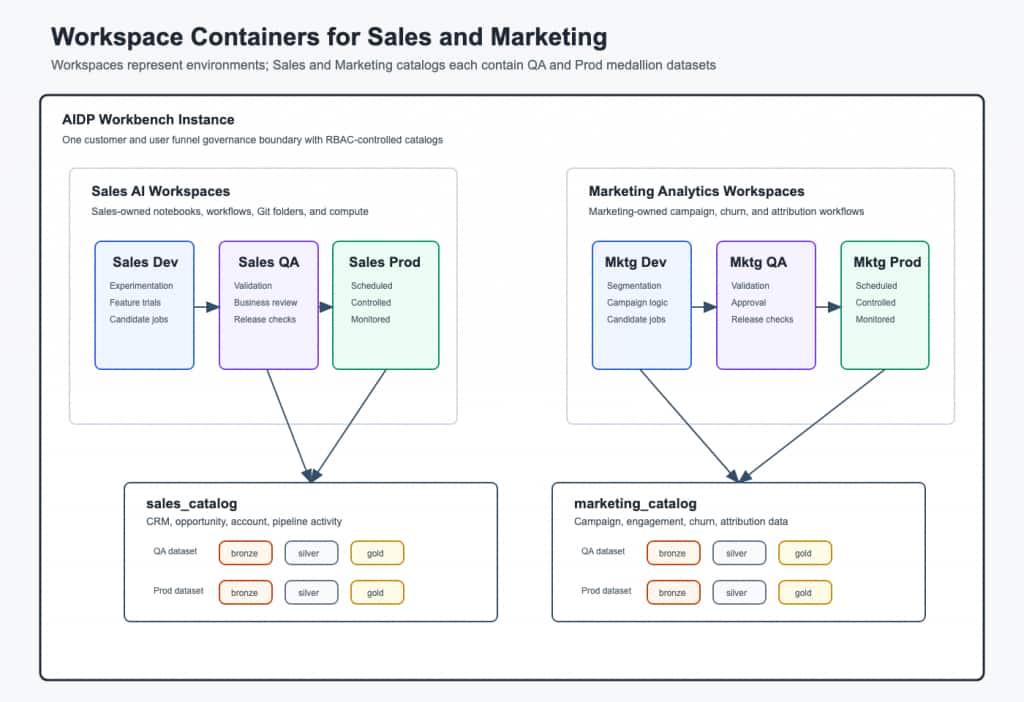
Sales and Marketing dev, QA, and prod workspace containers
A practical naming model looks like this:
- Sales Dev Workspace
- Sales QA Workspace
- Sales Prod Workspace
- Marketing Dev Workspace
- Marketing QA Workspace
- Marketing Prod Workspace
Inside those Workspaces, folders, jobs, notebooks, and workflows can follow bronze, silver, and gold naming. The data itself stays organized in catalog medallion structures. Workspaces show environment maturity: dev to QA to prod. Catalog layers show data maturity: bronze to silver to gold.
In the AI Data Platform console, this shows up as a Workspace list where each environment has a clear name and a default catalog.
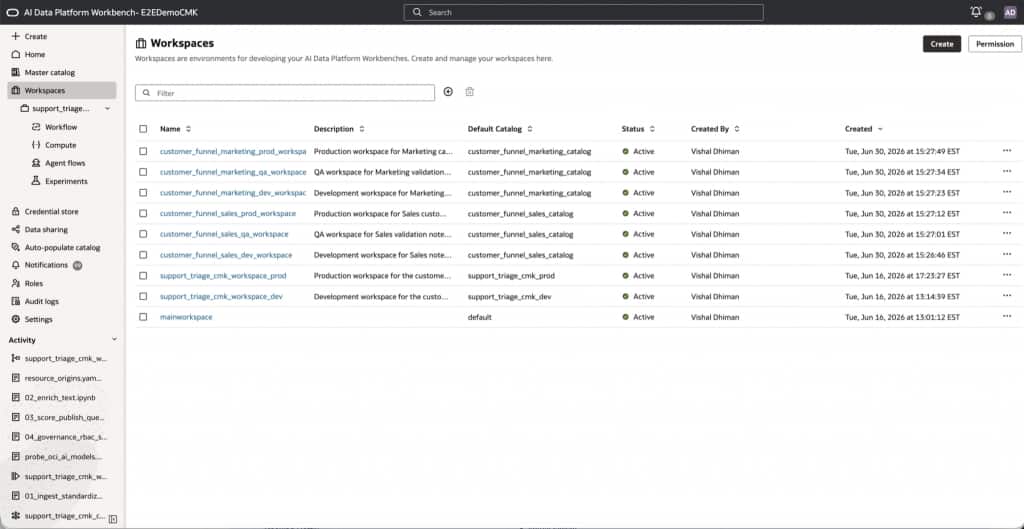
Figure: Workspaces represent environments, while the default catalog column keeps each Workspace tied to its data domain.
What to notice:
- Sales and Marketing each have dev, QA, and prod Workspaces.
- Each Workspace points to the appropriate default catalog, such as customer_funnel_sales_catalog or customer_funnel_marketing_catalog.
- The active status makes it easy for users and administrators to confirm which environments are ready for work.
Apply medallion responsibilities consistently
The medallion layers should have different responsibilities and access patterns:
| Layer | What belongs there | Typical controls |
| Bronze | Source-specific ingestion notebooks, raw landing logic, profiling outputs, and source completeness checks | Flexible development access, but controlled access to sensitive raw data |
| Silver | Transformation notebooks, validation workflows, shared utilities, feature engineering logic, and business-rule documentation | Collaborative engineering and analytics access with review and versioning |
| Gold | Curated datasets, trusted features, dashboards, reporting tables, and production AI inputs | Limited write access, clear ownership, controlled promotion, broad governed read access |
This does not mean gold needs to be difficult to use. It means gold should be predictable. Teams should know which assets are trusted, who can change them, and how updates are introduced.
Naming and access rules
Use names that expose the boundary before users open the asset.
| Boundary | Good examples | Access rule |
| AI Data Platform instance | Customer and User Funnel, Finance Forecasting, Regulated Customer Data | Create a new instance only for discrete data or stronger governance/compliance needs |
| Catalog | Sales, Marketing, Product Usage, Shared Customer | Use catalogs for related domains, sources, or data product families |
| Workspace | Sales Dev, Sales QA, Sales Prod, Marketing Dev, Marketing QA, Marketing Prod | Use Workspaces for environment separation |
| Schema or dataset | QA bronze, QA silver, QA gold, Prod bronze, Prod silver, Prod gold | Use consistent QA/prod and medallion naming inside each catalog |
Access should reflect responsibility: bronze contributors manage ingestion, silver contributors maintain shared transformation logic, gold operators manage curated outputs, consumers read trusted gold data, and administrators enforce standards through RBAC.
Use RBAC and data governance to control access
AI Data Platform roles should map to job responsibilities, not one-off individuals. Add existing IAM or identity-provider users and groups to roles, then use data governance to assign catalog, schema, table, view, and Workspace permissions. For example, this is a sample roles and permissions users may create:
| Role | Catalog governance | Workspace governance | Intended users or groups |
| Sales data engineer | Sales catalog: SELECT, CREATE_SCHEMA, MANAGE | Sales Dev: PRIVILEGED_USER; Sales QA: USER | Sales data engineering group |
| Marketing data engineer | Marketing catalog: SELECT, CREATE_SCHEMA, MANAGE | Marketing Dev: PRIVILEGED_USER; Marketing QA: USER | Marketing analytics and data engineering group |
| Shared data steward | Shared customer catalog: SELECT, CREATE_SCHEMA, MANAGE | Sales QA and Marketing QA: USER | Customer identity and governance group |
| Production operator | Sales, Marketing, and Shared catalogs: SELECT, MANAGE | Sales Prod and Marketing Prod: PRIVILEGED_USER | Production operations group |
| Business consumer | Sales, Marketing, and Shared catalogs: SELECT | Sales Prod and Marketing Prod: USER | Analysts, leaders, and downstream consumers |
| Platform admin | Sales, Marketing, and Shared catalogs: ADMIN | All customer-funnel Workspaces: ADMINISTRATOR | Platform administration group |
Use catalog permissions for the data plane, Workspace permissions for development and operational access, and schema/table/view policies for finer control. This keeps governance visible: users may enter the right Workspace, but they still only see or manage the catalog objects their role permits.
The Roles page gives administrators a single place to see the custom roles that support the access model.
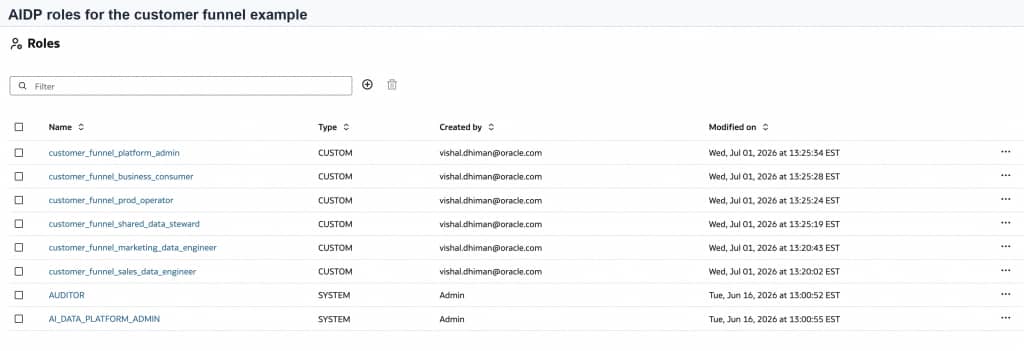
Figure: Custom roles separate Sales engineering, Marketing engineering, shared data stewardship, production operations, business consumption, and platform administration.
Catalog permission tabs show data-plane governance. In this example, each catalog has explicit role grants instead of relying only on broad administrator access.
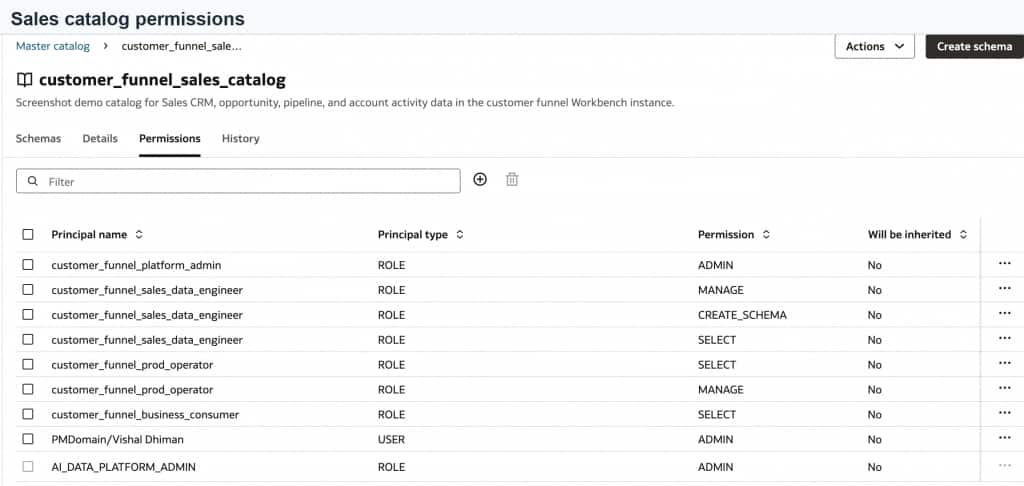
AI Data Platform Sales catalog permissions showing role-based grants
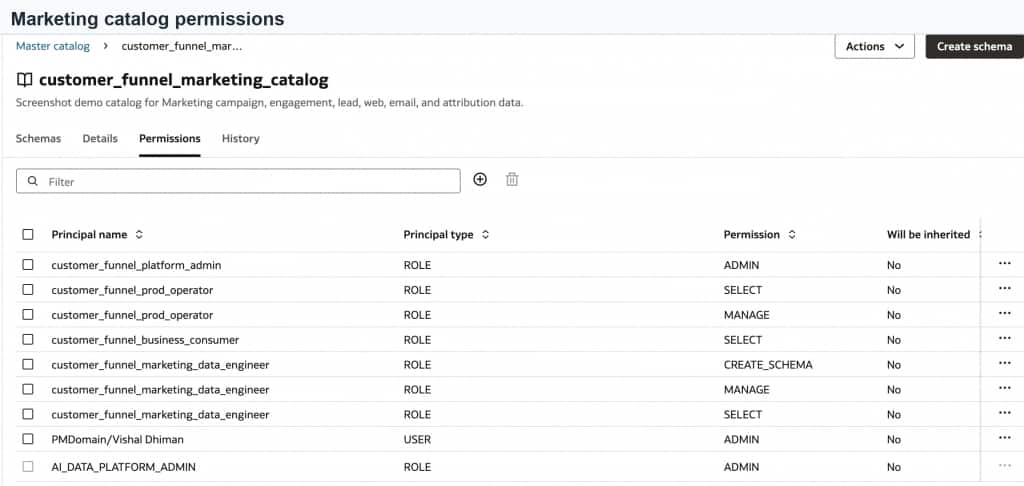
AI Data Platform Marketing catalog permissions showing role-based grants
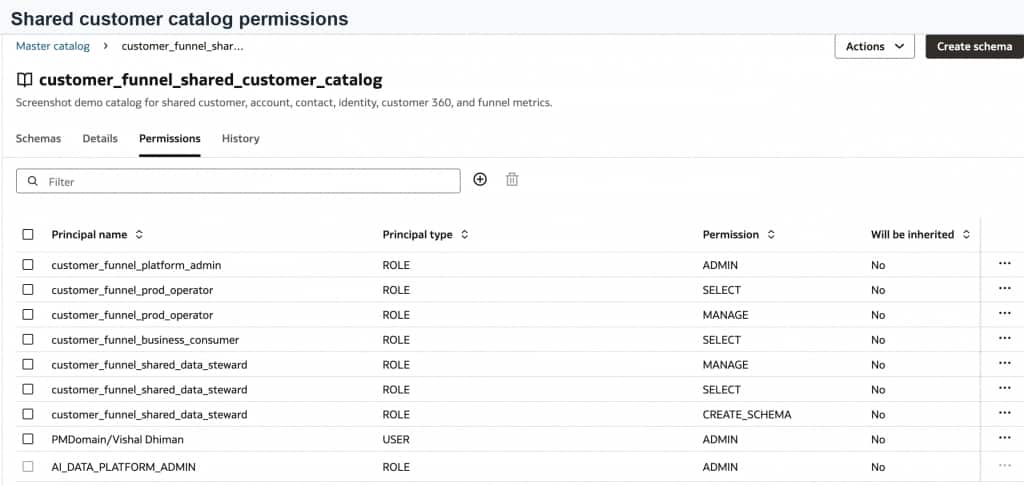
AI Data Platform Shared Customer catalog permissions showing steward, consumer, operator, and admin grants
What to notice:
- Domain engineering roles manage their own domain catalog: Sales engineers manage Sales, and Marketing engineers manage Marketing.
- Shared data stewards manage the shared customer catalog, where cross-domain customer and funnel definitions live.
- Business consumers receive read-oriented SELECT access, while production operators receive controlled operational access.
Workspace permissions should change by environment. Dev grants are broader for builders, QA grants support validation and stewardship, and prod grants narrow operational control.
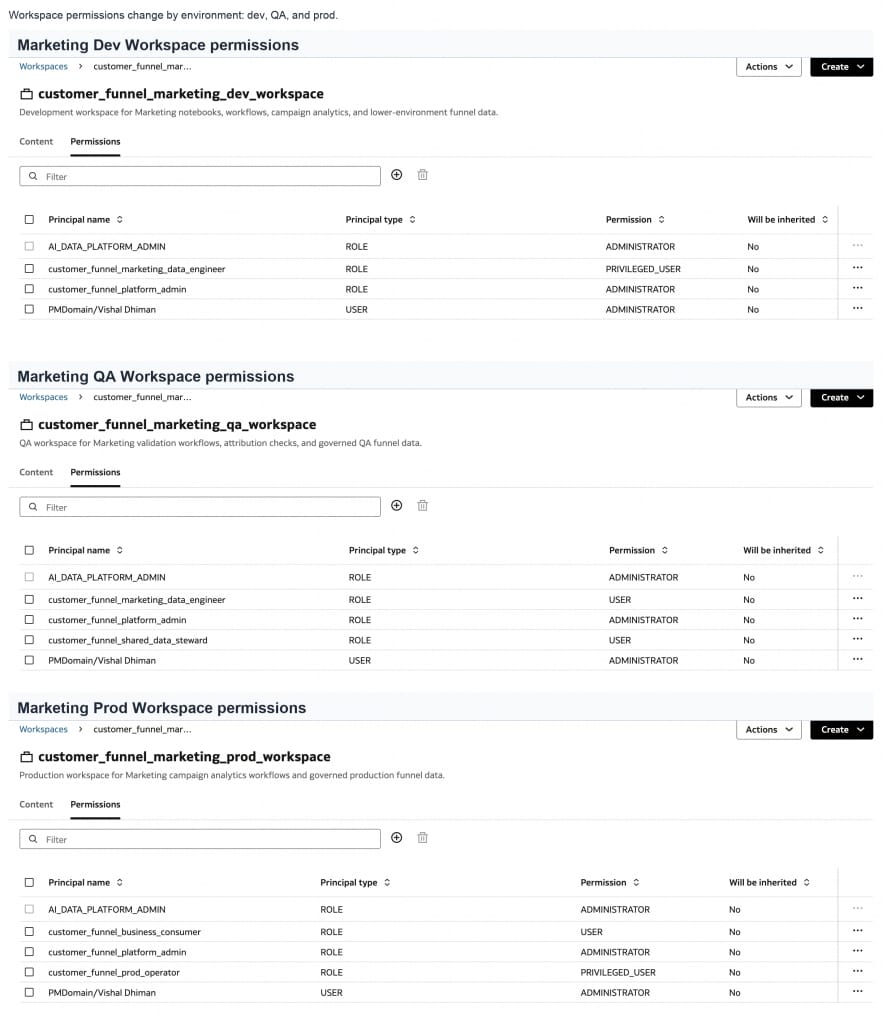
Figure: Dev, QA, and prod Workspaces use different permissions even when they point to the same Marketing catalog.
The same pattern applies to Sales. Prod access is controlled through production roles, while QA Workspaces keep validation assets visible and separate from production operation.
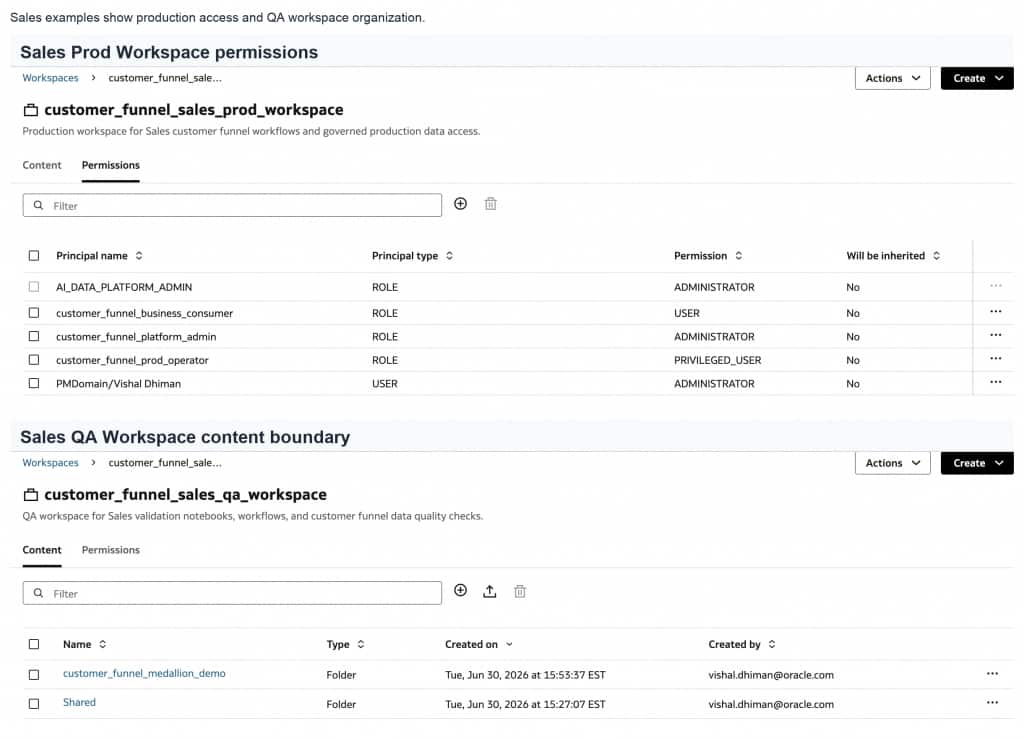
AI Data Platform Sales production permissions and QA workspace content boundary
Organize Workspace assets for collaboration
Even with good catalog boundaries, teams still need a clean internal Workspace layout. Use folders and names that make pipeline stage, ownership, and operational purpose visible: ingestion, transformation, quality checks, shared components, deployment bundles, documentation, and production workflows.
The screenshots below use a support-triage workspace, but the same organization applies to Sales, Marketing, or any other catalog domain.
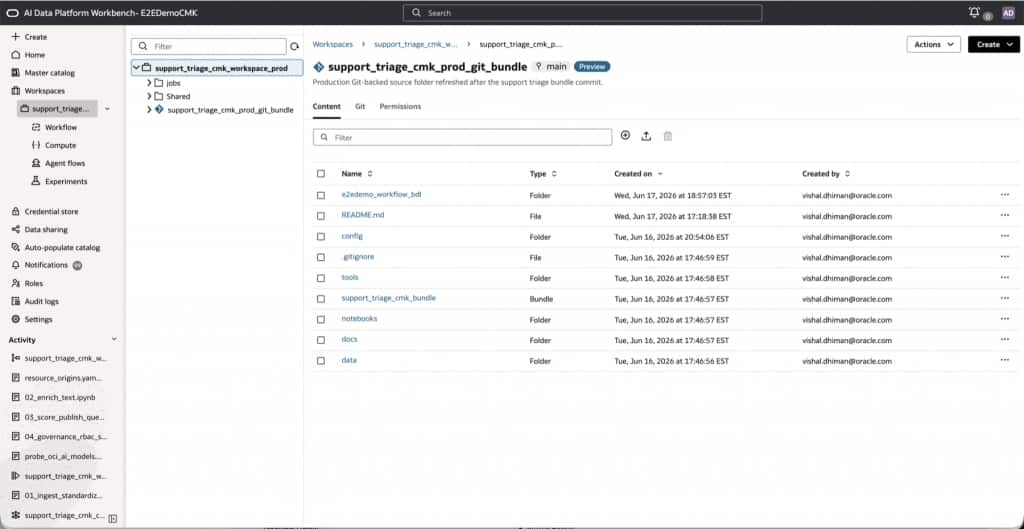
Figure: Git-backed folders, Bundle folders, notebooks, configuration, tools, data, and documentation can live together without becoming indistinguishable.
What to notice:
- The Git-backed source folder gives teams a controlled place for reviewed code. More about this covered in my dedicated blog for Git and CICD.
- The bundle asset is visible as a deployable unit, separate from notebooks and supporting folders.
- Project folders such as config, data, docs, tools, and notebooks help users understand where to look before they open files.
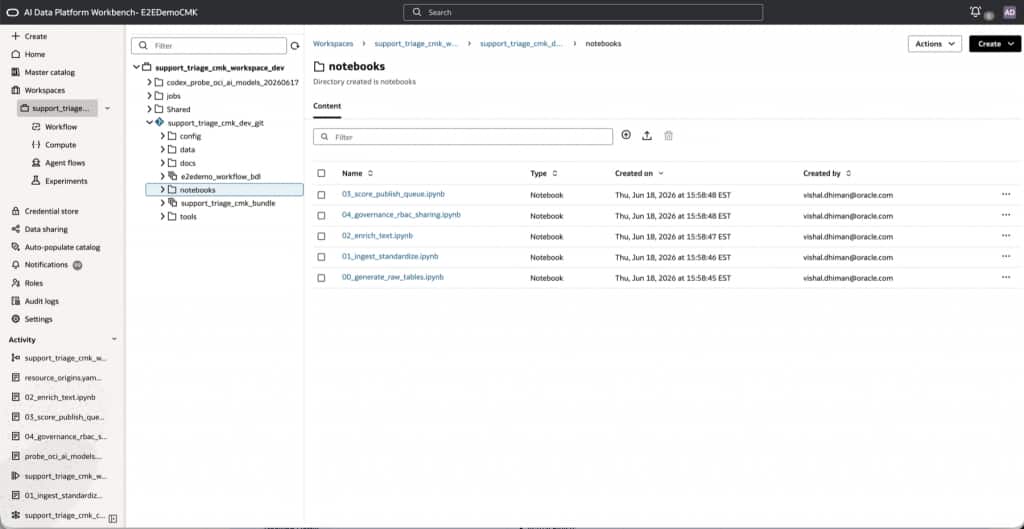
Figure: A notebook folder can make pipeline stages visible before users open any notebook.
What to notice:
- Numbered notebook names communicate execution order.
- Each notebook is typed as a Notebook object, not an ambiguous generic file.
- The folder boundary keeps related pipeline notebooks together instead of scattering them across the Workspace.
Workflows should make the operational path visible: which notebooks run, in what order, and under which execution context.
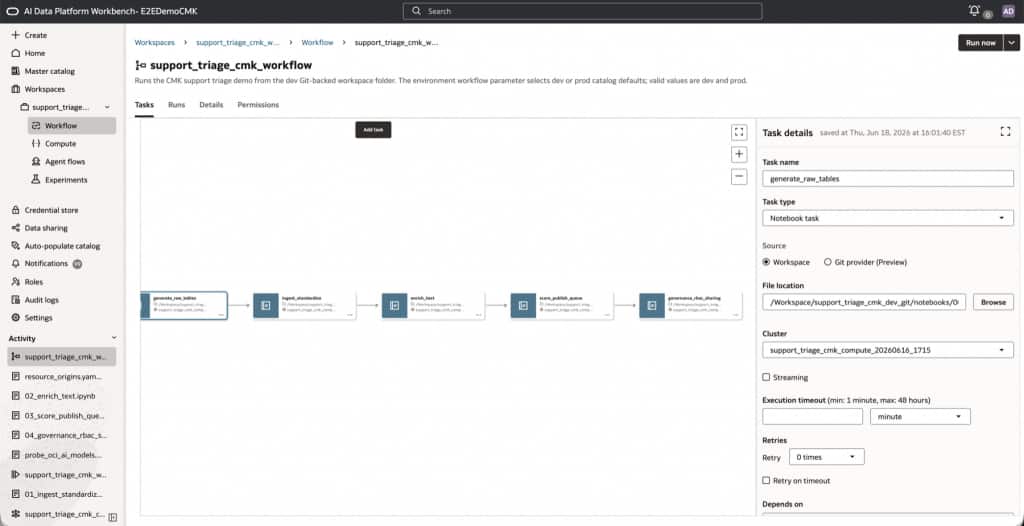
Figure: Workflow tasks turn organized notebooks into an operational pipeline with explicit task details and compute context.
What to notice:
- The task graph shows the sequence of notebook tasks from raw table generation through governance and sharing.
- The task details panel ties each task to a Workspace file location.
- The cluster selector makes the execution context explicit, which matters for production readiness and troubleshooting.
Summary – A practical starting model
For many organizations, a practical starting point is:
| Step | Action |
|---|---|
| 1 | Identify which datasets are related and should share a governance boundary. |
| 2 | Keep related datasets in a single instance unless they are completely discrete or require separate compliance, security, residency, or operational controls. |
| 3 | Create catalogs for related data domains, data sources, or data product families. |
| 4 | Use RBAC to define access boundaries across catalogs, schemas, datasets, and production outputs. |
| 5 | Within each catalog, create QA and prod datasets or schemas. |
| 6 | Organize each QA and prod dataset with bronze, silver, and gold layers. |
| 7 | Create Workspaces for environments such as dev, QA, and prod. |
| 8 | Use consistent naming conventions that include domain, environment, and medallion layer. |
| 9 | Keep gold assets curated, trusted, and operationally focused. |
| 10 | Review structure periodically as adoption grows. |
This gives teams enough structure to scale without forcing every group into the same detailed layout on day one. The value is practical: users find the right assets faster, administrators manage permissions with more confidence, production workflows are protected from accidental changes, and related data stays reusable across teams.
Final takeaway
OCI AI Data Platform enables organizations to integrate generative AI directly into existing data workflows without requiring external integrations, data movement, or workarounds to governance models. Instead, generative AI becomes a seamless extension of familiar tools such as SQL transformations, Spark pipelines, and governed data assets. This approach allows teams to adopt GenAI in a way that is practical, scalable, and aligned with enterprise requirements.
For more information: