
Modern AI and data projects rarely live in a single notebook for long. A promising experiment quickly turns into a set of notebooks, Python scripts, SQL files, workflow definitions, compute settings, and environment-specific configuration. That is usually the point where teams start feeling the gap between experimentation and delivery.
In many organizations, that gap shows up in familiar ways: notebook versions drift across environments, collaboration happens through exported files, and promotion from development to test or production becomes a manual exercise. It works, until it does not.
That is why Git integration and Bundle folders matter in AI Data Platform Workbench.
Together, these capabilities bring two forms of discipline to AI development – Continuous Integration and Continuous Delivery (CICD). Git-backed folders help teams manage source-controlled project assets directly inside Workbench. Bundle folders extend that foundation by packaging deployable resources and supporting repeatable promotion across environments. The result is a more reliable path from development to managed delivery.
Why teams need both source control and deployment discipline
Source control solves an important part of the problem, but not all of it.
Git is the right tool for versioning notebooks, Python files, SQL, and other project assets. It improves collaboration, preserves history, supports branching, and makes code review possible. For Workbench users, that means development artifacts no longer have to stay isolated inside a workspace with no clear promotion path.
But Git alone does not deploy runnable assets across environments. It does not create or update jobs and compute in the target environment. It does not automatically manage differences such as cluster settings, schema names, task parameters, or other environment-specific values. That is where Bundle folders come in.
With Git integration and Bundles working together, AI Data Platform Workbench supports both sides of the lifecycle:
- Day-to-day development and collaboration through version-controlled workspace assets
- Structured packaging, promotion, and deployment across environments such as Dev, Test, and Prod
Git integration inside AI Data Platform Workbench
AI Data Platform Workbench introduces Git-backed folders directly in the workspace, so teams can work with remote repositories without leaving their development environment.
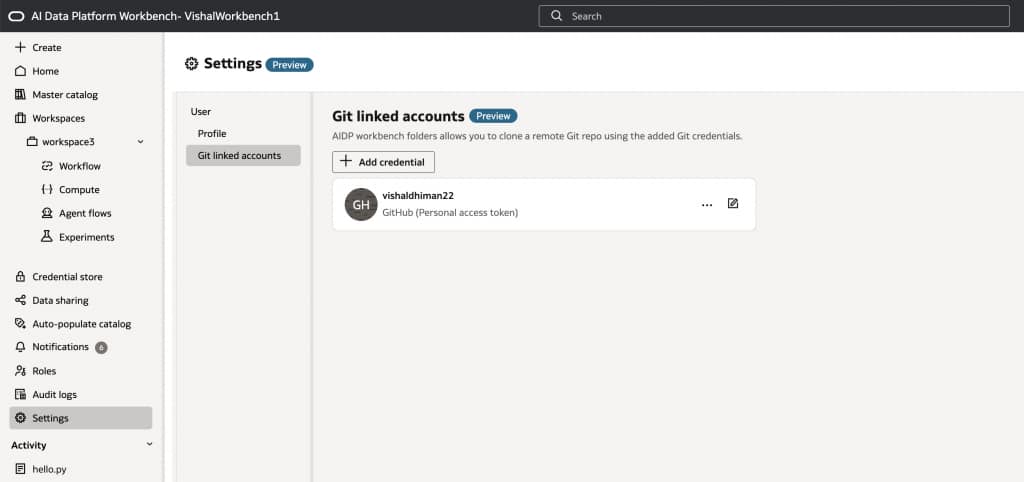
The flow is straightforward. A user creates Git credentials in the Settings section as seen below.
Next user creates a Git folder inside a workspace, connects it to a repository and branch, and pulls code into Workbench.
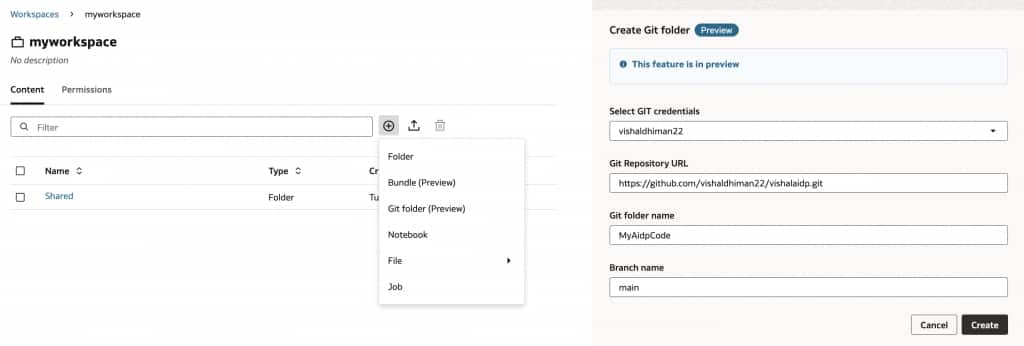
From there, notebooks, Python scripts, SQL files, and related assets can be edited in place and synchronized back to Git. Once done, your workspace project will have the Git folder with all existing code in your workspace as shown below.
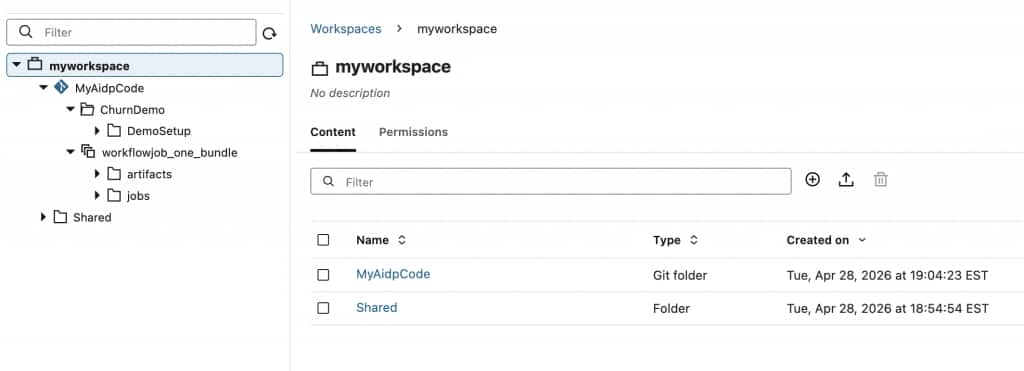
This matters because it turns the workspace into an organized project surface instead of a temporary sandbox. Teams can keep notebooks and supporting files together in a familiar folder structure, track every change, and collaborate through normal Git practices rather than ad hoc exports.
Inside a Git-backed folder, users can:
- Pull the latest code into the local workspace
- Create and edit notebooks, scripts, SQL, and other files
- Review changes before syncing them
- Commit all changes or only selected files
- Discard files they do not want to include
- Push updates back to the remote branch
- Create branches, switch branches, merge, rebase, and reset when needed
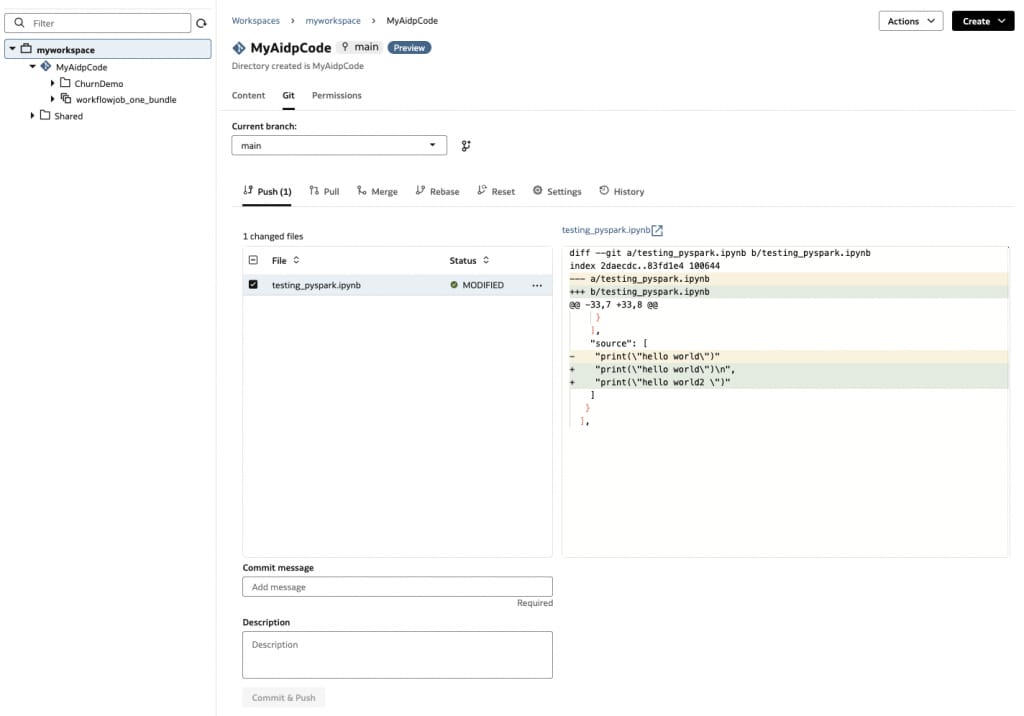
That combination is especially valuable for teams developing AI workflows across multiple contributors. One person can iterate on a notebook, another can update SQL or job logic, and both can coordinate through branches and merge practices that engineering teams already trust.
Git also becomes more than a storage layer for files. Workflows and tasks can reference Git-based sources, which means teams can execute jobs against versioned code instead of relying only on workspace-local copies. That helps align development and orchestration with the same repository model.
Governance matters too. Git actions are performed inside Workbench using managed credentials, and permissions on Git folders can be controlled at the parent folder level. That gives teams a more disciplined collaboration model than passing tokens around or sharing copies of files through external channels.
Version-controlling notebooks, assets, and workspace organization
For many AI teams, the real challenge is not just versioning a notebook. It is versioning the full working set around that notebook.
Workbench projects often include:
- Notebooks used for exploration, feature engineering, or model workflows
- Python and SQL files used by jobs and tasks
- Workflow jobs including supporting assets referenced by the jobs
- Workspace folder structures that help teams separate experiments, shared components, and production-ready assets
Git-backed folders make that structure manageable. Instead of treating notebooks as isolated artifacts, teams can place them alongside the files they depend on, organize them in a consistent project layout, and keep the whole working set under version control. This is discussed in the next section.
That improves collaboration across development teams in a few important ways:
- Data scientists can continue working in notebooks without giving up version history
- Data engineers can manage scripts and workflow assets in the same repository
- Platform or MLOps teams can enforce cleaner promotion practices across environments
- Cross-functional teams can align on a shared branch and repository model
In other words, Workbench starts to feel less like a disconnected authoring space and more like a platform where users with various personas can collaborate in a cohesive, governed software delivery workflow paradigm.
Git can manage code, but Bundles manage promotion
Once teams have their code and workspace assets under version control, the next challenge is packaging what actually needs to move between environments.
Bundle address that problem.
A Bundle is a portable package that defines deployable Workbench resources such as jobs, compute, notebooks, and agent flows. It gives teams a structured way to capture what was built in development and promote it into another environment in a repeatable manner. Bundles encapsulate a Workflow job and represents it as a single folder object.
The basic deployment flow looks like this:
- Build jobs, notebooks, compute, and other AI assets in a development environment.
- Create a Bundle from the relevant resources.
- Let AI Data Platform generate the Bundle contents, including deployment-ready YAML definitions.
- Push the Bundle folder to Git.
- Pull that Bundle folder into the target environment.
- Deploy the Bundle in the target environment.
The creation of workflow bundle flow is as follows:
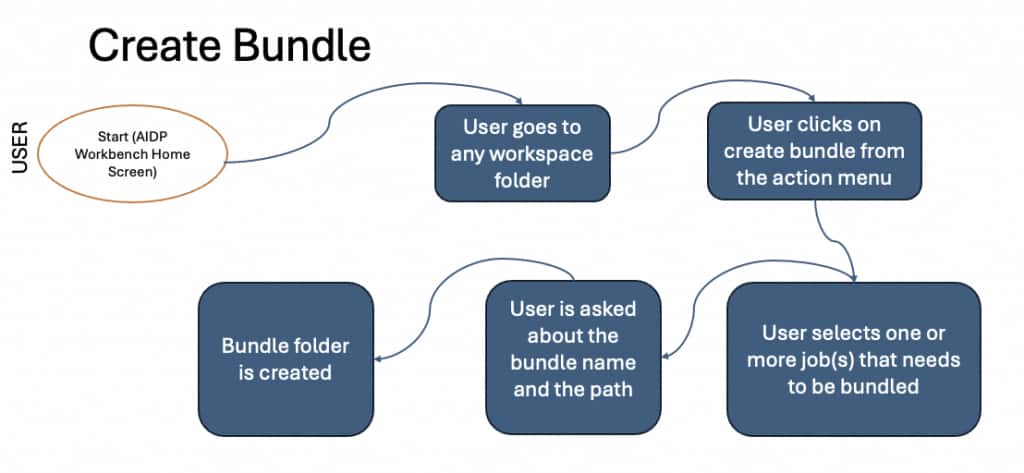
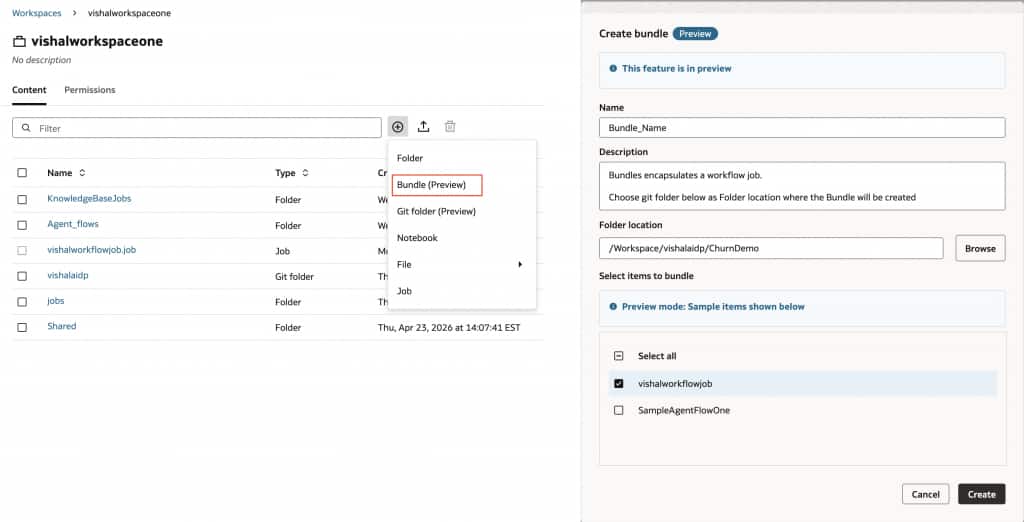
Here is how Bundles are creating using AI Data Platform UI:
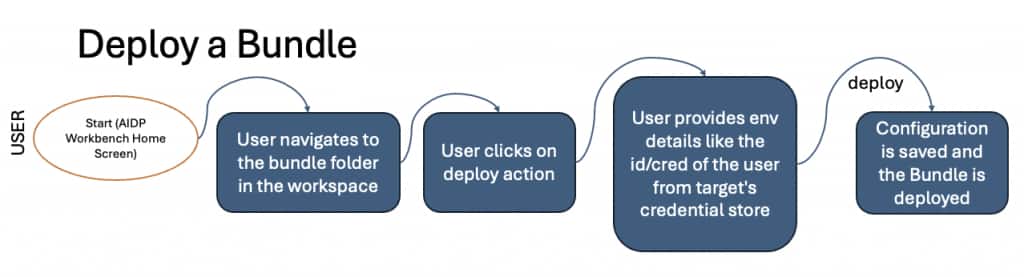
Similarly, the deployment of bundle follows the following flow:
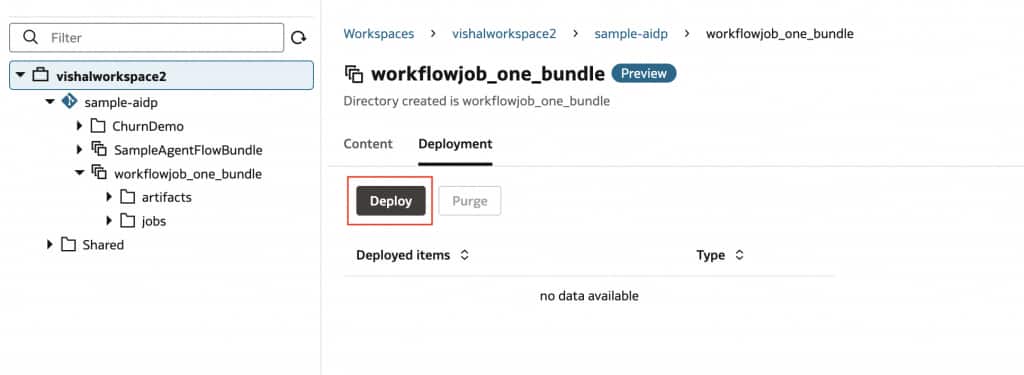
To deploy a Bundle, user needs to click the “Deploy” button on the Bundle’s Deployment tab:
This is the critical connection between Git and Bundles. Git carries the versioned project assets and Bundle folder contents across environments. The Bundle then handles deployment behavior inside the target environment.
That gives teams a clearer promotion model: develop in Dev or feature branches, version in Git, pull into Test or Prod, then deploy from the Bundle folder in a controlled way.
What happens on first deployment
On a first deployment, AI Data Platform Workbench can take the bundled resources created in development and establish them in the target environment. For example, if a bundle includes a job with a notebook task and an associated compute resource, deployment can create the job and compute in target environment, copy the notebook into the target workspace, and make the assets runnable there. In fact, you can see the deployed assets in the .aidp folder within the bundle. Since the contents of .aidp folder are not included in Git, it allows users to safely use git pull and update operations to safely update the Bundle from Git without risking updating the workflow jobs inadvertently. As we will discuss in the next section, to update the workflow jobs from git, users can use the Bundle Sync operations.
Therefore, the system keeps track of resource mappings between environments so future deployments update the same target resources instead of creating duplicates. That is a key part of moving from one-off promotion to managed delivery.
Keeping deployments repeatable as changes continue
Most teams are not deploying once. They are deploying repeatedly as notebooks evolve, schedules change, libraries are updated, or compute settings are tuned.
That is where Bundle Sync becomes important.
After resources change in Dev, users can sync the Bundle so it reflects the latest state of those resources, push the updated Bundle folder to Git, pull it into the target environment, and deploy again. AI Data Platform then applies the changes to the corresponding target resources. If only the notebook changed, only the notebook is replaced. If compute settings changed, those settings are updated. If libraries changed, those changes are applied.
A state-aware deployment model helps keep those updates tied to the same deployed resources over time. For customers, the value is simple: fewer manual re-creations, fewer accidental duplicates, and a more predictable deployment process.
ational detail because it keeps deployments portable without breaking the connection to the underlying source.
Why customers care
Customers care about these capabilities because they make AI Data Platform Workbench more practical for real team development.
Git integration helps teams bring notebooks and supporting files into a version-controlled workflow without forcing users out of Workbench. Bundle folders add the discipline needed to package, promote, and deploy those assets across environments in a repeatable way.
Together, they help customers:
- Reduce manual movement of notebooks, jobs, and configuration between environments
- Improve collaboration across data science, data engineering, and platform teams
- Support branch-based development and controlled merges
- Organize project files in a cleaner workspace structure
- Move from experimentation toward governed delivery with less operational friction
For customers trying to standardize AI development, this is not just about adding Git commands to a UI. It is about giving Workbench a more complete development-to-deployment story.
The bigger shift for AI Data Platform Workbench
The combination of Git-backed folders and Bundle folders changes how teams can use AIDP Workbench.
Instead of treating Workbench as the place where experiments happen before someone manually recreates everything elsewhere, teams can use it as a structured development environment connected to source control and aligned to promotion workflows. Notebooks, scripts, jobs, compute definitions, and environment configuration can all participate in a more disciplined lifecycle.
That is the shift customers have been asking for: keep the speed of interactive development, but add the version control, organization, collaboration, and deployment rigor needed for enterprise delivery.
For more information, please visit: