

From no-code to multi-agent — building intelligent workflows with MCP integration, Fusion connectivity, agentic orchestration, Python SDK, and pre-built agents.
Building intelligent agentic workflows has traditionally required complex code/designing, custom orchestration logic, and deep technical expertise. Oracle AI Database Private Agent Factory changes that equation. But how does it actually work in practice? Can you really connect external systems, build multi-agent workflows, and integrate with enterprise applications using a no-code platform?
Key Questions This Blog Answers
The goal was to focus on Private Agent Factory’s core capabilities through practical implementation:
- Can external systems or tools integrate via MCP (Model Context Protocol)?
- How do you connect agents built elsewhere (like Oracle Fusion) to an agentic workflow in Private Agent Factory?
- What does multi-agent orchestration look like in practice?
- Can you integrate the agents created in Private Agent Factory into custom Python applications?
- How do pre-built Knowledge and Data Analysis agents perform?
This wasn’t about building production systems—it was about understanding the platform’s capabilities and integration patterns.
Foundation: Understanding the Private Agent Factory Architecture
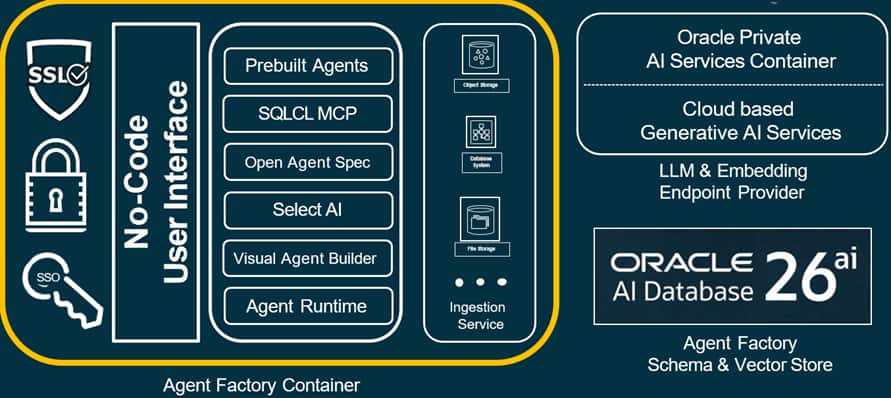
Before diving into implementation, let’s understand what we are working with. Oracle Private Agent Factory sits inside the Oracle AI Database 26ai ecosystem.
Key architectural insight: The Oracle AI Private Agent Factory brings AI to your data rather than moving data to AI. Agents run inside the database environment, which simplifies security (database-level access controls) and eliminates network latency for data operations.
Approach 1: Integrating External Systems via MCP Protocol
The Challenge: Connecting to External Tools and APIs
The first question was straightforward: can Private Agent Factory agents use external tools? Not database tables or internal knowledge bases, but actual external services—data fetching, custom microservices, anything running outside the database.
What is MCP and Why Does It Matter?
MCP is an open standard that lets AI agents discover and use external tools. Think of it as a universal adapter between agents (which need to invoke functions) and services (which expose capabilities).
Here’s what makes it powerful:
- Standardized protocol: Any service that speaks MCP can connect to Private Agent Factory.
- Dynamic tool discovery: Agents automatically see available tools when you connect an MCP server.
- Supports SSE and HTTP: Works with Server-Sent Events for streaming or standard HTTP.
- Flexible authentication: Bearer tokens, API keys, OAuth — configure directly in the Agent Builder UI.
Practical Implementation: Real-Time Flight Tracking Example
To validate this, we built a simple MCP server that wraps a flight tracking API. Here’s the implementation approach:
Step 1: Create the MCP Server
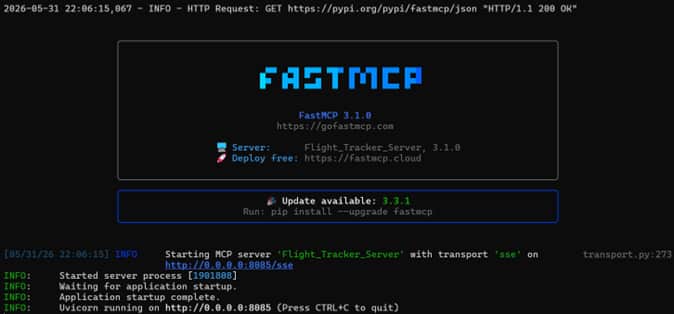
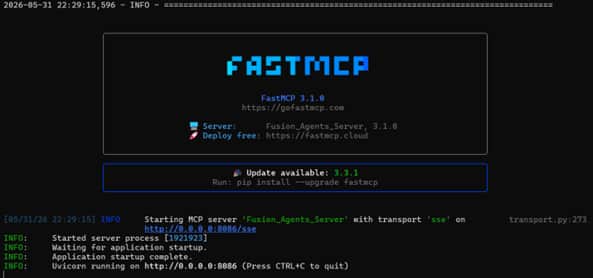
We used FastMCP (Python) to build the MCP server. The server needs to: expose tool definitions (what functions are available), handle tool invocations (execute the requested function), return structured responses, and support SSE protocol for real-time streaming.
Step 2: Deploy and Expose the Endpoint
The MCP server runs on a separate VM and is exposed via HTTP on a private port.
Step 3: Register in Private Agent Factory
Under Settings → MCP Servers in the Private Agent Factory UI, add the endpoint and configure authentication. Agent Factory immediately connects and discovers available tools through the endpoint.
Step 4: Use in Agent Workflows
In the Agent Builder, drag an MCP Server node onto the canvas, select your added MCP server, and connect it to an agent node. The agent can now invoke tools from the MCP just like built-in functions whenever required.
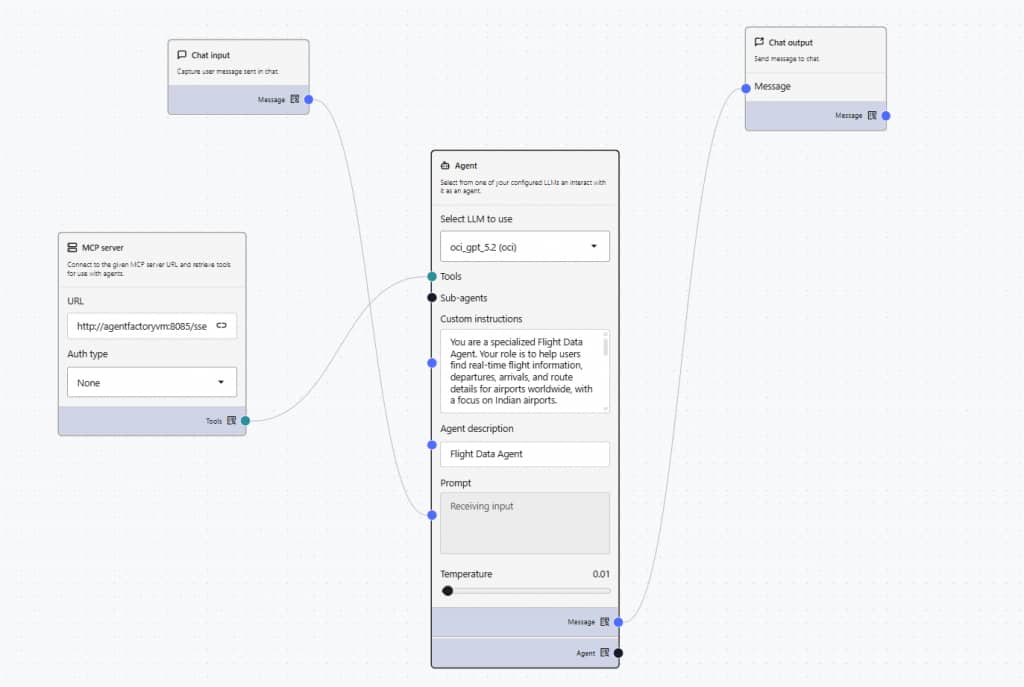
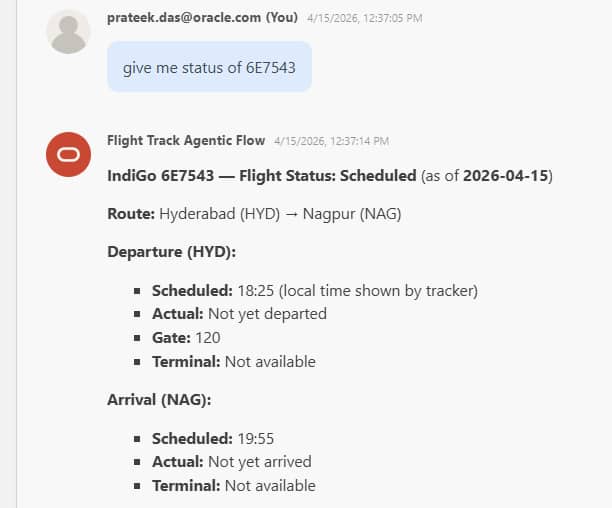
Key Takeaway: Any MCP can be added as an agent tool. If you can wrap a service with an MCP, you can integrate it with Oracle AI Database Private Agent Factory — opening up possibilities for connecting to any APIs, CRM systems, monitoring tools, or custom microservices accessible via HTTP.
Approach 2: Connecting External Agents (Fusion Agent Integration)
The Challenge: Integrating Agents Built in Other Platforms
Oracle Fusion had an embedded agents for common HR operations queries. We wanted to know: can agents from Private Agent Factory talk to Fusion agents? Can we orchestrate agents built in completely different platforms?
Fusion agents use the Agent-to-Agent (A2A) protocol, which Private Agent Factory doesn’t natively support yet. But here’s where MCP’s flexibility shines — we could build a bridge.
The MCP Wrapper Pattern
The solution was to create an MCP server that acts as a proxy between Private Agent Factory and Fusion agents.
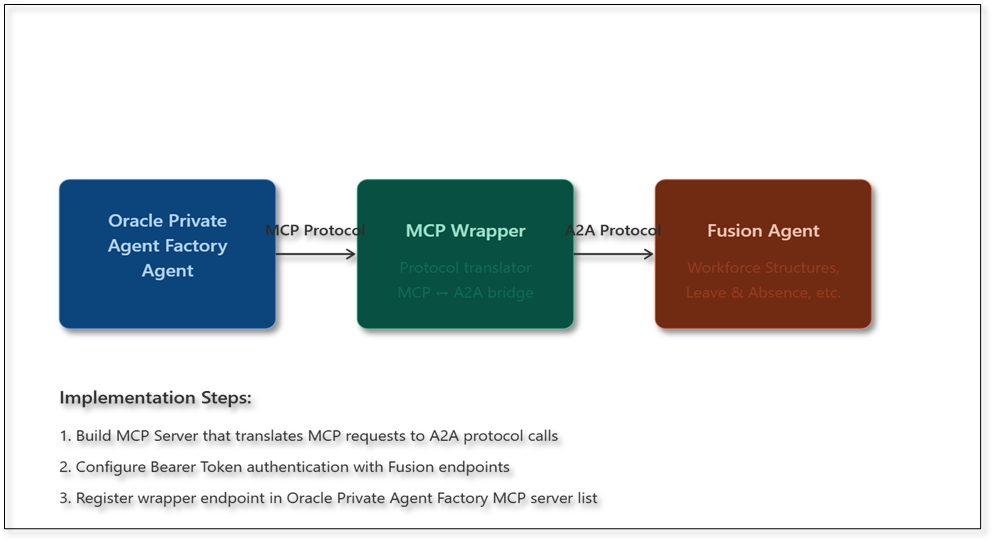
Here are the implementation steps:
Build MCP Server: Create a server that translates MCP requests to A2A protocol calls.
Configure Authentication: Handle Bearer Token authentication with Fusion endpoints.
Expose Fusion Tools: Map Fusion agent capabilities as MCP tools (e.g., ‘get_leave_balance’, ‘query_workforce_structure’, etc)
Register with Private Agent Factory: Add the wrapper endpoint (http://<Machine_IP>:<PORT>/sse) to Private Agent Factory’s MCP server list
Finally, drag/add a MCP tool into the canvas, select the fusion wrapper MCP and link it with the appropriate agent within the flow.
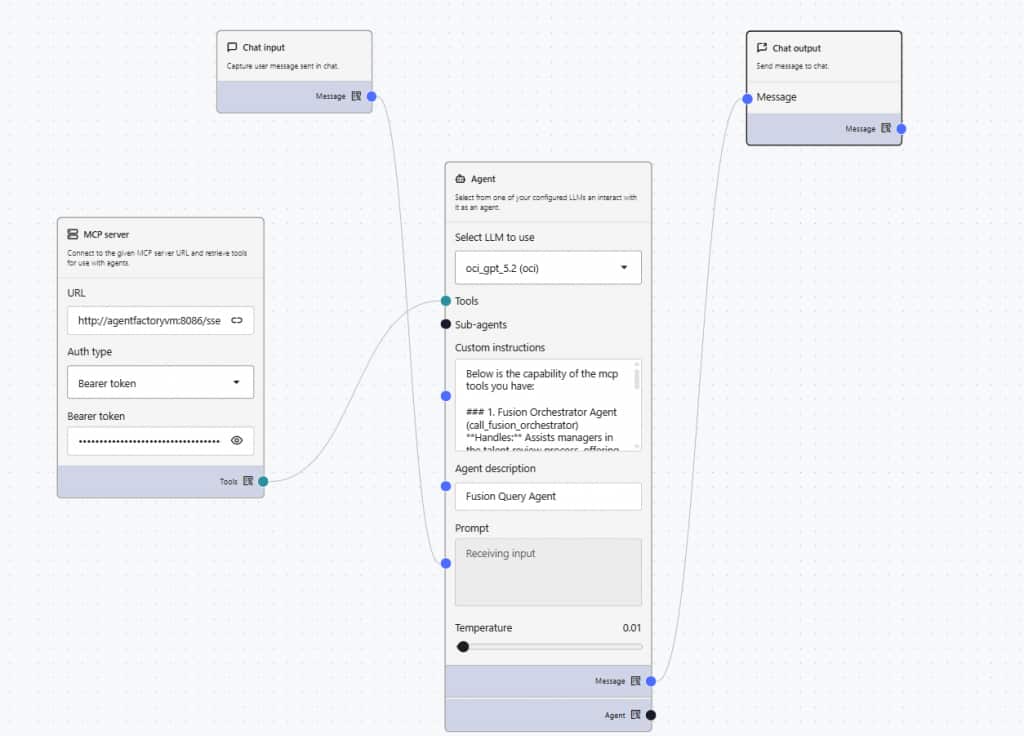
Result: Private Agent Factory agents could now invoke Fusion HCM agents as if they were native tools. Queries like ‘What is my leave balance?’ (An HR related query for the test) gets routed through the MCP wrapper to the appropriate Fusion agent and back.
What we wrapped under one MCP:
- Workforce Structures Agent (a Fusion embedded agent)
- Leave & Absence Agent (a Fusion embedded agent)
- Talent Advisor Agent (a Fusion embedded agent)
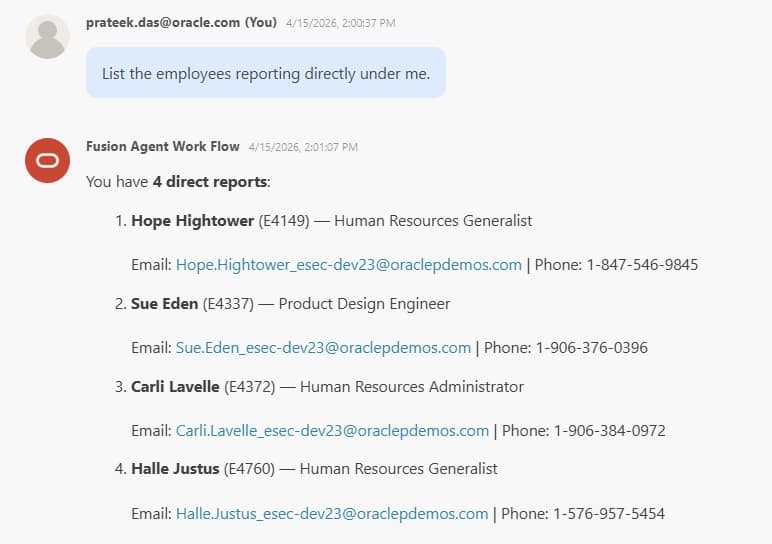
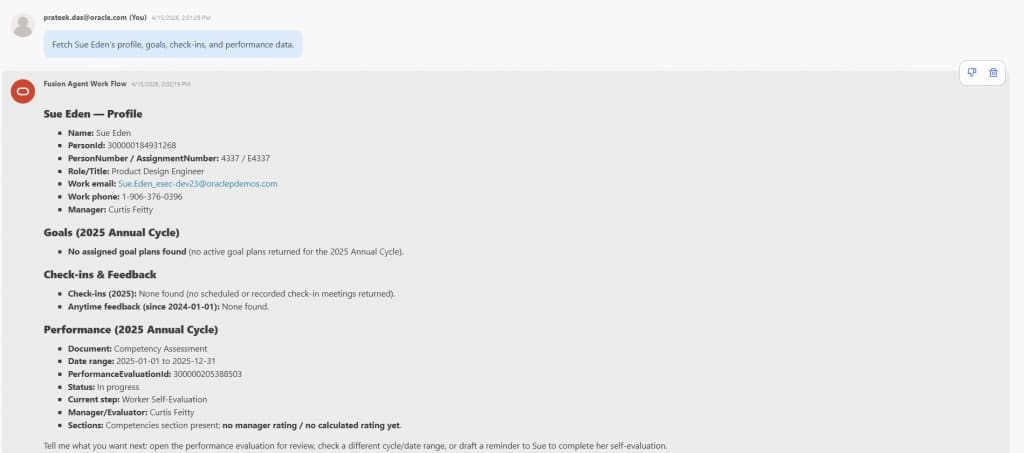
Key Insight: This pattern works for any external agent system. If you have agents running in Salesforce Agentforce, Microsoft Copilot Studio, LangChain, or custom frameworks — you can build an MCP wrapper to make them accessible to Private Agent Factory workflows. MCP becomes your universal integration layer.
Approach 3: Building Multi-Agent Workflows with Orchestration
The Orchestrator Pattern
Once you have multiple specialized agents, each connected to different MCP servers or data sources, the next challenge is coordination. How do you decide which agent handles which request? How do you aggregate responses from multiple agents?
This is where the orchestrator pattern becomes essential. Here’s how we implemented it.
Architecture:
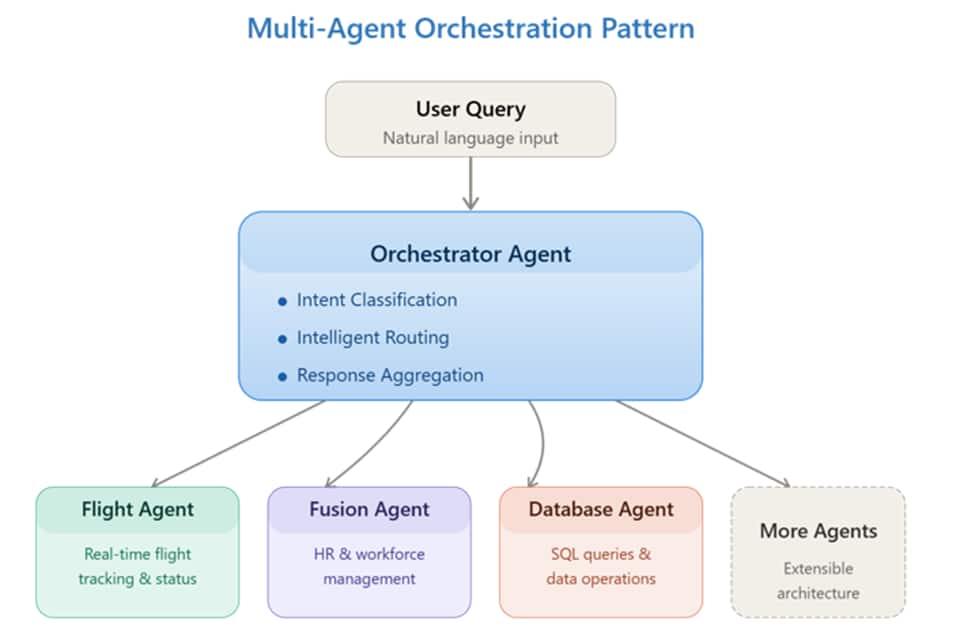
How to Build It in Private Agent Factory
Step 1: Create Specialized Agents
Build individual agents, each connected to their respective MCP servers or data sources:
- Agent A: Connected to real-time data tracker MCP → handles flight tracking queries.
- Agent B: Connected to Fusion MCP wrapper → handles HR queries.
- Agent C: Connected to Database MCP → handles data queries.
- Agent D: Generates responses using a specific LLM → handles any other generic query.
Step 2: Design the Orchestrator
Create a master agent with custom instructions that define routing logic. Adding these instructions to the orchestrator agent is critical as they define how queries get routed to sub-agents:
You are an orchestrator agent. Analyze the user's query and route it to the appropriate specialized agent:
- For flight information: invoke Flight Agent
- For HR/employee queries: invoke Fusion Agent
- For database queries: invoke Database Agent
- For any other queries: invoke Generic Query Agent
If the query requires multiple agents, invoke them and combine results.
Step 3: Connect in Agent Builder
In the Canvas:
- Add an Agent node/component, let’s call it as orchestrator agent node.
- Link the orchestrator node to all specialized agent nodes as Sub-Agents to the orchestrator.
- Connect to chat input/output from the Orchestrator.
- Add the instructions and names to the agents for a better clarification.
- Test and iterate with playground.
The Magic: LLM-Based Routing
What’s powerful here is that the orchestrator uses the LLM’s natural language understanding to make routing decisions. You don’t write if-else rules — the orchestrator intelligently determines which agent(s) to invoke based on query intent, whether to call agents in parallel or sequence, how to combine responses into a coherent answer and when to ask clarifying questions if intent is ambiguous.
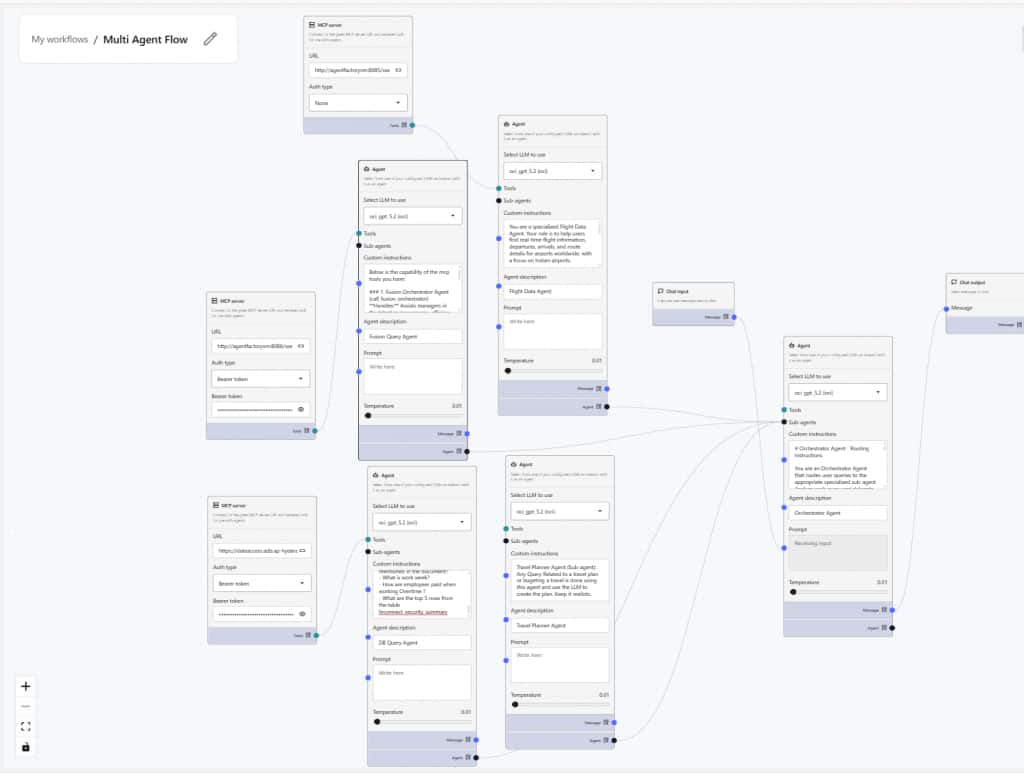
Example Query Flow:
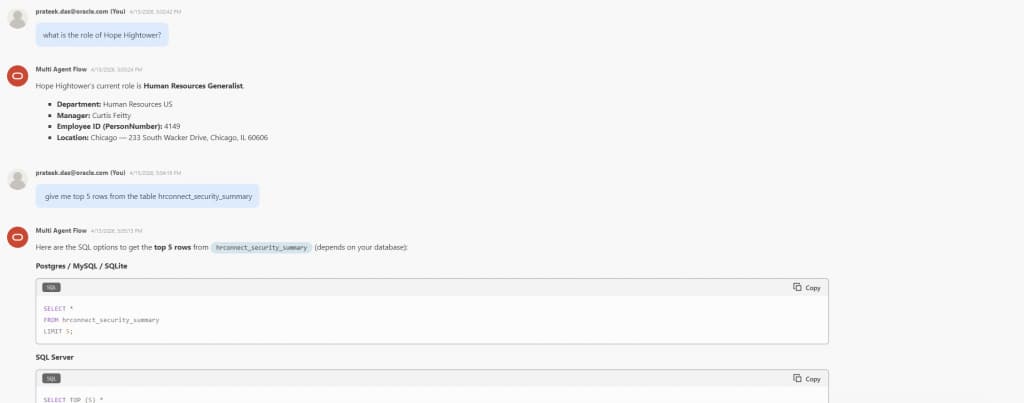
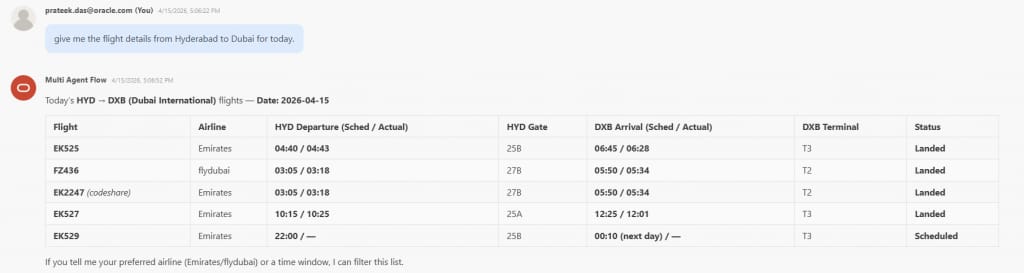
Key Learning: The orchestrator pattern scales beautifully. As you add new agents (invoice processing, customer data, inventory systems) into the flow, you just update the orchestrator’s instructions—no architecture changes needed.
Approach 4: From Agent Builder (UI) to Production Code (SDK Integration)
The No-Code to Pro-Code Bridge
The Agent Builder is fantastic for prototyping and testing agentic flows within Private Agent Factory. But what about production deployments? What if you need to:
- Embed agents in existing Python or Node.js applications.
- Trigger agents in Private Agent Factory from automated workflows.
- Integrate agent responses into custom UIs.
- Run agents from Private Agent Factory on schedules or based on events.
This is where the Python SDK (agentfactory-1.x.x) comes in. Oracle AI Private Agent Factory provides a complete Python SDK for programmatic agent invocation. (Resource: Python SDK)
The Integration Pattern
- Design in Agent Builder: Create and test your agent/multi-agent workflow using drag-and-drop
- Publish and Get Agent ID: Once satisfied, publish the workflow and note the Agent ID from the integration option within the playground of the workflow.
- Invoke via SDK: Use Python SDK to call the agent programmatically.
- Integrate Responses: Process agent output in your application logic
What This Enables:
- Hybrid Development: Domain experts design agents visually; developers integrate them into code.
- Rapid Iteration: Modify agent logic in UI without code changes.
- Production Integration: Embed intelligent workflows in existing systems.
- Scale and Automation: Trigger agents from monitoring systems, schedulers, event streams.
Key Insight: The SDK doesn’t replace the agent builder—it complements it. Think of the agent builder as your agent design tool and the SDK as your integration layer.
Leveraging Pre-Built Agents
While building custom agents is powerful, Oracle AI Private Agent Factory also provides two production-ready pre-built agents:
1. Knowledge Agent (RAG)
A retrieval-augmented generation agent that:
- Ingests documents (PDF, Word, text files)
- Creates vector embeddings automatically.
- Performs semantic search across knowledge base.
- Returns answers with source citations.
Use-cases: Internal documentation search, policy Q&A, troubleshooting guides, compliance documentation.
2. Data Analysis Agent (NL2SQL)
A natural language data analysis agent that:
- Connects to datasets (CSV, database tables)
- Generates SQL queries from natural language.
- Creates visualizations automatically.
- Provides statistical insights and summaries.
Use-cases: Business intelligence, ad-hoc data queries, report generation, exploratory data analysis.
Both were tested with datasets (Netflix titles, National Park data) and are capable out-of-the-box. The Data Analysis agent, in particular combines AI with statistical analysis for semantic data exploration—answering questions like ‘How has the mix of Movies vs TV Shows changed over time?’ for the Netflix dataset with minimal configuration.
Bonus: Extending to Air-Gapped and On-Premises Environments
One question that came up during the exploration: what about environments where data cannot leave the premises?
Regulated industries, government workloads, Exadata deployments in private data centers, and disconnected Oracle databases all share a hard constraint — the data stays inside the network boundary. The cloud-native path (OCI Marketplace, OCI GenAI endpoints) works well when that boundary is flexible. But for environments where it isn’t, the architecture needs to adapt.
Private Agent Factory’s database-native design doesn’t fundamentally require cloud connectivity. The pattern that looks most promising for these scenarios:
- Ollama on a local VM — an open-source runtime that serves open-weight models (Llama 3, Mistral, etc) via an OpenAI-compatible local endpoint, replacing cloud LLM calls entirely.
- MCP servers hosted on internal VMs — the same MCP integration approach from the approaches, but running within the network perimeter with no external exposure.
- Private Agent Factory on-prem — deployed directly on Oracle Linux or Exadata infrastructure rather than OCI Marketplace.
In theory, this means the full agentic stack — natural language queries, orchestration, tool invocation via MCP — could run without a single request leaving your data center.
This is particularly relevant for:
- Financial environments with data residency requirements.
- Healthcare systems governed by sovereignty or compliance constraints.
- Government and defence workloads on disconnected or classified networks.
- Exadata deployments where routing data through cloud inference would introduce latency or compliance risk.
Deployment and Getting Started
Oracle Private Agent Factory is available as part of Oracle AI Database 26ai. You can deploy it in multiple ways:
| Download Package | Download |
| Cloud Marketplace | Oracle AI Database Private Agent Factory | Oracle Marketplace |
Key Takeaways and Lessons Learned
- MCP as Universal Integration Layer: Any system with an API can become an agent tool via MCP wrapping.
- Visual Builder Accelerates Development: What would take weeks in code takes hours with drag-and-drop.
- LLM-Based Orchestration is Powerful: Orchestrator can intelligently routes based on intent.
- Database-Native Architecture Simplifies Security: Leverage existing database access controls and eliminate data movement.
- Pre-Built Agents Are Production-Ready: Knowledge and Data Analysis agents work well out-of-the-box.
Best Practices
- Document MCP Endpoints: Maintain clear records of server URLs, authentication, and available tools.
- Test Incrementally: Validate each agent independently before orchestration.
- Start Simple: Single-agent workflows before multi-agent coordination.
- Use Descriptive Instructions: Clear, detailed prompts in agent instructions improve routing accuracy.
- Keep Platform Updated: New features and improvements ship regularly.
Conclusion: The Path Forward
Oracle AI Database Private Agent Factory represents a significant shift in how enterprises can approach Agentic AI. The combination of:
- No-code visual development.
- Standardized integration via MCP
- Intelligent orchestration patterns
- Database-native architecture
- Production-ready SDK integration
…makes it possible to build sophisticated multi-agent systems without the complexity typically associated with agentic frameworks.
The patterns—MCP wrapping for external systems, agent-to-agent bridging, orchestrator-based coordination, SDK integration—are not specific to any single use case. They’re general-purpose approaches you can apply to:
- Customer service automation
- IT operations and troubleshooting
- Data analysis and reporting
- Document processing workflows
- Enterprise system integration
- Intelligent workflow automation
The question isn’t whether to explore agentic AI—it’s how quickly we can start. Oracle Private agent factory provides the platform, the patterns are proven, and the integration layer (MCP) is standardized.