
In Part 1, we explored how model distillation helps us move from a larger teacher model to a smaller student model for fraud detection. We trained the teacher ensemble, generated soft labels, trained the student model, and compared both models across accuracy, recall, latency, and model size. The result was clear: the student model kept strong predictive performance while becoming much faster and lighter for production use.
In this part, we take the next step. Instead of running the workflow manually in a notebook, we build a repeatable model distillation pipeline on OCI Data Science. We use OCI Data Science Jobs and Pipelines to automate each stage, store artifacts in Object Storage and capture logs and metrics.
This is where the experiment starts to look like a production ML workflow. The goal is not only to train a good model once, but to make the process repeatable, traceable, and easy to run again when new data becomes available.
Why Automate the Distillation Workflow
The notebook workflow from Part 1 is useful for exploration. It lets us test the teacher-student setup, compare metrics, and understand whether distillation is a good fit for the fraud detection use case. But production ML teams need more than a working notebook.
A production workflow needs to run the same way every time. It needs clear inputs and outputs, repeatable environments, logs for troubleshooting, and a way to connect every trained model back to the data, code, and parameters that created it.
Automating the workflow gives us several benefits:
- Repeatability: The same sequence of steps can run for every dataset, model version, or retraining cycle.
- Traceability: Each job run captures parameters, logs, artifacts, and model metadata.
- Operational control: Failures are easier to isolate because each pipeline step has a clear responsibility.
- Scalability: Heavier stages, such as teacher inference or student training, can run on the right compute shape without keeping a notebook session open.
- Governance: Only validated student models are registered and promoted for deployment.
For fraud detection, this matters because the data changes over time. Transaction patterns evolve, fraud behavior changes, and model performance needs to be checked regularly. A pipeline makes retraining and evaluation a standard process rather than a one-time activity.
Reference Architecture
The reference architecture uses OCI Data Science Pipeline as the orchestration layer. Each stage of the distillation workflow is implemented as a separate OCI Data Science Job. Object Storage is used for datasets, teacher outputs, distilled training data, model artifacts, and evaluation reports.
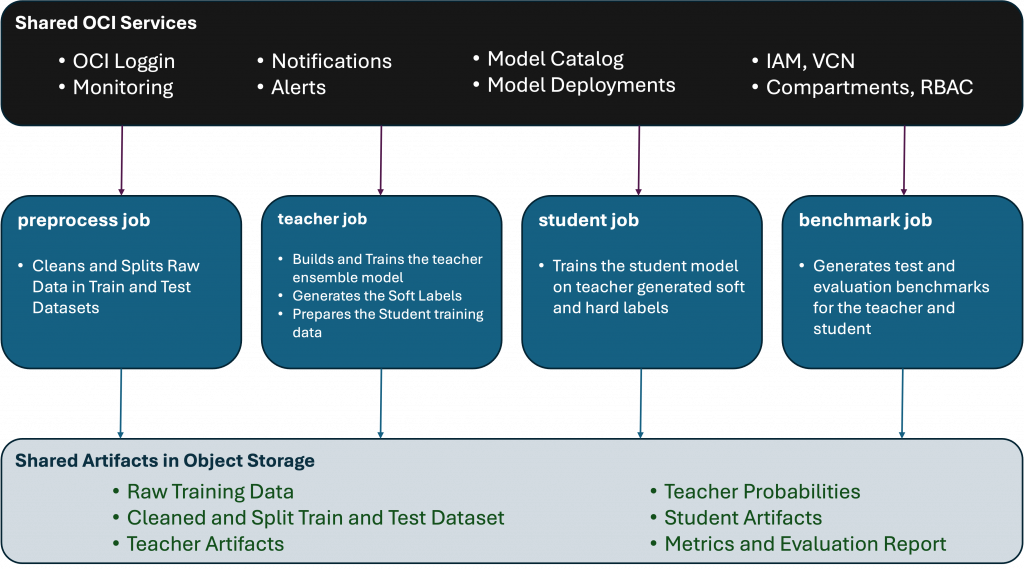
At a high level, the pipeline works like this:
- Training data and feature snapshots are stored in Object Storage.
- Preprocess job picks the data from the Object Storage location, cleans the data if needed and splits the data in train and test data sets.
- Teacher Training job creates an ensemble model, generates soft labels and combines soft labels with hard labels for student training.
- Student Training job is used to train a smaller model on teacher generated soft labels and the model artifact is saved in Object Storage.
- Benchmarking Job is used to evaluate the student against teacher using the same metrics from Part 1.
This architecture keeps the workflow modular. If the evaluation logic changes, we update the evaluation job. If we need a different student model, we update the training job. The pipeline remains the control plane that connects the stages together.
Prepare the Runtime Environment
Before creating jobs, create a reusable runtime environment for the pipeline. In OCI Data Science, this usually means using a conda environment or a custom container that includes the libraries needed by each job.
For this pipeline, I have used a custom docker image. The files for the image are structured in following manner.
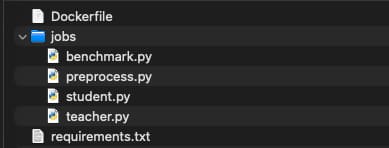
Dockerfile:
FROM python:3.10-slim
# System deps
RUN apt-get update && apt-get install -y \
    build-essential \
    gcc \
    g++ \
    libgomp1 \
    && rm -rf /var/lib/apt/lists/*
# Set working dir
WORKDIR /app
# Copy requirements
COPY requirements.txt .
COPY jobs/ /app/jobs/
# Install Python deps
RUN pip install --no-cache-dir -r requirements.txt
ENTRYPOINT ["python"]
Requirements.txt
pandas==2.1.0
numpy==1.24.0
scikit-learn==1.3.0
pyarrow==14.0.0
lightgbm
xgboost
matplotlib
seaborn
oci
sample_preprocess.py
import pandas as pd
import numpy as np
import os
import oci
import time
import logging
import traceback
import sklearn
from sklearn.model_selection import train_test_split

# ----------------------------
# LOGGING SETUP
# ----------------------------
logging.basicConfig(
    level=logging.INFO,
    format="%(asctime)s | %(levelname)s | %(message)s"
)

logger = logging.getLogger()

def log_step(step_name):
    logger.info(f"========== {step_name} ==========")


try:
    start_time = time.time()

    # ----------------------------
    # PATHS
    # ----------------------------
    log_step("INITIALIZATION")

    BASE_PATH = "/distillation"
    INPUT_FILE = os.getenv("INPUT_FILE", "data/raw/credit_card_transactions.parquet")  # INPUT_FILE should be set as an environment variable
    OUTPUT_DIR = os.getenv("OUTPUT_DIR", "data/processed")
    OUTPUT_TRAIN_FILE = os.getenv("OUTPUT_TRAIN_FILE", "train.parquet")
    OUTPUT_TEST_FILE = os.getenv("OUTPUT_TEST_FILE", "test.parquet")

    INPUT_PATH = os.path.join(BASE_PATH, INPUT_FILE)  # INPUT_FILE should be set as an environment variable
    OUTPUT_TRAIN = os.path.join(BASE_PATH, OUTPUT_DIR, OUTPUT_TRAIN_FILE)  # OUTPUT_TRAIN_FILE should be set as an environment variable
    OUTPUT_TEST = os.path.join(BASE_PATH, OUTPUT_DIR, OUTPUT_TEST_FILE)  # OUTPUT_TEST_FILE should be set as an environment variable

    logger.info(f"Base path: {BASE_PATH}")
    logger.info(f"Input path: {INPUT_PATH}")
    logger.info(f"Output dir: {OUTPUT_DIR}")

    os.makedirs(OUTPUT_DIR, exist_ok=True)

    # ----------------------------
    # LOAD DATA
    # ----------------------------
    log_step("LOADING DATA")

    if not os.path.exists(INPUT_PATH):
        raise FileNotFoundError(f"Input file not found: {INPUT_PATH}")

    df = pd.read_parquet(INPUT_PATH)

    logger.info(f"Loaded dataset shape: {df.shape}")
    logger.info(f"Columns: {list(df.columns)}")

    TARGET = "is_fraud"
    if TARGET not in df.columns:
        raise ValueError(f"Target column '{TARGET}' not found!")

    # ----------------------------
    # PREPROCESSING
    # ----------------------------
    log_step("PREPROCESSING")

    df_proc = df.copy()

    # Drop PII
    DROP_COLS = ["first", "last", "street", "trans_num"]
    df_proc = df_proc.drop(columns=DROP_COLS, errors="ignore")
    logger.info(f"Dropped PII columns")

    # Time features
    if "trans_date_trans_time" in df_proc.columns:
        logger.info("Processing timestamp features")
        df_proc["trans_date_trans_time"] = pd.to_datetime(
            df_proc["trans_date_trans_time"], errors="coerce"
        )
        df_proc["hour"] = df_proc["trans_date_trans_time"].dt.hour
        df_proc["dayofweek"] = df_proc["trans_date_trans_time"].dt.dayofweek
        df_proc["is_weekend"] = df_proc["dayofweek"].isin([5, 6]).astype(int)
        df_proc = df_proc.drop(columns=["trans_date_trans_time"])

    # Age
    if "dob" in df_proc.columns:
        logger.info("Processing age feature")
        df_proc["dob"] = pd.to_datetime(df_proc["dob"], errors="coerce")
        df_proc["age"] = (pd.Timestamp("now") - df_proc["dob"]).dt.days // 365
        df_proc = df_proc.drop(columns=["dob"])

    # Amount transform
    if "amt" in df_proc.columns:
        logger.info("Applying amount transformations")
        df_proc["amt_log"] = np.log1p(df_proc["amt"])

    # Frequency encoding
    logger.info("Applying frequency encoding")
    for col in ["merchant", "category", "city", "state"]:
        if col in df_proc.columns:
            freq = df_proc[col].value_counts(normalize=True)
            df_proc[col + "_freq"] = df_proc[col].map(freq)

    # Drop raw categoricals
    df_proc = df_proc.drop(columns=["merchant", "category", "city", "state"], errors="ignore")

    # Encode categorical
    logger.info("Encoding categorical variables")
    for col in df_proc.select_dtypes(include=["object"]).columns:
        df_proc[col] = df_proc[col].astype("category").cat.codes

    # Final cleanup
    df_proc = df_proc.apply(pd.to_numeric, errors="coerce")
    missing_before = df_proc.isnull().sum().sum()
    df_proc = df_proc.fillna(0)

    logger.info(f"Missing values handled. Before: {missing_before}, After: {df_proc.isnull().sum().sum()}")

    # Clean column names
    df_proc.columns = df_proc.columns.str.replace(r"[^\w]", "_", regex=True)
    logger.info("Column names sanitized for model compatibility")

    # ----------------------------
    # SPLIT DATA
    # ----------------------------
    log_step("TRAIN-TEST SPLIT")

    X = df_proc.drop(columns=[TARGET])
    y = df_proc[TARGET]

    logger.info(f"Feature shape: {X.shape}")
    logger.info(f"Target distribution: \n{y.value_counts(normalize=True)}")

    X_train, X_test, y_train, y_test = train_test_split(
        X, y, stratify=y, test_size=0.2, random_state=42
    )

    logger.info(f"Train shape: {X_train.shape}")
    logger.info(f"Test shape: {X_test.shape}")

    # ----------------------------
    # SAVE DATA
    # ----------------------------
    log_step("SAVING OUTPUT")

    train_df = X_train.copy()
    train_df["label"] = y_train.values

    test_df = X_test.copy()
    test_df["label"] = y_test.values

    train_df.to_parquet(OUTPUT_TRAIN, index=False)
    test_df.to_parquet(OUTPUT_TEST, index=False)

    logger.info(f"Saved train dataset: {OUTPUT_TRAIN}")
    logger.info(f"Saved test dataset: {OUTPUT_TEST}")

    # ----------------------------
    # COMPLETION
    # ----------------------------
    total_time = time.time() - start_time
    log_step("COMPLETED")

    logger.info(f"Total execution time: {total_time:.2f} seconds")

except Exception as e:
    logger.error("JOB FAILED!")
    logger.error(str(e))
    traceback.print_exc()
    raise
sample_teacher.py
import pandas as pd
import numpy as np
import os
import time
import logging
import traceback
import joblib
from lightgbm import LGBMClassifier
from xgboost import XGBClassifier
from sklearn.ensemble import RandomForestClassifier
from sklearn.neural_network import MLPClassifier

# ----------------------------
# LOGGING SETUP
# ----------------------------
logging.basicConfig(
    level=logging.INFO,
    format="%(asctime)s | %(levelname)s | %(message)s"
)

logger = logging.getLogger()

def log_step(name):
    logger.info(f"========== {name} ==========")

try:
    start_time = time.time()

    # ----------------------------
    # PATHS
    # ----------------------------
    log_step("INITIALIZATION")

    BASE_PATH = "/distillation"
    PROCESSED_DIR = os.getenv("PROCESSED_DIR", "data/processed")

    TRAIN_FILE = os.getenv("TRAIN_FILE", "train.parquet")

    TRAIN_PATH = os.path.join(BASE_PATH, PROCESSED_DIR, TRAIN_FILE)  # TRAIN_FILE should be set as an environment variable")
    OUTPUT_DIR = os.path.join(BASE_PATH, "data/teacher")
    MODEL_DIR = os.path.join(OUTPUT_DIR, "models")
    SOFT_LABEL_PATH = os.path.join(OUTPUT_DIR, "soft_labels.parquet")

    os.makedirs(MODEL_DIR, exist_ok=True)

    logger.info(f"Train path: {TRAIN_PATH}")
    logger.info(f"Output dir: {OUTPUT_DIR}")

    # ----------------------------
    # LOAD DATA
    # ----------------------------
    log_step("LOADING DATA")

    if not os.path.exists(TRAIN_PATH):
        raise FileNotFoundError(f"Train dataset not found: {TRAIN_PATH}")

    df = pd.read_parquet(TRAIN_PATH)

    logger.info(f"Dataset shape: {df.shape}")
    logger.info(f"Columns: {list(df.columns)}")

    if "label" not in df.columns:
        raise ValueError("Missing 'label' column in training data")

    X_train = df.drop(columns=["label"])
    y_train = df["label"]

    logger.info(f"Feature shape: {X_train.shape}")
    logger.info(f"Target distribution:\n{y_train.value_counts(normalize=True)}")

    # ----------------------------
    # TRAIN MODELS
    # ----------------------------
    log_step("TRAINING TEACHER MODELS")

    scale_pos_weight = (y_train == 0).sum() / (y_train == 1).sum()

    models = {
        "lgb": LGBMClassifier(n_estimators=500, scale_pos_weight=scale_pos_weight),
        "xgb": XGBClassifier(n_estimators=500, scale_pos_weight=scale_pos_weight, tree_method="hist"),
        "rf": RandomForestClassifier(n_estimators=300, n_jobs=-1),
        "mlp": MLPClassifier(hidden_layer_sizes=(256, 128), max_iter=50)
    }

    trained_models = {}

    for name, model in models.items():
        logger.info(f"Training model: {name}")
        t0 = time.time()
        model.fit(X_train, y_train)
        trained_models[name] = model
        logger.info(f"{name} training completed in {time.time() - t0:.2f}s")

    # ----------------------------
    # GENERATE SOFT LABELS
    # ----------------------------
    log_step("GENERATING SOFT LABELS")

    probs = []

    for name, model in trained_models.items():
        logger.info(f"Generating probabilities from: {name}")
        p = model.predict_proba(X_train)[:, 1]
        probs.append(p)

    raw_soft = np.mean(probs, axis=0)

    logger.info(f"Raw soft label stats:\n{pd.Series(raw_soft).describe()}")

    # ----------------------------
    # TEMPERATURE SCALING
    # ----------------------------
    log_step("TEMPERATURE SCALING")

    def temperature_scale(probs, T=5.0):
        probs = np.clip(probs, 1e-6, 1 - 1e-6)
        logits = np.log(probs / (1 - probs))
        scaled_logits = logits / T
        return 1 / (1 + np.exp(-scaled_logits))

    soft_labels = temperature_scale(raw_soft, T=5.0)

    logger.info(f"Scaled soft label stats:\n{pd.Series(soft_labels).describe()}")

    # ----------------------------
    # SAVE MODELS
    # ----------------------------
    log_step("SAVING MODELS")

    model_paths = {}

    for name, model in trained_models.items():
        path = os.path.join(MODEL_DIR, f"{name}.pkl")
        joblib.dump(model, path)
        model_paths[name] = path
        logger.info(f"Saved {name} model to: {path}")

    # Save ensemble metadata
    ensemble_meta = {
        "models": model_paths,
        "type": "average_ensemble"
    }

    meta_path = os.path.join(MODEL_DIR, "ensemble_meta.json")

    import json
    with open(meta_path, "w") as f:
        json.dump(ensemble_meta, f, indent=2)

    logger.info(f"Saved ensemble metadata to: {meta_path}")

    # ----------------------------
    # SAVE SOFT LABEL DATASET
    # ----------------------------
    log_step("SAVING SOFT LABEL DATASET")

    df_soft = X_train.copy()
    df_soft["soft_label"] = soft_labels
    df_soft["hard_label"] = y_train.values

    df_soft.to_parquet(SOFT_LABEL_PATH, index=False)

    logger.info(f"Saved soft labels dataset to: {SOFT_LABEL_PATH}")

    # ----------------------------
    # COMPLETION
    # ----------------------------
    total_time = time.time() - start_time
    log_step("COMPLETED")

    logger.info(f"Total execution time: {total_time:.2f} seconds")

except Exception as e:
    logger.error("TEACHER JOB FAILED!")
    logger.error(str(e))
    traceback.print_exc()
    raise
sample_student.py
import pandas as pd
import numpy as np
import os
import time
import logging
import traceback
import joblib
from sklearn.ensemble import HistGradientBoostingRegressor

# ----------------------------
# LOGGING SETUP
# ----------------------------
logging.basicConfig(
    level=logging.INFO,
    format="%(asctime)s | %(levelname)s | %(message)s"
)
logger = logging.getLogger()

def log_step(name):
    logger.info(f"========== {name} ==========")

try:
    start_time = time.time()

    # ----------------------------
    # PATHS
    # ----------------------------
    log_step("INITIALIZATION")

    BASE_PATH = "/distillation"

    TEACHER_OUTPUT_DIR = os.path.join(BASE_PATH, "data/teacher")
    PROCESSED_DIR = os.path.join(BASE_PATH, "data/processed")

    SOFT_LABEL_PATH = os.path.join(TEACHER_OUTPUT_DIR, "soft_labels.parquet")
    TEST_PATH = os.path.join(PROCESSED_DIR, "test.parquet")

    OUTPUT_DIR = os.path.join(BASE_PATH, "data/student")
    MODEL_PATH = os.path.join(OUTPUT_DIR, "student_model.pkl")

    os.makedirs(OUTPUT_DIR, exist_ok=True)

    logger.info(f"Soft label path: {SOFT_LABEL_PATH}")
    logger.info(f"Test path: {TEST_PATH}")

    # ----------------------------
    # LOAD DATA
    # ----------------------------
    log_step("LOADING DATA")

    df_train = pd.read_parquet(SOFT_LABEL_PATH)
    df_test = pd.read_parquet(TEST_PATH)

    logger.info(f"Train shape: {df_train.shape}")
    logger.info(f"Test shape: {df_test.shape}")

    X_train = df_train.drop(columns=["soft_label", "hard_label"])
    y_soft = df_train["soft_label"]

    X_test = df_test.drop(columns=["label"])
    y_test = df_test["label"]

    logger.info(f"Feature shape: {X_train.shape}")

    # ----------------------------
    # TRAIN STUDENT MODEL
    # ----------------------------
    log_step("TRAINING STUDENT MODEL")


    model = HistGradientBoostingRegressor(
        max_iter=200,
        learning_rate=0.1,
        max_depth=6
    )

    t0 = time.time()
    model.fit(X_train, y_soft)
    logger.info(f"Training completed in {time.time() - t0:.2f}s")

    # ----------------------------
    # EVALUATE
    # ----------------------------
    log_step("EVALUATION")

    from sklearn.metrics import roc_auc_score, average_precision_score

    preds = np.clip(model.predict(X_test), 0, 1)

    roc = roc_auc_score(y_test, preds)
    pr = average_precision_score(y_test, preds)

    logger.info(f"Student ROC-AUC: {roc}")
    logger.info(f"Student PR-AUC: {pr}")

    # ----------------------------
    # SAVE MODEL
    # ----------------------------
    log_step("SAVING MODEL")

    joblib.dump(model, MODEL_PATH)
    logger.info(f"Model saved at: {MODEL_PATH}")

    # ----------------------------
    # COMPLETION
    # ----------------------------
    total_time = time.time() - start_time
    log_step("COMPLETED")

    logger.info(f"Total execution time: {total_time:.2f}s")

except Exception as e:
    logger.error("STUDENT JOB FAILED!")
    logger.error(str(e))
    traceback.print_exc()
    raise
sample_benchmark.py
import pandas as pd
import numpy as np
import os
import time
import logging
import traceback
import joblib
import json

# ----------------------------
# LOGGING SETUP
# ----------------------------
logging.basicConfig(
    level=logging.INFO,
    format="%(asctime)s | %(levelname)s | %(message)s"
)
logger = logging.getLogger()

def log_step(name):
    logger.info(f"========== {name} ==========")

try:
    start_time = time.time()

    # ----------------------------
    # PATHS
    # ----------------------------
    log_step("INITIALIZATION")

    BASE_PATH = "/distillation/data"

    TEST_PATH = os.path.join(BASE_PATH, "processed", "test.parquet")
    MODEL_DIR = os.path.join(BASE_PATH, "teacher", "models")
    META_PATH = os.path.join(MODEL_DIR, "ensemble_meta.json")

    STUDENT_MODEL_PATH = os.path.join(BASE_PATH, "student", "student_model.pkl")

    OUTPUT_DIR = os.path.join(BASE_PATH, "benchmarks")
    METRICS_PATH = os.path.join(OUTPUT_DIR, "metrics.json")

    os.makedirs(OUTPUT_DIR, exist_ok=True)

    # ----------------------------
    # LOAD DATA
    # ----------------------------
    log_step("LOADING DATA")

    df_test = pd.read_parquet(TEST_PATH)

    X_test = df_test.drop(columns=["label"])
    y_test = df_test["label"]

    logger.info(f"Test shape: {df_test.shape}")

    # ----------------------------
    # LOAD TEACHER MODELS
    # ----------------------------
    log_step("LOADING TEACHER MODELS")

    with open(META_PATH) as f:
        meta = json.load(f)

    model_paths = meta["models"]

    teacher_models = {}
    for name, path in model_paths.items():
        logger.info(f"Loading model: {name} from {path}")
        teacher_models[name] = joblib.load(path)

    # Optional weights
    weights = meta.get("weights", None)

    # ----------------------------
    # LOAD STUDENT MODEL
    # ----------------------------
    log_step("LOADING STUDENT MODEL")

    student_model = joblib.load(STUDENT_MODEL_PATH)

    # ----------------------------
    # PREDICTIONS
    # ----------------------------
    log_step("RUNNING INFERENCE")

    X_np = X_test.values  # ensure compatibility

    teacher_preds = []

    for name, model in teacher_models.items():
        logger.info(f"Predicting with: {name}")

        if hasattr(model, "predict_proba"):
            p = model.predict_proba(X_np)[:, 1]
        else:
            # fallback (e.g., regressors)
            p = np.clip(model.predict(X_np), 0, 1)

        teacher_preds.append(p)

    teacher_preds = np.array(teacher_preds)

    # ----------------------------
    # ENSEMBLE
    # ----------------------------
    log_step("ENSEMBLING")

    if weights:
        logger.info("Using weighted ensemble")
        weights = np.array([weights[name] for name in teacher_models.keys()])
        weights = weights / weights.sum()
        teacher_probs = np.average(teacher_preds, axis=0, weights=weights)
    else:
        logger.info("Using equal-weight ensemble")
        teacher_probs = np.mean(teacher_preds, axis=0)

    # ----------------------------
    # STUDENT PREDICTIONS
    # ----------------------------
    student_probs = np.clip(student_model.predict(X_np), 0, 1)

    # ----------------------------
    # METRICS
    # ----------------------------
    log_step("EVALUATION")

    from sklearn.metrics import roc_auc_score, average_precision_score

    teacher_auc = roc_auc_score(y_test, teacher_probs)
    student_auc = roc_auc_score(y_test, student_probs)

    teacher_pr = average_precision_score(y_test, teacher_probs)
    student_pr = average_precision_score(y_test, student_probs)

    logger.info(f"Teacher ROC-AUC: {teacher_auc}")
    logger.info(f"Student ROC-AUC: {student_auc}")
    logger.info(f"Teacher PR-AUC: {teacher_pr}")
    logger.info(f"Student PR-AUC: {student_pr}")

    # ----------------------------
    # LATENCY
    # ----------------------------
    log_step("LATENCY MEASUREMENT")

    def measure_latency(model, X, is_proba=True):
        X_sample = X.sample(1000, random_state=42).values
        start = time.time()

        if is_proba and hasattr(model, "predict_proba"):
            model.predict_proba(X_sample)
        else:
            model.predict(X_sample)

        return time.time() - start

    teacher_latency = measure_latency(list(teacher_models.values())[0], X_test, True)
    student_latency = measure_latency(student_model, X_test, False)

    logger.info(f"Teacher latency: {teacher_latency}")
    logger.info(f"Student latency: {student_latency}")

    # ----------------------------
    # MODEL SIZE
    # ----------------------------
    log_step("MODEL SIZE")

    teacher_size = sum(
        os.path.getsize(path) for path in model_paths.values()
    ) / (1024 * 1024)

    student_size = os.path.getsize(STUDENT_MODEL_PATH) / (1024 * 1024)

    logger.info(f"Teacher size (MB): {teacher_size}")
    logger.info(f"Student size (MB): {student_size}")

    # ----------------------------
    # SAVE METRICS
    # ----------------------------
    log_step("SAVING METRICS")

    metrics = {
        "teacher_auc": teacher_auc,
        "student_auc": student_auc,
        "teacher_pr": teacher_pr,
        "student_pr": student_pr,
        "teacher_latency": teacher_latency,
        "student_latency": student_latency,
        "teacher_size_mb": teacher_size,
        "student_size_mb": student_size
    }

    with open(METRICS_PATH, "w") as f:
        json.dump(metrics, f, indent=2)

    logger.info(f"Metrics saved at: {METRICS_PATH}")

    # ----------------------------
    # COMPLETION
    # ----------------------------
    total_time = time.time() - start_time
    log_step("COMPLETED")

    logger.info(f"Total execution time: {total_time:.2f}s")

except Exception as e:
    logger.error("BENCHMARK JOB FAILED!")
    logger.error(str(e))
    traceback.print_exc()
    raise
It is also a good practice to keep the teacher and student code in source control and package the job artifacts from the same repository. This gives each pipeline run a clear link back to the code version that produced the model.
I am using Oracle Cloud Container Registry to store the container images and use these during job creation. Please refer to the following link on how to use OCIR to store container images.
Create OCI Data Science Job/s
- On the OCI Console, click on the Hamburger menu in top left corner and select Data Science under Analytics & AI.
- Select the Project where you want to create the pipeline and select Jobs.
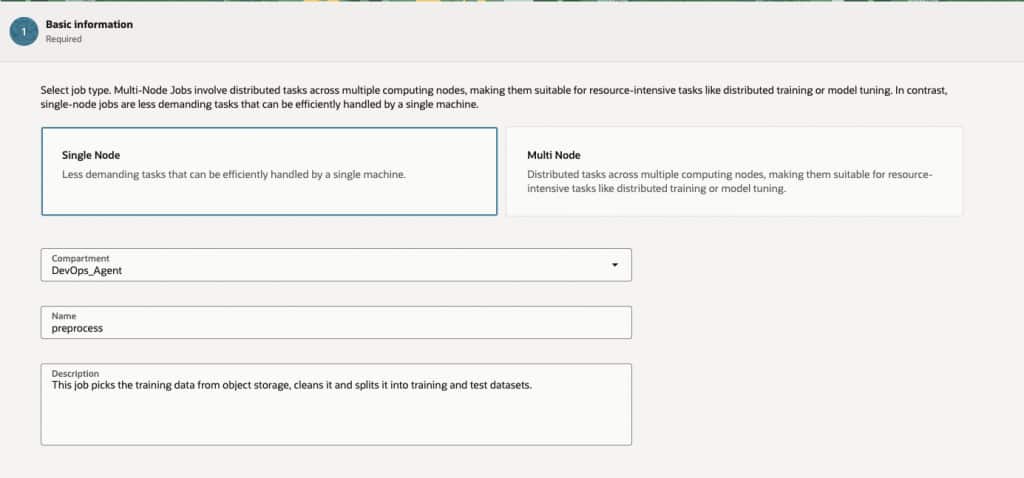
- Select Create job and provide the required details
- Node Type: Single
- Compartment: Select the compartment for the job
- Name: Name of the job.
- Description: Description for the job.
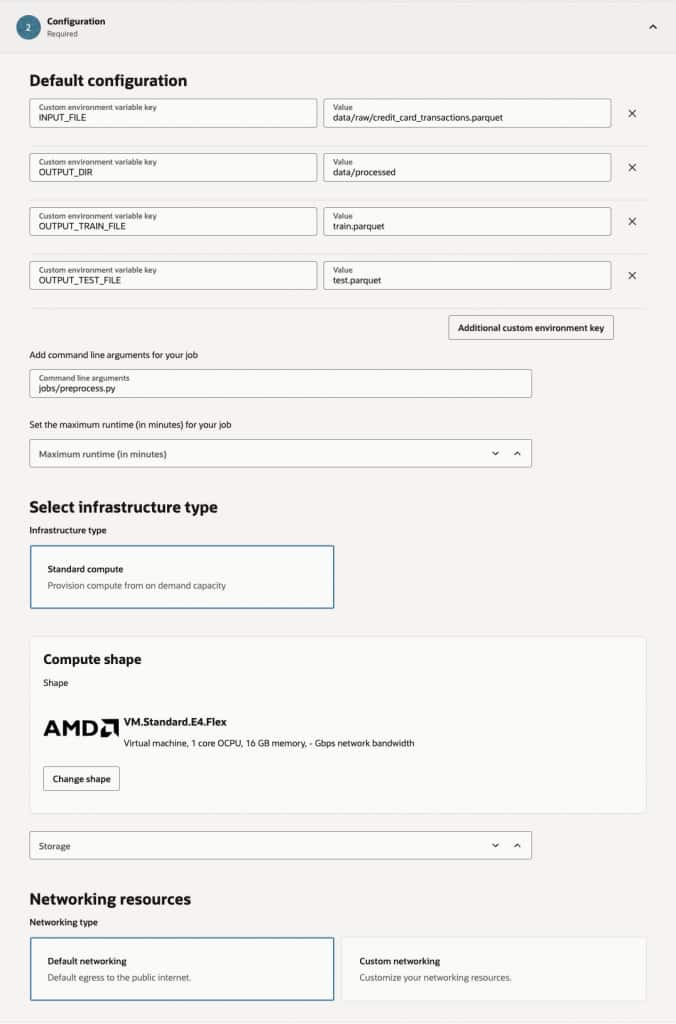
- Under Configuration Section, provide following details:
- Custom Environment Variables:
- INPUT_FILE – Raw Training Data path in object storage bucket.
- OUTPUT_DIR – Ouput directory name for train and test data.
- OUTPUT_TRAIN_FILE – Train dataset file name.
- OUTPUT_TEST_FILE – Test dataset file name.
- Command Line Argument:
- jobs/preprocess.py – Artifact file for the job containing the actual python code to process the data.
- Select the Compute Shape.
- Select Default networking.
- Custom Environment Variables:
- In the Storage section, mount the object storage directly to the job instance. Review and Cerate the Job.
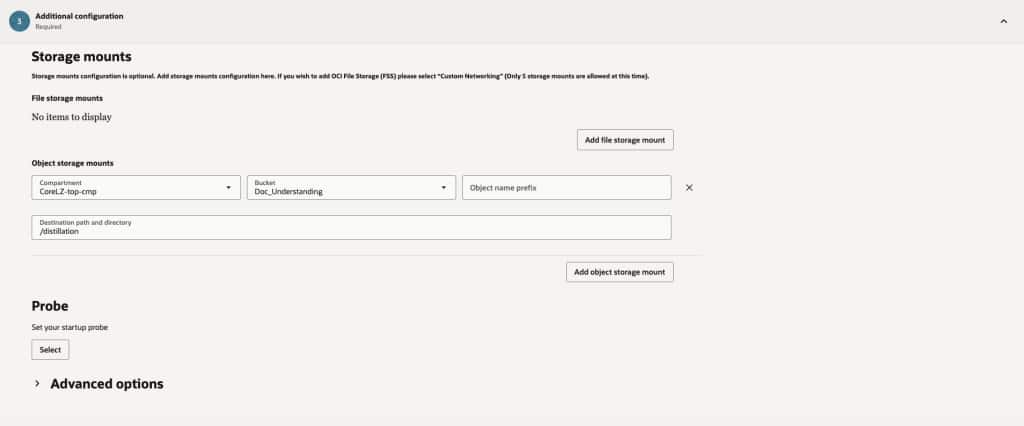
- Repeat these steps and create the teacher, student and benchmark jobs.
Create the OCI Data Science Pipeline
After the jobs are packaged, create the pipeline and add each job as a step. The dependency graph should follow the distillation lifecycle:
- Preprocess job should run first as the data needs to be prepped and split before the teacher can use it. This job does not depend on any other job.
- Teacher job next for soft label generation. It is dependent on preprocess job.
- Student training depends on the teacher job, soft labels and hard labels to it would go after Teacher but before Evaluation.
- Evaluation depends on the trained student model and the teacher reference output.
Follow the steps below to create the pipeline.
- On the OCI Console, click on the Hamburger menu in top left corner and select Data Science under Analytics & AI.
- Select the Project where you want to create the pipeline and select Pipelines and click Create pipeline
- Provide following details on the create pipeline page.
- Compartment: compartment where the pipeline will be created.
- Name: Name of the pipeline.
- Description: Description for the pipeline.
- Click on Add pipeline steps and add all 4 jobs that we had created earlier.
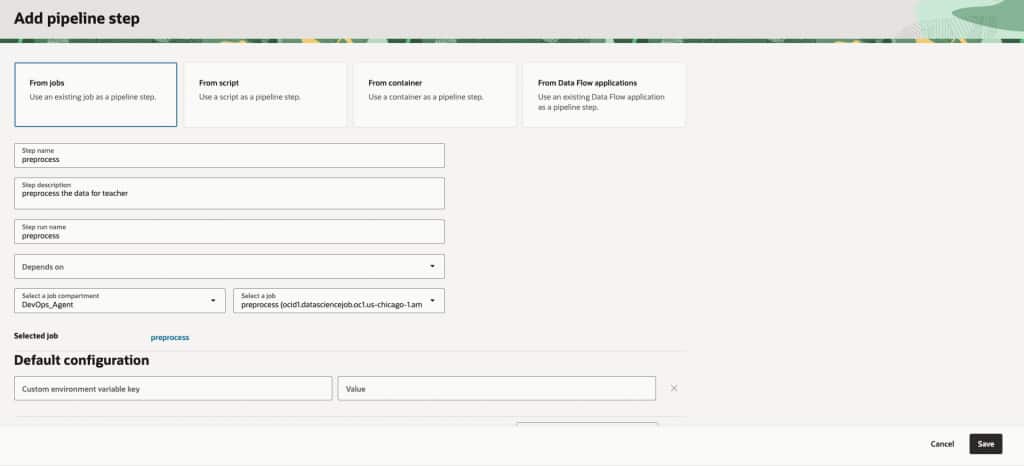
- Leave everything else at default, if you are building the pipeline for testing otherwise change the compute shape, networking and storage to match your pipeline requirements.
- Create Pipeline and wait for the process to complete.
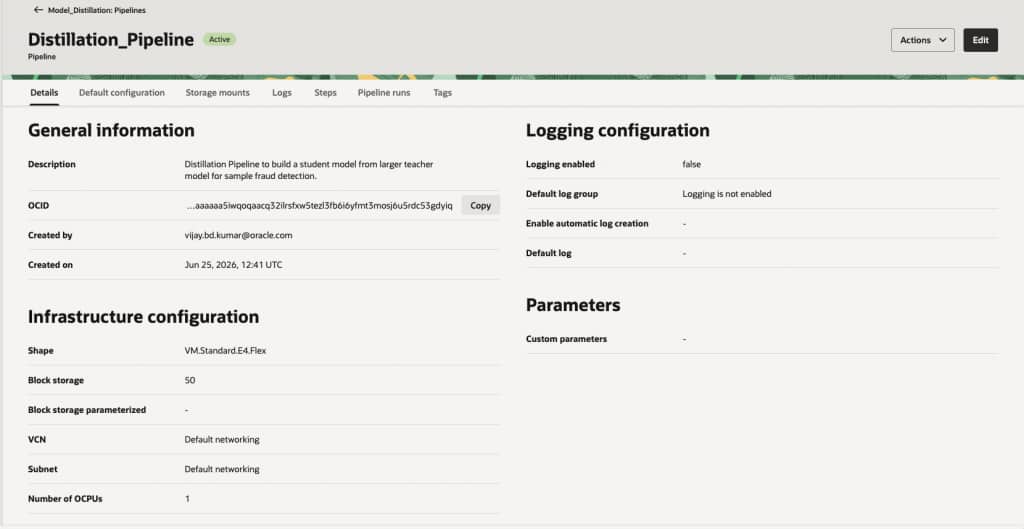
After the pipeline has been created, you can view the details on the pipeline details page.
Start a Pipeline run
You can trigger a new pipeline run by following below steps:
- On the OCI Console, click on the Hamburger menu in top left corner and select Data Science under Analytics & AI.
- Select the Project where you want to create the pipeline and select Pipelines and click on the pipeline name that you just created.
- Select Pipeline runs and click on Start a pipeline run.
- Provide the details for the pipeline run. You can modify the environment variables, command line arguments and also override customer parameters with every run.
- Click Start to trigger the pipeline.
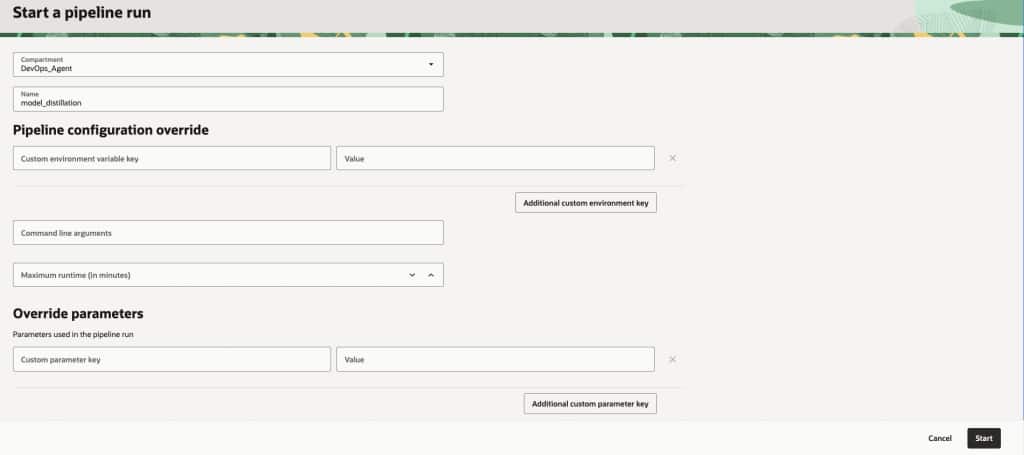
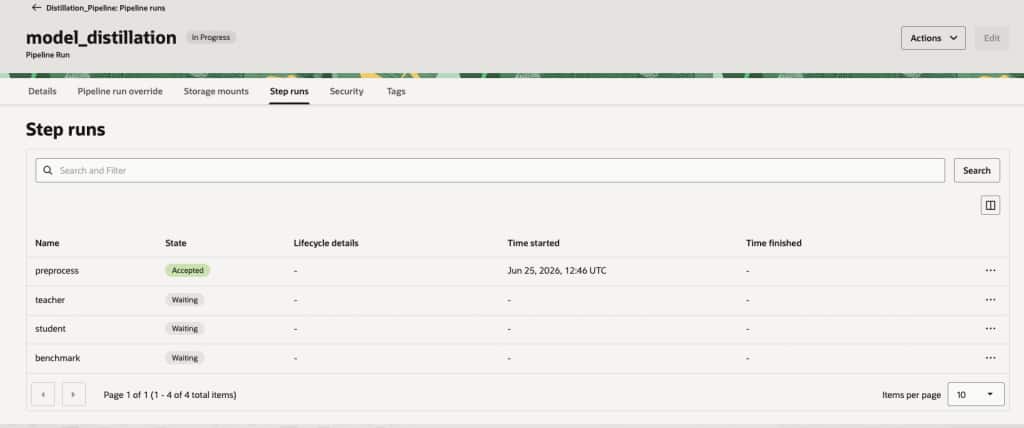
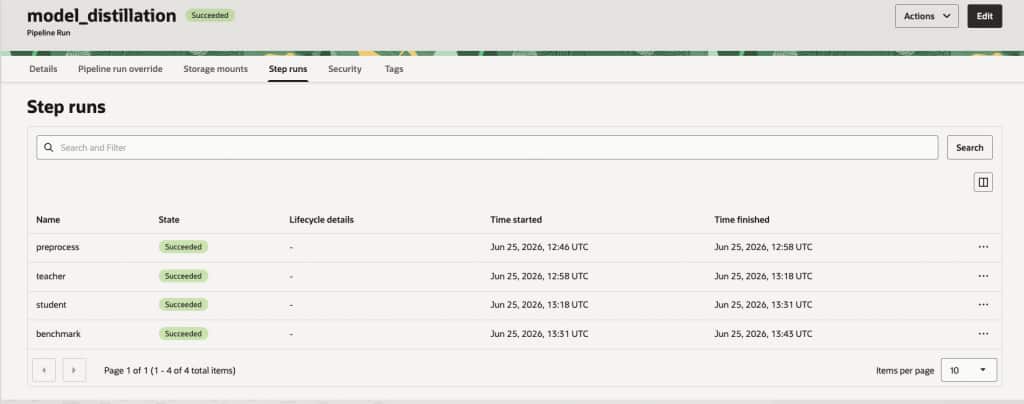
You can monitor the pipeline run status in Step runs section. Wait for the run to finish.
Monitoring and Operations
A production pipeline also needs operational visibility. OCI Data Science Jobs and Pipelines provide job run and pipeline run information, and job logs can be sent to OCI Logging. Object Storage can keep the generated datasets, model artifacts, and evaluation reports for each run.
For day-to-day operations, monitor the following:
- Pipeline status: successful, failed, canceled, or still running.
- Step-level logs: errors, warnings, data validation messages, and model training output.
- Artifact completeness: expected files written to the output prefix for each run.
- Metric drift: changes in ROC-AUC, recall, precision, latency, and model size across runs.
- Data drift indicators: changes in feature distributions, missing values, or fraud rate.
Notifications can help teams respond faster when a pipeline run fails. For example, a failed evaluation step should notify the ML team, while a successful registration step can notify the application or platform team that a new student model is ready for review or deployment.
Best Practices
When building this kind of pipeline, a few practices make the workflow more reliable:
- Keep every job focused on one responsibility. Small steps are easier to debug and rerun.
- Version the input data, teacher model, student model, and evaluation reports.
- Use parameters for environment-specific values such as bucket names, compartment OCIDs, and thresholds.
- Separate development, test, and production resources using compartments and policies.
- Use least-privilege IAM policies so jobs can access only the resources they need.
- Store secrets in OCI Vault instead of embedding credentials in code or environment variables.
- Capture metrics for every run, including failed runs, so performance trends are visible over time.
- Register only validated models and keep rejected artifacts for troubleshooting.
The goal is to make the workflow repeatable without making it rigid. Teams should be able to change the student model, thresholds, or evaluation logic while keeping the overall pipeline structure stable.
Key Takeaways
Model distillation helps us create a smaller, faster model that is better suited for real-time fraud detection. But the model itself is only part of the production story. To use distillation reliably, we also need a repeatable way to generate soft labels, train the student model, evaluate the results, and register only the models that meet the quality bar.
OCI Data Science Jobs and Pipelines provide a managed way to automate this lifecycle. Jobs turn each notebook step into a reusable operation. Pipelines connect those steps into a repeatable workflow. Object Storage keeps the artifacts, Logging captures run details, and Model Catalog gives the approved student model a governed home.
What’s Next
In this blog, we built the automated distillation pipeline on OCI Data Science. The next natural step is deployment. After the student model is registered and approved, it can be deployed to a model endpoint for low-latency online inference, or used in a batch scoring workflow for offline fraud review.
In a future blog, we can extend this pipeline with automated deployment, model monitoring, drift checks, and rollback logic so that only the best validated student model is promoted into production.