

AI is moving from simple chat responses to helping people get work done, and a big part of that comes from letting models interact safely with real systems and data. This blog walks through how MCP fits into how it works with Oracle tools like Autonomous Database, SQLcl, and Oracle Code Assist, and some practical use cases where customers can benefit from these AI‑driven workflows.
What is MCP
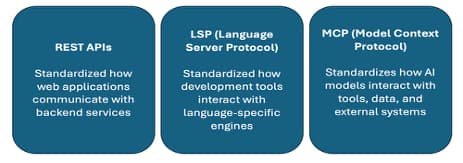
Model Context Protocol (MCP) is a standard way for AI models to connect to tools and data sources. Instead of every platform creating its own plugin system, MCP provides one common model approach. The goal is to make sure models get the right context, the right data, and the right instructions so they can act intelligently. Just like how HTTP is to the web, MCP is to AI. HTTP defines how browsers talk to websites. MCP defines how AI models talk to systems. This helps makes AI interactions more predictable, secure, and consistent across different environments.
Why MCP
Large language models are only as useful as the systems and data they can reach. Without that connectivity, even the smartest model can’t deliver real business value. The Model Context Protocol (MCP) solves this by giving AI a standard, open‑source way to interact with external tools and data much like REST did for web apps. Instead of building custom, inconsistent integrations for every model and backend, MCP provides one unified, vendor‑neutral interface that reduces complexity, improves security, and scales across platforms. Enterprises can connect AI to databases, CRMs, developer tools, and more, while reusable MCP servers power multiple workflows without extra coding. In short, MCP helps enterprises move from “AI that talks” to “AI that works.”
MCP Architecture
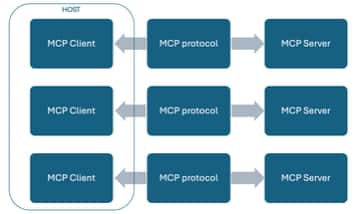
MCP has two main components:
Client:
Lives inside an AI application. Maintains a direct 1:1 connection with each MCP server. Communicates using lightweight JSON messages.
Server:
A small program that exposes tools and capabilities that models can use.
Can provide actions such as running SQL queries, calling APIs, or performing other system‑level tasks.
How Clients Operate:
Clients run inside a host application, for example, Claude Desktop, VS Code, IDEs, or other AI agents.
The host application manages all server connections on behalf of the model.
Server Capabilities and Tool Exposure:
When a client connects, the server provides a list of available tools, Input and output schemas for each tool.
The model can call these tools as needed, and the server executes the requested operations.
How MCP Works
This design keeps things modular, secure, and ensures the model never has direct access to underlying systems.
In MCP, the client is responsible for three core actions:
- Invoking tools,
- Querying resources, and
- Interpolating prompt templates.
The server exposes these capabilities—
- Publishing tools,
- Making resources available, and
- Providing prompt templates that the client can discover and use.
Tools
- Executable operations that interact with external systems.
- In OCI we can use SELECT AI agents in ADB, then Autonomous AI Database MCP Server enables clients to invoke these tools.
Resources
- Read only data exposed by the server, comparable to a GET request.
- These can include files, database rows, API responses, or any static context the client may choose to load.
Prompt templates
- Predefined prompts hosted on the server that encapsulate best practice instructions for common tasks like document Q&A or summarization.
- Remove the burden of prompt engineering from the user by giving the client ready‑made templates to work with.
When an MCP compatible model connects, the server first runs discovery and shares the available tools and their input/output formats. After that, the model can call these tools through JSON messages. The server validates each request, routes it to the right backend like database, filesystem, or API, executes it, and returns a clean JSON response. It also enforces strict boundaries, exposing only what is explicitly allowed. This makes MCP a more secure, practical way for enterprises to let AI work with existing systems without rewriting them.
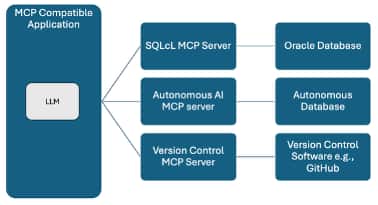
Oracle offers two main MCP servers,
Autonomous AI Database MCP Server:
This MCP server is built into Autonomous Database and works with Select AI as a managed endpoint for each database. DBAs or developers register built‑in or custom Select AI tools, and the server automatically exposes them to any MCP compatible client like Claude Desktop, VS Code with Cline, OCI AI Agent based on the user’s database roles.
At runtime, the AI client connects, authenticates, discovers the allowed tools, and selects the right one for the user’s natural‑language request. The MCP server invokes the Select AI tool, which may generate SQL and return results. Select AI enables governance and security; the MCP server handles protocol and safe exposure.
The result is a fully managed, more secure, least‑privileged way for AI to work with Autonomous Database,no extra infrastructure required.
SQLcl MCP Server:
The SQLcl MCP Server lets AI apps work with Oracle Databases through SQLcl tools instead of writing SQL manually. It runs on the client side, turning any SQLcl session into an MCP server using your saved connections. It exposes tools for running SQL, executing PL/SQL, and calling SQLcl commands. When a user asks a question in plain language, the AI generates SQL, sends it through the SQLcl MCP Server, which runs it in the database and returns the results in natural language.
In both cases, the MCP protocol defines the structured messages exchanged between clients and servers, enabling consistent behavior across tools, models, and environments.
In this blog we will dive deeper into using SQLcl for MCP.
SQLcl MCP Server Workflow
Connecting an AI agent like Cline in VS Code to the SQLcl MCP Server creates a far more powerful way to work with Oracle Database. Users can request database operations in plain language, execute them through MCP tools, and return results for review.
The SQLcl MCP Server currently exposes five core tools:
list-connections – discover saved Oracle connections
connect – open a named connection
disconnect – close the active connection
run-sql – execute SQL and PL/SQL
run-sqlcl – run SQLcl-specific commands
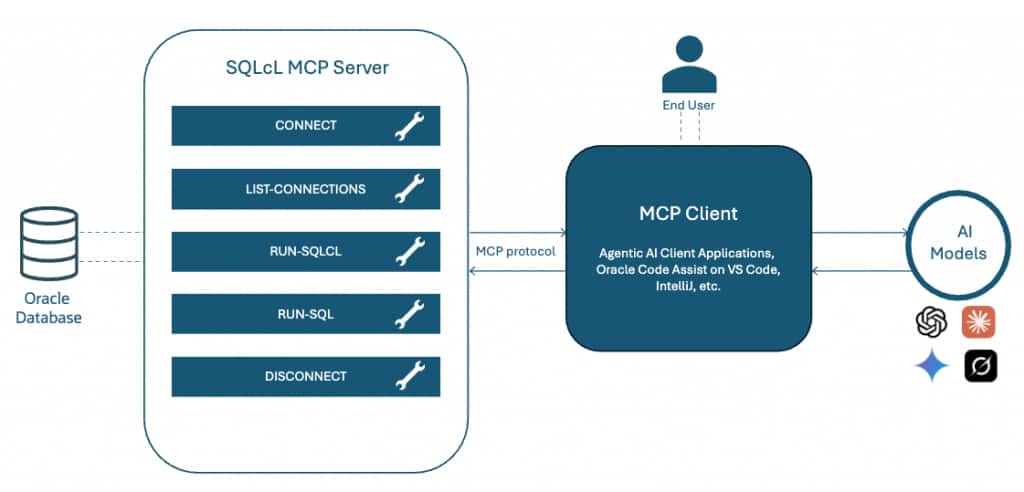
Single‑shot AI stops after one response, forcing the user to guide every step. Agentic workflows let the agent create a plan, get approval, execute with MCP tools, and iterate automating the work while keeping the user in control.
Paired with Cline, the SQLcl MCP Server turns natural‑language requests into context‑aware database actions. The client interprets the request, generates SQL, sends an MCP tool call, and SQLcl executes and formats the results. The MCP server returns them cleanly so the client can present clear, natural‑language output.
Developers can simulate enterprise scenarios where AI agents ask:
“What are the top 5 customers by revenue in Q4?”
“Which indexes are unused in this schema?”
“Show me the slowest queries in the last 24 hours.”
The MCP Server parses these requests, provides relevant metadata, and enables the model to generate executable SQL — all in real time.
This makes Oracle Database interaction conversational, auditable, and deeply integrated without writing a single line of SQL.
Configuring Environments for SQLcl
To get hands‑on with MCP, this section walks through configuring the development environment in VS Code using Oracle Code Assist (OCA). OCA is Oracle’s AI coding assistant for IntelliJ, VS Code, and the CLI, and it includes Cline, the agentic workflow interface that serves as the MCP client inside the editor.
With OCA providing intelligent code generation on Oracle‑approved, CSSAP‑certified models and Cline handling natural‑language agent interactions, VS Code becomes a unified AI‑enhanced workspace.
When paired with the SQL Developer extension and the SQLcl MCP Server, the agent can discover connections, execute SQL, and collaborate with the developer through conversational, tool‑driven workflows.
Together, these components turn VS Code into a complete, AI‑assisted Oracle development environment ready for MCP‑powered database operations.
Launch your VS Code, then from Extensions, type ‘Cline’ and hit Install. Once installed you will see the Cline in left hand bar or where your default extensions are positioned.
To setup the Cline, launch Cline, extension in the sidebar, and use your own API key. Select the API Provider, in our case, we will scroll down to bottom and select Oracle Code Assist.
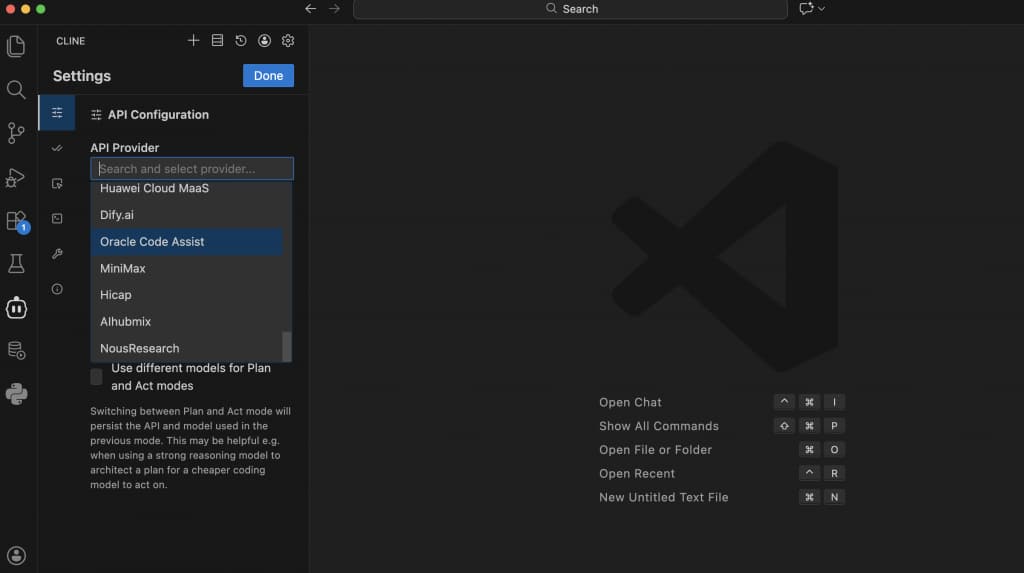
Login with your SSO and choose from the model you want to choose from.
Oracle Code Assist is powered by the latest models from Open AI, xAI and Meta.
For rapid responses: Choose GPT-4.1, Grok Code Fast or Llama4
For complex reasoning and planning: Opt for GPT-5, or Grok 4
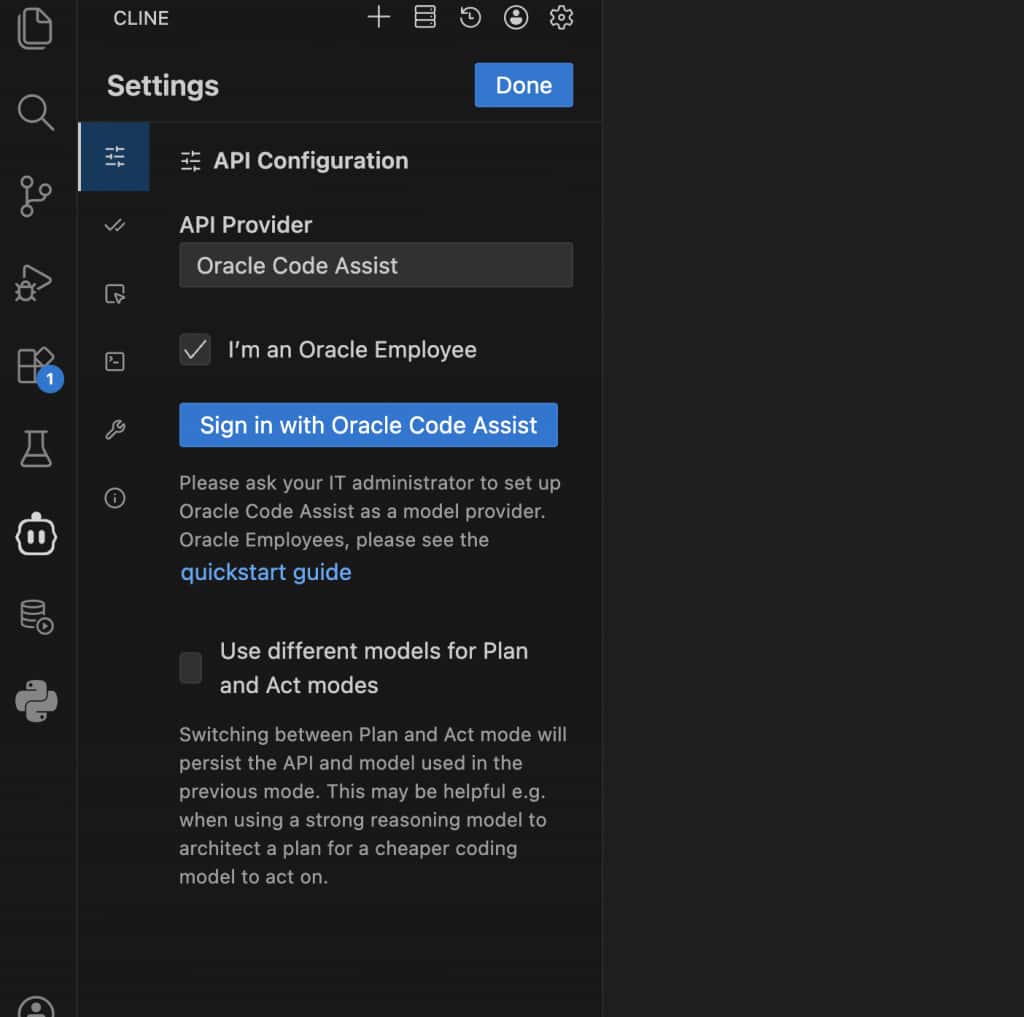
With your provider settings complete, you’re ready to configure the SQLcl MCP Server.
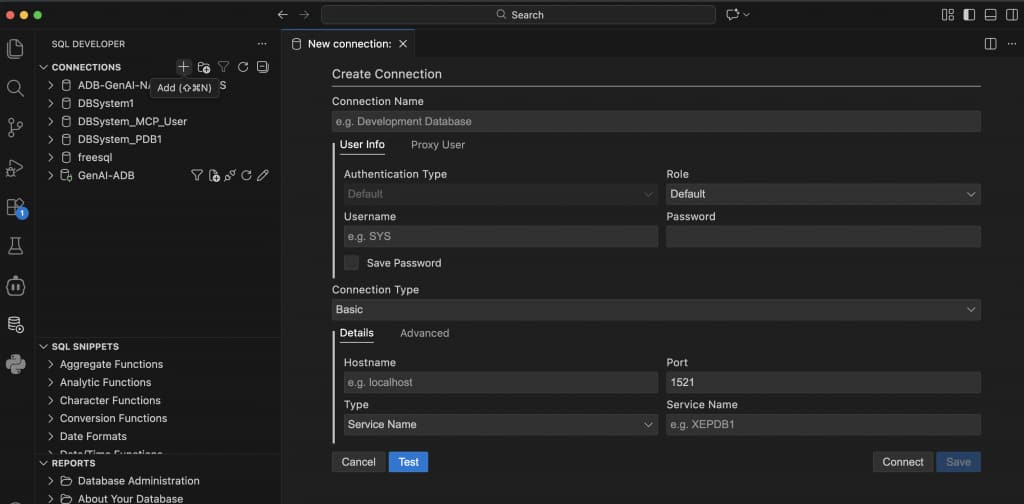
To configure SQL Developer on VSCode, launch SQL Developer in the extensions and click Install. The SQL Developer icon will appear in your extension bars. Launch the SQLDev extension and connect to your Oracle Database.
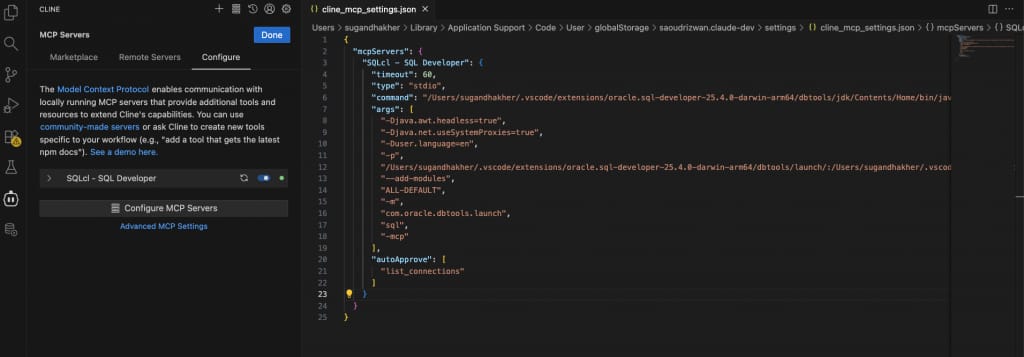
To configure the SQLcl MCP Server, in VSCode, open Command Palette and search for: Configure Cline SQLcl MCP. Once located, preview the cline_mcp_settings.json.
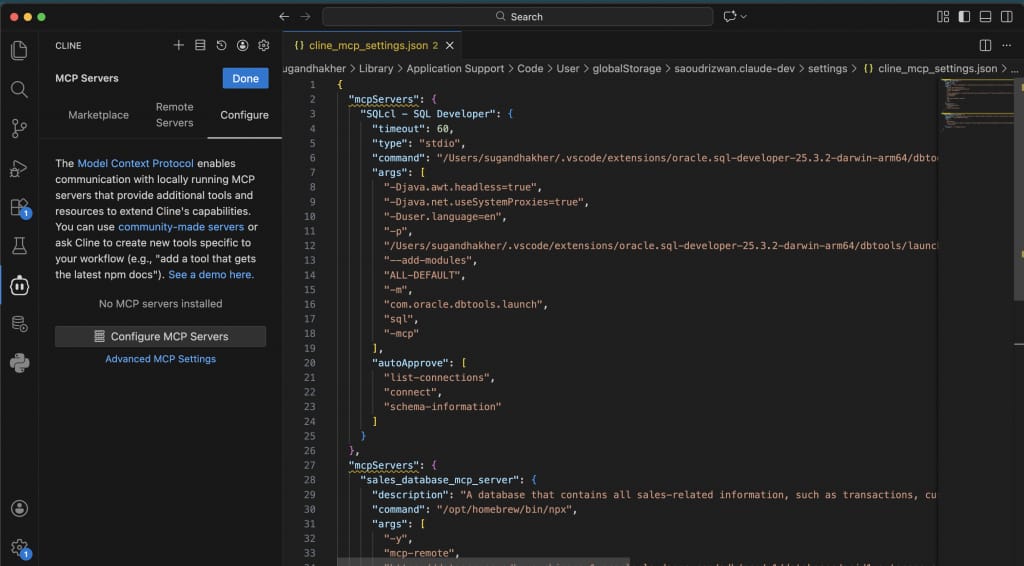
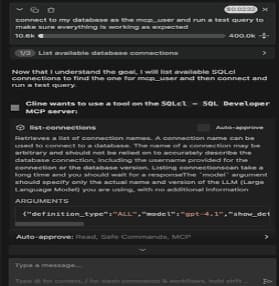
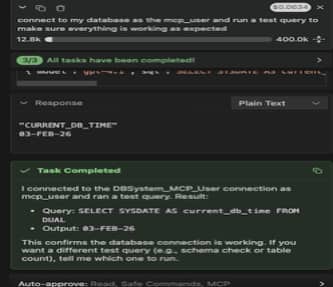
To test, enter the following prompt:
“Connect to my database as the <name of your DB connection> and run a test query to make sure everything is working as expected”
Architectural Use Cases for the SQLcl MCP Server
1) Self-service analytics on Autonomous Database
The SQLcl MCP Server enables a mediated access layer between natural-language requests and enterprise data. Business questions such as “show monthly revenue trends” are translated by the AI into governed SQL, executed against Autonomous Database, and returned with full policy enforcement.
This pattern removes direct credential exposure while standardizing how AI-driven analytics interact with authoritative data sources.
2) Faster application troubleshooting
For operational scenarios, MCP provides controlled retrieval of database diagnostics, execution plans, and workload signals. AI agents can analyze slow statements, job failures, or anomaly patterns, then propose remediations.
By inserting MCP into the path, organizations gain repeatable, auditable troubleshooting workflows instead of ad-hoc access by individual engineers.
3) Secure DevOps automation
MCP supports machine-to-machine execution of routine lifecycle tasks such as schema comparison, release validation, and performance regression checks.
Rather than granting broad privileges to automation scripts, teams expose narrowly defined capabilities through MCP, ensuring OCI policy, identity, and governance frameworks remain intact.
4) Accelerated developer productivity
Within IDEs like Visual Studio Code, MCP acts as a broker between AI assistants and database services. Developers can inspect metadata, validate migrations, and test changes without leaving their toolchain.
The architecture reduces context switching while maintaining separation between development workflows and protected runtime environments.
Summary
MCP gives a unified way to build AI‑driven workflows on top of Oracle Database and developer tooling which allows AI agents to interact with Autonomous Database governed without custom integrations. It combines AI flexibility with Oracle’s strengths in security, governance, and enterprise readiness.
To Dive more into MCP follow these links:
MCP: Build Rich-Context AI Apps with Anthropic