
Review
Review these blogs before creating a database on an ODA:
Introduction
The Oracle Database Appliance [ODA] is a family of engineered systems which are designed to be database servers. These Linux x8664 based systems are simple, affordable and optimized for database workloads. These engineered systems are a combination of hardware and software with certified configurations. By using certified configurations, customers can focus on using optimized systems rather than trying to figure out how to build and optimize a combination of CPUs, memory, storage devices, networking, operating systems, file systems and databases.
Matching an ODA to a TimesTen configuration
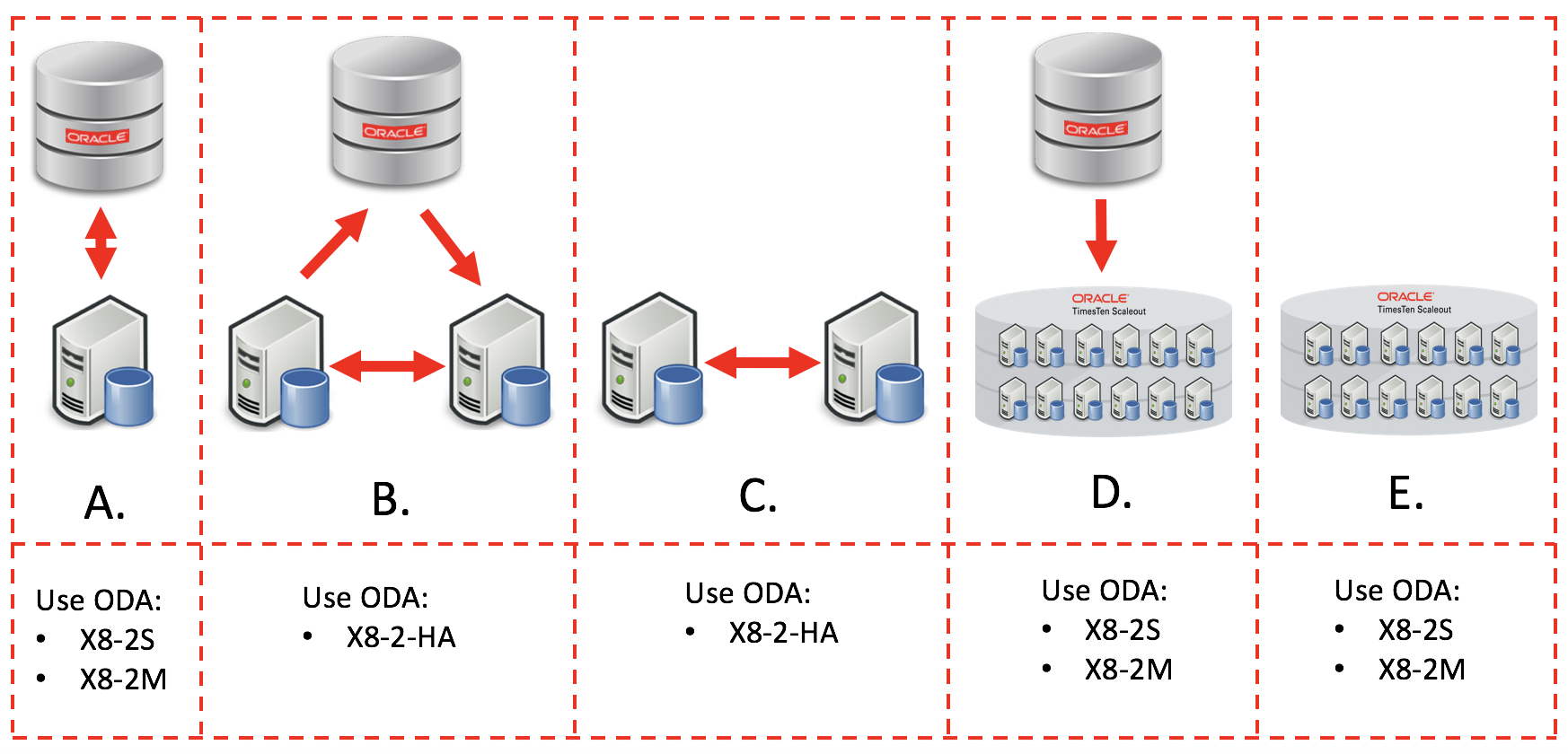
TimesTen can be used in several different configurations as either a cache or as a system of record. When TimesTen is used as a cache to an Oracle Database, the Oracle Database can be any of Exadata, ODA, RAC or single instance.
A. TimesTen Classic can be used as a read only or read/write cache to an Oracle Database
Either the ODA X8-2S or X8-2M can be used depending on the TimesTen database cache size.
B. TimesTen Classic can be used as a read only or read/write cache to an Oracle Database with high availability via replication
The ODA X8-2-HA can be used as an high availability configuration for TimesTen replication.
C. TimesTen Classic can be used as a system of record with high availability via TimesTen replication
The ODA X8-2-HA can be used as an high availability configuration for replication.
D. TimesTen Scaleout can be used as a read only cache to an Oracle Database when used as a target for Oracle GoldenGate
Either the ODA X8-2S or X8-2M can be used for each TimesTen Scaleout instance depending on the TimesTen database cache size. TimesTen Scaleout is deprecated since TimesTen release 22.1.1.29.0.
E. TimesTen Scaleout can be used as a system of record
Either the ODA X8-2S or X8-2M can be used for each TimesTen Scaleout instance depending on the TimesTen database size. TimesTen Scaleout is deprecated since TimesTen release 22.1.1.29.0.
Installing TimesTen on ODA
The way to install TimesTen on an ODA is the same for all ODA models and is the same whether TimesTen is used as a cache or as a system of record.
ODA Software pre-prerequisites
The Oracle Database Appliance must have Oracle Clusterware and ACFS 18c or 19c installed and the ACFS volumes mounted.
- Use the Oracle Database Appliance documentation to install the ODA GI software on a baremetal configuration
- You want to use the GI [Grid Infrastructure] Clone zip file to enable the Oracle Clusterware and ACFS software
- You do not need to install the Oracle DB Clone zip file as you will not be using an Oracle Database
- Define a Data Storage Percentage of <= 80
- Configure the ODA with ACFS storage
- For optimal TimesTen performance, do not reduce the CPU core count as a post installation task
- The ACFS mount point for the DATA ASM diskgroup should be used for the TimesTen checkpoint files
- The ACFS mount point for the REDO ASM diskgroup should be used or the TimesTen transaction log files
TimesTen Software Versions
- To support Oracle Clusterware 18c, use TimesTen 18.1.4.1.0 or later.
- To support Oracle Clusterware 19c, use TimesTen 18.1.4.1.0 or later.
Installation steps
-
SSH onto the ODA machine
-
Determine an OS user which has the same primary group as the Oracle Clusterware installation owner. eg if Oracle Clusterware is installed as user grid with primary group oinstall, then an OS user like oracle which has oinstall as its primary group should be used.
-
As user oracle, create a directory for the TimesTen installation, eg /opt/timesten. This directory should not be part of an ACFS volume mount. ie mkdir /opt/timesten
-
Download the TimesTen Linux x8664 software from oracle.com, eg timesten2211220.server.linux8664.zip
-
As user oracle, copy the TimesTen zip file to the /opt/timesten directory
-
Unzip the TimesTen zip file in the /opt/timesten directory. This will result in a new directory eg /opt/timesten/tt22.1.1.22.0
The unzipped directory structure, eg /opt/timesten/tt22.1.1.22.0 is known as the TimesTen Installation. An installation is a read only copy of the TimesTen software.
If you are creating an Active Standby Pair on ODA then repeat the installation steps on the other ODA node using the same OS user and the same directory structure.
Create a TimesTen Instance on ODA
A TimesTen instance are the read/write configuration files.
To create a TimesTen instance, do the following:
- As user oracle, cd /opt/timesten/tt22.1.1.22.0/bin
- Run the ttInstanceCreate utility, eg ./ttInstanceCreate
- Choose an instance name, eg tt221
- Choose where the instance will be created. use a directory that is not part of an ACFS volume mount, eg /opt/timesten
- Choose the TCP port for the main daemon. Ideally you will use the default port, 6624
- Choose the value of TNS_ADMIN
- Choose the port for the TimesTen Client/Server port. Ideally you will use the default port, 6625
- Choose not to use TimesTen Replication with Oracle Clusterware
- This will be done later as a separate step
If you need to modify these instance values, you can use the ttInstanceModify utility to change them.
This should result in the creation of a TimesTen Instance directory structure, eg /opt/timesten/tt221
The TimesTen main daemon should also be running. eg
Starting the daemon …
TimesTen Daemon (PID: 92753, port: 6624) startup OK
You can verify that the TimesTen main daemon is running via ‘ps -ef | grep tend’
[oracle@scaoda8m012 bin]$ ps -elf | grep tend
1 S oracle 78889 1 0 80 0 – 175405 futex_ 01:26 ? 00:00:00 /opt/timesten/tt221/install/bin/timestend -initfd 13 -minsubs 2
0 S oracle 79489 74428 0 80 0 – 55484 – 01:26 pts/0 00:00:00 grep –color=auto tend
If you plan to create an Active Standby Pair on ODA then repeat the instance creation steps on the other ODA node using the same OS user and the same directory structure.
See the following blogs for more configuration options:
- Creating an Oracle TimesTen Database on Oracle Database Appliance
- Configuring Oracle Database Appliance X8-2-HA for TimesTen Replication with Clusterware and ACFS
- Optimizing TimesTen Synchronous Replication on Oracle Database Appliance
- Configuring Oracle Database Appliance X8-2-HA for TimesTen Cache and Replication with ACFS
- Configuring Oracle Database Appliance X8-2-HA for TimesTen TLS 1.2 Replication with ACFS
- Configuring Oracle Database Appliance X8-2-HA for TimesTen Replication with ACFS Encryption
- Configuring Oracle Database Appliance X8-2-HA for TimesTen Replication with Clusterware Managed Applications
- Configuring Oracle Database Appliance X8-2-M for TimesTen Scaleout
Disclaimer: These are my personal thoughts and do not represent Oracle’s official viewpoint in any way, shape, or form.