
Oracle Solaris 11.4: The trusted business platform.
I’m pleased to announce the release of Oracle Solaris 11.4. Of the four releases of Oracle Solaris that I’ve been involved in, this is the best one yet!
Oracle Solaris is the trusted business platform that you depend on. Oracle Solaris 11 gives you consistent compatibility, is simple to use and is designed to always be secure.
Some fun facts about Oracle Solaris 11.4
There have been 175 development builds to get us to Oracle Solaris 11.4. We’ve tested Oracle Solaris 11.4 for more than 30 million machine hours. Over 50 customers have already put Oracle Solaris 11.4 into production and it already has more than 3000 applications certified to run on it.
Oracle Solaris 11.4 is the first and, currently, the only operating system that has completed UNIX® V7 certification.
What’s new
Consistently Compatible
That last number in the fun facts is interesting because that number is a small subset of applications that will run on Oracle Solaris 11.4. It doesn’t include applications that will run on Oracle Solaris 11 that were designed and build for Oracle Solaris 10 (nor 8 and 9 for that matter). One of the reasons why Oracle Solaris is trusted by so many large companies and governments around the world to run their most mission-critical applications is our consistency. One of the key capabilities for Oracle Solaris is the Oracle Solaris Application Compatibility Guarantee. For close to 20 years now, we have guaranteed that Oracle Solaris will run applications built on previous releases of Oracle Solaris, and we continue to keep that promise today.
Additionally, we’ve made it easier than ever to migrate your Oracle Solaris 10 workloads to Oracle Solaris 11. We’ve enhanced our migration tools and documentation to make moving from Oracle Solaris 10 to Oracle Solaris 11 on modern hardware simple. All in an effort to save you money.
Simple to Use
Of course with every release of Oracle Solaris, we work hard to make life simpler for our users. This release is no different. We’ve included several new features in Oracle Solaris 11.4 that make it easier than ever to manage. The coolest of those new features is our new Observability Tools System Web Interface.
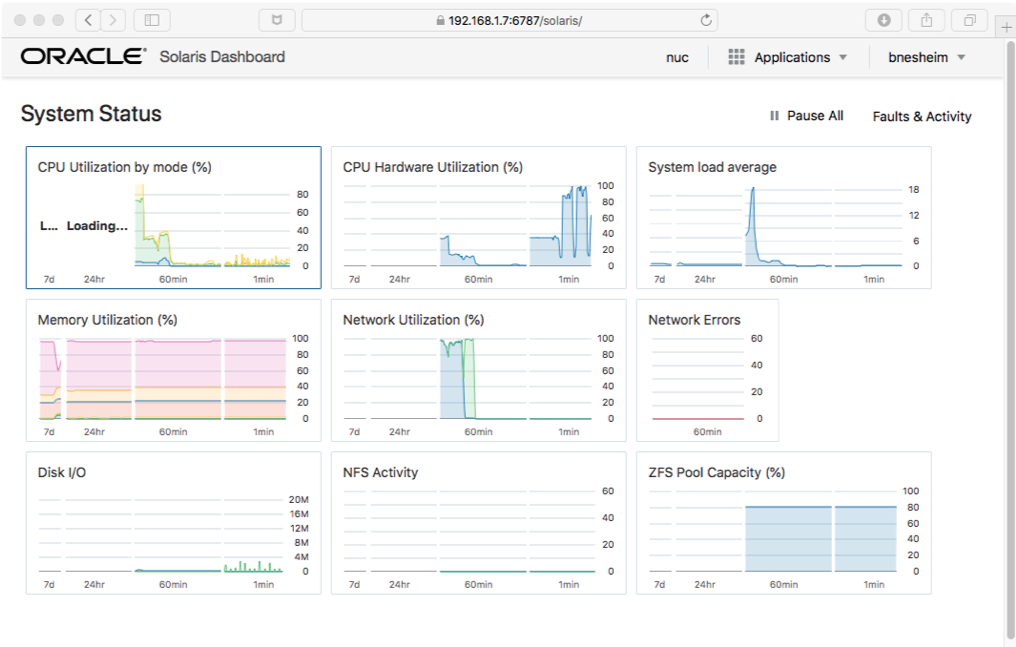
The System Web Interface brings together several key observability technologies, including the new StatsStore data, audit events and FMA events, into a centralized, customizable browser-based interface, that allows you to see the current and past system behavior at a glance. James McPherson did an excellent job of writing all about the Web Interface here. He also wrote about what we collect by default here. Of course, you can also add your own data to be collected and customize the interface as you like. And if you want to export the data to some other application like a spreadsheet or database, my colleague Joost Pronk wrote a blog on how to get the data into a csv format file. For more information about that, you can read more about it all in our Observability Tools documentation.
The Service Management Framework has been enhanced to allow you to automatically monitor and restart critical applications and services. Thejaswini Kodavur shows you how to use our new SMF goal services.
We’ve made managing and updating Oracle Solaris Zones and the applications you run inside them simpler than ever. We started by supplying you with the ability to evacuate a system of all of its Zones with just one command. Oh, and you can bring them all back with just one command too.
Starting with Oracle Solaris 11.4, you can now build intra-Zone dependencies and have the dependent Zones boot in the correct order, allowing you to automatically boot and restart complex application stacks in the correct order. Jan Pechanec wrote a nice how-to blog for you to get started. Joost Pronk wrote a community article going into the details more deeply.
In Oracle Solaris 11.4, we give you one of the most requested features to make ZFS management even simpler than it already is. Cindy Swearingen talks about how Oracle Solaris now gives you ZFS device removal.
Oracle Solaris is designed from the ground up to be simple to manage, saving you time.
Always Secure
Oracle Solaris is consistently compatible and is simple to use, but if it is one thing above all others, it is focused on security, and in Oracle Solaris 11.4 we give you even more security capabilities to make getting and staying secure and compliant easy.
We start with multi-node compliance. In Oracle Solaris 11.4, you can now setup compliance to either push a compliance assessment to all systems with a single command and review the results in a single report, or you can setup your systems to regularly generate their compliance reports and push them to a central server where they can also be viewed via a single report. This makes maintaining compliance across your data center even easier. You can find out more about multi-node compliance here.
But how do you keep your systems compliant once they are made compliant? One of the most straightforward ways is to take advantage of Immutable Zones (this includes the Global Zone). Immutable Zones even prevents system administrators from writing to the system and yet still allowed patches and updates via IPS. This is done via a trusted path. However, this also means that your configuration management tools like Puppet and Chef aren’t able to write to the Zone to apply require configuration changes. In Oracle Solaris 11.4, we added trusted path services. Now, you can create your own services like Puppet and Chef, that can be placed on the trusted path, allowing them to make the requisite changes while keeping the system/zone immutable and protected.
Oracle Solaris Zones, especially Immutable Zones, are an incredibly useful tool for building isolation into your environment to protect applications and your data center from cyber attack or even just administrative error. However, sometimes, a Zone is too much. You really just want to be able to isolate applications on a system or within a Zone or VM. For this, we give you Application Sandboxing. It allows you to isolate an application or isolate applications from each other. Sandboxes provide additional separation of applications and reduce the risk of unauthorized data access. You can read more about it in Darren Moffat’s blog, here.
Oracle Solaris 11 is engineered to help you get and stay secure and compliant, reducing your risk.
Updating
In order to make your transition from Oracle Solaris 11.3 to Oracle Solaris 11.4 as smooth as possible, we’ve included a new compliance benchmark that will tell you if there are any issues such as old, unsupported device drivers, unsupported software or if the hardware you are running on isn’t supported by Oracle Solaris 11.4.
To install this new benchmark, update to Oracle Solaris 11.3 SRU 35 and run:
# pkg install update-check
Then to run the check, you simple run # compliance assess -b ehc-update -a 114update
# compliance report -a 114update -o ./114update.html
You can then use FireFox to view the report:
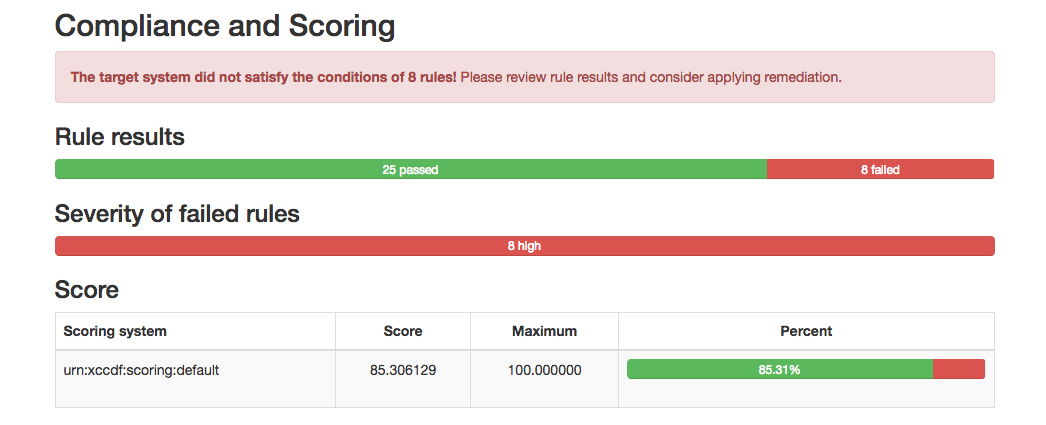
My personal system started out as an Oracle Solaris 11.1 system and has been upgraded over the years to an Oracle Solaris 11.3 system. As you can see, I had some failures. These were some old device drivers, and old versions of software like gcc-3, iperf benchmarking tool, etc. The compliance report report tells you exactly what needs to happen to resolve the failures. The devices drivers weren’t needed any longer, and I uninstalled them per the reports instructions. The report said the software will be removed automatically during upgrade.
Oracle Solaris Cluster 4.4
Of course with each update of Oracle Solaris 11, we release an new version of Oracle Solaris Cluster so you can upgrade in lock-step to provide a smooth transition for your HA environments.
You can read about what’s new in Oracle Solaris Cluster 4.4 in the What’s New and find out more from the Data Sheet, the Oracle Technology Network and in our documentation.
Try it out
You can download Oracle Solaris 11.4 now from the Oracle Technology Network for bare metal or VirtualBox, OTN, MOS, and our repository at pkg.oracle.com.Take a moment to check out our new OTN page, and you can engage with other Oracle Solaris users and engineers on the Oracle Solaris Community page.
UNIX® and UNIX® V7 are registered trademarks of The Open Group.