
If you login into your cloud console and create a new autonomous data warehouse, or if you have an existing data warehouse instance, then there is great news – you can now launch SQL Developer Web direct from the service console. There is no need to download and install the full desktop version of SQL Developer anymore.
If you want a quick overview of this feature then there is great video by Jeff Smith (Oracle Product Manager for SQL Developer) on YouTube: https://www.youtube.com/watch?v=asHlUW-Laxk. In the video Jeff gives an overview and a short demonstration of this new UI.
ADMIN-only Access
First off, straight out the box, only the ADMIN user can access SQL Developer web – which makes perfect sense when you think about it! Therefore, the ADMIN user is always going to be the first person to connect to SQL Dev Web and then they enable access for other users/schemas as required.
A typical autonomous workflow will look something like this:
- Create a new ADW instance
- Open Service Console
- Connect to SQL Dev Web as ADMIN user
- Enable each schema/user via the ords_admin.enable_schema package
- Send schema-specific URL to each developer
Connecting as the ADMIN user
From the Administration tab on the service console you will see that we added two new buttons – one to access APEX (more information here) and one to access SQL Developer Web.:

As this is on the Administration tab then the link for SQL Developer Web, not surprisingly, provides a special admin-only URL which, one you are logged in as the admin user, brings you to the home screen:

and the admin user has some additional features enabled for monitoring their autonomous data warehouse via the hamburger menu in the top left corner

The Dashboard view displays general status information about the data warehouse:.
- Database Status: Displays the overall status of the database.
- Alerts: Displays the number of Error alerts in the alert log.
- Database Storage: Displays how much storage is being used by the database.
- Sessions: Displays the status of open sessions in the database.
- Physical IO Panel: Displays the rates of physical reads and writes of database data.
- Waits: Displays how many wait events are occurring in the database for various reasons
- Quick Links: Provides buttons to open the Worksheet, Data Modelel. It also provides a button to open the Oracle Application Express sign-in page for the current database.

Home Page View
This page has some cool features – there is a timeline that tracks when objects got added to the database:

and there is an associated quick glance view that shows the status of those objects so you know that if it’s a table whether it’s been automatically analyzed and the stats are up to date:

Enabling the users/schemas
To allow a developer to access their schema and login the ADMIN user has to run a small PL/SQL script to enable the schema and that process is outlined here: https://docs.oracle.com/en/database/oracle/sql-developer-web/19.1/sdweb/about-sdw.html#GUID-A79032C3-86DC-4547-8D39-85674334B4FE.
Once that’s done the ADMIN user can provide the developer with their personal URL to access SQL Developer Web. Essentially, this developer URL is the same as the URL the ADMIN user gets from the service console, but with the /admin/ segment of the URL replaced by /schema-alias/ specified during the “enable-user-access” step. The doc lays this out very nicely.
Guided Demo
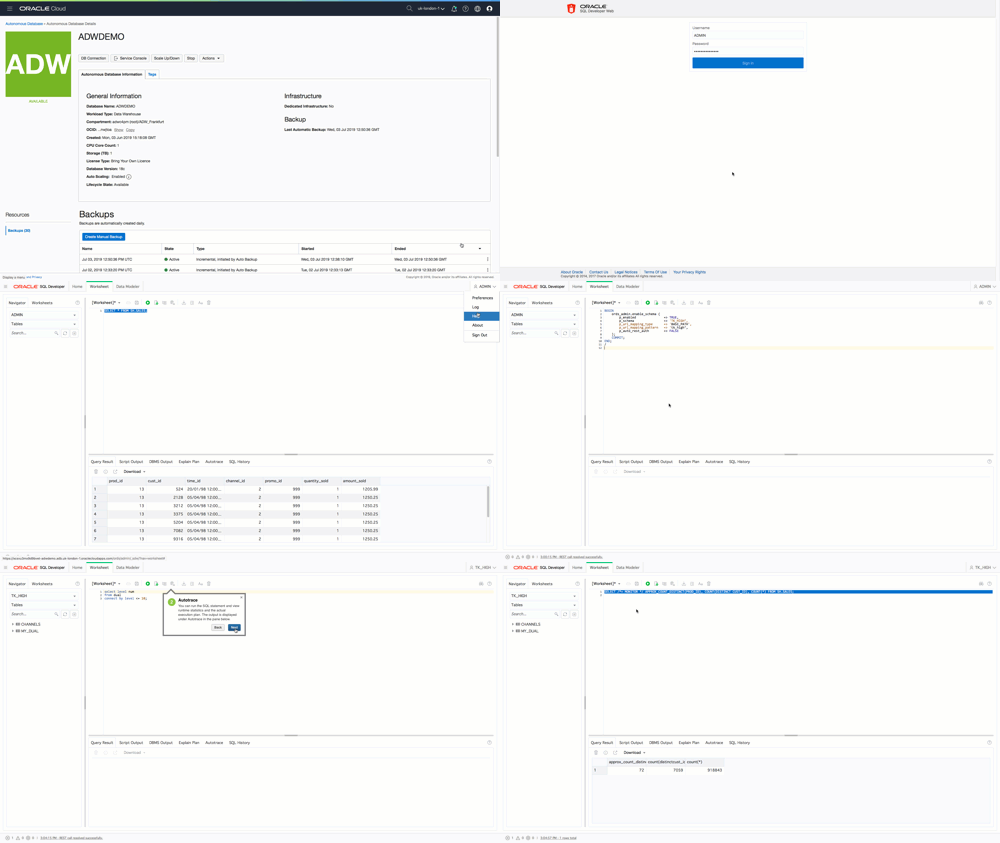
Overall adding SQL Dev Web to Autonomous Data Warehouse is going to make life so much easier for DBAs and developers. For most tasks SQL Developer Web can now be the go-to interface for doing most in-database tasks which means you don’t have to download and install a desktop tool (which in most corporate environments creates all sorts of problems due to locked-down Windows and Mac desktops).
Where to get more information
When it comes to SQL Developer there is only one URL you need and it belongs the Jeff Smith who is the product manager for SQL Developer: https://www.thatjeffsmith.com/. Jeff’s site contains everything you could ever want to know about using SQL Developer Desktop and SQL Developer Web. There are overview videos, tutorial videos, feature videos, tips & tricks etc etc.
Have fun with SQL Developer Web and Autonomous Data Warehouse