
We are pleased to announce that Oracle Autonomous Data Warehouse now comes with spatial intelligence! If you are completely new to Oracle Autonomous Data Warehouse (where have you been for the last 18 months?) then here is a quick recap of the key features:
What is Oracle Autonomous Data Warehouse
Oracle Autonomous Data Warehouse provides a self-driving, self-securing, self-repairing cloud service that eliminate the overhead and human errors associated with traditional database administration. Oracle Autonomous Data Warehouse takes care of configuration, tuning, backup, patching, encryption, scaling, and more. Additional information can be found at https://www.oracle.com/database/autonomous-database.html.
Special Thanks…
This post has been prepared by David Lapp who is part of the Oracle Spatial and Graph product management team.He is extremely well known within our spatial and graph community. If you want to follow David’s posts on the Spatial and Graph blog then use this link and the spatial and graph blog is here.
Spatial Features
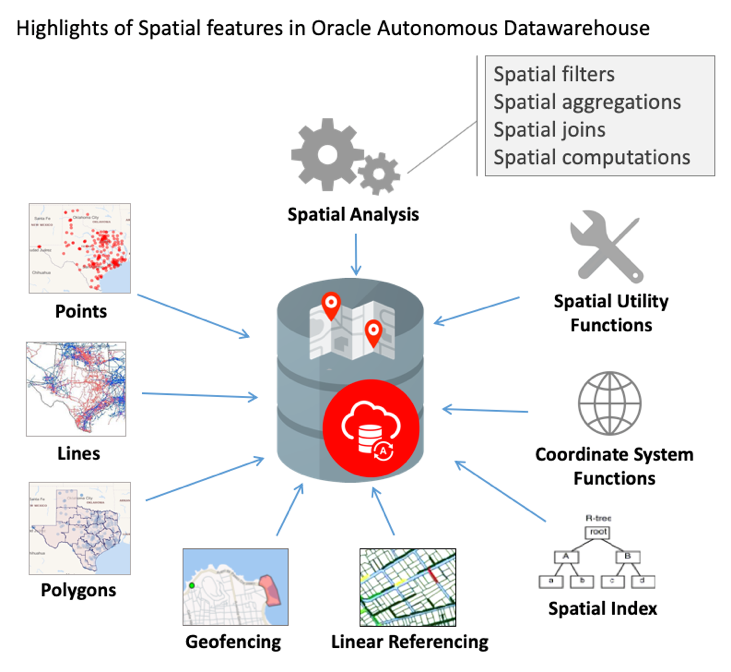
The core set of Spatial features have been enabled on Oracle Autonomous Data Warehouse. Highlights of the enabled features are; native storage and indexing of point/line/polygon geometries, spatial analysis and processing, such as proximity, containment, combining geometries, distance/area calculations, geofencing to monitor objects entering and exiting areas of interest, and linear referencing to analyze events and activities located along linear networks such as roads and utilities. For details on enabled Spatial features, please see the Oracle Autonomous Data Warehouse documentation.
Loading Your Spatial Data into ADW
In Oracle Autonomous Data Warehouse, data loading is typically performed using either Oracle Data Pump or Oracle/3rd party data integration tools. There are a few different ways to load and configure your spatial data sets:
- Load existing spatial data
- Load GeoJSON, WKT, or WKB and convert to Spatial using SQL.
- Load coordinates and convert to Spatial using SQL.
Obviously the files containing your spatial data sets can be located in your on-premise data center or maybe your desktop computer, but for the fastest data loading performance Oracle Autonomous Data Warehouse also supports loading from files stored in Oracle Cloud Infrastructure Object Storage and other cloud file stores. Details can be found here: https://docs.oracle.com/en/cloud/paas/autonomous-data-warehouse-cloud/user/load-data.html.
Configuring Your Spatial Data
Routine Spatial data configuration is performed using Oracle SQL Developer GUIs or SQL commands for:
- Insertion of Spatial metadata
- Creation of Spatial index
- Validation of Spatial data
Example Use Case
The Spatial features enabled for Oracle Autonomous Data Warehouse support the most common use cases in data warehouse contexts. Organizations such as insurance, finance, and public safety require data warehouses to perform a wide variety of analytics. These data warehouses provide the clues to answer questions such as:
- What are the major risk factors for a potential new insurance policy?
- What are the patterns associated with fraudulent bank transactions?
- What are the predictors of various types of crimes?
In all of these data warehouse scenarios, location is an important factor, and the Spatial features of Oracle Autonomous Data Warehouse enable building and analyzing the dimensions of geographic data. Using the insurance scenario as an example, the major steps for location analysis are:
- Load historical geocoded policy data including outcomes such as claims and fraud
- Load geospatial reference data for proximity such as businesses and transportation features
- Use Spatial to calculate location-based metrics
For example lets find the number of restaurants within 5 miles, and the distance to the nearest restaurant:
— Count within distance
— Use a SQL statement with SDO_WITHIN_DISTANCE
— and DML to build the result data
SELECT policy_id, count(*) as no_restaurant_5_mi
FROM policies, businesses
WHERE businesses.type = ‘RESTAURANT’
AND SDO_WITHIN_DISTANCE(
businesses.geometry,
policies.geometry,
‘distance=5 UNIT=mile’) = ‘TRUE’
GROUP BY policy_id;
POLICY_ID NO_RESTAURANT_5_MI
81902842 5
86469385 1
36378345 3
36323540 3
36225484 2
40830185 5
40692826 1
…
Now we can expand the above query to use the SDO_NN function to do further analysis and find the closest restaurant within the group of restaurants that are within a mile radius of a specific location. Something like the following:
— Distance to nearest
— The SDO_NN function does not perform an implicit join
— so use PL/SQL with DML to build the result data
DECLARE
distance_mi NUMBER;
BEGIN
FOR item IN (SELECT * FROM policies)
LOOP
execute immediate
‘SELECT sdo_nn_distance(1) FROM businesses ‘||
‘WHERE businesses.type = ”RESTAURANT” ‘||
‘AND SDO_NN(b.ora_geometry,:1,’||
”’sdo_batch_size=10 unit=mile”, 1) = ”TRUE” ‘||
‘AND ROWNUM=1’
INTO distance_mi USING item.geometry;
DBMS_OUTPUT.PUT_LINE(item.policy_id||’ ‘||distance_mi);
END LOOP;
END;
POLICY_ID RESTAURANT_MI
81902842 4.100
86469385 1.839
36378345 4.674
36323540 3.092
36225484 1.376
40830185 2.237
40692826 4.272
44904642 2.216
…
- Generate the desired spectrum of location-based metrics by stepping through combinations of proximity targets (i.e., restaurants, convenience stores, schools, hospitals, police stations …) and distances (i.e., 0.25 mi, 0.5 mi, 1 mi, 3 mi, 5 mi…).
- Combine these location-based metrics with traditional metrics (i.e., value of property, age of policy holder, household income …) for analytics to identify predictors of outcomes.
- To enable geographic aggregation, start with a geographic hierarchy with geometry at the most detailed level. For example, a geographic hierarchy where ZONE rolls up to SUB_REGION which rolls up to REGION:
DESCRIBE geo_hierarchy
Name Type
——————— ————————————————-
ZONE VARCHAR2(30)
GEOMETRY SDO_GEOMETRY
SUB_REGION VARCHAR2(30)
REGION VARCHAR2(30)
- Use Spatial to calculate containment (things found within a region) within the detailed level, which by extension associates the location with all levels of the geo-hierarchy for aggregations:
— Calculate containment
—
— The SDO_ANYINTERACT function performs an implicit join
— so, use a SQL statement with DML to build the result data
—
SELECT policy_id, zone
FROM policies, geo_hierarchy
WHERE SDO_ANYINTERACT(policies.geometry, geo_hierarchy.geometry) = ‘TRUE’;
POLICY_ID ZONE
81902842 A23
86469385 A21
36378345 A23
36323540 A23
36225484 B22
40830185 C05
40692826 C10
44904642 B16
…
With these and similar operations, analytics may be performed including the calculation of additional location-based metrics and aggregation by geography.
Summary
For important best practices and further details on the use of these and many other Spatial operations, please refer to the Oracle Autonomous Data Warehouse documentation: https://www.oracle.com/database/autonomous-database.html.