


Passwordless authentication can reduce reliance on passwords and improve resistance to phishing. For Oracle Fusion Cloud Applications, the design must also reflect the identity architecture introduced by the Fusion Applications Identity Upgrade.
August 2026 update: At this stage, the passwordless pattern described in this article is not supported directly from the IAM identity domain associated with the Fusion Applications environment. It requires a separate, customer-managed Oracle Cloud Infrastructure Identity and Access Management (OCI IAM) identity domain to act as the external identity provider and enforce passwordless or FIDO-based authentication.
The federation configuration also changes after the Fusion Applications Identity Upgrade. Before the upgrade, administrators configured the external identity provider in the Single Sign-On area of the Fusion Applications Security Console. After the upgrade, the Fusion Applications identity domain is the security assertion markup language (SAML) service provider, and the additional IAM domain is configured as its external identity provider in the Oracle Cloud Console. Use the environment-specific SAML metadata and the current identity-upgrade federation procedure; do not reuse the former Fusion (OAM) endpoints or the old Security Console procedure.
The shift toward passwordless authentication
Passwords remain a frequent target for phishing, credential stuffing, replay, and social-engineering attacks. Passwordless authentication changes the sign-in model by using possession of a registered authenticator, together with a local device gesture such as a biometric check or PIN, instead of asking the user to type a reusable password.
OCI IAM supports passwordless sign-in with Fast Identity Online (FIDO) authenticators. Depending on the device and organizational policy, the authenticator can be a platform authenticator built into a laptop or mobile device, a synced passkey, or a roaming hardware security key. See Understanding Passwordless Authentication.
Why FIDO is phishing-resistant
FIDO authentication uses public-key cryptography. The private key remains protected by the authenticator, while the service stores a public key. Authentication is bound to the legitimate service origin, so a fake sign-in page cannot collect a reusable secret that can later be replayed against the real service.
This phishing-resistant property applies specifically to FIDO and passkeys. Other multifactor methods, such as mobile push approval, time-based one-time passcodes, SMS codes, or email codes, can improve security but should not be described as having the same phishing resistance as FIDO.
Two IAM identity domains with different roles
The architecture uses two OCI IAM identity domains. Their roles must remain distinct.
- Fusion Applications identity domain: This is the IAM identity domain associated with the Fusion Applications environment. After the identity upgrade, it provides the SAML service-provider layer for Fusion sign-in and routes authentication according to its identity-provider policy. At this stage, do not use this domain itself to implement the passwordless pattern described in this article.
- Additional customer-managed OCI IAM identity domain: This separate domain acts as the external SAML identity provider. It contains or represents the participating users, applies the sign-on policy, and enforces the FIDO or passwordless authentication requirement.
The additional domain is required for the OCI IAM passwordless design covered here. If an organization instead uses a separate enterprise identity provider that supports passkeys or FIDO, it can evaluate that provider as the external identity provider under its own support model; that alternative is outside the configuration steps in this article. Direct passwordless authentication from the Fusion Applications identity domain is not the supported option described here.
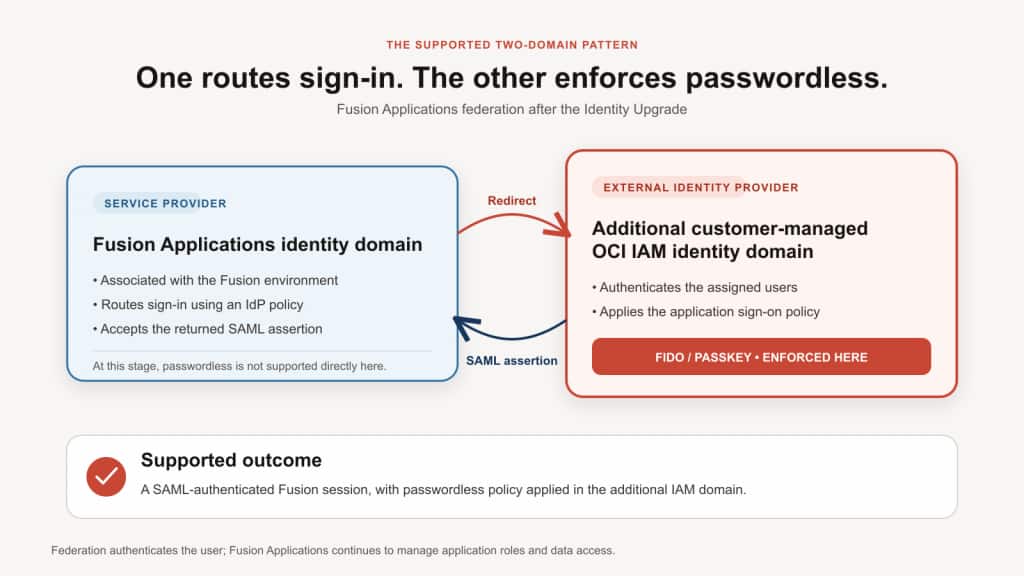
What changed after the Fusion Applications Identity Upgrade
The identity upgrade moved Fusion Applications sign-in and federation administration to OCI IAM. The user still opens the normal Fusion Applications URL, but the associated Fusion Applications identity domain now provides the service-provider function and routes the user to the configured external identity provider.
For an upgraded environment:
- Manage the SAML identity provider and identity-provider routing in the Oracle Cloud Console, not in the Single Sign-On area of the Fusion Applications Security Console.
- Use the SAML metadata generated for the specific Fusion Applications environment.
- Treat the Fusion Applications identity domain as the SAML service provider and the additional customer-managed IAM domain as the external SAML identity provider.
- Do not reuse legacy Fusion OAM entity IDs, assertion-consumer endpoints, or sign-in URLs. Oracle states that the legacy login URL no longer works after the upgrade.
- Continue to manage Fusion user provisioning, application roles, and data access through the applicable Fusion Applications processes. Federation authenticates the user; it does not grant application access.
For the authoritative transition model, see the Fusion Applications Identity Upgrade Overview and Fusion Applications Identity Upgrade Checklist.
Implementing passwordless and FIDO after the identity upgrade
1. Confirm the environment’s identity status
In the Oracle Cloud Console, open the Fusion Applications environment and follow the Associated identity domain link. Confirm that the environment has completed the identity upgrade before following the post-upgrade steps below. Newer environment families and environments provisioned after April 6, 2025 are already on OCI IAM.
2. Create or retain a separate customer-managed IAM identity domain
Create or select an additional OCI IAM identity domain that is separate from the domain associated with Fusion Applications. Choose a domain type that supports the required user population, authentication factors, and licensing model. See IAM Identity Domain Types.
Do not attempt to configure the Fusion Applications identity domain in a circular identity-provider/service-provider relationship back to Fusion. Oracle documents limitations for using the Fusion Applications identity domain as an identity provider for Fusion-related integrations in Overview of Using Oracle Fusion Cloud Applications Identity Domain to Build Extensions.
3. Configure the Fusion service provider in the additional domain
Download the environment-specific SAML metadata for the Fusion Applications identity domain. In the additional IAM domain, create or update a SAML application that represents that Fusion service provider. Import the metadata where supported, verify the entity ID and assertion-consumer service values, configure the agreed subject identifier, and assign the application to the intended user population.
Use separate metadata and application configuration for each Fusion Applications environment. Do not mix development, test, and production metadata.
4. Configure the additional domain as the external identity provider
Export the identity-provider metadata from the additional domain. In the Fusion Applications identity domain, add or update a SAML identity provider, import the metadata, configure the user-identifier mapping, activate the provider, and test the connection.
Apply an OCI IAM identity-provider policy that routes the Fusion application to the additional domain. Decide whether users should be routed automatically or shown an identity-provider choice, and preserve a tested administrative recovery path before changing the default-provider behavior. See About Identity Provider Policies.
5. Configure FIDO and passwordless policy in the additional domain
In the additional customer-managed IAM domain, enable the supported FIDO authenticators and configure the sign-on policy for the Fusion SAML application. OCI IAM passwordless authentication uses a username-first sign-in flow and a FIDO authenticator instead of a password. Follow Configuring Passwordless Authentication for the current prerequisites and policy sequence.
Determine which authenticators are acceptable for the user population. Platform authenticators can provide a convenient biometric or device-PIN experience. Hardware security keys can be useful for privileged users, shared-workstation scenarios, or users who need a portable authenticator. Establish enrollment, replacement, and recovery procedures before making the policy mandatory.
6. Prepare users and assignments
Ensure that each participating user can authenticate in the additional domain and is assigned to the Fusion SAML application and the applicable sign-on policy. The SAML subject or mapped identifier must resolve to the correct Fusion user. Test the exact identifier format, including case and email-address conventions, rather than assuming that similar-looking accounts will match.
The identity upgrade does not replace Fusion user lifecycle, role provisioning, or data-security administration. A successful SAML assertion establishes identity, but the user must still have the required Fusion account, roles, and data access.
7. Pilot and test the complete sign-in journey
Start in a non-production environment with representative users and authenticators. Validate:
- Opening the normal Fusion Applications URL and routing to the correct identity provider.
- First-time FIDO enrollment and subsequent passwordless sign-in.
- Correct SAML subject mapping and successful return to Fusion Applications.
- Application roles and data access after authentication.
- Logout, session timeout, reauthentication, and multiple-browser behavior.
- Lost-device, replacement-authenticator, and account-recovery procedures.
- An emergency administrative sign-in path that does not depend on the new federation route.
8. Roll out in controlled stages
Expand the policy in stages after the pilot succeeds. Communicate supported devices and browsers, enrollment instructions, the expected change in the sign-in journey, and the support process for lost or replaced authenticators. Monitor failed sign-ins and help-desk patterns during the rollout.
If the environment has not yet completed the identity upgrade
Do not build new long-term federation instructions around the legacy Security Console path. For each federated Fusion environment, follow Oracle’s pre-upgrade actions: download the new environment-specific service-provider metadata from the Oracle Cloud Console; configure a new service provider or enterprise application in the additional IAM domain; export its identity-provider metadata; update and test the provider in the Oracle Cloud Console; and acknowledge readiness.
Complete the required actions at least 72 hours before the scheduled downtime, in accordance with Oracle’s stated window. The new trust becomes active with the identity upgrade. Follow the current Fusion Applications Identity Upgrade Checklist rather than relying on the original federation steps in this article.
Important implementation guardrails
- Keep the domains distinct. Apply the passwordless and FIDO policy in the additional customer-managed IAM domain, not directly in the Fusion Applications identity domain.
- Use the post-upgrade federation path. For upgraded environments, manage the external identity provider and routing in OCI IAM rather than in the Fusion Applications Security Console.
- Use current metadata. Replace legacy OAM service-provider values with the environment-specific metadata supplied for the identity upgrade.
- Do not equate every MFA method with FIDO. Push approvals and one-time passcodes can strengthen authentication, but FIDO and passkeys provide the phishing-resistant behavior discussed here.
- Separate authentication from authorization. Federation does not create Fusion roles or data access. Continue to manage those controls in Fusion Applications.
- Assess non-browser integrations separately. Service accounts, APIs, automation, and integrations can use different authentication paths. Test them before changing routing, basic-authentication restrictions, or web application firewall controls.
- Maintain recovery access. Keep a tested administrative path and documented recovery process before enforcing passwordless authentication broadly.
Benefits of the supported two-domain design
- Improved resistance to phishing: FIDO authentication does not expose a reusable password or one-time code to a fraudulent site.
- A simpler user experience: Users can authenticate with a registered device gesture or security key instead of remembering and entering a password.
- Centralized policy: The additional IAM domain provides a dedicated place to manage passwordless factors, application assignment, sign-on rules, and recovery for the target population.
- Alignment with the current Fusion architecture: The design preserves the Fusion Applications identity domain as the post-upgrade service-provider layer and uses supported external-identity-provider routing.
Conclusion
Passwordless and FIDO-based authentication can strengthen the Fusion Applications sign-in experience when implemented through a supported external identity provider. In the architecture described here, a separate customer-managed OCI IAM identity domain applies the passwordless policy, while the Fusion Applications identity domain provides the post-upgrade federation layer.
The distinction is important: At this stage, the Fusion Applications-associated IAM identity domain does not directly provide the passwordless pattern described in this article. Use the additional IAM domain and the current post-identity-upgrade SAML federation model to obtain the security and usability benefits of FIDO without carrying forward the legacy federation procedure.
Resources
- Fusion Applications Identity Upgrade Overview
- Fusion Applications Identity Upgrade Checklist
- Overview of Using Oracle Fusion Cloud Applications Identity Domain to Build Extensions
- Understanding Passwordless Authentication
- Configuring Passwordless Authentication
- About Identity Provider Policies
- Changes in Oracle Fusion Cloud Applications Sign In Page
- IAM Identity Domain Types