
HAProxy delivers Redis high availability
How can you achieve Redis high availability deployment? We’ve already documented the detailed process of deploying Redis replication on Oracle Cloud Infrastructure (OCI). The main purpose of this blog is to demonstrate the implementation of HAProxy in front of a Redis master and slave (agent) replication to ensure that client and application connections are always redirected to the master server. High availability for Redis deployment including master and agent implementation is achieved by implementing Redis Sentinel, which continuously performs monitoring, notification, and automatic failover if a master becomes unresponsive.
The challenge comes in when the master stops responding because of the Redis process termination, hardware failure, or network hiccups, and Sentinel automatically fails over the master to one of the remaining agent nodes. In this case, the clients and applications connecting to Redis fail, unless the connection configuration is manually changed to point to the new master. However, this solution might not be acceptable in production environment where you want automatic failover capability.
Here, HAProxy comes to the rescue. This free and reliable solution provides Redis high availability, load balancing, and proxying for TCP- or HTTP-based applications.
HAProxy architecture for Redis
The following diagram shows the high-level deployment architecture:
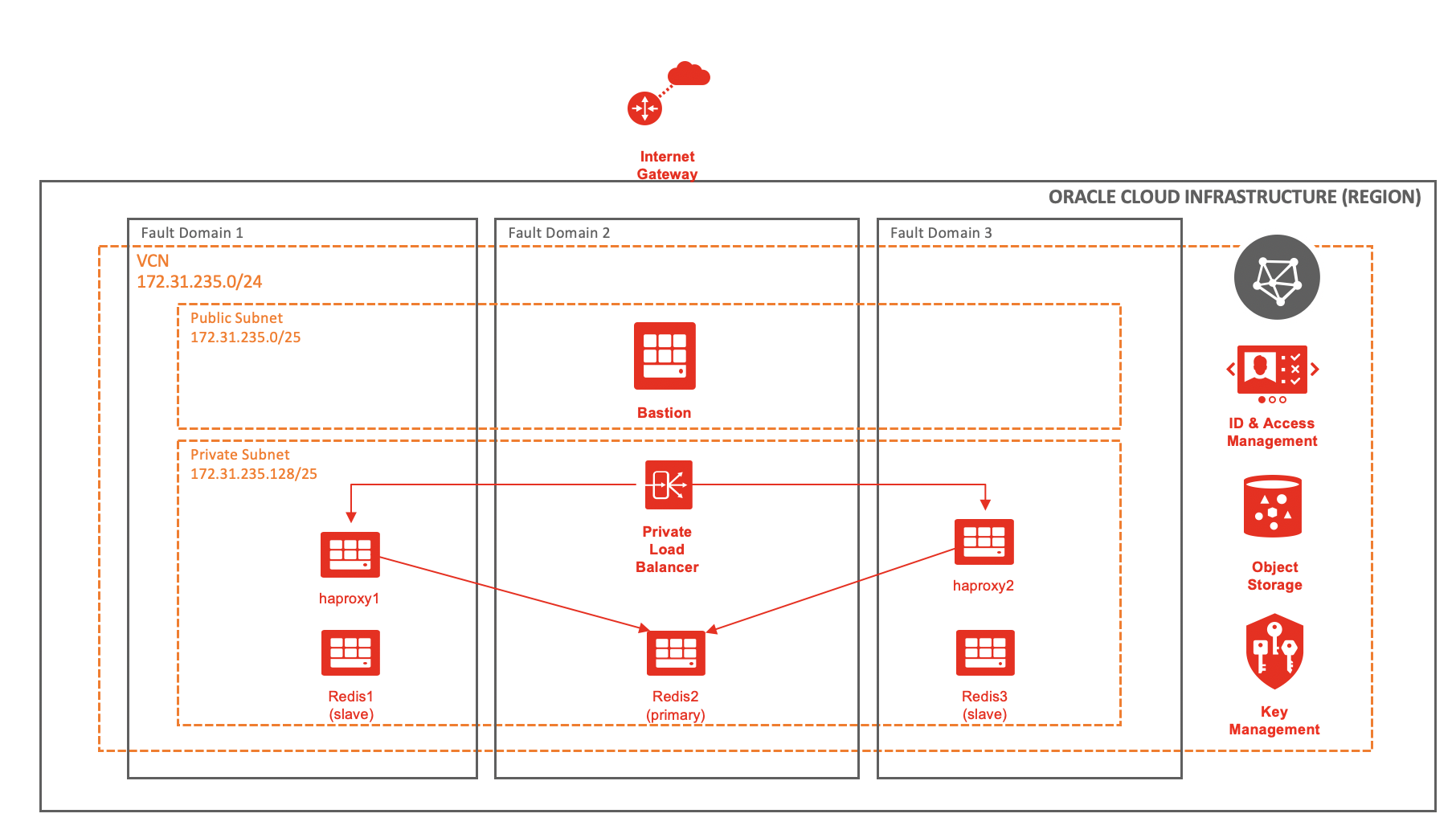 Three Redis servers provide the master-agent replication. For Redis high availability, all the three servers are separated to different fault domains. If the region supports multiple availability domains, you can place Redis servers in different availability domains for better high availability. To ease the network provisioning and on-going management, you can also use regional subnets instead of availability-domain specific subnets.
To allow access to all the servers in a private subnet, two HAProxy servers for high availability sit behind a private load balancer and a bastion server in a public subnet. If the connectivity to the on-premises environment is available in a VPN or OCI FastConnect, you can skip the bastion server.
Deployment for Redis high availability
The following table gives the server details, which we refer to in the rest of the blog.
| Server name | Private or public IP address | Private subnet |
| bastion | 172.31.235.2 / 129.159.42.186 | No |
| redis1 | 172.31.235.131 | Yes |
| redis2 | 172.31.235.132 | Yes |
| redis3 | 172.31.235.133 | Yes |
| haproxy1 | 172.31.235.141 | Yes |
| haproxy2 | 172.31.235.142 | Yes |
| private load balancer | 172.31.235.188 | Yes |
Verify the Redis configuration
[opc@redis1 ~]$ redis-cli -h 172.31.235.132 -p 6379
172.31.235.132:6379> auth 2822dbbd71fa5d8e03440e78c66dab16dbe085c4
OK
172.31.235.132:6379> INFO REPLICATION
# Replication
role:master
connected_slaves:2
slave0:ip=172.31.235.133,port=6379,state=online,offset=6839298,lag=1
slave1:ip=172.31.235.131,port=6379,state=online,offset=6839298,lag=1
master_failover_state:no-failover
master_replid:bf85aef6cbde5ba6249d8e75760ad42979b67051
master_replid2:9a1e8b2787f6e3140d84ed4e365655eef4f5a969
master_repl_offset:6839441
second_repl_offset:5711543
repl_backlog_active:1
repl_backlog_size:1048576
repl_backlog_first_byte_offset:5790866
repl_backlog_histlen:1048576
A client connects to the server redis2 with IP address 172.31.235.132 and acts as the master. The servers with IP address 172.31.235.131 and 172.31.235.133 are the agents.
[opc@redis1 ~]$ redis-cli -h 172.31.235.132 -p 26379
172.31.235.132:26379> SENTINEL MASTER mymaster
 1) "name"
 2) "mymaster"
 3) "ip"
 4) "172.31.235.132"
 5) "port"
 6) "6379"
 7) "runid"
 8) "5f698427a528c2ca8b529b982a7e62f631903b30"
 9) "flags"
10) "master"
11) "link-pending-commands"
12) "0"
13) "link-refcount"
14) "1"
15) "last-ping-sent"
16) "0"
17) "last-ok-ping-reply"
18) "369"
19) "last-ping-reply"
20) "369"
21) "down-after-milliseconds"
22) "30000"
23) "info-refresh"
24) "1400"
25) "role-reported"
26) "master"
27) "role-reported-time"
28) "5160828"
29) "config-epoch"
30) "3"
31) "num-slaves"
32) "2"
33) "num-other-sentinels"
34) "2"
35) "quorum"
36) "2"
37) "failover-timeout"
38) "180000"
39) "parallel-syncs"
40) "1"
The sentinel information shows that the sentinel is configured on all three Redis servers, with redis2 server acting as the master.
After the Redis Sentinel configuration is validated, we can move onto the HAProxy setup.
HAProxy setup for Redis high availability
- To install HAProxy on the haproxy1 and haproxy2 server, run the following command:
[opc@haproxy1 ~]$ sudo yum -y install haproxy - Append the following code in file /etc/haproxy/haproxy.cfg and ensure that you modify the code appropriately:
listen stats
        bind *:1936
        stats enable
        stats hide-version
        stats refresh 30s
        stats show-node
        stats auth admin:oracle
        stats uri /stats

# redis block start

defaults REDIS
        mode tcp
        timeout connect 3s
        timeout server 6s
        timeout client 6s
        option  log-health-checks

frontend front_redis
        bind 172.31.235.141:6379 name redis
        mode tcp
        default_backend redis_cluster

backend redis_cluster
        option tcp-check
        tcp-check connect
        tcp-check send AUTH\ 2822dbbd71fa5d8e03440e78c66dab16dbe085c4\r\n
        tcp-check send PING\r\n
        tcp-check expect string +PONG
        tcp-check send info\ replication\r\n
        tcp-check expect string role:master
        tcp-check send QUIT\r\n
        tcp-check expect string +OK

        server redis1 172.31.235.131:6379 check inter 3s
        server redis2 172.31.235.132:6379 check inter 3s
        server redis3 172.31.235.133:6379 check inter 3s

# redis block end
The IP address 172.31.235.141 is the private IP address of the haproxy1 server. We use it to connect to the Redis master on port 6379. Modify the IP address accordingly for both the HAProxy servers.
Specify the IP address of all the Redis servers and specify the interval in seconds. The interval is the duration between the probes to learn about the configuration and determine which server act as primary.
We use the parameter “tcp-check send AUTH” to take the password for authenticating to the Redis database. If no password authenticating is configured, comment out that line.
Ensure that Security-Enhanced Linux (SElinux) is either configured to run in permissive mode or is disabled. You can add the following rule to allow HAProxy to connect to all TCP ports. SElinux is disabled by default.
sudo setsebool -P haproxy_connect_any 1 -
Enable and start the HAProxy service.
sudo systemctl enable haproxy --now -
Validate that HAProxy service is running.
sudo systemctl status haproxy -
Next, connect using the private IP address of the haproxy1 server.
[opc@redis1 ~]$ redis-cli -h 172.31.235.141 -p 6379
172.31.235.141:6379> auth 2822dbbd71fa5d8e03440e78c66dab16dbe085c4
OK
172.31.235.141:6379> ROLE
1) "master"
2) (integer) 6752924
3) 1) 1) "172.31.235.133"
      2) "6379"
      3) "6752924"
   2) 1) "172.31.235.131"
      2) "6379"
      3) "6752924"
Ensure that either the firewall is disabled or port 6379 is allowed through the firewall. Also ensure that OCI security lists allow the TCP traffic through port 6379.
Connecting through the HAProxy always connects you to the master server. When the master fails, Sentinel promotes one of the remaining agents as a new master and HAProxy detects the change in configuration and redirects all the application or client connections to the new master server.
-
Create an SSH tunnel between the haproxy1 server in a private subnet through a bastion server and forward the port 1936. This port was configured during the configuration for accessing the HAProxy statistics report. If you have VPN or FastConnect connectivity, skip this step.
ssh -L 1936:172.31.235.141:1936 opc@129.159.42.186
-
To access the HAProxy statistics, open a web browser and type the following URL. When prompted, use the username and password specified in the HAProxy configuration file.
http://localhost:1936/stats
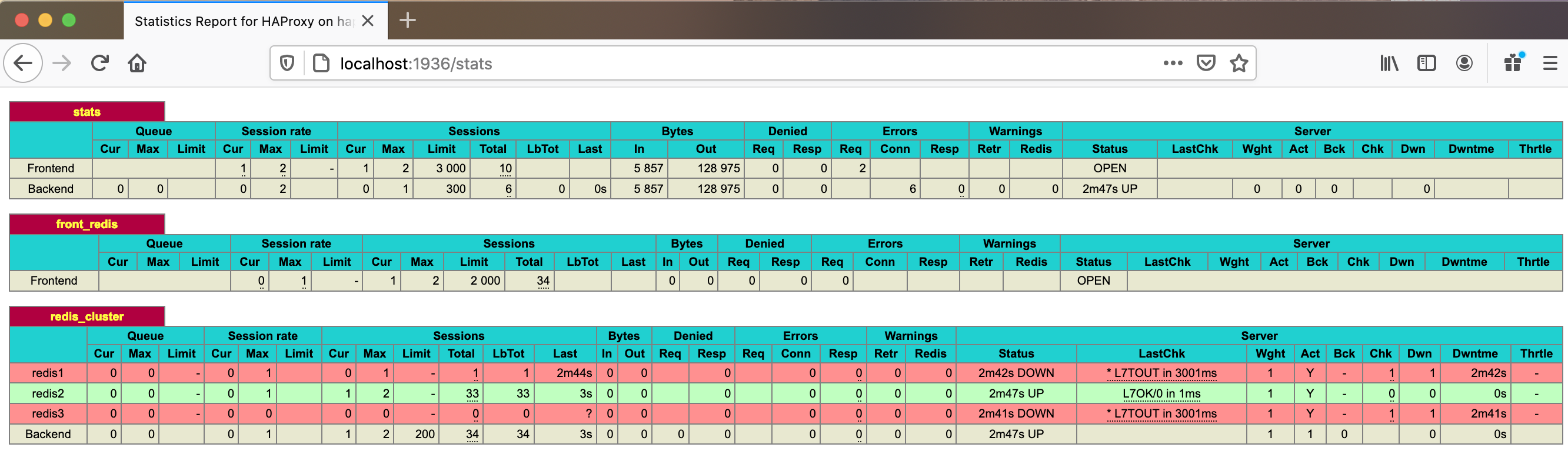
- The HAProxy statistics report looks like the following example where redis2 is the master server, and all traffic redirects to it:
High availability of the HAProxy server
The HAProxy server can be a single point of failure and might not be a recommended solution for highly available and visible applications. So, it’s important to have at least two HAProxy servers to achieve high availability and load balancing.
You can create a network load balancer with both the HAProxy servers configured as the backend and the listener configured to listen on port 6379 for Redis.
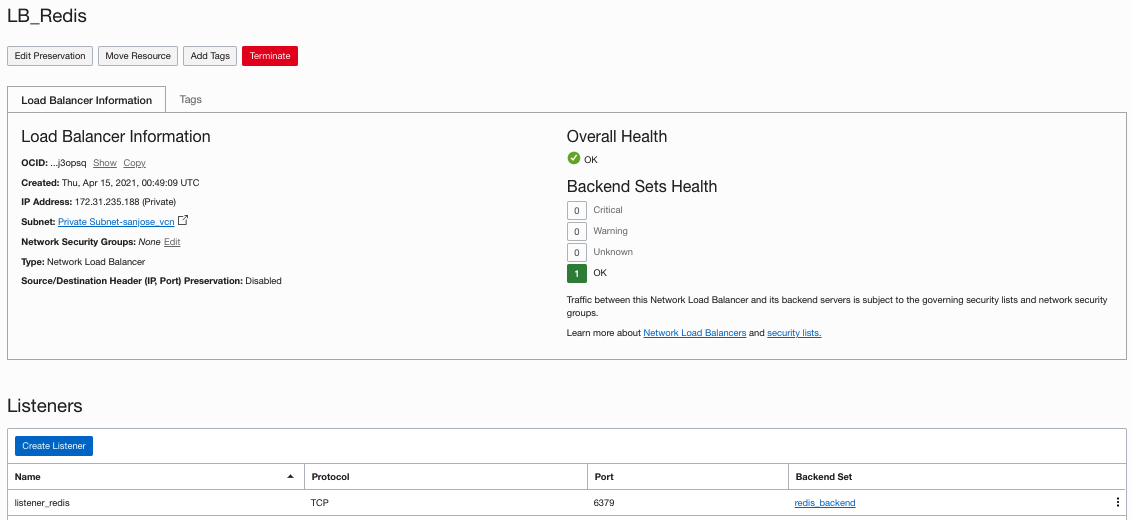
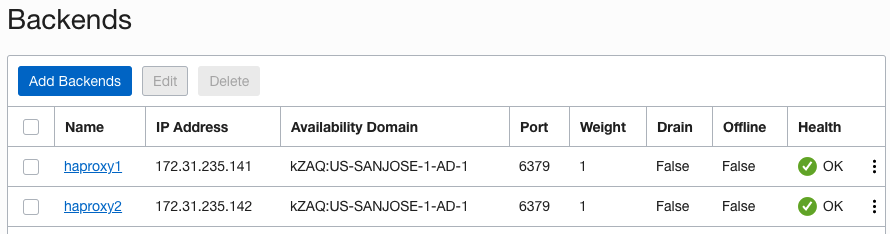
The IP address that connects to Redis is the IP address of the private load balancer, 172.31.235.188. It routes through one of the HAProxy servers configured as the backend of the load balancer.
[opc@redis1 ~]$ redis-cli -h 172.31.235.188 -p 6379
172.31.235.188:6379> auth 2822dbbd71fa5d8e03440e78c66dab16dbe085c4
OK
172.31.235.188:6379> ROLE
1) "master"
2) (integer) 6361817
3) 1) 1) "172.31.235.133"
      2) "6379"
      3) "6361803"
   2) 1) "172.31.235.131"
      2) "6379"
      3) "6361803"
HAProxy testing using Redis failover
-
Manually fail over the configuration from the existing master, redis2, to redis1.
172.31.235.132:6379> FAILOVER TO 172.31.235.131 6379
OK
-
Connect using the private IP of either HAProxy server.
redis-cli -h 172.31.235.141
172.31.235.141:6379> auth 2822dbbd71fa5d8e03440e78c66dab16dbe085c4
OK
172.31.235.141:6379> role
1) "master"
2) (integer) 262348
3) 1) 1) "172.31.235.132"
      2) "6379"
      3) "262348"
   2) 1) "172.31.235.133"
      2) "6379"
      3) "262348"
The HAProxy server always routes the client or application connections to only the master server in the configuration.
-
Test the connection to Redis master using the private IP of a load balancer.
redis-cli -h 172.31.235.188
172.31.235.188:6379> auth 2822dbbd71fa5d8e03440e78c66dab16dbe085c4
OK
172.31.235.188:6379> role
1) "master"
2) (integer) 358968
3) 1) 1) "172.31.235.132"
      2) "6379"
      3) "358968"
   2) 1) "172.31.235.133"
      2) "6379"
      3) "358823"
The load balancer also routes the client connections to the master Redis server. However, the load balancer ensures high availability and loading balancing by routing through both of the HAProxy server. If failure of any HAProxy server occurs, the load balancer only routes the traffic through the remaining HAProxy.
Conclusion: High availability for Redis
In essence, you can achieve Redis high availability and maximum protection against any failure and disaster for Redis replication on OCI by combining the infrastructure services with the software configuration. From an infrastructure perspective, we achieve high availability for Redis replication between master and slave by using availability domains and fault domains. Redis Sentinel monitors and performs the failover of Redis replication from master to slave. You can deploy HAProxy and Oracle Cloud Infrastructure’s native load balancer to always automatically route the client or application connections to the master.
Every use case is different. The only way to know if Oracle Cloud Infrastructure is right for you is to try it. You can select either the Oracle Cloud Free Tier or a 30-day free trial, which includes US$300 in credit to get you started with a range of services, including compute, storage, and networking.