
Today, we’re excited to announce the ability of the Oracle Cloud Infrastructure Notifications service to send messages to Slack.
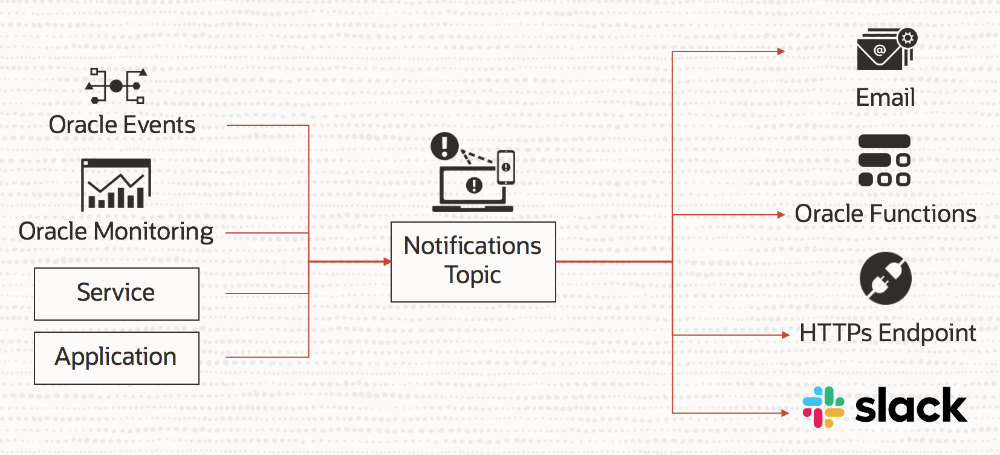
Notifications is a cloud native messaging service that allows push-based messaging to email, PagerDuty, Functions, and HTTPS endpoints. The Notifications service provides first-class integrations with other Oracle Cloud Infrastructure services, such as Events and Monitoring. You can use these integrations to configure a Notifications service topic to deliver notifications of events and alarms to multiple endpoints in a fan-out pattern.
Slack is one of the most popular productivity apps that acts as a collaboration hub within an organization. Many enterprise organizations are using the Slack platform as a replacement for email for the most time-critical tasks. A Slack channel can be used for a specific topic, team, or event, which enables multiple people to track the latest conversation at any given time. With its third-party integration platform, Slack allows information from various sources to be brought to a central place. We’re using this integration capability to deliver messages to a Slack channel.
Common Use Cases
You can use this feature to get notified in your Slack channel for these common occurrences:
- An event happens in your infrastructure. For example:
- A database is provisioned.
- A new user is added to your admin group (IAM).
- A new or modified resource is missing a required cost-center tag.
- An alarm is triggered. For example:
- CPU usage spikes.
- Network throughput exceeds your preset limit.
- Your application has a new activity. For example, your e-commerce application is shipping a new order.
Getting Started: Create a Subscription for a Topic
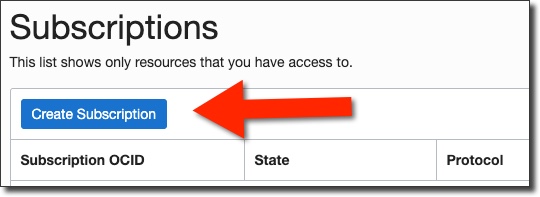
You can create a Slack subscription with Oracle Cloud Infrastructure Notifications by using the Console, CLI, SDK, Terraform, or API. Use the following examples to get started.
Console
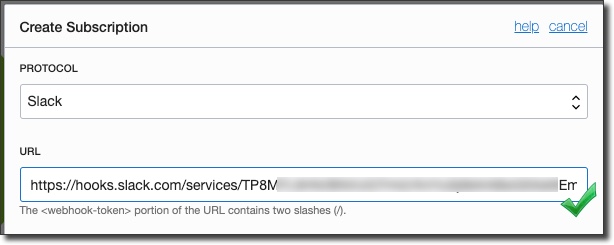
When you create a subscription on a topic, select Slack as the protocol type.
Then, create a Slack app and add an incoming webhook. If you’re not the admin of your Slack workspace, you might need to get admin approval to add a webhook to your Slack app.
CLI
Create a Slack subscription as follows:
oci ons subscription create \
  --compartment-id "<compartment-ocid>" \
  --topic-id "<topic-ocid>" \
  --protocol "SLACK" \
  --subscription-endpoint "<slack-webhook-url>"
Java SDK
Create a Slack subscription as follows:
subscription = client.createSubscription(CreateSubscriptionRequest.builder()
                .createSubscriptionDetails(CreateSubscriptionDetails.builder()
                        .compartmentId(compartmentId)
                        .topicId(topicId)
                        .protocol("SLACK")
                        .endpoint(slackWebhookUrl)
                        .build())
                .build()).getSubscription();
Terraform
Configure the protocol in your provider configuration as follows:
variable "subscription_protocol" {
  ...
  default = "SLACK"
  ...
  ...
}
Then, create a subscription with type “SLACK”:
resource "oci_ons_subscription" "test_subscription" {
  #Required
  compartment_id = "${var.compartment_OCID}"
  endpoint       = "${var.slack_webhook_url}"
  protocol       = "${var.subscription_protocol}"
  topic_id       = "${oci_ons_notification_topic.test_notification_topic.id}"

  #Optional
  defined_tags  = "${map("${oci_identity_tag_namespace.tag_namespace1.name}.${oci_identity_tag.tag1.name}", "${var.subscription_defined_tags_value}")}"
  freeform_tags = "${var.subscription_freeform_tags}"
}

data "oci_ons_subscriptions" "test_subscriptions" {
  #Required
  compartment_id = "${var.compartment_ocid}"

  #Optional
  topic_id = "${oci_ons_subscription.test_subscription.topic_id}"
}
You can find the complete set of Notifications service Terraform examples on GitHub.
REST API
Create a Slack subscription as follows:
POST /20181201/subscriptions
Host: notification.<oracle-cloud-infrastructure-region>.oraclecloud.com
<authorization and other headers>

{
  "topicId": "<topic_OCID>",
  "compartmentId": "<compartment_OCID>",
  "protocol": "SLACK",
  "endpoint": "<slack-webhook-URL>"
}
Pricing
The delivery of Slack messages counts toward your HTTPS delivery quota for the Notifications service. The first one million HTTPS messages sent are free of charge. Thereafter, you pay US$0.60 for every one million HTTPS messages sent. You can view the full pricing details on the Notifications pricing page.
More Information
For more information about this feature and the Notifications service, see the following resources: